
Introduction
This article shows how to copy contents to the clipboard in the client side using jQuery. Once the data is in the clipboard you can paste it anywhere or you can manipulate it. I hope you will like it.
Please see this article in my blog: Copy contents to clipboard.
See demo
Copy To Clipboard Demo
Background
Today one of my colleague asked me how to copy contents to the clipboard so that he can do some work with the data. Since I was not aware of that, I said I will check and let him know. I have done the requirement by using a plugin zclip. It is perfect. I hope you will find it useful.
Using the code
To start with, you need to add the following references.
- jQuery
- JQuery.zclip
- <script src="jquery-1.11.1.min.js"></script>
- <script src="jquery.zclip.js"></script>
- <a href="http://sibeeshpassion.com/">Copy to clipboard demo at Sibeesh Passion</a>
- <div style="margin: 25px;">
- <textarea id="myText" class="myText" onfocus="if(this.value=='Type contents here')this.value='';" onblur="if(this.value=='')this.value='Type contents here';">Type contents here</textarea>
- <button id="copyMe" class="copyMe">Copy</button>
- <button id="copyMeWithCallback" class="copyMe">Copy With Callback</button>
- <textarea style="margin-top: 25px;" id="copiedContent" class="myText" ></textarea>
- </div>
- < style > .copyMe {
- display: inline - block;
- height: 32px;
- width: 200px;
- position: relative;
- border - radius: 10px; - moz - border - radius: 10px; - webkit - border - radius: 10px;
- background - color: #0033CC;
- color: # CCFFFF;
- }.myText {
- display: block;
- border - radius: 10px; - moz - border - radius: 10px; - webkit - border - radius: 10px;
- width: 375px;
- padding: 10px;
- margin: 15px 0;
- height: 75px;
- border: 4px solid#ccc;
- margin - top: 0;
- } < /style>
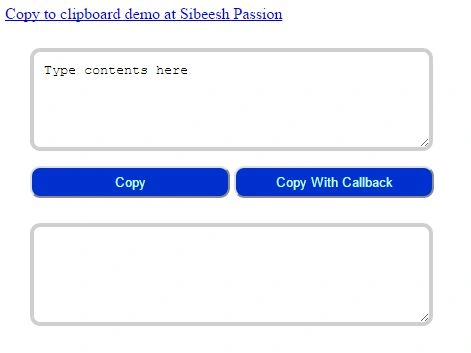
We will create the following two demos:
- Without callback (Normal use)
- With callback
Without callback (Normal use)
To work with a normal use, you need to add the following script:
- $("#copyMe").zclip({
- path: 'ZeroClipboard.swf',
- copy: function () {
- return $(this).prev().val();
- }
- });
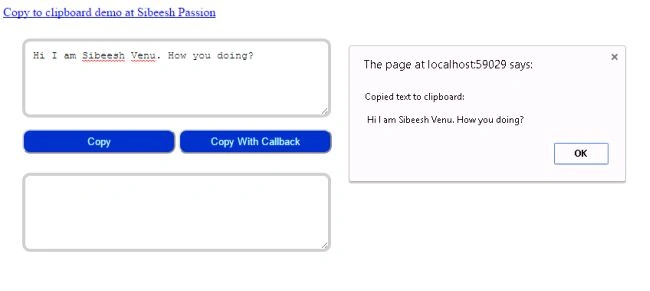
With callback
- $("#copyMeWithCallback").zclip({
- path: 'ZeroClipboard.swf',
- copy: $('#myText').val(),
- beforeCopy: function () {
- $('#copiedContent').text($('#myText').val() + '-- Before Copy');
- },
- afterCopy: function () {
- $('#copiedContent').text($('#myText').val() + '-- After Copy');
- }
- });
- beforeCopy
- afterCopy
You can do many processes in these two events, like updating the colour of your UI elements or text box. Here I am changing the text property.
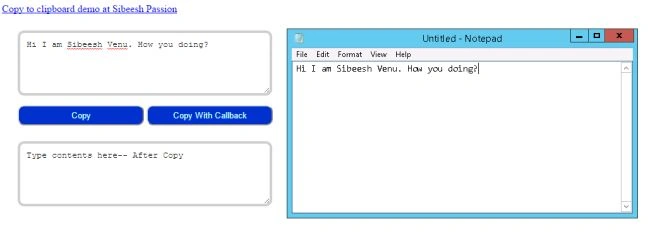
Please run the preceding script and see the output as follows.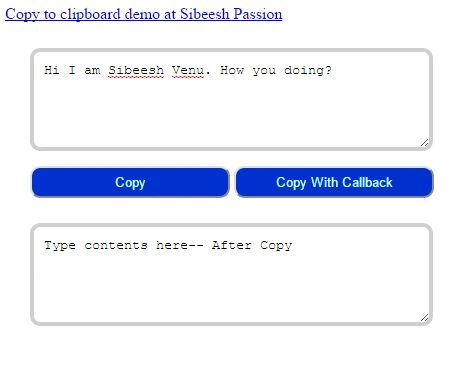
As you can see, we are changing the text property of our text area in those two events.
Since this copied data is in the clipboard, you can even paste that content anywhere. For example I am pasting that contents into Notepad as follows.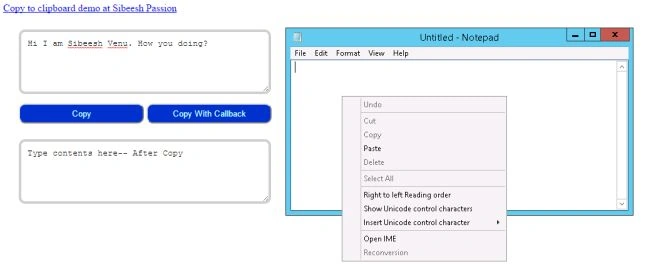
Complete Code
- <!DOCTYPE html>
- <html>
- <head>
- <title>Copy to clipboard demo at Sibeesh Passion</title>
- <script src="jquery-1.11.1.min.js"></script>
- <script src="jquery.zclip.js"></script>
- <style>
- .copyMe {
- display: inline-block;
- height: 32px;
- width: 200px;
- position: relative;
- border-radius: 10px;
- -moz-border-radius: 10px;
- -webkit-border-radius: 10px;
- background-color: #0033CC;
- color: #CCFFFF;
- }
- .myText {
- display: block;
- border-radius: 10px;
- -moz-border-radius: 10px;
- -webkit-border-radius: 10px;
- width: 375px;
- padding: 10px;
- margin: 15px 0;
- height: 75px;
- border: 4px solid #ccc;
- margin-top: 0;
- }
- </style>
- </head>
- <body>
- <a href="http://sibeeshpassion.com/">Copy to clipboard demo at Sibeesh Passion</a>
- <div style="margin: 25px;">
- <textarea id="myText" class="myText" onfocus="if(this.value=='Type contents here')this.value='';" onblur="if(this.value=='')this.value='Type contents here';">Type contents here</textarea>
- <button id="copyMe" class="copyMe">Copy</button>
- <button id="copyMeWithCallback" class="copyMe">Copy With Callback</button>
- <textarea style="margin-top: 25px;" id="copiedContent" class="myText" ></textarea>
- </div>
- <script>
- $(document).ready(function () {
- $("#copyMe").zclip({
- path: 'ZeroClipboard.swf',
- copy: function () {
- return $(this).prev().val();
- }
- });
- $("#copyMeWithCallback").zclip({
- path: 'ZeroClipboard.swf',
- copy: $('#myText').val(),
- beforeCopy: function () {
- $('#copiedContent').text($('#myText').val() + '-- Before Copy');
- },
- afterCopy: function () {
- $('#copiedContent').text($('#myText').val() + '-- After Copy');
- }
- });
- });
- </script>
- </body>
- </html>
I hope you will find this article useful. Please share me your valuable thoughts and comments. Your feedback is always welcomed.
Thanks in advance. Happy coding!


Sibeesh VenuTOP 100Posted Jul 11, 2015, 11:03 PM EDT
Santhakumar Munuswamy Thank you
Sibeesh VenuTOP 100Posted Jul 11, 2015, 11:03 PM EDT
Rajeesh Menoth Thank you
Santhakumar MunuswamyPosted Jul 11, 2015, 7:44 PM EDT
Good article! Thanks for sharing
Rajeesh MenothPosted Jul 11, 2015, 7:19 PM EDT
Good One Sibeesh Venu
Sibeesh VenuTOP 100Posted Jul 11, 2015, 5:25 PM EDT
Pankaj Kumar Choudhary thank you
Sibeesh VenuTOP 100Posted Jul 11, 2015, 5:25 PM EDT
Gopi Chand thank you
Sibeesh VenuTOP 100Posted Jul 11, 2015, 5:24 PM EDT
Rakesh Chavda thank you
Sibeesh VenuTOP 100Posted Jul 11, 2015, 5:24 PM EDT
Sathish Kumar thank you
Pankaj Kumar ChoudharyTOP 100Posted Jul 11, 2015, 3:58 PM EDT
Nice Work Sir...........
Gopi ChandPosted Jul 11, 2015, 9:22 AM EDT
Great work
RakeshPosted Jul 11, 2015, 8:51 AM EDT
nice one
Sathish KumarPosted Jul 11, 2015, 8:45 AM EDT
Cool sibeesh...