
Introduction
WAMP stands for Windows, Apache, MySQL, and anyone of PHP, Perl, or Python. WAMP server is a local webserver for running the scripting language (PHP, Perl) and this is open source. XAMPP stands for Cross-Platform (X), Apache (A), Maria DB (M), PHP (P), and Perl (P). It is developed by Apache Friends. It includes Apache and MySQL, FileZilla, Mercury, Tomcat, and Maria DB.
Here, I am going to show how to create a login form validation, using PHP and XAMPP.
Requirements
- XAMPP/WAMP Server.
- Brackets (IDE).
- Little HTML, CSS, and PHP knowledge.
Steps given below are required to be followed
Follow the steps to create a login form validation, using PHP and XAMPP. I have included the source code, which is given below.
Step 1
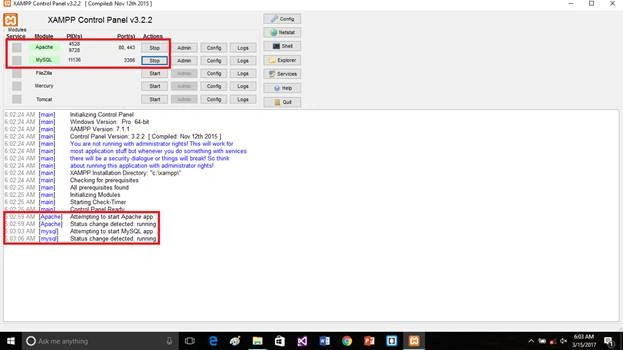
Open the XAMPP Control Panel. Start Apache and MySQL Server.
Step 2
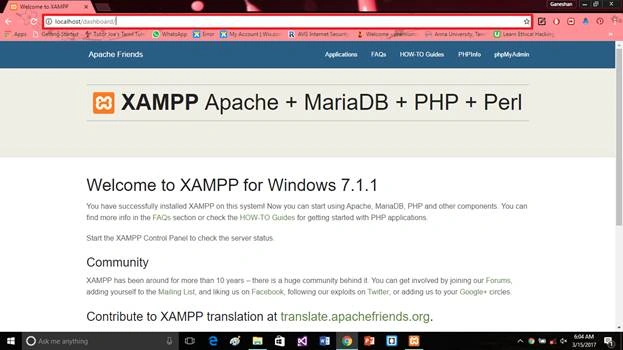
Open your browser and then type http:// localhost or http://127.0.0.1. After you see the XAMPP community page, make sure, if your Server is running or not.
Step 3
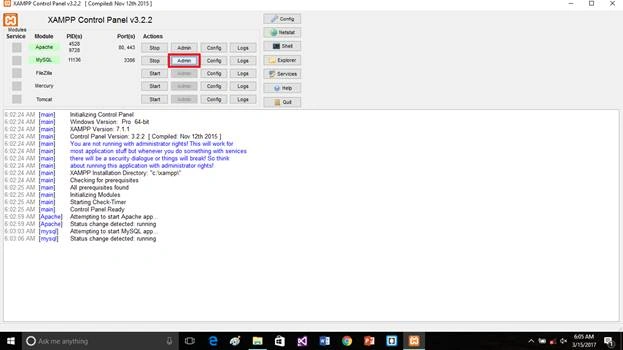
Open XAMPP Control Panel, followed by clicking MySQL admin. Now, create the database for the login validation form.
Step 4
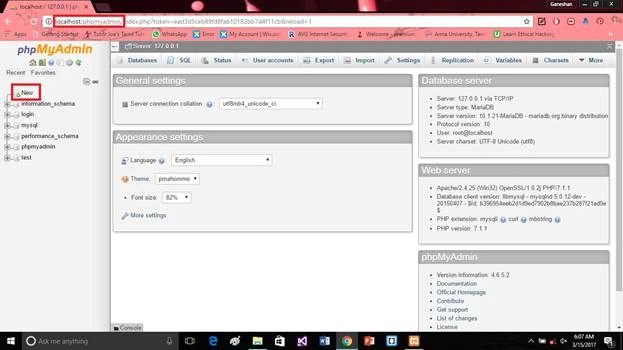
To create the new database, click New.
Step 5
Put the database name, which you want. Here, the database name is user-registration, followed by clicking create.
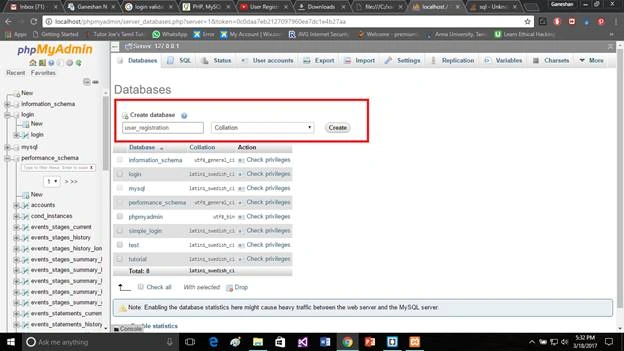
Step 6
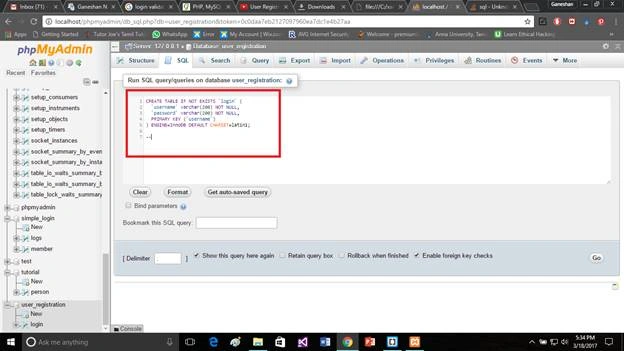
Go to the SQL query tab, copy and paste the query given below. Click go. Afterward, your table (my table name: person) is created successfully.
SQL query
- CREATE TABLE IF NOT EXISTS `login` (
- `username` varchar(200) NOT NULL,
- `password` varchar(200) NOT NULL,
- PRIMARY KEY (`username`)
- ) ENGINE=InnoDB DEFAULT CHARSET=latin1;
Put your Webpage files into the destination folder. Default folder is c:/xampp/htdocs.
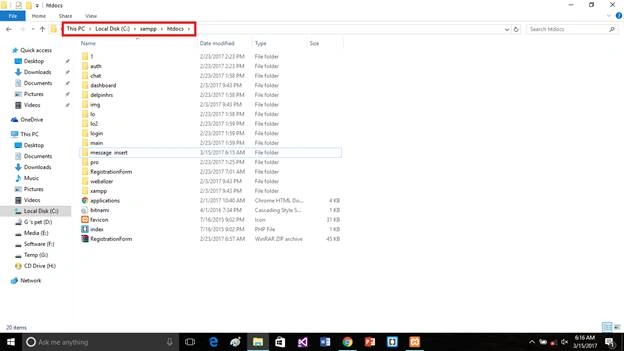
Step 8
Open the bracket(IDE) and create the login.php file. Copy the code given below and paste into login.php
- <!doctype html>
- <html>
- <head>
- <title>Login</title>
- <style>
- body{
- margin-top: 100px;
- margin-bottom: 100px;
- margin-right: 150px;
- margin-left: 80px;
- background-color: azure ;
- color: palevioletred;
- font-family: verdana;
- font-size: 100%
- }
- h1 {
- color: indigo;
- font-family: verdana;
- font-size: 100%;
- }
- h3 {
- color: indigo;
- font-family: verdana;
- font-size: 100%;
- } </style>
- </head>
- <body>
- <center><h1>CREATE REGISTRATION AND LOGIN FORM USING PHP AND MYSQL</h1></center>
- <p><a href="register.php">Register</a> | <a href="login.php">Login</a></p>
- <h3>Login Form</h3>
- <form action="" method="POST">
- Username: <input type="text" name="user"><br />
- Password: <input type="password" name="pass"><br />
- <input type="submit" value="Login" name="submit" />
- </form>
- <?php
- if(isset($_POST["submit"])){
- if(!empty($_POST['user']) && !empty($_POST['pass'])) {
- $user=$_POST['user'];
- $pass=$_POST['pass'];
- $con=mysql_connect('localhost','root','') or die(mysql_error());
- mysql_select_db('user_registration') or die("cannot select DB");
- $query=mysql_query("SELECT * FROM login WHERE username='".$user."' AND password='".$pass."'");
- $numrows=mysql_num_rows($query);
- if($numrows!=0)
- {
- while($row=mysql_fetch_assoc($query))
- {
- $dbusername=$row['username'];
- $dbpassword=$row['password'];
- }
- if($user == $dbusername && $pass == $dbpassword)
- {
- session_start();
- $_SESSION['sess_user']=$user;
- /* Redirect browser */
- header("Location: member.php");
- }
- } else {
- echo "Invalid username or password!";
- }
- } else {
- echo "All fields are required!";
- }
- }
- ?>
- </body>
- </html>
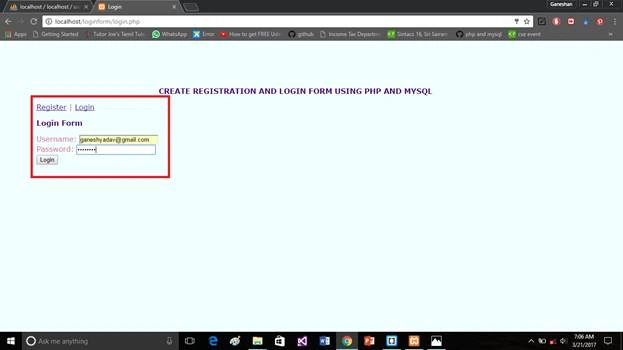
Create the register.php file. Copy the code given below and paste it into register.php.
register.php
- <!doctype html>
- <html>
- <head>
- <title>Register</title>
- <style>
- body{
- margin-top: 100px;
- margin-bottom: 100px;
- margin-right: 150px;
- margin-left: 80px;
- background-color: azure ;
- color: palevioletred;
- font-family: verdana;
- font-size: 100%
- }
- h1 {
- color: indigo;
- font-family: verdana;
- font-size: 100%;
- }
- h2 {
- color: indigo;
- font-family: verdana;
- font-size: 100%;
- }</style>
- </head>
- <body>
- <center><h1>CREATE REGISTRATION AND LOGIN FORM USING PHP AND MYSQL</h1></center>
- <p><a href="register.php">Register</a> | <a href="login.php">Login</a></p>
- <center><h2>Registration Form</h2></center>
- <form action="" method="POST">
- <legend>
- <fieldset>
- Username: <input type="text" name="user"><br />
- Password: <input type="password" name="pass"><br />
- <input type="submit" value="Register" name="submit" />
- </fieldset>
- </legend>
- </form>
- <?php
- if(isset($_POST["submit"])){
- if(!empty($_POST['user']) && !empty($_POST['pass'])) {
- $user=$_POST['user'];
- $pass=$_POST['pass'];
- $con=mysql_connect('localhost','root','') or die(mysql_error());
- mysql_select_db('user_registration') or die("cannot select DB");
- $query=mysql_query("SELECT * FROM login WHERE username='".$user."'");
- $numrows=mysql_num_rows($query);
- if($numrows==0)
- {
- $sql="INSERT INTO login(username,password) VALUES('$user','$pass')";
- $result=mysql_query($sql);
- if($result){
- echo "Account Successfully Created";
- } else {
- echo "Failure!";
- }
- } else {
- echo "That username already exists! Please try again with another.";
- }
- } else {
- echo "All fields are required!";
- }
- }
- ?>
- </body>
- </html>
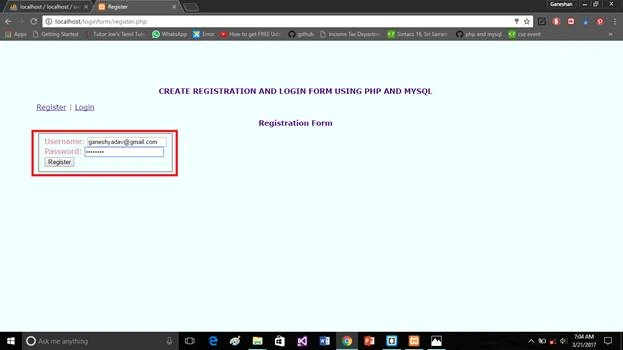
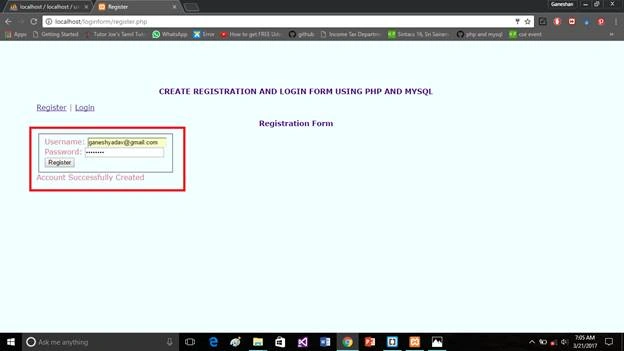
Step 10
Create the logout.php file. Copy the code given below and paste it into logout.php.
logout.php
- <?php
- session_start();
- unset($_SESSION['sess_user']);
- session_destroy();
- header("location:login.php");
- ?>
Step 13
Create the member.php file. Copy the code given below and paste it into member.php.
member.php
- <?php
- session_start();
- if(!isset($_SESSION["sess_user"])){
- header("location:login.php");
- } else {
- ?>
- <!doctype html>
- <html>
- <head>
- <title>Welcome</title>
- <style>
- body{
- margin-top: 100px;
- margin-bottom: 100px;
- margin-right: 150px;
- margin-left: 80px;
- background-color: azure ;
- color: palevioletred;
- font-family: verdana;
- font-size: 100%
- }
- h2 {
- color: indigo;
- font-family: verdana;
- font-size: 100%;
- }
- h1 {
- color: indigo;
- font-family: verdana;
- font-size: 100%;
- }
- </style>
- </head>
- <body>
- <center><h1>CREATE REGISTRATION AND LOGIN FORM USING PHP AND MYSQL</h1></center>
- <h2>Welcome, <?=$_SESSION['sess_user'];?>! <a href="logout.php">Logout</a></h2>
- <p>
- WE DO IT. SUCCESSFULLY CREATED REGISTRATION AND LOGIN FORM USING PHP AND MYSQL
- </p>
- </body>
- </html>
- <?php
- }
- ?>
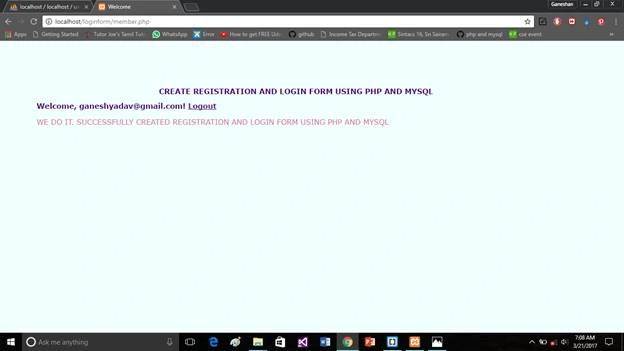
Now, you need to click the logout.
Output
Now, check the database to check, whether our data was stored or not.
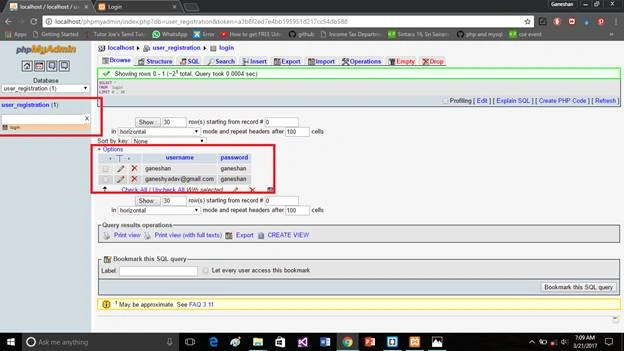
Here, we have successfully created a login form validation. Using PHP and WAMP/XAMPP, and we created and executed it. I will continue my next article to give you in-depth knowledge about XAMPP, FileZilla, and GitHub lessons.
Reference article
https://www.c-sharpcorner.com/article/install-and-configure-xampp-server-with-data-insert-into-database2/


vikas kumarPosted Jan 23, 2021, 8:29 AM EST
This code has many problems and it's not work properly like no work of validation....so please check and update according to new version of php...
Praveen VilliersPosted Nov 2, 2019, 11:13 AM EDT
Warning: session_start() [function.session-start]: Cannot send session cookie - headers already sent by (output started at C:\wamp\www\pro\login.php:5) in C:\wamp\www\pro\login.php on line 60
Muhd FaizPosted May 6, 2018, 7:59 AM EDT
The numrows thing got some problem it says
Happy IndiaPosted Dec 29, 2017, 11:34 PM EST
Cannot select db coming whene i click register
mahaveer chvanPosted Dec 11, 2017, 11:14 PM EST
Please help me Fatal error: Uncaught Error: Call to undefined function mysql_connect() in C:\xampp\htdocs\register.php:49 Stack trace: #0 {main} thrown in C:\xampp\htdocs\register.php on line 49
mohit tyagiPosted Jun 7, 2017, 3:53 AM EDT
How to restrict multiple login using a single account in PHP
Ivan BarayevPosted May 28, 2017, 5:31 AM EDT
Are u kidding the people ? u wrote your bio "Engineer". u wrote this article in Mar 22 2017 but u r using depreched php codes! this codes is dangerous because easily can get SQL Inject. and you install wamp server with PHP 7.1 ver. but still using depreched mysql* functions. hey new coders ! don't take referance this article.
Waruna ManjulaPosted May 2, 2017, 1:08 AM EDT
Good article.......
Ajit SPosted Apr 7, 2017, 8:46 PM EDT
trouble to start mysql server...... any solutions for that
Ajit SPosted Apr 7, 2017, 8:45 PM EDT
good article....... the