
Introduction
This article makes it easy to learn and use functions and sessions. Look at the following procedure.
Step 1
Create a database as in the following:
- Create database login_db;
Step 2
Create a table as in the following:
- CREATE TABLE IF NOT EXISTS `users` (
- `id` int(11) NOT NULL AUTO_INCREMENT,
- `username` varchar(30) NOT NULL,
- `emailid` varchar(30) NOT NULL,
- `password` varchar(30) NOT NULL,
- PRIMARY KEY (`id`)
- ) ENGINE=MyISAM DEFAULT CHARSET=latin1 AUTO_INCREMENT=3 ;
Step 3
Create a form named index.php as in the following:
- <!DOCTYPE html>
- <html lang="en" class="no-js">
- <head>
- <meta charset="UTF-8" />
- <title>Login and Registration Form with HTML5 and CSS3</title>
- <meta name="viewport" content="width=device-width, initial-scale=1.0">
- <meta name="description" content="Login and Registration Form with HTML5 and CSS3" />
- <meta name="keywords" content="html5, css3, form, switch, animation, :target, pseudo-class" />
- <meta name="author" content="Codrops" />
- <link rel="shortcut icon" href="../favicon.ico">
- <link rel="stylesheet" type="text/css" href="css/demo.css" />
- <link rel="stylesheet" type="text/css" href="css/style2.css" />
- <link rel="stylesheet" type="text/css" href="css/animate-custom.css" />
- </head>
- <body>
- <div class="container">
- <header>
- <h1>Login and Registration Form </h1>
- </header>
- <section>
- <div id="container_demo" >
- <a class="hiddenanchor" id="toregister"></a>
- <a class="hiddenanchor" id="tologin"></a>
- <div id="wrapper">
- <div id="login" class="animate form">
- <form name="login" method="post" action="">
- <h1>Log in</h1>
- <p>
- <label for="emailsignup" class="youmail" data-icon="e" > Your email</label>
- <input id="emailsignup" name="emailid" required="required" type="email" placeholder="[email protected]"/>
- </p>
- <p>
- <label for="password" class="youpasswd" data-icon="p"> Your password </label>
- <input id="password" name="password" required="required" type="password" placeholder="eg. X8df!90EO" />
- </p>
- <p class="keeplogin">
- <input type="checkbox" name="loginkeeping" id="loginkeeping" value="loginkeeping" />
- <label for="loginkeeping">Keep me logged in</label>
- </p>
- <p class="login button">
- <input type="submit" name="login" value="Login" />
- </p>
- <p class="change_link">
- Not a member yet ?
- <a href="#toregister" class="to_register">Join us</a>
- </p>
- </form>
- </div>
- <div id="register" class="animate form">
- <form name="login" method="post" action="">
- <h1> Sign up </h1>
- <p>
- <label for="usernamesignup" class="uname" data-icon="u">Your username</label>
- <input id="usernamesignup" name="username" required="required" type="text" placeholder="mysuperusername690" />
- </p>
- <p>
- <label for="emailsignup" class="youmail" data-icon="e" > Your email</label>
- <input id="emailsignup" name="emailid" required="required" type="email" placeholder="[email protected]"/>
- </p>
- <p>
- <label for="passwordsignup" class="youpasswd" data-icon="p">Your password </label>
- <input id="passwordsignup" name="password" required="required" type="password" placeholder="eg. X8df!90EO"/>
- </p>
- <p>
- <label for="passwordsignup_confirm" class="youpasswd" data-icon="p">Please confirm your password </label>
- <input id="passwordsignup_confirm" name="confirm_password" required="required" type="password" placeholder="eg. X8df!90EO"/>
- </p>
- <p class="signin button">
- <input type="submit" name="register" value="Sign up"/>
- </p>
- <p class="change_link">
- Already a member ?
- <a href="#tologin" class="to_register"> Go and log in </a>
- </p>
- </form>
- </div>
- </div>
- </div>
- </section>
- </div>
- </body>
- </html>
Step 4
Create a config file named config.php as in the following:
- <?php
- define("DB_HOST", 'localhost');
- define("DB_USER", 'root');
- define("DB_PASSWORD", '');
- define("DB_DATABSE", 'mypratice');
- ?>
Step 5
Make a database connection class. Create the file named dbConnect.php as in the following:
- <?php
- class dbConnect {
- function __construct() {
- require_once('config.php');
- $conn = mysql_connect(DB_HOST, DB_USER, DB_PASSWORD);
- mysql_select_db(DB_DATABSE, $conn);
- if(!$conn)// testing the connection
- {
- die ("Cannot connect to the database");
- }
- return $conn;
- }
- public function Close(){
- mysql_close();
- }
- }
- ?>
Step 6
Make a Function class. Create the file named dbFunction.php as in the following:
- <?php
- require_once 'dbConnect.php';
- session_start();
- class dbFunction {
- function __construct() {
- // connecting to database
- $db = new dbConnect();;
- }
- // destructor
- function __destruct() {
- }
- public function UserRegister($username, $emailid, $password){
- $password = md5($password);
- $qr = mysql_query("INSERT INTO users(username, emailid, password) values('".$username."','".$emailid."','".$password."')") or die(mysql_error());
- return $qr;
- }
- public function Login($emailid, $password){
- $res = mysql_query("SELECT * FROM users WHERE emailid = '".$emailid."' AND password = '".md5($password)."'");
- $user_data = mysql_fetch_array($res);
- //print_r($user_data);
- $no_rows = mysql_num_rows($res);
- if ($no_rows == 1)
- {
- $_SESSION['login'] = true;
- $_SESSION['uid'] = $user_data['id'];
- $_SESSION['username'] = $user_data['username'];
- $_SESSION['email'] = $user_data['emailid'];
- return TRUE;
- }
- else
- {
- return FALSE;
- }
- }
- public function isUserExist($emailid){
- $qr = mysql_query("SELECT * FROM users WHERE emailid = '".$emailid."'");
- echo $row = mysql_num_rows($qr);
- if($row > 0){
- return true;
- } else {
- return false;
- }
- }
- }
- ?>
Step 7
After the preceding procedure use the Function in index.php as in the following:
- <?php
- include_once('dbFunction.php');
- $funObj = new dbFunction();
- if($_POST['login']){
- $emailid = $_POST['emailid'];
- $password = $_POST['password'];
- $user = $funObj->Login($emailid, $password);
- if ($user) {
- // Registration Success
- header("location:home.php");
- } else {
- // Registration Failed
- echo "<script>alert('Emailid / Password Not Match')</script>";
- }
- }
- if($_POST['register']){
- $username = $_POST['username'];
- $emailid = $_POST['emailid'];
- $password = $_POST['password'];
- $confirmPassword = $_POST['confirm_password'];
- if($password == $confirmPassword){
- $email = $funObj->isUserExist($emailid);
- if(!$email){
- $register = $funObj->UserRegister($username, $emailid, $password);
- if($register){
- echo "<script>alert('Registration Successful')</script>";
- }else{
- echo "<script>alert('Registration Not Successful')</script>";
- }
- } else {
- echo "<script>alert('Email Already Exist')</script>";
- }
- } else {
- echo "<script>alert('Password Not Match')</script>";
- }
- }
- ?>
- <!DOCTYPE html>
- <html lang="en" class="no-js">
- <head>
- <meta charset="UTF-8" />
- <title>Login and Registration Form with HTML5 and CSS3</title>
- <meta name="viewport" content="width=device-width, initial-scale=1.0">
- <meta name="description" content="Login and Registration Form with HTML5 and CSS3" />
- <meta name="keywords" content="html5, css3, form, switch, animation, :target, pseudo-class" />
- <meta name="author" content="Codrops" />
- <link rel="shortcut icon" href="../favicon.ico">
- <link rel="stylesheet" type="text/css" href="css/demo.css" />
- <link rel="stylesheet" type="text/css" href="css/style2.css" />
- <link rel="stylesheet" type="text/css" href="css/animate-custom.css" />
- </head>
- <body>
- <div class="container">
- <header>
- <h1>Login and Registration Form </h1>
- </header>
- <section>
- <div id="container_demo" >
- <a class="hiddenanchor" id="toregister"></a>
- <a class="hiddenanchor" id="tologin"></a>
- <div id="wrapper">
- <div id="login" class="animate form">
- <form name="login" method="post" action="">
- <h1>Log in</h1>
- <p>
- <label for="emailsignup" class="youmail" data-icon="e" > Your email</label>
- <input id="emailsignup" name="emailid" required="required" type="email" placeholder="[email protected]"/>
- </p>
- <p>
- <label for="password" class="youpasswd" data-icon="p"> Your password </label>
- <input id="password" name="password" required="required" type="password" placeholder="eg. X8df!90EO" />
- </p>
- <p class="keeplogin">
- <input type="checkbox" name="loginkeeping" id="loginkeeping" value="loginkeeping" />
- <label for="loginkeeping">Keep me logged in</label>
- </p>
- <p class="login button">
- <input type="submit" name="login" value="Login" />
- </p>
- <p class="change_link">
- Not a member yet ?
- <a href="#toregister" class="to_register">Join us</a>
- </p>
- </form>
- </div>
- <div id="register" class="animate form">
- <form name="login" method="post" action="">
- <h1> Sign up </h1>
- <p>
- <label for="usernamesignup" class="uname" data-icon="u">Your username</label>
- <input id="usernamesignup" name="username" required="required" type="text" placeholder="mysuperusername690" />
- </p>
- <p>
- <label for="emailsignup" class="youmail" data-icon="e" > Your email</label>
- <input id="emailsignup" name="emailid" required="required" type="email" placeholder="[email protected]"/>
- </p>
- <p>
- <label for="passwordsignup" class="youpasswd" data-icon="p">Your password </label>
- <input id="passwordsignup" name="password" required="required" type="password" placeholder="eg. X8df!90EO"/>
- </p>
- <p>
- <label for="passwordsignup_confirm" class="youpasswd" data-icon="p">Please confirm your password </label>
- <input id="passwordsignup_confirm" name="confirm_password" required="required" type="password" placeholder="eg. X8df!90EO"/>
- </p>
- <p class="signin button">
- <input type="submit" name="register" value="Sign up"/>
- </p>
- <p class="change_link">
- Already a member ?
- <a href="#tologin" class="to_register"> Go and log in </a>
- </p>
- </form>
- </div>
- </div>
- </div>
- </section>
- </div>
- </body>
- </html>
Step 8
Create a Home Page named home.php as in the following:
- <?php
- include_once('dbFunction.php');
- if($_POST['welcome']){
- // remove all session variables
- session_unset();
- // destroy the session
- session_destroy();
- }
- if(!($_SESSION)){
- header("Location:index.php");
- }
- ?>
- <!DOCTYPE html>
- <html lang="en" class="no-js">
- <head>
- <meta charset="UTF-8" />
- <title>Login and Registration Form with HTML5 and CSS3</title>
- <meta name="viewport" content="width=device-width, initial-scale=1.0">
- <meta name="description" content="Login and Registration Form with HTML5 and CSS3" />
- <meta name="keywords" content="html5, css3, form, switch, animation, :target, pseudo-class" />
- <meta name="author" content="Codrops" />
- <link rel="shortcut icon" href="../favicon.ico">
- <link rel="stylesheet" type="text/css" href="css/demo.css" />
- <link rel="stylesheet" type="text/css" href="css/style2.css" />
- <link rel="stylesheet" type="text/css" href="css/animate-custom.css" />
- </head>
- <body>
- <div class="container">
- <header>
- <h1>Welcome Form </h1>
- </header>
- <section>
- <div id="container_demo" >
- <a class="hiddenanchor" id="toregister"></a>
- <a class="hiddenanchor" id="tologin"></a>
- <div id="wrapper">
- <div id="login" class="animate form">
- <form name="login" method="post" action="">
- <h1>Welcome </h1>
- <p>
- <label for="emailid" class="uname" > Your Name </label>
- <?=$_SESSION['username']?>
- </p>
- <p>
- <label for="email" class="youpasswd" > Your Email </label>
- <?=$_SESSION['email']?>
- </p>
- <p class="login button">
- <input type="submit" name="welcome" value="Logout" />
- </p>
- </form>
- </div>
- </div>
- </div>
- </section>
- </div>
- </body>
- </html>
Step 9
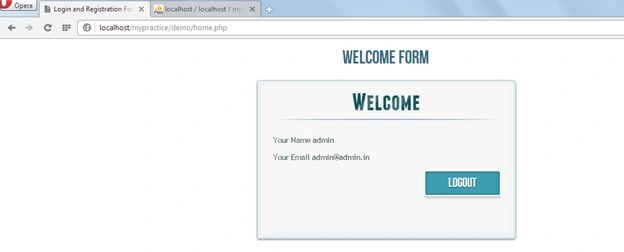
After the preceding procedure has been done run your program. After running it the following will be the output screens.
1- Login Screen
 2- Registration Screen
 3- Home Screen


Joe TPosted Mar 29, 2021, 12:13 PM EDT
This has no protection against SQL injection. It would be so easy to hack a system using this. Do not use!
Abhishek bhatnagarPosted Mar 28, 2016, 12:41 AM EDT
Password do not match error
Kevin RubioPosted Mar 15, 2016, 10:41 PM EDT
This code is ripe for an SQL Injection attack. You NEVER EVER send user supplied data directly to the database! Aside from that, it uses Mysql code that has been completely removed from Php. NOBODY SHOULD BE USING THIS DANGEROUS OBSOLETE CODE!!!! This code should immediately be removed from this site. ANANT SHARMA, you clearly have no idea what you are doing. Stop posting bad code and learn current coding standards. People, just look at what he says about himself, "1.3 Years of experience in PHP Web Development". This is not someone that should be teaching anyone anything. He uses MD5 which was hacked about 20 years ago. This code is a complete disaster!
Rozalia RamziPosted Feb 23, 2016, 10:55 AM EST
Notice: Undefined index: login in C:\xampp\htdocs\wowo\index.php plz help
Janelle Ann LagatuzPosted Sep 3, 2015, 6:55 PM EDT
I made some modification with the code, because i just want to log the user with a static password, but every time that i logged, there's no insert query happening
Javed Ur RehmanPosted Aug 28, 2015, 1:42 AM EDT
Nice Tutorial Anant.
Jonathan KabaselePosted Aug 17, 2015, 5:22 AM EDT
i have this error after registering 0Data too long for column 'password' at row 1
Mike Gil KimPosted Aug 14, 2015, 9:57 PM EDT
After registration, when i login i found this error invalid emailid/password don't match. How to fix it.
Adhieresthenes Hier Banu ArfakhshadPosted Aug 14, 2015, 8:43 AM EDT
I have problem with this function, idont know why the emailid can't work thought my database was created for it. can you explain to me? Thanks : public function isUserExist($emailid){ $qr = mysql_query("SELECT * FROM users WHERE emailid = '".$emailid."'"); echo $row = mysql_num_rows($qr); if($row > 0){ return true; } else { return false; }
Adhieresthenes Hier Banu ArfakhshadPosted Aug 14, 2015, 8:41 AM EDT
Unknown column 'emailid' in 'field list'
Reem AlNaimiPosted Jun 29, 2015, 6:42 AM EDT
hi,, thank you for the tutorial .. i have question if you could answer me? how can i use the same form but to store the data in sqlite database, as i will use the webpage in different computers not in my personal computer..
keyur patelPosted Jun 24, 2015, 11:59 PM EDT
It is a really good and helpful artical .Thank You.
Jasmine Monquie LewisPosted Jun 17, 2015, 9:29 PM EDT
Where are the css files?
Ghulam MurtazaPosted Jun 2, 2015, 3:21 AM EDT
Anant Sharma: well job this is nice tutorial for newbies :)
Anoop SinghPosted May 13, 2015, 4:28 AM EDT
The data is not insert in the table how can i fix it.Plz tell me soon
Edzio AuditorePosted Apr 14, 2015, 2:49 AM EDT
where is the css files please ?
Akila HewagePosted Apr 8, 2015, 4:20 AM EDT
Notice: Undefined index: login in D:\xampp\htdocs\akila\booking\index.php on line 5
mithu khanPosted Mar 24, 2015, 4:54 PM EDT
ohh sorry It was my mistake. All files are there. Thanks :)
mithu khanPosted Mar 24, 2015, 4:48 PM EDT
you did not give html files and images too. please upload them to download. thanks
Syed MaqsoodPosted Mar 4, 2015, 10:26 AM EST
Its is not working
Ramu DovariPosted Jan 20, 2015, 12:51 AM EST
errors find on this .... emailid/password not match
Vithal WadjeTOP 100Posted Jan 9, 2015, 2:03 AM EST
great start keep it up