
In this article we will be seeing about how to create a new term, termset and
group in SharePoint 2010 using powershell.
In this article we will be seeing the following:
- Create a new group for the term store
- Create a new termset for the group
- Create a new term for the termset
Create a new group for the term store:
$taxonomySession=Get-SPTaxonomySession -Site
"http://servername:10/"
$termStore=$taxonomySession.TermStores["MMS"]
$group=$termStore.CreateGroup("SharePoint Group")
$termStore.CommitAll()

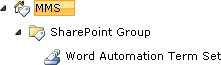
Create a new termset for the group:
$taxonomySession=Get-SPTaxonomySession -Site
"http://servername:10/"
$termStore=$taxonomySession.TermStores["MMS"]
$group=$termStore.Groups["SharePoint Group"]
$termSet=$group.CreateTermSet("Word Automation Term Set")
$termStore.CommitAll()
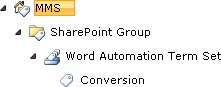
Create a new term for the termset:
$taxonomySession=Get-SPTaxonomySession -Site
"http://servername:10/"
$termStore=$taxonomySession.TermStores["MMS"]
$group=$termStore.Groups["SharePoint Group"]
$termSet=$group.TermSets["Word Automation Term Set"]
$term1=$termSet.CreateTerm("Conversion",1033)
$termStore.CommitAll()


snehaPosted Feb 3, 2013, 7:51 PM EST
Can you please provide me the powershell script to import export .csv taxonomy file . Thanks in advance.
madhu reddyeditedPosted Mar 19, 2012, 8:52 PM EDTEdited Mar 19, 2012, 10:32 PM EDT
Can you please tell me how to write all the above programmatically in single file in powershell??? thanks in advance
madhu reddyPosted Mar 19, 2012, 8:48 PM EDT
helped me a lot.........