
Abstract
In this article I built a small Windows Forms application that enables users to enter data into textboxes, save the data in a Word template and then export the Word template as a new Word or PDF file using the free Spire.Doc.
Introduction
In many situations, we could often be asked to fill out various kinds of forms that are launched by organizations such as a hospital, a school, a company or an investigation agency. Would it be possible for me to create a Windows Forms application that automatically generates a Word format file based on user's information? This idea eventually drove me to find a solution with a .NET Word API, the free Spire.Doc and share the scenario here in this article.
As I have shown in the abstract, the method in this solution can be very simple.
- First, I get a Word template prepared in which there are some strings preset between two “#" symbols.
- Create a Windows Forms application to capture the personal data of users that will be used to replace the strings in the Word template.
- Finally, export the Word template as a new Word file or PDF file.
The below picture shows the Word template: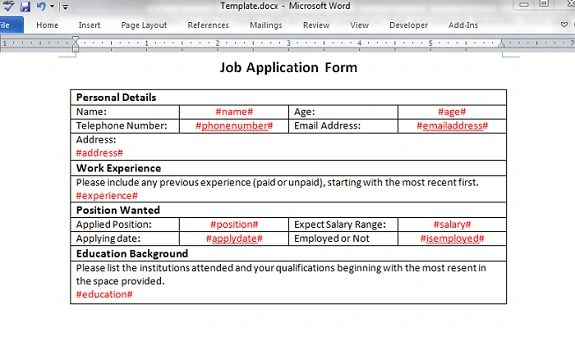
Creating the User Interface
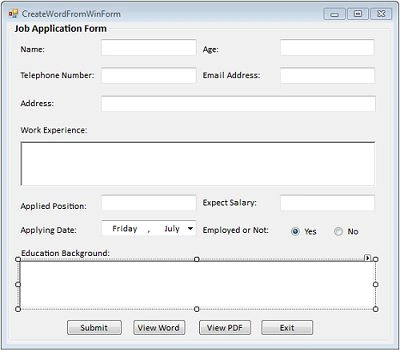
Using the Code
Import necessary namespaces into the project.
- using System.IO;
- using Spire.Doc;
- //initialize word object
- document = new Document();
- document.LoadFromFile(samplePath);
- //get strings to replace
- Dictionary<string, string> dictReplace = GetReplaceDictionary();
- //Replace text
- foreach (KeyValuePair<string, string> kvp in dictReplace)
- {
- document.Replace(kvp.Key, kvp.Value, true, true);
- }
- //Save doc file.
- document.SaveToFile(docxPath, FileFormat.Docx);
- //Convert to PDF
- document.SaveToFile(pdfPath, FileFormat.PDF);
- MessageBox.Show("All tasks are finished.", "doc processing", MessageBoxButtons.OK, MessageBoxIcon.Information);
- document.Close();
- Dictionary<string, string> GetReplaceDictionary()
- {
- Dictionary<string, string> replaceDict = new Dictionary<string, string>();
- replaceDict.Add("#name#", txtName.Text.Trim());
- replaceDict.Add("#age#",txtAge.Text);
- replaceDict.Add("#address#", txtAddress.Text.Trim());
- replaceDict.Add("#phonenumber#",txtPhonenumber.Text);
- replaceDict.Add("#emailaddress#",txtEmailaddress.Text);
- replaceDict.Add("#experience#", txtExperience.Text.Trim());
- replaceDict.Add("#position#", txtPosition.Text.Trim());
- replaceDict.Add("#salary#", txtSalary.Text);
- replaceDict.Add("#applydate#",dateTimePicker.Text);
- string isEmployed= this.radio_isEmployed_Yes.Checked ? "Yes" : "No";
- replaceDict.Add("#isemployed#", isEmployed);
- replaceDict.Add("#education#", txtEducation.Text.Trim());
- return replaceDict;
- }
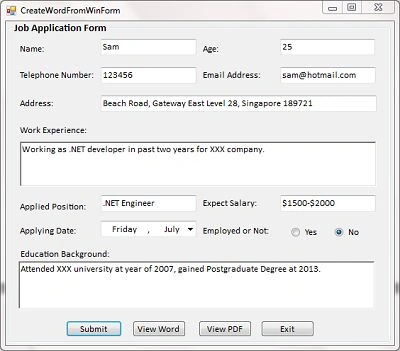
Output
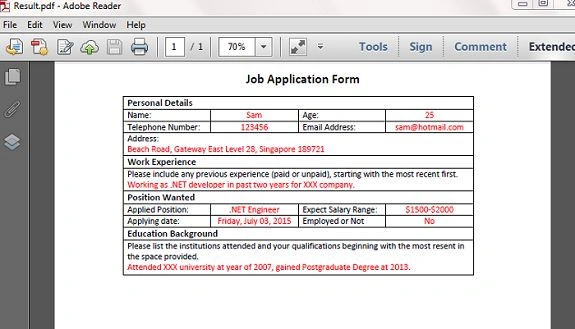
Click Submit, the program will automatically generate the Word and PDF files based on the user's information. Click View Word and View PDF to get the following results.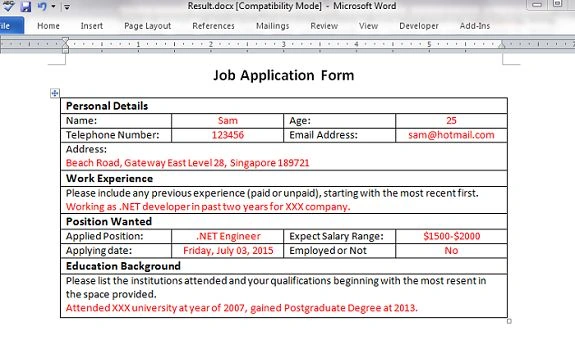
Note
Microsoft Word or Adobe Acrobat is not required to be installed on the system, but you need a Word viewer and PDF reader to view the file generated by Spire.Doc.Thanks for reading and I hope you find this article helpful.


NURU DAWUDPosted Mar 29, 2023, 9:56 AM EDT
Urgent, Please replay everyone! I have used this demo for my c# desktop application with Access database. It works fine when I run on visual studio but after changed to .exe file it puts 0 for every report. What shall I do?
Godfrey MapundaPosted Oct 30, 2022, 2:02 PM EDT
Hi..i have been passing through this article and i'e tried to create the similar application to this.....but unfortunately when i use those odes on visual studio 2022........they bring nothing....
husin hashimPosted Aug 19, 2020, 4:33 AM EDT
Is there an example like this but on an excel sheet instead of word document
Yasser ZaidPosted Sep 23, 2019, 7:50 PM EDT
How can we apply this with repeated data in table
Antony BrunoPosted Feb 1, 2019, 11:33 PM EST
Try to zetword.com- this an advance word document processing API for .NET application
Maja HPosted Dec 18, 2018, 4:44 AM EST
Thanks for sharing this, Susan.
nanda vishalPosted Jun 12, 2018, 12:22 AM EDT
I want to pass data from gridview daynamaclly how ??
Hayeenawhere HasanPosted Feb 7, 2018, 2:31 AM EST
Hello, I am a starter, can u plz provide me a similar program but instead we input the data in one textbox and it assign to places
Huynh HiPosted Jan 18, 2018, 4:05 AM EST
How to set font for word. that is Times New Roman
YoganjulaReddy GangarapuPosted Jun 9, 2017, 12:30 AM EDT
Great Tutorial............Thank you....
Vinay KPosted Apr 9, 2017, 11:45 PM EDT
Nice to share... Good article
Divahar RobinsonPosted Mar 8, 2017, 8:40 AM EST
Hello Susan. Thanks for the tutorial. Good one ! I tried using the community edition of the SPIRE DOC library, I find it super easy and pretty powerful. But at the same time, in thier website they have a friendly reminder as below, +++++++"Friendly Reminder: Free version is limited to 500 paragraphs and 25 tables. This limitation is enforced during reading or writing files. When converting word documents to PDF and XPS files, you can only get the first 3 page of PDF file"+++++ Does it mean that we can't use files that has more than 500 Paragraphs and 25 tables [talking about the file size] ?. Or its the total number of paragraphs that we can process throughout our entire work. Could you please throw some light if you got an insight about it. Best, Sahaya Divahar
Pritam ZopePosted Mar 2, 2017, 4:11 AM EST
Great one Susan....
AnkushPosted Jan 19, 2016, 9:47 PM EST
Susan, I have used the above code and modified as per my requirement, but I have one query i.e. after printing / transferring data to pdf or doc, the file is opened after creation, which I don't want as I have code to silently print the file. The file which is generated should not open and if possible can I delete it?
AnkushPosted Jan 19, 2016, 9:36 PM EST
Use the code this way to resolve ur query. I my self have used the above code to print in doc and pdf format,but I modified the code, as I wanted to transfer data from Data Gridview Dictionary<string, string> GetReplaceDictionary() { Dictionary<string, string> replaceDict = new Dictionary<string, string>(); replaceDict.Add("#name#", dgvReport.Rows[0].Cells[1].Value.ToString()); replaceDict.Add("#age#", dgvReport.Rows[1].Cells[1].Value.ToString()); replaceDict.Add("#address#", dgvReport.Rows[2].Cells[1].Value.ToString()); replaceDict.Add("#phonenumber#", dgvReport.Rows[3].Cells[1].Value.ToString()); return replaceDict; }
fabio botelhoPosted Jan 19, 2016, 1:33 PM EST
Susan I would you like some insite of you about how to export my datagridview itens to the table into word document. I tried to use Dictionary class but I get an error. How could I do this? Do you have some ideia to share?
AnkushPosted Jan 18, 2016, 11:00 PM EST
Is it possible to do without using spire.dll?
Heru WandiraPosted Sep 8, 2015, 10:08 PM EDT
Thank you so much Susan. Very useful article!
Eranga TennakoonPosted Aug 11, 2015, 5:21 AM EDT
Thanks you, this is nice article. I've a question, is this couple with any kind of license? Can you please explain me what's this spire.dll is?
Nilesh JadavPosted Jul 13, 2015, 3:01 AM EDT
Good Article sir
Vipul MalhotraPosted Jul 13, 2015, 1:50 AM EDT
Nice Article
Pankaj Kumar ChoudharyTOP 100Posted Jul 13, 2015, 1:14 AM EDT
Nice Start mam.......
Debasis SahaTOP 100Posted Jul 13, 2015, 12:43 AM EDT
Nice Article..
Neeraj KumarPosted Jul 12, 2015, 11:56 PM EDT
Good one
Sanjay KumarPosted Jul 12, 2015, 11:34 PM EDT
Nice Article! Susan Wong
Brian WheldalePosted Jul 6, 2015, 11:12 PM EDT
This is so neat! It's also exactly what I need to know right now. It made me smile, thank you so much. :)
Faruk YildizPosted Jul 6, 2015, 10:02 PM EDT
Thanks, nice sharing. Good working.
Susan WongPosted Jul 6, 2015, 9:52 PM EDT
Thanks to all of you for reading my article.
Neeraj KumarPosted Jul 6, 2015, 9:22 PM EDT
Good one
Sibeesh VenuTOP 100Posted Jul 6, 2015, 8:50 PM EDT
Nice Article! Thanks for sharing
SharadPosted Jul 6, 2015, 8:18 PM EDT
nice article...
Gopi ChandPosted Jul 6, 2015, 6:41 PM EDT
Good effort..welcome