
For getting the mail services in MSCRM, we need to configure the Exchange Mail Server to MSCRM.
The following procedure configures the Exchange Mail Server profile.
Navigate to Settings then select Email Configuration > Email Server profiles:
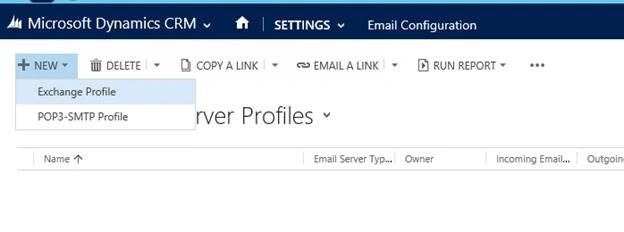
Click new and select Exchange Profile and fill in the required fields that are specified on there, provide a meaningful name that can indicate something and should be specified in the description, what the purpose of this profile is, that’s why the email will send out.
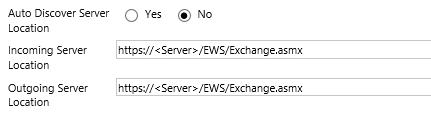
Here in Auto Discover Server, click “Yes”. And you just put it here as the address of the exchange server in the place of both the incoming and outgoing Server Location.
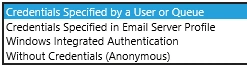
Here you just specify as authentic credential type in the options above. Without credentials, the profile is not valid. So, put it here as your user name and password as in the following image:
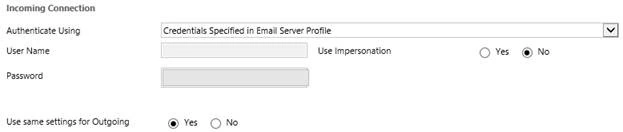
This configuration determines how the email sends and receives email.
Here the following is for the setting of the configuration Exchange Impersonation, it allows for the same credentials or new credentials for the outgoing server.
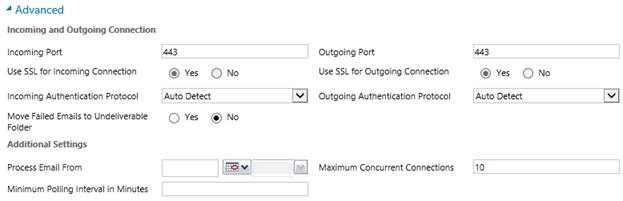
Here, in the preceding image, you can write your update ports and specify here the maximum number of concurrent connections in order to do something for the capability of your network performance.
So, whenever your configuration is complete, save the record using the save ribbon button, be sure the profile chosen is the default.
After the profile is created, you just manage the associated Mailboxes in the listing of mailboxes, at the same time you just manage the Microsoft CRM mail boxes in the same way.



Vikas KumarPosted Jun 18, 2018, 10:08 PM EDT
it's good one
Bhuvanesh MohankumarPosted May 15, 2016, 8:11 AM EDT
Worth reading, Good article.
Santhakumar MunuswamyPosted Aug 29, 2015, 12:40 AM EDT
Welcome
Santhakumar MunuswamyPosted Aug 29, 2015, 12:40 AM EDT
Good Start
Swatismita BiswalPosted Aug 28, 2015, 4:08 AM EDT
Great job!
RakeshPosted Aug 28, 2015, 12:38 AM EDT
Good Start
Vinodh NarayananPosted Aug 27, 2015, 11:59 PM EDT
nice share
Gowtham KTOP 100Posted Aug 27, 2015, 11:39 PM EDT
Good one, Thanks for sharing
Sanghamitra MohantyPosted Aug 27, 2015, 9:44 PM EDT
oh, thank you so much ....
Amarendra SahooPosted Aug 27, 2015, 9:43 PM EDT
Nice article, thanks for your effort really helpful....
Karthikeyan KPosted Aug 27, 2015, 7:35 PM EDT
Informative..Thanks for share
Mohammed IbrahimPosted Aug 27, 2015, 7:00 PM EDT
nice
Van LaiPosted Aug 27, 2015, 5:59 PM EDT
Nice introduction.
Pankaj Kumar ChoudharyTOP 100Posted Aug 27, 2015, 5:05 PM EDT
Nice Start mam and article contain short but rich content......