
This article shows how to create a Cascading Dropdownlist.
Use JSON with razor syntax.
CascadingDropDown enables a common scenario in which the contents of one list depends on the selection of another list and does so without having to embed the entire data set in the page or transfer it to the client at all.
The main purpose is to reduce Postbacks.
Let's start.
Srep 1: Create a project then select Web from above Menu in left
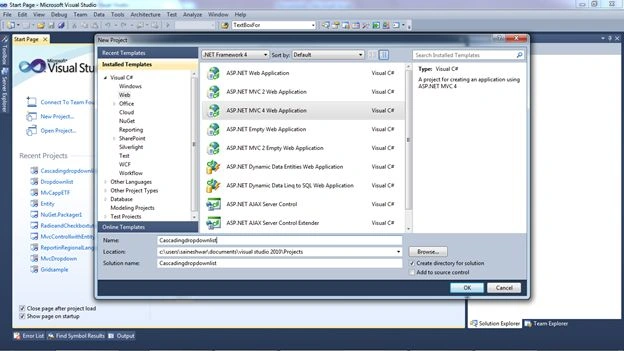
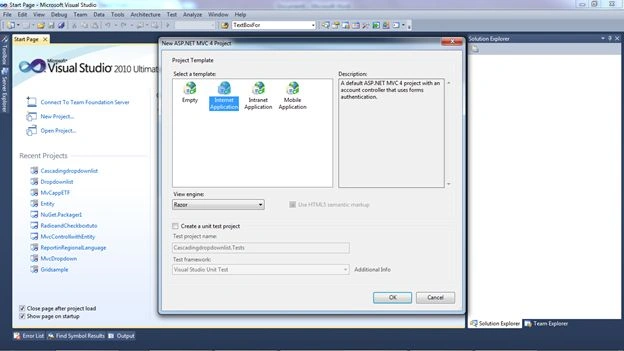
And name it Cascadingdropdownlist.
Step 3: After creating the application we will add a Controller to the page.
For adding the Controller right-click on the Controller Folder and select Add inside add Select Controller.


And I am naming the Contoller CustomerFeedbackController.cs.
Step 4: After adding the Controller to the application I am now just adding a new action result and naming it LoadCountries.
- public ActionResult LoadCountries()
- {
- List<SelectListItem> li = new List<SelectListItem>();
- li.Add(new SelectListItem { Text = "Select", Value = "0" });
- li.Add(new SelectListItem { Text = "India", Value = "1" });
- li.Add(new SelectListItem { Text = "Srilanka", Value = "2" });
- li.Add(new SelectListItem { Text = "China", Value = "3" });
- li.Add(new SelectListItem { Text = "Austrila", Value = "4" });
- li.Add(new SelectListItem { Text = "USA", Value = "5" });
- li.Add(new SelectListItem { Text = "UK", Value = "6" });
- ViewData["country"] = li;
- return View();
- }
In this I created a Generic List and in the list I am adding an item to it.
After adding it I am storing it in ViewData for passing to the view.
Step 5: For adding the View to LoadCountries rigtht-click on the loadCountries and select Add View.
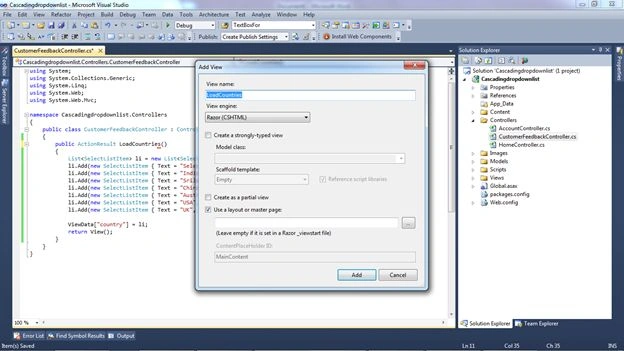
Add a click on the Add Button. Add Razor Syntax to the Begin Form.
- @using (Html.BeginForm())
- {
- }
- @using (Html.BeginForm())
- {
- @Html.DropDownList("Country", ViewData["country"] as List<SelectListItem>)
- }
Now just run the application and check how it is output.
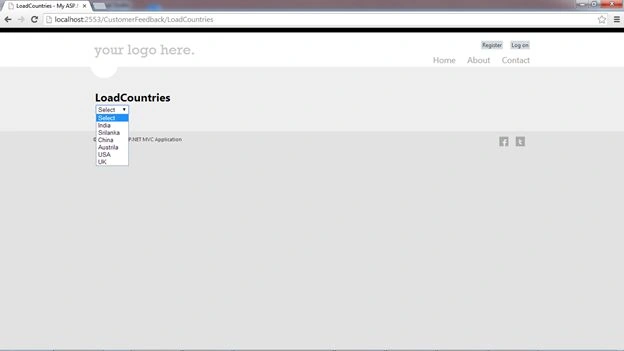
The preceding was a simple example of how to bind a list to a Dropdownlist in MVC.
Now we will be doing a Cascading Dropdown Demo. For that we would be writing a JSON script and JSON method.
And add two DropDownLists with an empty Datasource.
Step 7:
- State DropDownList
- @Html.DropDownList("State", new SelectList(string.Empty, "Value", "Text"), "Please select a State", new { style = "width:250px", @class = "dropdown1" })
- City DropDownList
- @Html.DropDownList("city", new SelectList(string.Empty, "Value", "Text"), "Please select a city", new { style = "width:250px", @class = "dropdown1" })
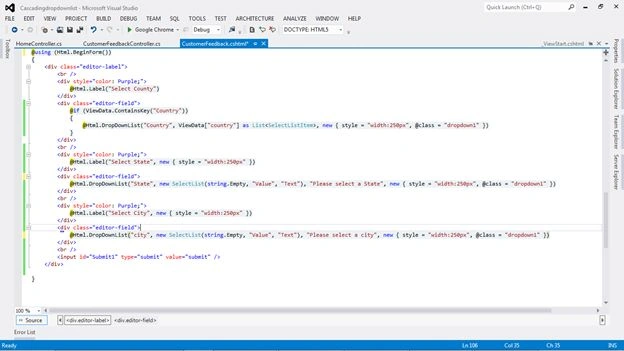
Now we have added two DropDownLists.
Here is a Snapshot of the View:
Step 8: Further we will be adding a method for the JSON and a script for JSON for the States.
Just below I have added the method for JSON.
And also you will see the method for JSON is taking an input parameter, id (this is the id of the Country Dropdownlist that I created).
The Script for JSON will be called when the Country Dropdownlist is selected.
- public JsonResult GetStates(string id)
- {
- List<SelectListItem> states = new List<SelectListItem>();
- switch (id)
- {
- case "1":
- states.Add(new SelectListItem { Text = "Select", Value = "0" });
- states.Add(new SelectListItem { Text = "ANDAMAN & NIKOBAR ISLANDS", Value = "1" });
- states.Add(new SelectListItem { Text = "ANDHRA PRADESH", Value = "2" });
- states.Add(new SelectListItem { Text = "ARUNACHAL PRADESH", Value = "3" });
- states.Add(new SelectListItem { Text = "ASSAM", Value = "4" });
- states.Add(new SelectListItem { Text = "BIHAR", Value = "5" });
- states.Add(new SelectListItem { Text = "CHANDIGARH", Value = "6" });
- states.Add(new SelectListItem { Text = "CHHATTISGARH", Value = "7" });
- states.Add(new SelectListItem { Text = "DADRA & NAGAR HAVELI", Value = "8" });
- states.Add(new SelectListItem { Text = "DAMAN & DIU", Value = "9" });
- states.Add(new SelectListItem { Text = "GOA", Value = "10" });
- states.Add(new SelectListItem { Text = "GUJARAT", Value = "11" });
- states.Add(new SelectListItem { Text = "HARYANA", Value = "12" });
- states.Add(new SelectListItem { Text = "HIMACHAL PRADESH", Value = "13" });
- states.Add(new SelectListItem { Text = "JAMMU & KASHMIR", Value = "14" });
- states.Add(new SelectListItem { Text = "JHARKHAND", Value = "15" });
- states.Add(new SelectListItem { Text = "KARNATAKA", Value = "16" });
- states.Add(new SelectListItem { Text = "KERALA", Value = "17" });
- states.Add(new SelectListItem { Text = "LAKSHADWEEP", Value = "18" });
- states.Add(new SelectListItem { Text = "MADHYA PRADESH", Value = "19" });
- states.Add(new SelectListItem { Text = "MAHARASHTRA", Value = "20" });
- states.Add(new SelectListItem { Text = "MANIPUR", Value = "21" });
- states.Add(new SelectListItem { Text = "MEGHALAYA", Value = "22" });
- states.Add(new SelectListItem { Text = "MIZORAM", Value = "23" });
- states.Add(new SelectListItem { Text = "NAGALAND", Value = "24" });
- states.Add(new SelectListItem { Text = "NCT OF DELHI", Value = "25" });
- states.Add(new SelectListItem { Text = "ORISSA", Value = "26" });
- states.Add(new SelectListItem { Text = "PUDUCHERRY", Value = "27" });
- states.Add(new SelectListItem { Text = "PUNJAB", Value = "28" });
- states.Add(new SelectListItem { Text = "RAJASTHAN", Value = "29" });
- states.Add(new SelectListItem { Text = "SIKKIM", Value = "30" });
- states.Add(new SelectListItem { Text = "TAMIL NADU", Value = "31" });
- states.Add(new SelectListItem { Text = "TRIPURA", Value = "32" });
- states.Add(new SelectListItem { Text = "UTTAR PRADESH", Value = "33" });
- states.Add(new SelectListItem { Text = "UTTARAKHAND", Value = "34" });
- states.Add(new SelectListItem { Text = "WEST BENGAL", Value = "35" });
- break;
- case "UK":
- break;
- case "India":
- break;
- }
- return Json(new SelectList(states, "Value", "Text"));
- }
Step 9: After creating the method for JSON I just wrote a script for JSON.
- <script src="../../Scripts/jquery-1.7.1.js" type="text/javascript"></script>
- <script src="../../Scripts/jquery-1.7.1.min.js" type="text/javascript"></script>
- <script type="text/javascript">
- $(document).ready(function () {
- //Dropdownlist Selectedchange event
- $("#Country").change(function () {
- $("#State").empty();
- $.ajax({
- type: 'POST',
- url: '@Url.Action("GetStates")', // we are calling json method
- dataType: 'json',
- data: { id: $("#Country").val() },
- // here we are get value of selected country and passing same value
- as inputto json method GetStates.
- success: function (states) {
- // states contains the JSON formatted list
- // of states passed from the controller
- $.each(states, function (i, state) {
- $("#State").append('<option value="' + state.Value + '">' +
- state.Text + '</option>');
- // here we are adding option for States
- });
- },
- error: function (ex) {
- alert('Failed to retrieve states.' + ex);
- }
- });
- return false;
- })
- });
- </script>
Step 10:
We have just now bound States from Country. We will now bind city from States.
In the same manner I created a method for JSON for binding the City.
- public JsonResult GetCity(string id)
- {
- List<SelectListItem> City = new List<SelectListItem>();
- switch (id)
- {
- case "20":
- City.Add(new SelectListItem { Text = "Select", Value = "0" });
- City.Add(new SelectListItem { Text = "MUMBAI", Value = "1" });
- City.Add(new SelectListItem { Text = "PUNE", Value = "2" });
- City.Add(new SelectListItem { Text = "KOLHAPUR", Value = "3" });
- City.Add(new SelectListItem { Text = "RATNAGIRI", Value = "4" });
- City.Add(new SelectListItem { Text = "NAGPUR", Value = "5" });
- City.Add(new SelectListItem { Text = "JALGAON", Value = "6" });
- break;
- }
- return Json(new SelectList(City, "Value", "Text"));
- }
Step 11: And also wrote a script for JSON that wil be active when you select States.
- <script type="text/javascript">
- $(document).ready(function () {
- //Dropdownlist Selectedchange event
- $("#State").change(function () {
- $("#city").empty();
- $.ajax({
- type: 'POST',
- url: '@Url.Action("GetCity")',
- dataType: 'json',
- data: { id: $("#State").val() },
- success: function (citys) {
- // states contains the JSON formatted list
- // of states passed from the controller
- $.each(citys, function (i, city) {
- $("#city").append('<option value="'
- + city.Value + '">'
- + city.Text + '</option>');
- });
- },
- error: function (ex) {
- alert('Failed to retrieve states.' + ex);
- }
- });
- return false;
- })
- });
- </script>
Final step
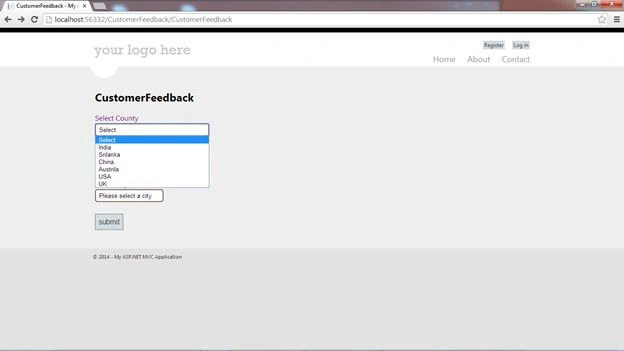
Countries Dropdown snapshot.
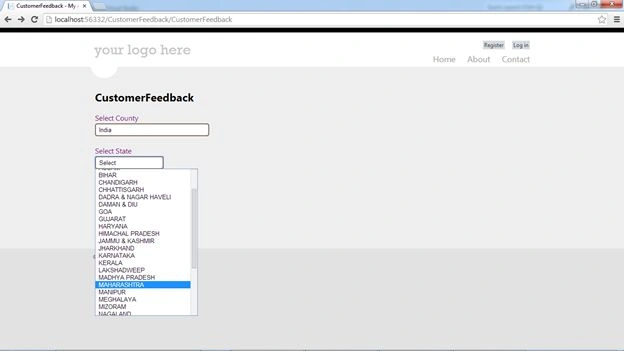
States Dropdown snapshot.
City Dropdown snapshot.
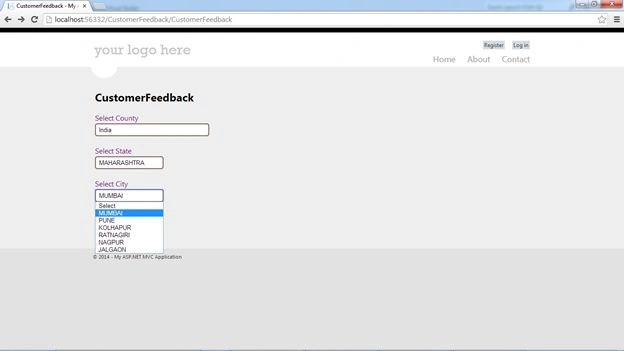
And fetching data a post here is a snapshot.



Ryan CourtneyPosted May 5, 2021, 12:37 PM EDT
I am getting "undefined" for my state values when I run the project and select a country from the dropdown. Do you know why that is happening?
Gustavo MaltosPosted Oct 26, 2018, 1:16 PM EDT
Hello, I have little work on vb.net and instead of C # I work with vb that is to say that I am not very familiar with programming and less with C #, but I have doubts about how I could apply this in a vbhtml way with MVC, can you help me not I know how different it is, thank you ...
Derek BPosted Aug 18, 2018, 6:12 AM EDT
Thank you for this. Helps me a lot. 2 things, the images should be clickable to make bigger, and how do I make the correct items selected on load when doing a customer edit?
jeff banjoPosted Apr 2, 2018, 2:06 AM EDT
Nice once, i incorporated this but i get this error : [object Object]" no matter what I select from country, any idea what am doing wrong?
jamil khanPosted Mar 7, 2018, 3:10 AM EST
Please help me in edit state wise city dropdownlist value in MVC single view (multiple action)
jamil khanPosted Mar 7, 2018, 3:04 AM EST
Excellent work sir, but I have a problem in edit (state dropdownlist is updating ok but city dropdownlist not bind in edit mode ) in mvc single view
tarek rebhiPosted Feb 25, 2018, 8:34 PM EST
Great work sir, if it possible can you please show us how to get the value of each selected choice
Alejandro LopezPosted Aug 22, 2017, 9:54 AM EDT
Saineshwar, excellent article. You are the Messi of the MVC
Akash WaghmarePosted Jul 27, 2017, 1:57 AM EDT
I have 2 dropdowns one place at the top second at the bottom when I change the Top DD then my bottom DD gets a focus and whole page comes from top to bottom how to solve it Do you have any Idea?
Juan MurilloPosted Mar 29, 2017, 7:53 AM EDT
Excelete publicaci?n, Gracias
sajan bhatiaPosted Mar 14, 2017, 5:30 AM EDT
If browser java script off then its work?
Manav PandyaPosted Dec 29, 2016, 11:41 PM EST
Not issue , but just dont understand its syntax , i mean how to write it manually JSON for any fuctionality
Manav PandyaPosted Dec 29, 2016, 6:53 AM EST
But i dont understand JSON thats why i asked you , suggest me some way to solve it
Manav PandyaPosted Dec 29, 2016, 6:53 AM EST
Are sir mat kaho , im ur junior and u r inspiration for me sir
Manav PandyaPosted Dec 28, 2016, 9:57 PM EST
But i dont have any background in JSON , how to do JSON manually , Thanks
Manav PandyaPosted Dec 28, 2016, 9:57 PM EST
Nice article shared sir Saineshwar Bageri ...
Melvin CastellanosPosted Dec 13, 2016, 5:28 AM EST
What if i ALREADY have all the information populated on both of my dropdowns using Nhibernate and all i want to do i filter the second dropdown depending on what has been selected on the first dropdown?
Ramesh PalaniappanPosted Aug 28, 2016, 10:46 PM EDT
Good one
akash vermaPosted Aug 21, 2016, 10:23 AM EDT
State Drop Down list is not loading. seems like onChange event is not working.
kalu singh raoPosted Jul 9, 2016, 5:15 PM EDT
Nice...
Rajeev PunhaniPosted Jul 5, 2016, 9:26 PM EDT
Nice.
Upendra Pratap ShahiPosted Mar 15, 2016, 4:08 AM EDT
nice..
John CPosted Mar 3, 2016, 4:40 AM EST
Thanks this helped me a lot.
Former memberPosted Feb 14, 2016, 6:40 AM EST
You can find simple code here : http://www.dotnetcode2u.com/2016/01/mvc4-cascading-dropddownlist-to-insert.html
Shital UmarePosted Feb 1, 2016, 1:00 PM EST
I am facing issue on view load.first dropdownlist value is already selected and based on that other dropdownlist should populate and it is not happening. I followed your mentod for on change but what if user wont select first dropdown value.
chourouk HjaiejPosted Jan 12, 2016, 9:57 AM EST
https://code.msdn.microsoft.com/Dropdowlist-in-MVC5-8571a783
Javier CordovaPosted Nov 30, 2015, 10:33 AM EST
HI, got error"failed to retrieve state.object" can you please tell how to solve this
Javier CordovaPosted Nov 30, 2015, 10:24 AM EST
Hi! Help me!
Brad FuquaPosted Nov 6, 2015, 9:49 AM EST
Thanks for the tutorial. This works great for me when creating a new record, but I also would like to use the cascading drop downs when editing. I've added them to my edit.cshtml, but the drop downs don't populate with the value already saved in the db table. Any way to repopulate the drop down when editing?
Ashish SrivastavaPosted Oct 15, 2015, 6:54 AM EDT
hello saineshwar, is there any way to pass selected text value of those two dropdown into controller action methods so that we can save them into database instead of value field as u r showing in the last image
krishan KumarPosted Oct 14, 2015, 10:22 PM EDT
not working failed to retrieve there state
jhoiner castilloPosted Oct 8, 2015, 5:55 AM EDT
Excellent !! I served a lot, Thanks thank you very much
DarinPosted Sep 19, 2015, 2:49 AM EDT
Thanx for the code Buddy !!
sameen kashifPosted Sep 13, 2015, 12:13 PM EDT
i am following the same code. i got error"failed to retrieve state.object" can you please tell how to solve this
Raunak DeepPosted Jul 15, 2015, 3:26 AM EDT
ya i want to know is any way to casscading the drop down on by cercular reference
Saineshwar BageriPosted Feb 27, 2015, 2:49 AM EST
I have shared solution on gdrive you will get mail on gmail just download it and see homes controller
Parth MashrooPosted Feb 27, 2015, 2:39 AM EST
actually i am calling prepaid.cshtml partial view in Index.cshtml file so i hope this helps you!
Saineshwar BageriPosted Feb 27, 2015, 2:05 AM EST
Parth Mashroo sir in which view you are having issue
Saineshwar BageriPosted Feb 27, 2015, 12:10 AM EST
sent it on [email protected]
Saineshwar BageriPosted Feb 26, 2015, 11:53 PM EST
parth sir just see browser console if any error in that and try to resolve it .
Parth MashrooPosted Feb 26, 2015, 11:26 PM EST
sir for first dropdown i am binding with database and based on that value i am using json from ur example but it isn't working pls help on that!!
Saineshwar BageriPosted Feb 5, 2015, 9:40 PM EST
JSON requires less tags than XML
Vipin BhandariPosted Feb 5, 2015, 8:40 PM EST
sir can u plz tell me why u use json?
Saineshwar BageriPosted Feb 5, 2015, 7:00 PM EST
Prakash Joshi sir its getting your required fulfilled then you can customize it
Prakash JoshiPosted Jan 18, 2015, 11:49 PM EST
@Saineshwar Bageri i have made a little change in Costomerfeedback POST method public ActionResult CustomerFeedback(FormCollection FC) { string country = FC["Country"].ToString(); string state = FC["State"].ToString(); string city = FC["city"].ToString(); // change return CustomerFeedback(); } want to know it is good or not
Zaid AnsariPosted Jan 18, 2015, 7:52 PM EST
Nice Article Sir Ji
Saineshwar BageriPosted Jan 16, 2015, 8:09 PM EST
thanks Deepak sir i had made change have a look
Deepak VermaPosted Jan 16, 2015, 7:18 PM EST
Good article, but the use of country's id is incorrect. You're using $("#Country").change() instead of $("#Countries").change(). Plz correct it.
Mani KPosted Jan 8, 2015, 7:02 PM EST
Nice article, its help me a lot
Saineshwar BageriPosted Jan 2, 2015, 9:10 PM EST
thanks Dinesh sir it was you how told me this Process
Dinesh BeniwalTOP 10Posted Jan 2, 2015, 9:03 PM EST
Congratulations Saineshwar, one more articles of the Day at ASP.NET
Saineshwar BageriPosted Dec 16, 2014, 1:07 AM EST
use entity framework to get data from database and pass list to dropdown
mathan kumarPosted Dec 16, 2014, 12:21 AM EST
how to get in the database to dropdownlistfor
mathan kumarPosted Dec 16, 2014, 12:21 AM EST
how to get in the database
ankireddy lingireddyPosted Dec 11, 2014, 8:38 PM EST
Pretty clear example. How can i do validations for these controls with out using model class
Masoud BagheriPosted Nov 18, 2014, 11:26 AM EST
Hello Your article was very helpful. but i have a problem. i define a maproute: {controller}/{action}/{Brand}/{Car} when page load with second segment, dropdownlist events don't work. for example: advertises/index/kia/cerato but this work: advertises/index/kia please help me.
Saineshwar BageriPosted Oct 30, 2014, 2:52 AM EDT
it do not have database just change you need to code it sir where ever i am using list you need to add your database code there to get values from database.
murali krishnaPosted Oct 30, 2014, 1:57 AM EDT
i didnt find database file in this
murali krishnaPosted Oct 30, 2014, 1:57 AM EDT
where is database
santosh kushwahaPosted Aug 26, 2014, 8:30 AM EDT
Thanks Saineshwar Bageri
santosh kushwahaPosted Aug 26, 2014, 8:30 AM EDT
fantastic article, great job.
Saineshwar BageriPosted Aug 5, 2014, 8:14 PM EDT
janu sir GetStates you will write in your controller and 9 on View of that controller
januPosted Aug 5, 2014, 2:05 AM EDT
can you pls explain 8th and 9th step im not getting where to write that code
Farhad abbasPosted May 22, 2014, 11:18 PM EDT
thanx
tej pratap singhPosted May 1, 2014, 10:05 PM EDT
really helpful
Saineshwar BageriPosted Apr 28, 2014, 5:22 AM EDT
check this sir
Saineshwar BageriPosted Apr 28, 2014, 5:18 AM EDT
i have written small function for clearing<script type="text/javascript"> function abc() { $("#city").empty(); } and calling this function on $("#Country").change if ($("#Country").val() == "0") { abc(); }
Praveen Raveendran PillaiPosted Apr 27, 2014, 11:23 PM EDT
Great Code.. I need a small clarification. When we select the country to "Select" the state is changing to "Select". But the city is empty.Could you please show how to make it to defaut ones when country is not selected.