
This article shows how to do Create, Read, Update and Delete (CRUD) operations in MVC 5, WEB API 2 and AngularJS with a Stored Procedure.
The following is the table I will use to do the CRUD operations: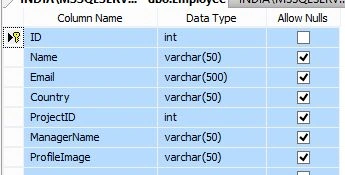
Image 1.
The following is sample data for the table: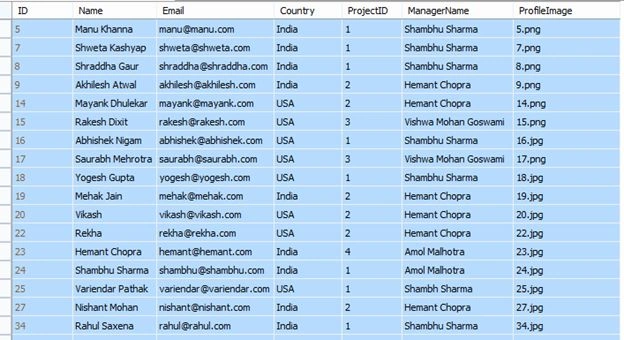
Image 2.
The following are the four Stored Procedures.
1. ADDNewEmployee
- CREATE PROCEDURE [dbo].[ADDNewEmployee]
- (
- @Emp_Name VARCHAR(100) = null,
- @Email VARCHAR(500) = null,
- @Country VARCHAR(100) = null ,
- @ProjectID INT,
- @ManagerName VARCHAR(100) = null,
- @ProfileImage VARCHAR(100) = null
- )
- AS
- BEGIN
- INSERT INTO Employee (Name, Email,Country,ProjectID,ManagerName,ProfileImage)
- VALUES (@Emp_Name, @Email, @Country,@ProjectID,@ManagerName, @ProfileImage)
- END
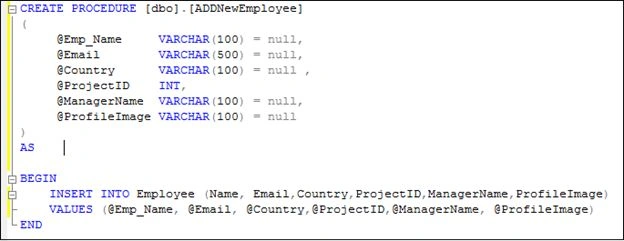
Image 3.
2. UpdateEmployee
- CREATE PROCEDURE [dbo].[UpdateEmployee]
- (
- @Emp_ID INT,
- @Emp_Name VARCHAR(100) = null,
- @Email VARCHAR(500) = null,
- @Country VARCHAR(100) = null ,
- @ManagerName VARCHAR(100) = null
- )
- AS
- BEGIN
- UPDATE Employee
- SET Name=@Emp_Name,
- Email=@Email,
- Country=@Country,
- ManagerName=@ManagerName
- WHERE ID=@Emp_ID
- END
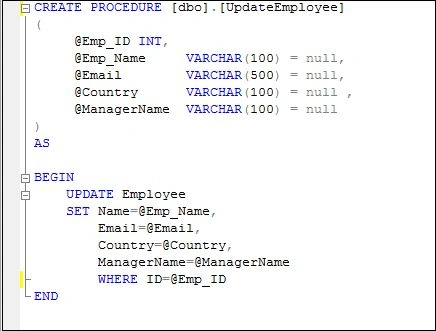
Image 4.
3. DeleteEmployee.
- ALTER PROCEDURE [dbo].[DeleteEmployee]
- (
- @Emp_ID INT
- )
- AS
- BEGIN
- DELETE FROM Employee WHERE ID=@Emp_ID
- END
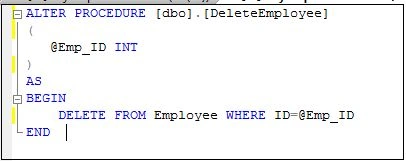
Image 5.
4. ReadAllEmployee
- -- EXEC [ReadAllEmployee] null, null, null
- ALTER PROCEDURE [dbo].[ReadAllEmployee]
- (
- @Emp_Name VARCHAR(100) = null,
- @Country VARCHAR(100) = null,
- @ManagerName VARCHAR(100) = null
- )
- AS
- BEGIN
- IF (@Emp_Name IS NULL)
- BEGIN
- SET @Emp_Name=''
- END
- IF (@Country IS NULL)
- BEGIN
- SET @Country=''
- END
- IF (@ManagerName IS NULL)
- BEGIN
- SET @ManagerName=''
- END
- SELECT ID, Name, Email, Country, ManagerName
- FROM Employee
- WHERE Name like @Emp_Name +'%'
- AND Country like @Country +'%'
- AND ManagerName like @ManagerName +'%'
- ORDER BY Name
- END
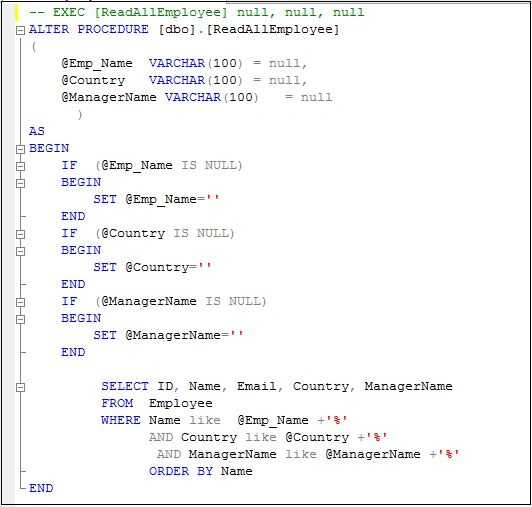
Image 6.
Now open Visual Studio 2015 and create new ASP.NET web application.
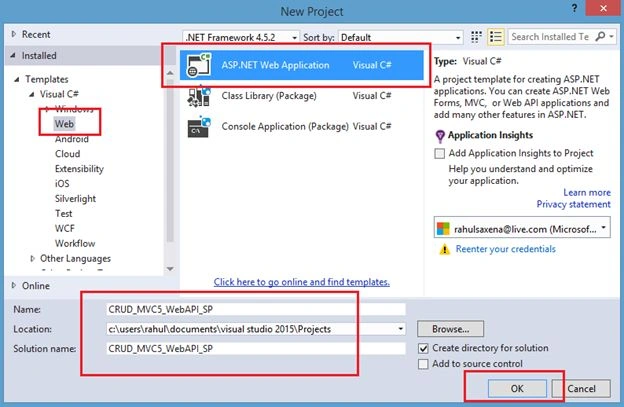
Image 7.
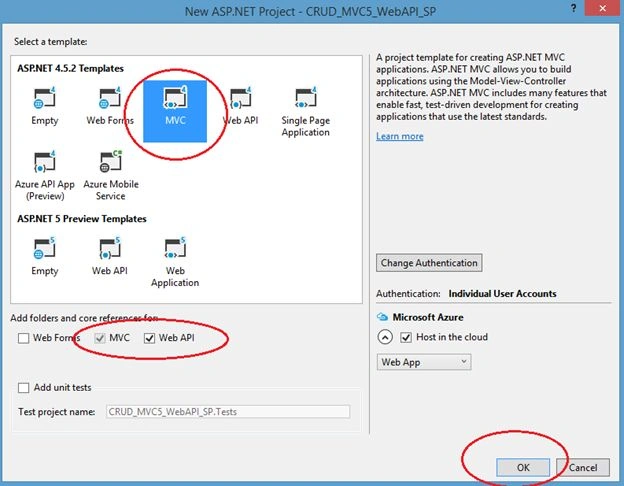
Image 8.
Now right-click on the project in the Solution Explorer as in the following:
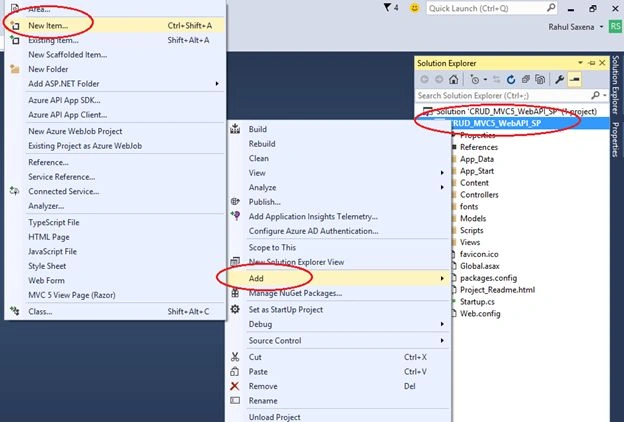
Image 9.
Select ADO.NET Entity Data Model.
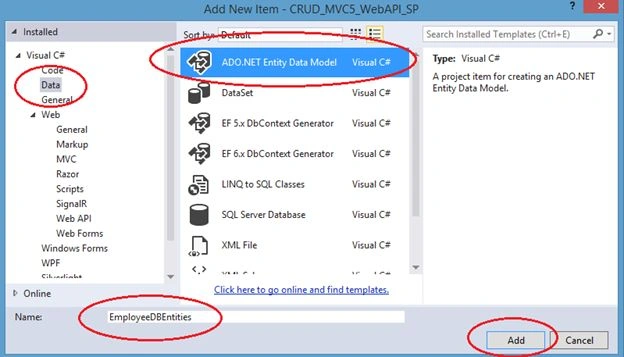
Image 10.
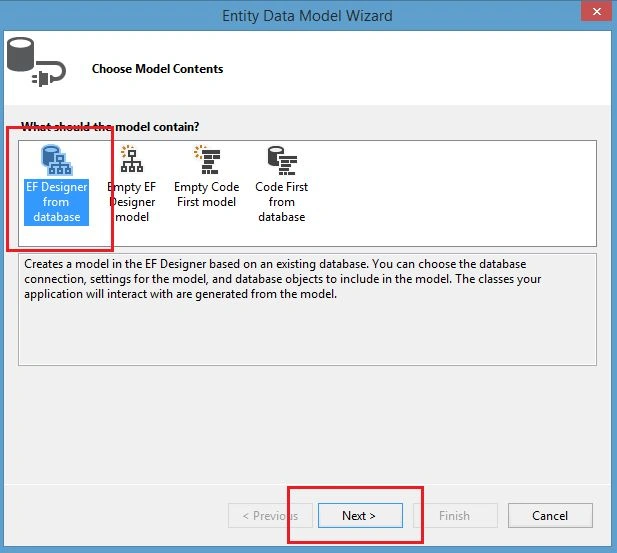
Image 11.
Select your Data Source and database.
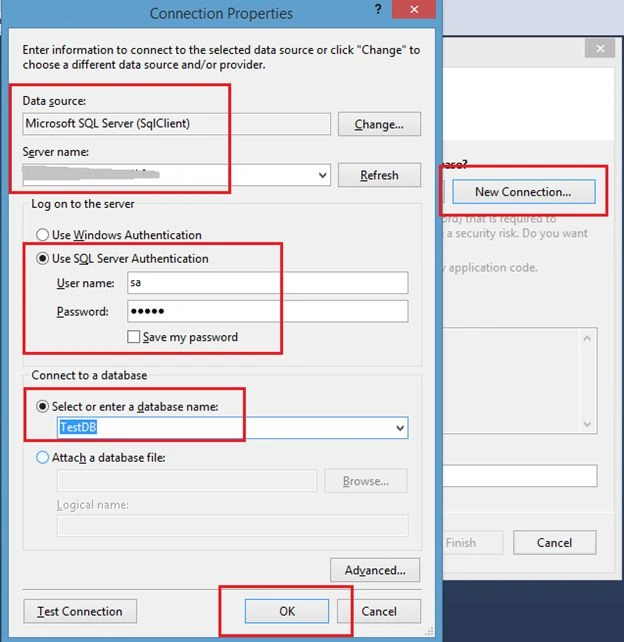
Image 12.
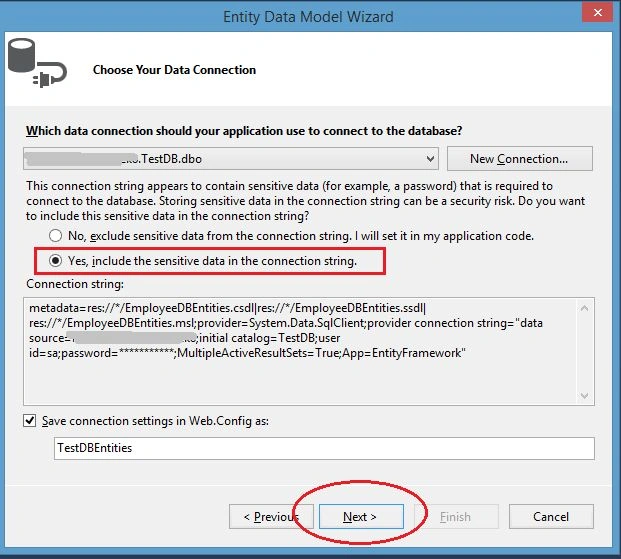
Image 13.
Select your data table and Stored Procedure.
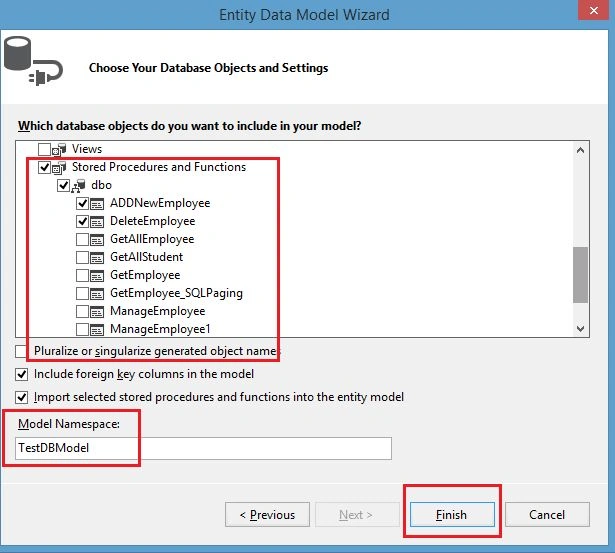
Image 14.
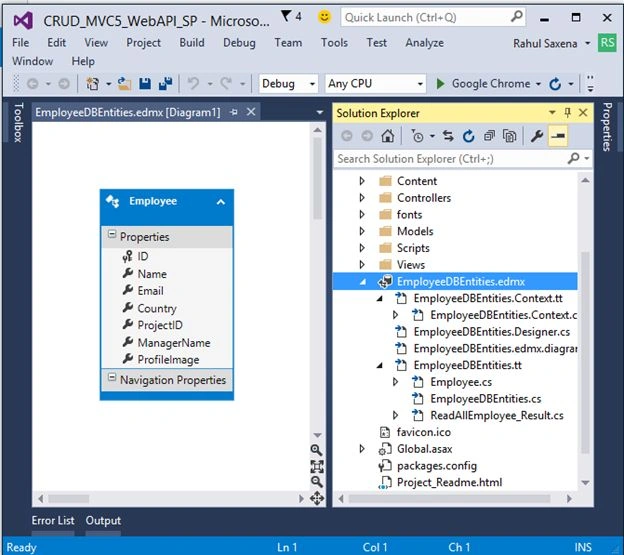
Image 15.
Now to add a Web API controller. So right-click on Controllers and Add New Controller.
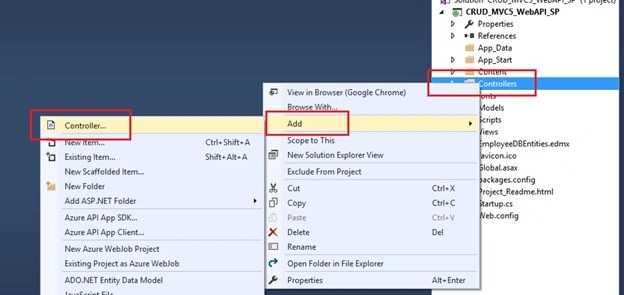
Image 16.
Select Web API 2 Controller – Empty.
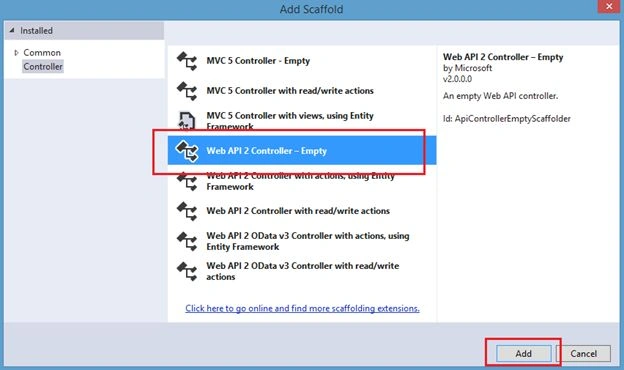
Image 17.
Provide it a name.
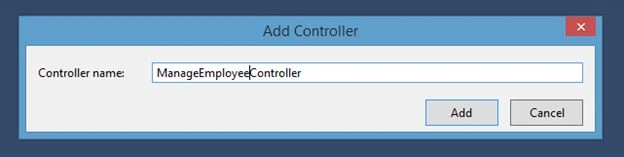
Image 18.
Here's the code:
- using System;
- using System.Collections.Generic;
- using System.Linq;
- using System.Net;
- using System.Net.Http;
- using System.Web.Http;
- using CRUD_MVC5_WebAPI_SP.Models;
- namespace CRUD_MVC5_WebAPI_SP.Controllers
- {
- public class ManageEmployeeController : ApiController
- {
- TestDBEntities obj = new TestDBEntities();
- [HttpGet]
- public IEnumerable<ReadAllEmployee_Result> ListAllEmployee(string emp_Name, string country, string managerName)
- {
- return obj.ReadAllEmployee(emp_Name, country, managerName).AsEnumerable();
- }
- [HttpGet]
- public void addNewEmployee(string emp_Name, string email, string country, string managerName)
- {
- obj.ADDNewEmployee(emp_Name, email, country, 1, managerName, "Profile.jpg");
- }
- [HttpGet]
- public void updateEmployee(int? emp_ID, string emp_Name, string email, string country, string managerName)
- {
- obj.UpdateEmployee(emp_ID, emp_Name, email, country, managerName);
- }
- [HttpGet]
- public void deleteEmployee(int emp_ID)
- {
- obj.DeleteEmployee(emp_ID);
- obj.SaveChanges();
- }
- }
- }
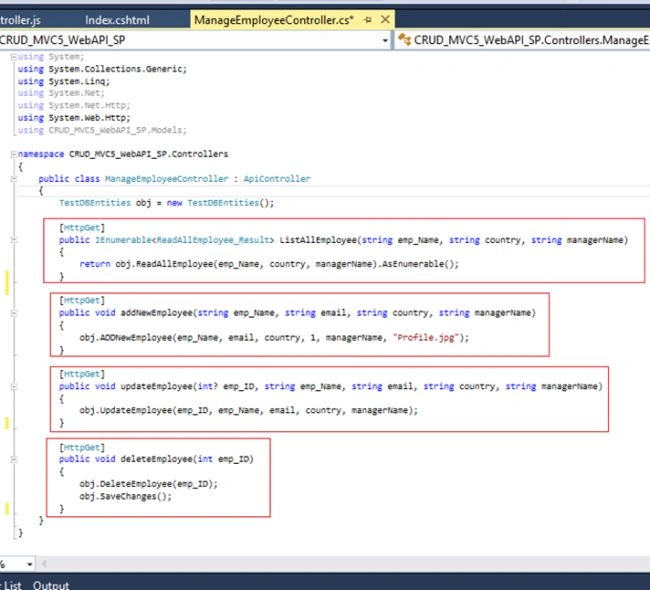
Image 19.
Now to add the AngularJs reference to your project. So right-click on your project in the Solution Explorer as in the following, then click Manage NuGet Packages...
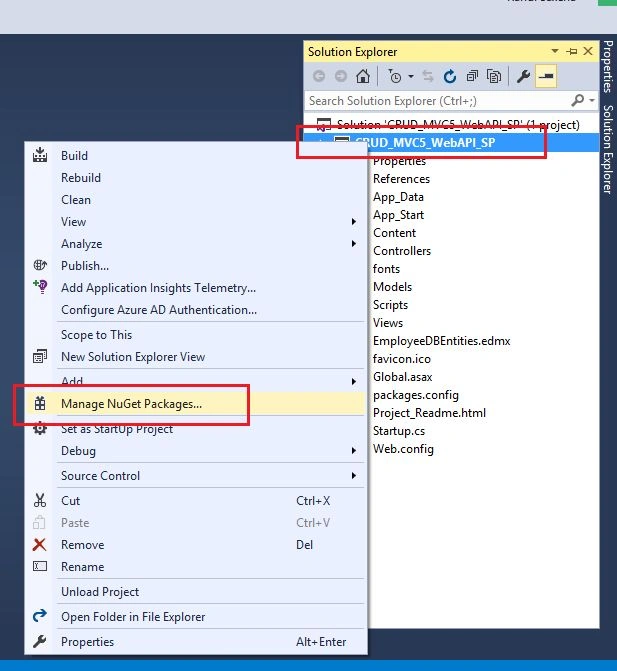
Image 20.
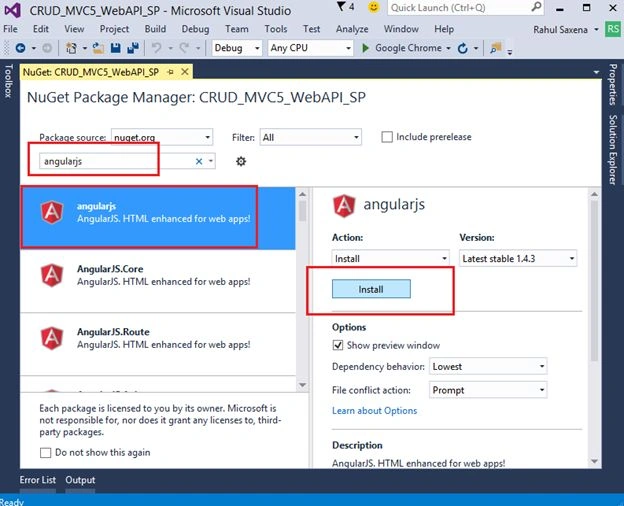
Image 21.
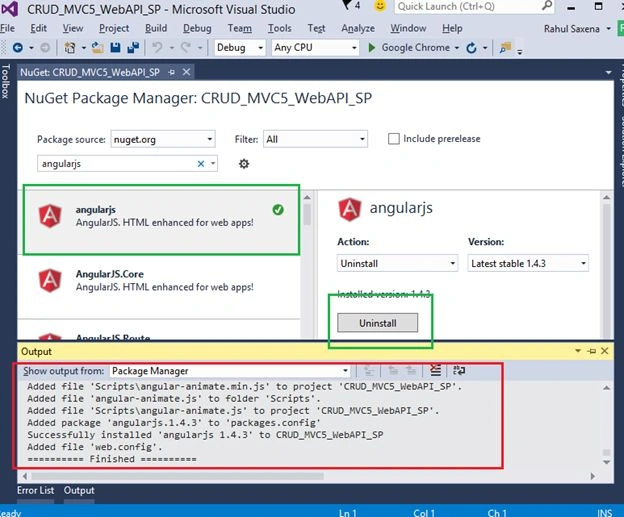
Image 22.
Now create a new folder under the Scripts Folder, then right-click MyScripts and select AngularController as in the following:
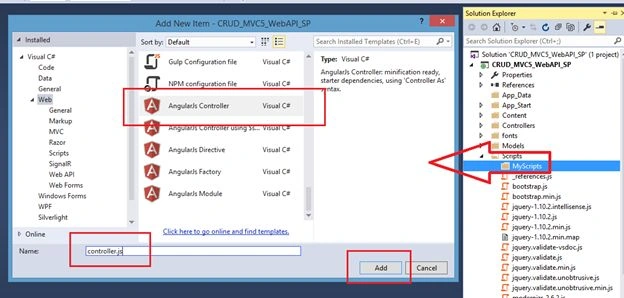
Image 23.
Here's the code:
- // <reference path="../angular.js" />
- /// <reference path="../angular.min.js" />
- /// <reference path="../angular-animate.js" />
- /// <reference path="../angular-animate.min.js" />
- var app;
- (function () {
- app = angular.module("RESTClientModule", ['ngAnimate']);
- })();
- app.controller("AngularJs_ManageEmployeeInfoController", function ($scope, $timeout, $rootScope, $window, $http) {
- $scope.date = new Date();
- $scope.empNameSearch = "";
- $scope.empCountrySearch = "";
- $scope.ManagerNameSearch = "";
- $scope.ManageEMP_Info = false;
- $scope.ListEmployee = true;
- $scope.searchEmployee = true;
- $scope.EmpIds = 0;
- $scope.empName = "";
- $scope.empEmail = "";
- $scope.empCountry = "";
- $scope.empManager = "";
- getEmployeeList($scope.empNameSearch, $scope.empCountrySearch, $scope.ManagerNameSearch);
- function getEmployeeList(EmployeeName, Country, ManagerName) {
- $http.get('/api/ManageEmployee/', { params: { emp_Name: EmployeeName, country: Country, managerName: ManagerName } }).success(function (data) {
- $scope.Employees = data;
- $scope.ManageEMP_Info = false;
- $scope.ListEmployee = true;
- $scope.searchEmployee = true;
- if ($scope.Employees.length > 0) {
- }
- })
- .error(function () {
- $scope.error = "Some Error.";
- });
- }
- //Search
- $scope.searchEmp = function () {
- getEmployeeList($scope.empNameSearch, $scope.empCountrySearch, $scope.ManagerNameSearch);
- }
- //Edit Employee Details
- $scope.editEmployeeInfo = function editEmployeeInfo(Employee_ID, Name, Email, Country, ManagerName) {
- cleardetails();
- $scope.EmpIds = Employee_ID;
- $scope.empName = Name
- $scope.empEmail = Email;
- $scope.empCountry = Country;
- $scope.empManager = ManagerName;
- $scope.ManageEMP_Info = true;
- $scope.ListEmployee = true;
- $scope.searchEmployee = true;
- }
- //Delete Dtudent Detail
- $scope.Employee_Delete = function Employee_Delete(EmpIds, Name) {
- cleardetails();
- $scope.EmpIds = EmpIds;
- var delConfirm = confirm("Are you sure you want to delete the Employee " + Name + " ?");
- if (delConfirm == true) {
- $http.get('/api/ManageEmployee/deleteEmployee/', { params: { emp_ID: $scope.EmpIds } }).success(function (data) {
- alert("Employee Deleted Successfully!!");
- cleardetails();
- $scope.empNameSearch = "";
- $scope.empCountrySearch = "";
- $scope.ManagerNameSearch = "";
- getEmployeeList($scope.empNameSearch, $scope.empCountrySearch, $scope.ManagerNameSearch);
- })
- .error(function () {
- $scope.error = "Some Error.";
- });
- }
- }
- $scope.AddEmployeeForm = function () {
- cleardetails();
- $scope.ManageEMP_Info = true;
- $scope.ListEmployee = true;
- $scope.searchEmployee = true;
- }
- function cleardetails() {
- $scope.EmpIds = 0;
- $scope.empName = "";
- $scope.empEmail = "";
- $scope.empCountry = "";
- $scope.empManager = "";
- }
- //Form Validation
- $scope.Message = "";
- $scope.IsFormSubmitted = false;
- $scope.IsFormValid = false;
- $scope.$watch("f1.$valid", function (isValid) {
- $scope.IsFormValid = isValid;
- });
- //Save-Edit Employee
- $scope.saveDetails = function () {
- $scope.IsFormSubmitted = true;
- if ($scope.IsFormValid) {
- if ($scope.EmpIds == 0) {
- $http.get('/api/ManageEmployee/addNewEmployee/', { params: { emp_Name: $scope.empName, email: $scope.empEmail, country: $scope.empCountry, managerName: $scope.empManager } }).success(function (data) {
- alert("Employee Added Successfully.");
- cleardetails();
- $scope.empNameSearch = "";
- $scope.empCountrySearch = "";
- $scope.ManagerNameSearch = "";
- getEmployeeList($scope.empNameSearch, $scope.empCountrySearch, $scope.ManagerNameSearch);
- })
- .error(function () {
- $scope.error = "Some Error.";
- });
- }
- else {
- $http.get('/api/ManageEmployee/updateEmployee/', { params: { emp_ID: $scope.EmpIds, emp_Name: $scope.empName, email: $scope.empEmail, country: $scope.empCountry, managerName: $scope.empManager } }).success(function (data) {
- alert("Employee Updated Successfully");
- cleardetails();
- $scope.empNameSearch = "";
- $scope.empCountrySearch = "";
- $scope.ManagerNameSearch = "";
- getEmployeeList($scope.empNameSearch, $scope.empCountrySearch, $scope.ManagerNameSearch);
- })
- .error(function () {
- $scope.error = "Some Error.";
- });
- }
- }
- else {
- $scope.Message = "All the fields are required.";
- }
- }
- });
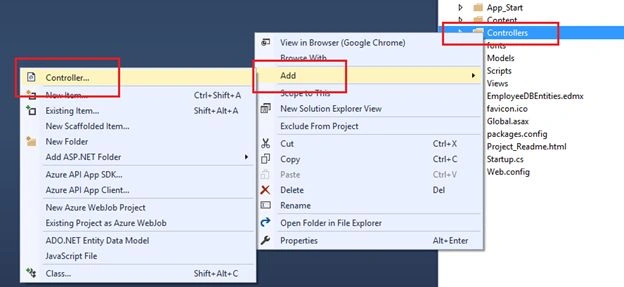
Image 24.
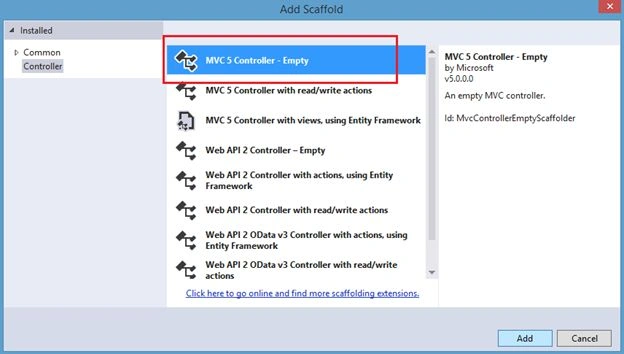
Image 25.
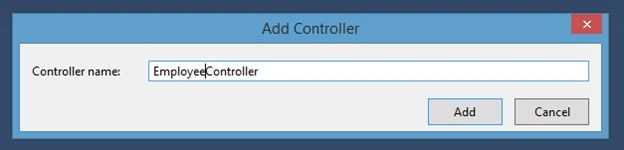
Image 26.
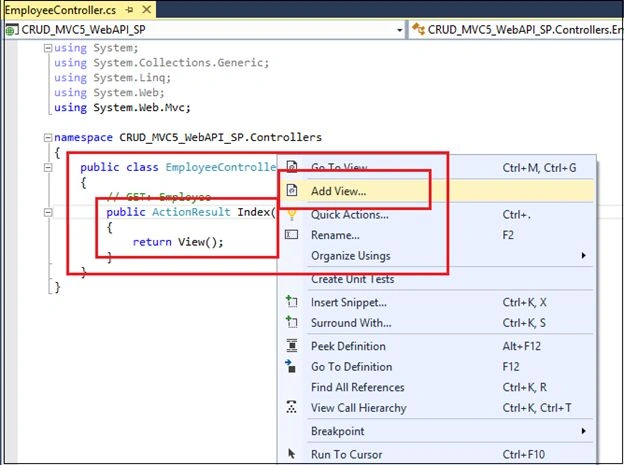
Image 27.
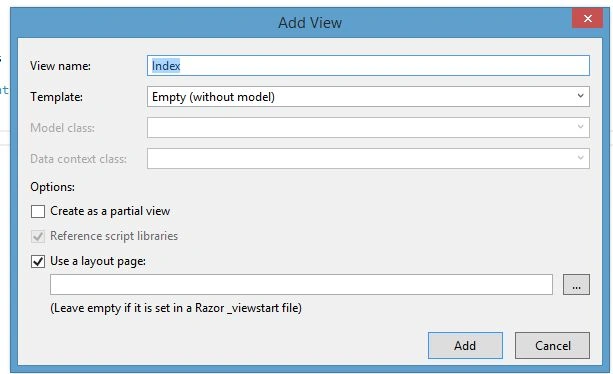
Image 28.
Here's the code in Index.cshtml:
- <html data-ng-app="RESTClientModule">
- @{
- ViewBag.Title = "Manage Employee Information Uisng MVC 5 , WebAPI2, AngularJS with Stored Procedure";
- }
- <body data-ng-controller="AngularJs_ManageEmployeeInfoController">
- <table style='width: 99%; background-color:skyblue; text-align:center;'>
- <tr ng-show="searchEmployee">
- <td>
- <table style=" background-color:crimson; border: solid 4px green; padding: 5px;width: 99%; color:white;" cellpadding="2" cellspacing="2">
- <tr>
- <td>
- <b>Name</b>
- : <input type="text" name="txtEmpName" ng-model="empNameSearch" value="" />
- </td>
- <td>
- <b> Country </b> :
- <input type="text" name="txtCountry" ng-model="empCountrySearch" />
- </td>
- <td>
- <b> Manager Name </b> :
- <input type="text" name="txtManager" ng-model="ManagerNameSearch" />
- </td>
- <td>
- <input type="submit" value="Search Employee" ng-click="searchEmp()" />
- </td>
- <td align="right">
- <input type="button" value="Add New Employee" ng-click="AddEmployeeForm()" />
- </td>
- </tr>
- </table>
- </td>
- </tr>
- <tr ng-show="ManageEMP_Info">
- <td>
- <table style="border:solid 4px blue; background-color:orange; width:100%;">
- <tr>
- <td width="20"></td>
- <td valign="top">
- <form novalidate name="f1" ng-submit="saveDetails()">
- <table style="color:#0d3d2b; font-weight:bold; font-size:12pt; text-align:right;">
- <tr>
- <td>
- Employee ID :
- </td>
- <td>
- <input type="text" name="txtEmpId" ng-model="EmpIds" value="0" style="background-color:tan" readonly />
- </td>
- <td>
- Name :
- </td>
- <td>
- <input type="text" name="txtEmpName" ng-model="empName" placeholder=" Employee Name..." required />
- <br />
- <span class="error" ng-show="(f1.file.$dirty || IsFormSubmitted) && f1.txtEmpName.$error.required">Name required!</span>
- </td>
- </tr>
- <tr>
- <td>
- Email :
- </td>
- <td>
- <input type="text" name="txtEmail" ng-model="empEmail" placeholder=" Email..." required />
- <br />
- <span class="error" ng-show="(f1.file.$dirty || IsFormSubmitted) && f1.txtEmail.$error.required">Email required!</span>
- </td>
- <td>
- Country :
- </td>
- <td>
- <input type="text" name="txtCountry" ng-model="empCountry" placeholder=" Country ..." required />
- <br />
- <span class="error" ng-show="(f1.file.$dirty || IsFormSubmitted) && f1.txtCountry.$error.required">Country required!</span>
- </td>
- </tr>
- <tr>
- <td>
- Manager Name:
- </td>
- <td>
- <input type="text" name="txtManager" ng-model="empManager" placeholder=" Manager ..." required />
- <br />
- <span class="error" ng-show="(f1.file.$dirty || IsFormSubmitted) && f1.txtManager.$error.required">Manager Name required!</span>
- </td>
- <td colspan="2">
- <input type="submit" value="Save Employee" style="background-color:#336699;color:#FFFFFF" required />
- </td>
- </tr>
- </table>
- </form>
- </td>
- </tr>
- </table>
- </td>
- </tr>
- <tr ng-show="ListEmployee">
- <td>
- <table style="width:100%;">
- <tr style="background-color:darkgreen; color:white; font-weight:bold;">
- <td width="120px" align="center">Name</td>
- <td width="120" align="center">Email</td>
- <td width="80" align="center">Country</td>
- <td width="200" align="center">Manager Name</td>
- <td width="40" align="center">Edit</td>
- <td width="40" align="center">Delete</td>
- </tr>
- <tbody data-ng-repeat="emp in Employees">
- <tr style="background-color:whitesmoke; font-family:Cambria, Cochin, Georgia, Times, Times New Roman, serif; font-size:11pt; color:midnightblue; text-align:left; padding-left:10px;">
- <td style="width:120px;">
- {{emp.Name}}
- </td>
- <td>
- {{emp.Email}}
- </td>
- <td>
- {{emp.Country}}
- </td>
- <td>
- {{emp.ManagerName}}
- </td>
- <td align="center">
- <span style="color:#9F000F;">
- <input type="submit" value="Edit" ng-click="editEmployeeInfo(emp.ID,emp.Name,emp.Email,emp.Country,emp.ManagerName)" />
- </span>
- </td>
- <td align="center">
- <span style="color:#9F000F;">
- <input type="submit" value="Delete" ng-click="Employee_Delete(emp.ID,emp.Name)" />
- </span>
- </td>
- </tr>
- </tbody>
- </table>
- </td>
- </tr>
- </table>
- </body>
- </html>
- <script src="~/Scripts/angular-animate.js"></script>
- <script src="~/Scripts/angular.js"></script>
- <script src="~/Scripts/angular.min.js"></script>
- <script src="~/Scripts/angular-animate.min.js"></script>
- <script src="~/Scripts/MyScripts/controller.js"></script>
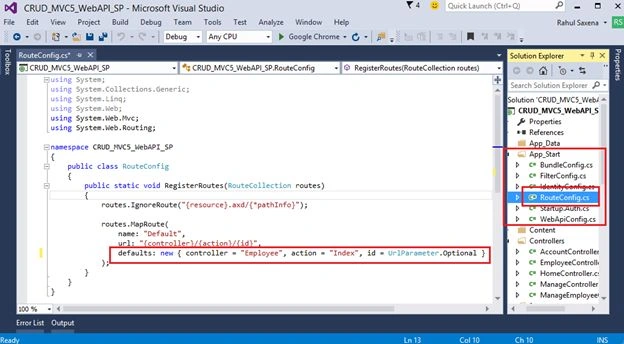
Image 29.
Now run your application:
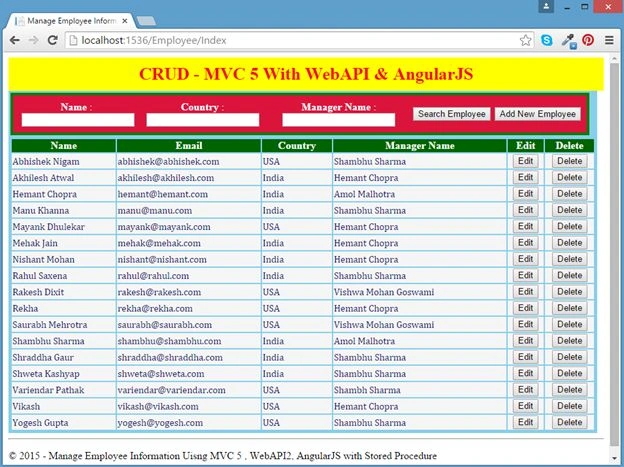
Image 30.
Now provide some search criteria as in the following:
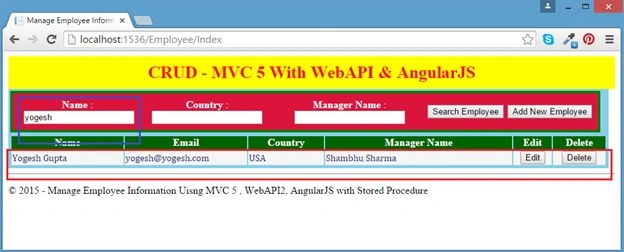
Image 31.
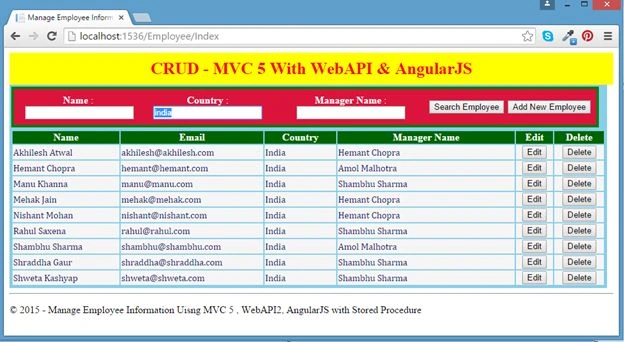
Image 32.
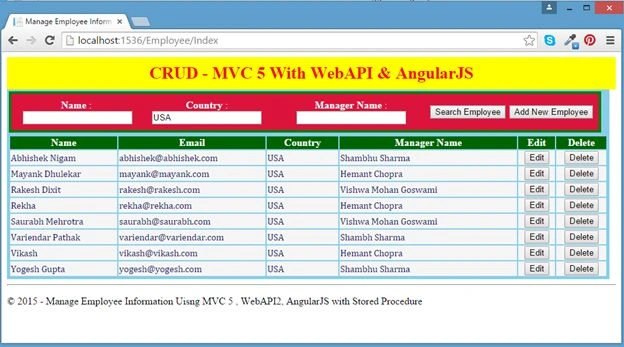
Image 33.
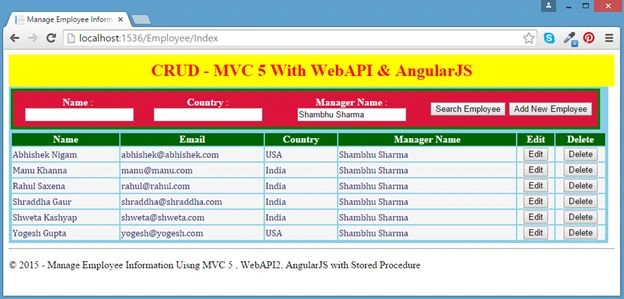
Image 34.
Now click on Add New Employee.
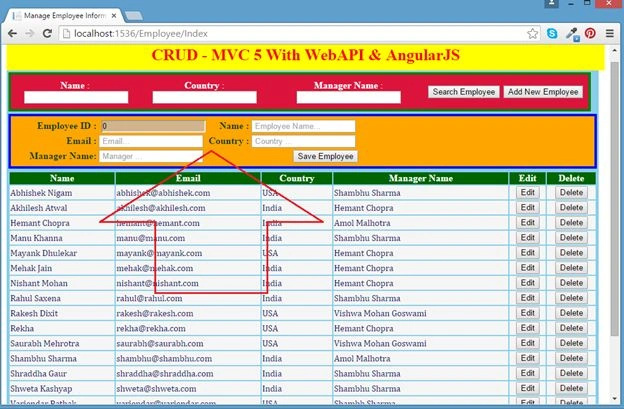
Image 35.
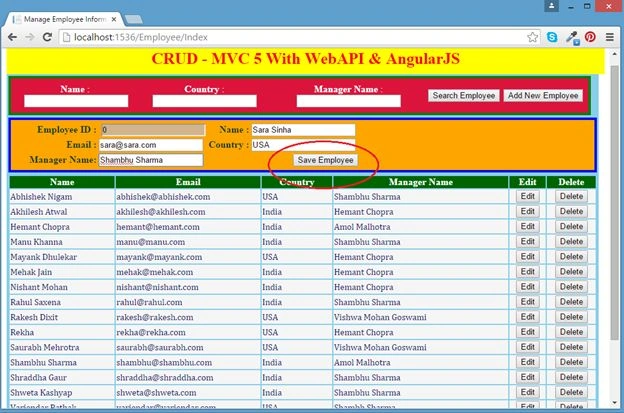
Image 36.
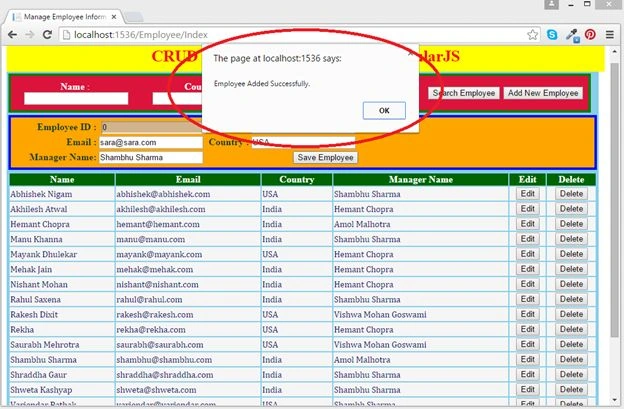
Image 37.
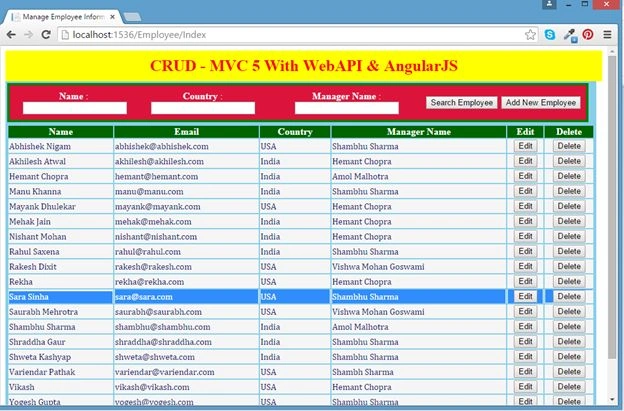
Image 38.
Now edit a record:
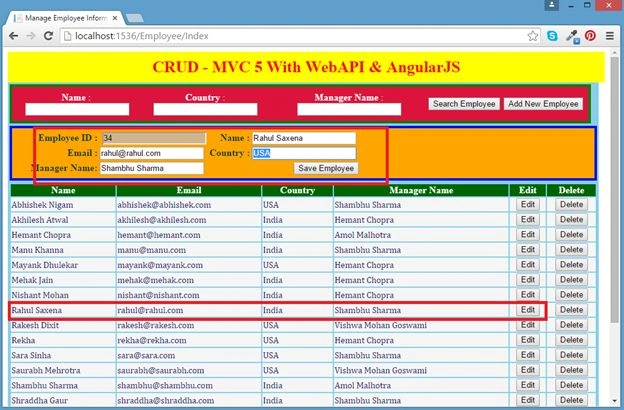
Image 39.
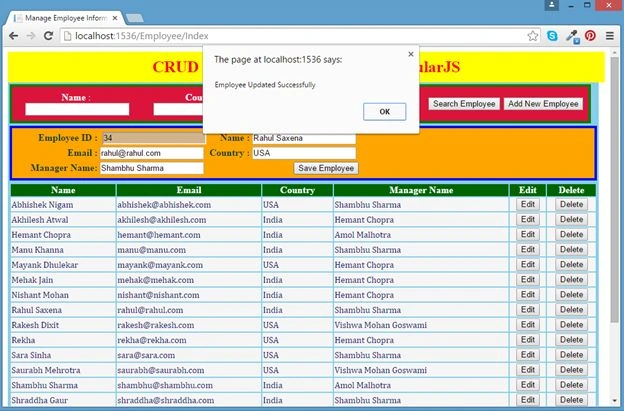
Image 40.
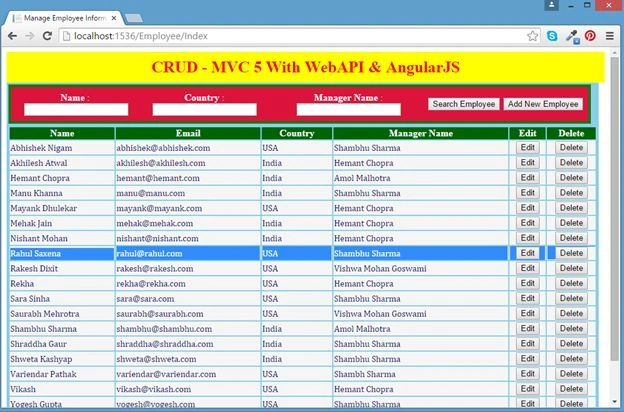
Image 41.
Now delete a record:
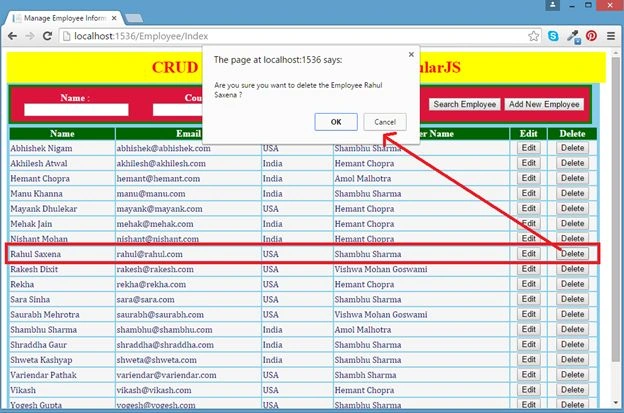
Image 42.


Monir MiaPosted Oct 30, 2017, 11:24 AM EDT
Hi Do you have the same code with Angular 2 or Angular 4 ?
bhavinPosted Apr 20, 2017, 9:08 PM EDT
Very Nice Article. Now I am trying with new angluar js version 1.6.4. Please let me know what changes to be done in controller.js for working with new angurlar js version.
Rahul Kumar SaxenaTOP 100Posted Sep 1, 2016, 2:22 AM EDT
Thanks Delpin Susai Raj
Delpin Susai RajTOP 100Posted Aug 28, 2016, 2:51 AM EDT
Nice
Rahul Kumar SaxenaTOP 100Posted May 12, 2016, 10:54 PM EDT
Thanks Rupali
Rupali ShindePosted Apr 18, 2016, 3:21 AM EDT
really useful article sir :) thanks for sharing
Rahul Kumar SaxenaTOP 100Posted Nov 19, 2015, 9:17 PM EST
Thanks Prahalad..
Rahul Kumar SaxenaTOP 100Posted Nov 19, 2015, 9:17 PM EST
Welcome Ramesh S
PrahaladPosted Nov 19, 2015, 7:06 AM EST
Worth reading!!!
Ramesh SPosted Nov 12, 2015, 1:02 AM EST
Thank u for code
Rahul Kumar SaxenaTOP 100Posted Sep 1, 2015, 9:24 PM EDT
Thanks Amit Prabhu
Rahul Kumar SaxenaTOP 100Posted Sep 1, 2015, 9:24 PM EDT
Thanks Kiranteja Jallepalli
Rahul Kumar SaxenaTOP 100Posted Sep 1, 2015, 9:24 PM EDT
Thanks Shridhar Sharma
Rahul Kumar SaxenaTOP 100Posted Sep 1, 2015, 9:24 PM EDT
Thanks Ravi Makhija
Amit PrabhuPosted Aug 31, 2015, 7:19 PM EDT
Nice
Kiranteja JallepalliPosted Aug 27, 2015, 5:15 AM EDT
very nice Rahul
Shridhar SharmaPosted Aug 19, 2015, 6:47 AM EDT
awesome !
Ravi MakhijaPosted Aug 19, 2015, 5:41 AM EDT
Nice article thanks for sharing..Rahul. :)
Rahul Kumar SaxenaTOP 100Posted Aug 4, 2015, 5:52 AM EDT
thank u Nihal Ahmed
Nihal AhmedPosted Aug 4, 2015, 3:30 AM EDT
Nice one sir. good explain.
Rahul Kumar SaxenaTOP 100Posted Aug 3, 2015, 10:43 PM EDT
Thanks. Debasis Saha
Rahul Kumar SaxenaTOP 100Posted Aug 3, 2015, 10:43 PM EDT
Thanks. Nilesh Jadav
Rahul Kumar SaxenaTOP 100Posted Aug 3, 2015, 10:43 PM EDT
Thanks Chervine Bhiwoo
Debasis SahaTOP 100Posted Aug 3, 2015, 8:54 PM EDT
Good One...
Nilesh JadavPosted Aug 3, 2015, 8:14 PM EDT
Ohh that's really nice article thank you for sharing
Chervine BhiwooPosted Aug 3, 2015, 7:25 PM EDT
Great share!
Rahul Kumar SaxenaTOP 100Posted Aug 3, 2015, 7:23 PM EDT
Thank u Narasimha Reddy Chennupalli
Narasimha Reddy ChennupalliPosted Aug 3, 2015, 7:19 PM EDT
Nice article Sir
Rahul Kumar SaxenaTOP 100Posted Aug 3, 2015, 11:12 AM EDT
Thanks sreenivasa k
Rahul Kumar SaxenaTOP 100Posted Aug 3, 2015, 11:12 AM EDT
Thanks Santhakumar Munuswamy
sreenivasa kPosted Aug 3, 2015, 10:37 AM EDT
really wonderful example
Santhakumar MunuswamyPosted Aug 3, 2015, 10:36 AM EDT
Good Show. Thanks for sharing
Rahul Kumar SaxenaTOP 100Posted Aug 3, 2015, 7:27 AM EDT
Thanks Shridhar Sharma
Rahul Kumar SaxenaTOP 100Posted Aug 3, 2015, 7:27 AM EDT
Thank u Rakesh Chavda
Shridhar SharmaPosted Aug 3, 2015, 7:04 AM EDT
very nice article sir.
RakeshPosted Aug 3, 2015, 7:04 AM EDT
Really Well Explain Sir
Rahul Kumar SaxenaTOP 100Posted Aug 3, 2015, 5:15 AM EDT
Thanks Ankit Bansal
Rahul Kumar SaxenaTOP 100Posted Aug 3, 2015, 5:15 AM EDT
Thanks Neeraj Kumar
Ankit BansalPosted Aug 3, 2015, 4:32 AM EDT
well explained...good...Rahul...Thanks for sharing..
Neeraj KumarPosted Aug 3, 2015, 3:18 AM EDT
Nice Article
Rahul Kumar SaxenaTOP 100Posted Aug 3, 2015, 2:33 AM EDT
thanks Vignesh Mani
Vignesh ManiTOP 100Posted Aug 3, 2015, 2:32 AM EDT
Nice One
Rahul Kumar SaxenaTOP 100Posted Aug 3, 2015, 2:32 AM EDT
Thanks Rajeesh Menoth
Rahul Kumar SaxenaTOP 100Posted Aug 3, 2015, 2:32 AM EDT
Thanks Vu Hong Trieu
Rahul Kumar SaxenaTOP 100Posted Aug 3, 2015, 2:31 AM EDT
Thanks Gopi Chand
Rajeesh MenothPosted Aug 3, 2015, 2:27 AM EDT
Good Explanation
Vu Hong TrieuPosted Aug 3, 2015, 2:24 AM EDT
Nice tut.
Gopi ChandPosted Aug 3, 2015, 2:14 AM EDT
Excellent work
Rahul Kumar SaxenaTOP 100Posted Aug 3, 2015, 2:05 AM EDT
thank u Sibeesh Venu
Rahul Kumar SaxenaTOP 100Posted Aug 3, 2015, 2:05 AM EDT
thank u Keyur Patel
Sibeesh VenuTOP 100Posted Aug 3, 2015, 2:00 AM EDT
Nice share buddy.
Keyur PatelPosted Aug 3, 2015, 1:51 AM EDT
Very detailed explanation. Good effort.