
Introduction
This is a simple CRUD operation using Ajax or without loading the page and binding the data in HTML Table using Ajax.
Description
To implement this first we need to create a table in our database. The table structure I have used is like the following:
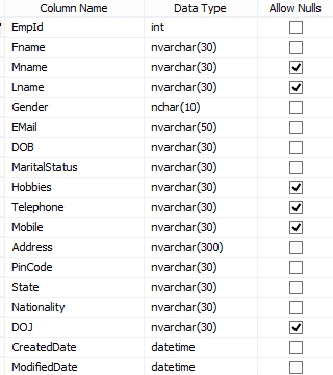
The SQL query for creating the table is as follows:
CREATE TABLE [dbo].[TblUser](
    [EmpId] [int] IDENTITY(1,1) NOT NULL,
    [Fname] [nvarchar](30) NOT NULL,
    [Mname] [nvarchar](30) NULL,
    [Lname] [nvarchar](30) NULL,
    [Gender] [nchar](10) NOT NULL,
    [EMail] [nvarchar](50) NOT NULL,
    [DOB] [nvarchar](30) NOT NULL,
    [MaritalStatus] [nvarchar](30) NOT NULL,
    [Hobbies] [nvarchar](30) NULL,
    [Telephone] [nvarchar](30) NULL,
    [Mobile] [nvarchar](30) NULL,
    [Address] [nvarchar](300) NOT NULL,
    [PinCode] [nvarchar](30) NOT NULL,
    [State] [nvarchar](30) NOT NULL,
    [Nationality] [nvarchar](30) NOT NULL,
    [DOJ] [nvarchar](30) NULL,
    [CreatedDate] [datetime] NOT NULL,
    [ModifiedDate] [datetime] NOT NULL,
 CONSTRAINT [PK_TblUser] PRIMARY KEY CLUSTERED
(
    [EmpId] ASC
)WITH (PAD_INDEX  = OFF, STATISTICS_NORECOMPUTE  = OFF, IGNORE_DUP_KEY = OFF, ALLOW_ROW_LOCKS  = ON, ALLOW_PAGE_LOCKS  = ON) ON [PRIMARY]
) ON [PRIMARY]
Design
Here I have used HTML controls instead of ASP.NET Server controls and also used Bootstrap Template for better view.
The main reason I prefer HTML controls instead of ASP.NET server controls is that they are lightweight and validation can be managed by client side. But still there are a lot of advantageS of server controls (eg. Maintaining view state, events and many more.).
<div class="col-lg-8">
    <div class="panel panel-primary">
        <div class="panel-heading">
            <h3 class="panel-title"><i class="fa fa-bar-chart-o"></i>Employee Details </h3>
        </div>
        <div class="panel-body">
            <div class="form-group col-lg-4">
                <label>First Name</label>
                <input type="text" name="FirstName" id="FirstName" class="form-control" placeholder="First Name" required="" />
            </div>
            <div class="form-group col-lg-4">
                <label>Middle Name</label>
                <input type="text" name="MiddleName" id="MiddleName" class="form-control" placeholder="Kumar" required="" />
            </div>
            <div class="form-group col-lg-4 ">
                <label>Surname</label>
                <input type="text" name="Surname" id="Surname" class="form-control" placeholder="Gupta" required="" />
            </div>
            <div class="clearfix"></div>
            <div class="form-group col-lg-6">
                <label>Email ID</label>
                <input type="email" name="EmailId" id="EmailId" class="form-control" placeholder="[email protected]" required="" />
            </div>
            <div class="form-group col-lg-6">
                <label>Date of Birth </label>
                <input type="date" name="Dob" id="Dob" min="1920-01-02" class="form-control datepicker" required="" />
            </div>
            <div class="form-group col-lg-6">
                <label>MaritalStatus</label>
                <select name="MaritalStatus" id="MaritalStatus" class="form-control" required="">
                    <option value="" disabled="disabled">-- Select -- </option>
                    <option value="Single">Single</option>
                    <option value="Married">Married</option>
                </select>
            </div>
            <div class="form-group col-lg-6">
                <label>Hobbies</label>
                <input type="text" name="Hobbies" id="Hobbies" class="form-control" placeholder="Football, Cricket etc." />
            </div>

            <div class="form-group col-lg-6">
                <label>Home Telephone</label>
                <input type="text" name="TelephoneNo" id="TelephoneNo" class="form-control" placeholder="1234567890" />
            </div>

            <div class="form-group col-lg-6">
                <label>Mobile</label>
                <input type="tel" name="MobileNo" id="MobileNo" class="form-control" required="" placeholder="0987654321" />
            </div>
            <div class="form-group col-lg-12">
                <label>Residential Address</label>
                <textarea rows="2" name="ResidentialAddress" id="ResidentialAddress" class="form-control" required="">
                    <div class="form-group col-lg-6 ">
                        <label>Pin Code</label>
                        <input name="PinCode" id="PinCode" class="form-control" placeholder="999999" type="text">
                    </div>

                    <div class="form-group col-lg-6">
                        <label>State</label>
                        <select name="State" id="State" class="form-control" required="">
                            <option value="" disabled="disabled">-- Select -- </option>
                            <option value="Maharashtra">Maharastra</option>
                            <option value="Assam">Assam</option>
                            <option value="UP">UP</option>
                            <option value="Gujarat">Gujarat</option>
                            <option value="AP">Andhra Pradesh</option>
                        </select>
                    </div>
                    <div class="form-group col-lg-6">
                        <label>Nationality</label>
                        <input name="title" id="Nationality" class="form-control" placeholder="Indian" type="text">
                    </div>
                    <div class="form-group col-lg-6">
                        <label>Date of Joining</label>
                        <input name="Doj" id="Doj" class="form-control datepicker" required="" type="date">
                    </div>
                    <div class="form-group col-lg-8">
                        <div style="float: right">
                            <input value="Cancel" id="BtnCancel" class="btn btn-primary" type="button">
                            <input class="btn btn-primary" name="submitButton" id="btnSave" value="Save" type="button">
                        </div>
                    </div>
            </div>
        </div>
    </div>
</div>
And the form will somehow look like the following:
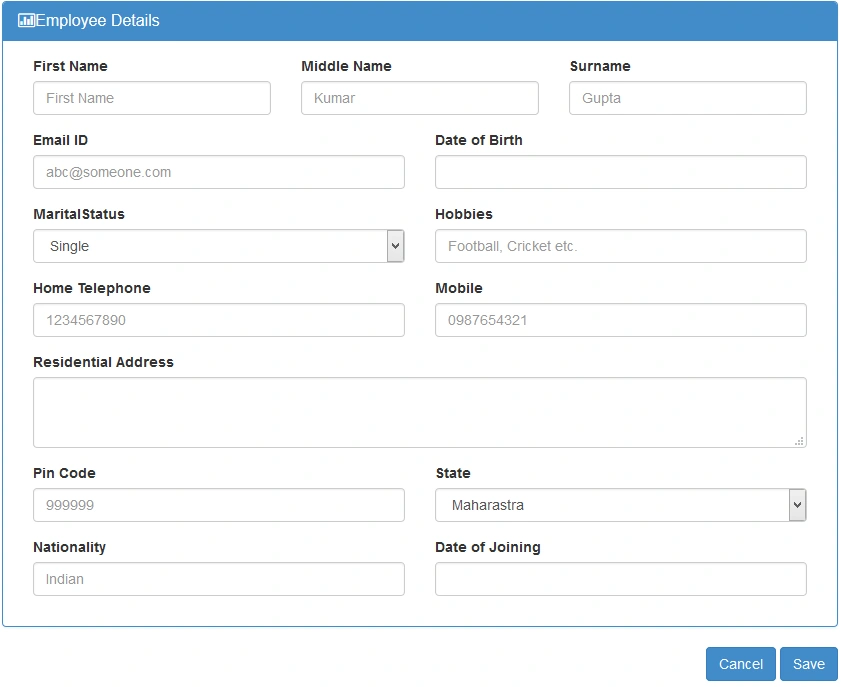
Now we need to do Ajax insert for all the fields, that's why I have taken class for all the fields and my class is like this:
Employee Class
public class Employee
{
   public int EmpId;
   public string FName;
   public string LName;
   public string MName;
   public string Email;
   public DateTime Dob;
   public string MaritalStatus;
   public string Hobbies;
   public string HomeMobile;
   public string OfficeMobile;
   public string Address;
   public string Pincode;
   public string State;
   public string Nationality;
   public DateTime Doj;
   public DateTime CreatedDateTime;
   public DateTime ModifiedDateTime;
}
Save Method to Insert Data in the Database
As we need to call the method through Ajax, so it has to be WebMethod and static:
[WebMethod]
public static void SaveUser(Employee objEmployee) //Insert data in database
{
    using (var con = new SqlConnection(Constr))
    {
        using (var cmd = new SqlCommand("INSERT INTO TblUser VALUES(@Fname, @Mname,@Lname,@Email,@Dob,@MStatus,@Hobbies,"+
                   "@HMobile,@OMobile,@Address,@Pin,@State,@Nationality,@Doj,@CreatedDate,@ModifiedDate)"))
        {
            cmd.CommandType = CommandType.Text;
            cmd.Parameters.AddWithValue("@Fname", objEmployee.FName);
            cmd.Parameters.AddWithValue("@Mname", objEmployee.MName);
            cmd.Parameters.AddWithValue("@Lname", objEmployee.LName);
            cmd.Parameters.AddWithValue("@Email", objEmployee.Email);
            cmd.Parameters.AddWithValue("@Dob", objEmployee.Dob);
            cmd.Parameters.AddWithValue("@MStatus", objEmployee.MaritalStatus);
            cmd.Parameters.AddWithValue("@Hobbies", objEmployee.Hobbies);
            cmd.Parameters.AddWithValue("@OMobile", objEmployee.OfficeMobile);
            cmd.Parameters.AddWithValue("@HMobile", objEmployee.HomeMobile);
            cmd.Parameters.AddWithValue("@Address", objEmployee.Address);
            cmd.Parameters.AddWithValue("@Pin", objEmployee.Pincode);
            cmd.Parameters.AddWithValue("@State", objEmployee.State);
            cmd.Parameters.AddWithValue("@Nationality", objEmployee.Nationality);
            cmd.Parameters.AddWithValue("@Doj", objEmployee.Doj);
            cmd.Parameters.AddWithValue("@CreatedDate",DateTime.Now);
            cmd.Parameters.AddWithValue("@ModifiedDate", DateTime.Now);
            cmd.Connection = con;
            con.Open();
            cmd.ExecuteNonQuery();
            con.Close();
        }
    }
}
Now we need to call the method SaveUser() through Ajax to save data in the database.
<script type="text/javascript">
    $(function() {
        $("#btnSave").click(function() {
            var user = {};
            user.FName = $("#FirstName").val(); // FName as per name of Employee Class
            user.LName = $("#Surname").val();
            user.MName = $("#MiddleName").val();
            user.Gender = $("#Male").val();
            user.Email = $("#EmailId").val();
            user.Dob = $("#Dob").val();
            user.MaritalStatus = $("#MaritalStatus").val();
            user.Hobbies = $("#Hobbies").val();
            user.HomeMobile = $("#TelephoneNo").val();
            user.OfficeMobile = $("#MobileNo").val();
            user.Address = $("#ResidentialAddress").val();
            user.Pincode = $("#PinCode").val();
            user.State = $("#State").val();
            user.Nationality = $("#Nationality").val();
            user.Doj = $("#Doj").val();
            user.CreatedDateTime = new Date();
            user.ModifiedDateTime = new Date();
            $.ajax({
                type: "POST",
                url: "Default.aspx/SaveUser", // Default.aspx is the page and SaveUser is the WebMethod to save data in database
                data: '{objEmployee: ' + JSON.stringify(user) + '}', //objEmployee is the object of Employee Class defined in .cs
                dataType: "json",
                contentType: "application/json; charset=utf-8",
                success: function() {
                    alert("User has been added successfully.");
                    getDetails(); //This method is to bind the added data into my HTML Table through Ajax call instead of page load
                    // window.location.reload(); we can also use this to load window to show updated data
                },
                error: function() {
                    alert("Error while inserting data");
                }
            });
            return false;
        });
    });
</script>
After this point we have our inserted data in the database.
Display Data in Table Structure(like Grid View):
<table id="dataTables-example" class="table table-striped table-bordered table-hover dataTable no-footer" role="grid" aria-describedby="dataTables-example_info">
    <thead>
        <tr role="row">
            <th class="sorting_asc" tabindex="0" aria-controls="dataTables-example" rowspan="1" colspan="1" style="width: 175px;" aria-sort="ascending" aria-label="Rendering engine: activate to sort column descending">Name</th>
            <th class="sorting" tabindex="0" aria-controls="dataTables-example" rowspan="1" colspan="1" style="width: 203px;" aria-label="Browser: activate to sort column ascending">Email Id</th>
            <th class="sorting" tabindex="0" aria-controls="dataTables-example" rowspan="1" colspan="1" style="width: 184px;" aria-label="Platform(s): activate to sort column ascending">Mobile(H)</th>
            <th class="sorting" tabindex="0" aria-controls="dataTables-example" rowspan="1" colspan="1" style="width: 150px;" aria-label="Engine version: activate to sort column ascending">Mobile(O)</th>
            <th class="sorting" tabindex="0" aria-controls="dataTables-example" rowspan="1" colspan="1" style="width: 108px;" aria-label="CSS grade: activate to sort column ascending">Joining Date</th>
            <th class="sorting" tabindex="0" aria-controls="dataTables-example" rowspan="1" colspan="1" style="width: 108px;" aria-label="CSS grade: activate to sort column ascending">Birth Date</th>
            <th class="sorting" tabindex="0" aria-controls="dataTables-example" rowspan="1" colspan="2" style="width: 108px;" aria-label="CSS grade: activate to sort column ascending">Action</th>
        </tr>
    </thead>
    <tbody>
        <% for (var data = 0; data < TableData.Rows.Count; data++)
                                                       { %>
            <tr class="gradeA odd" role="row">
                <td class="sorting_1">
                    <%=TableData.Rows[data]["FName"]%>
                </td>
                <td>
                    <%=TableData.Rows[data]["EMail"]%>
                </td>
                <td>
                    <%=TableData.Rows[data]["Telephone"]%>
                </td>
                <td>
                    <%=TableData.Rows[data]["Mobile"]%>
                </td>
                <td>
                    <%=TableData.Rows[data]["DOJ"]%>
                </td>
                <td>
                    <%=TableData.Rows[data]["DOB"]%>
                </td>
                <td>
                    <input type="button" class="btn btn-primary editButton" data-id="<%=TableData.Rows[data][" EmpId "] %>" data-toggle="modal" data-target="#myModal" name="submitButton" id="btnEdit" value="Edit" />
                </td>
                <td>
                    <input type="button" class="btn btn-primary" name="submitButton" id="btnDelete" value="Delete" />
                </td>
            </tr>
            <% } %>
    </tbody>
</table>
Ajax Call to Show Data
function getDetails() {
    $.ajax({
        type: "POST",
        contentType: "application/json; charset=utf-8",
        url: "Default.aspx/GetData", //Default.aspx is page and GetData is the WebMethod
        data: {},
        dataType: "json",
        success: function(data) {
            $('#dataTables-example tbody').remove(); // Every time I am removing the body of Table and applying loop to display data
            //console.log(data.d);
            for (var i = 0; i < data.d.length; i++) {
                $("#dataTables-example").append(
                    "<tr><td>" + data.d[i].FName + "</td><td>" + data.d[i].Email + "</td>" +
                    "<td>" + data.d[i].HomeMobile + "</td>" + "<td>" + data.d[i].OfficeMobile + "</td>" +
                    "<td>" + data.d[i].Doj + "</td>" + "<td>" + data.d[i].Dob + "</td>" +
                    "<td>" + "<input type='button' class='btn btn-primary editButton' data-id='" + data.d[i].EmpId + "' data-toggle='modal' data-target='#myModal' name='submitButton' id='btnEdit' value='Edit' />" + "</td>" +
                    "<td><input type='button' class='btn btn-primary' name='submitButton' id='btnDelete' value='Delete'/> </td></tr>");
            }
        },
        error: function() {
            alert("Error while Showing update data");
        }
    });
}
Note: We can use window.location.reload(); instead of getDetails(). But the getDetails() method will load the entire page to show the added data in the table.
WebMethod to Get Data to be binded to Table using Ajax call:
[WebMethod]
public static Employee[] GetData() //Show the details of the data after insert in HTML Table
{
    var details = new List<Employee>();
    using (var con = new SqlConnection(Constr))
    {
        const string query = "select * from TblUser order by EmpId desc";
        using (var cmd = new SqlCommand(query, con))
        {
            using (var sda = new SqlDataAdapter())
            {
                cmd.Connection = con;
                sda.SelectCommand = cmd;
                TableData.Clear();
                sda.Fill(TableData);
                details.AddRange(from DataRow dtrow in TableData.Rows
                    select new Employee
                    {
                        EmpId = Convert.ToInt32(dtrow["EmpId"]),
                        FName = dtrow["Fname"].ToString(),
                        Email = dtrow["EMail"].ToString(),
                        HomeMobile = dtrow["Telephone"].ToString(),
                        OfficeMobile = dtrow["Mobile"].ToString(),
                        Doj = dtrow["DOJ"].ToString(),
                        Dob = dtrow["DOB"].ToString()
                    });
            }
        }
    }
    return details.ToArray();
}
Method to Show data on Load:
protected void Page_Load(object sender, EventArgs e)
{
    if (!IsPostBack)
    {
        GetAllData();
    }
}
private void GetAllData() //Get all the data and bind it in HTLM Table
{
    using (var con = new SqlConnection(Constr))
    {
        const string query = "select * from TblUser order by EmpId desc";
        using (var cmd = new SqlCommand(query, con))
        {
            using (var sda = new SqlDataAdapter())
            {
                cmd.Connection = con;
                sda.SelectCommand = cmd;
                using (TableData)
                {
                    TableData.Clear();
                    sda.Fill(TableData);
                }
            }
        }
    }
}
After adding this the page will look like the following:

For PopUp Edit and Delete in HTML Table through Ajax Visit Crud Operations Ajax Part-2.
You will get complete attached CRUD Application in Part-2.
For Inserting multiple rows in the database from HTML table visit here.
Hope that helps, thanks for reading.


Soheb AhmadPosted Apr 4, 2024, 9:11 AM EDT
<% for (var data = 0; data < TableData.Rows.Count; data++) sir i dont understand this line can you explain it what is the meaning of TableData.Rows.Count. TableData is tablename,object what is this please explain it
Sunil RockPosted Oct 7, 2020, 7:36 AM EDT
When i click Serverside Code not fire
Saepul BahriPosted Oct 27, 2018, 3:25 PM EDT
Very nice code
Tanmay NehetePosted Aug 23, 2018, 2:40 AM EDT
Need code on edit and delete button
Juan FerreyraPosted Jan 19, 2018, 8:07 AM EST
Great article!!! Thx
Ade SulistiawanPosted Sep 8, 2017, 4:19 PM EDT
Where place variable TableData? And what the data type?
Vijay BadgujarPosted May 18, 2017, 4:34 AM EDT
Bro when you create table for employee there is filed DOB nvarchar(30) then in Employee Class how can you define DOB as Datetime by the way code is Nice take it as Complement bro
sathish reddyPosted Feb 18, 2017, 9:35 PM EST
Can you please provide link to download this project
Jeffrey RudeloffPosted Feb 1, 2017, 11:58 PM EST
Sabyasachi you are a rare thing in these forums, not only is your code what I was looking for but works on the first try after setting up the db and constr. Keep it up!
SubashPosted Aug 1, 2016, 1:40 AM EDT
Nice
Pops FalePosted Mar 29, 2016, 1:11 AM EDT
simple and effective, nice article
Karthik PuppalaPosted Jan 18, 2016, 2:35 AM EST
Nice Code, easy to understand
vinodh kumarPosted Jan 1, 2016, 8:18 PM EST
super code
vinodh kumarPosted Jan 1, 2016, 8:18 PM EST
Superb Coding
Abdul KhaliqPosted Dec 8, 2015, 1:00 AM EST
Exellent
Pratham DavePosted Sep 26, 2015, 12:46 AM EDT
Nice, pagination & search is not working can you please fixed it.
Ankur ChaturvediPosted Sep 21, 2015, 12:25 AM EDT
Thanks
Ankur ChaturvediPosted Sep 21, 2015, 12:25 AM EDT
When i am using these code than getting "Instance failure." Error can you help me to resolve these problem
Ankur ChaturvediPosted Sep 21, 2015, 12:24 AM EDT
using (TableData) { TableData.Clear(); sda.Fill(TableData); }
tarun sainPosted Sep 12, 2015, 12:02 AM EDT
nice article sir..
Pratham DavePosted Sep 9, 2015, 9:35 PM EDT
Thanks for sharing your knowledge.
Ankit BansalPosted Sep 9, 2015, 9:04 PM EDT
good one..thanks...
Santhakumar MunuswamyPosted Sep 7, 2015, 10:30 AM EDT
Thanks for nice share
RakeshPosted Sep 7, 2015, 8:48 AM EDT
Nice one
Pankaj Kumar ChoudharyTOP 100Posted Sep 7, 2015, 8:32 AM EDT
Nice Explain Sir...........
Mohammed IbrahimPosted Sep 7, 2015, 7:54 AM EDT
nice
Karthikeyan KPosted Sep 7, 2015, 7:05 AM EDT
Good one sir...Thanks for sharing
Shridhar SharmaPosted Sep 7, 2015, 6:56 AM EDT
nice article