
Introduction
Sometimes we need to work with JSON data in WCF REST services to make data available across different platforms. So let us learn in this article how to make CRUD operations in WCF REST service and communicate using JSON data. To Perform CRUD operations in WCF REST service we need to use the following HTTP methods:
- GET : Get the resource (Records) from particular source such as SQL database.
- POST : Used to insert the records into the particular source such as SQL, Oracle database.
- PUT : Used to modify the resource or records.
- DELETE : used Delete the specific resource or record from particular source.
To work with specific message format in WCF REST service, we need to set Web Message Format to JSON or XML in REST template. Now let's implement above methods to make CRUD operations in WCF REST Service Step by step.
Step 1: Create WCF Service.
- "Start" - "All Programs" - "Microsoft Visual Studio 2015".
- "File" - "New Project" - "C#" - WCF Service Application as in the following screenshot:
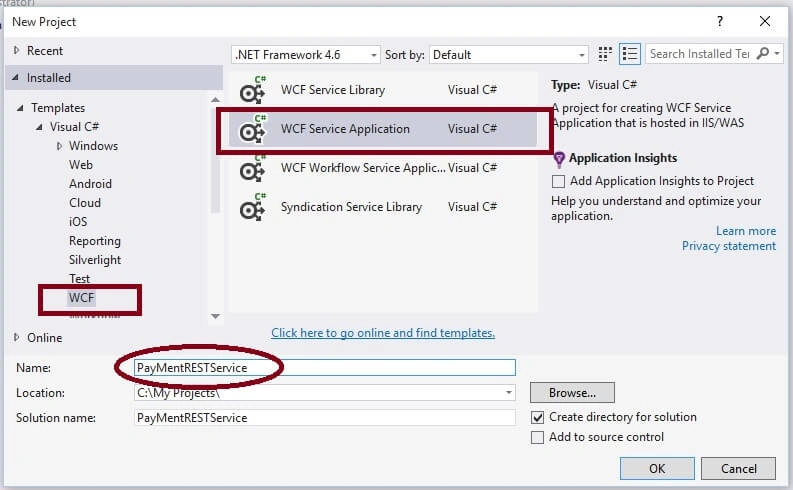
- Provide the project name such as "PayMentRESTService " or another as you wish and specify the location.
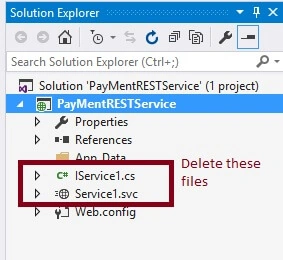
- Now delete the auto created interface and svc file which we will create new one so beginners can understand it.
- Now Add New WCF Service file and give name PayMentRESTService as:
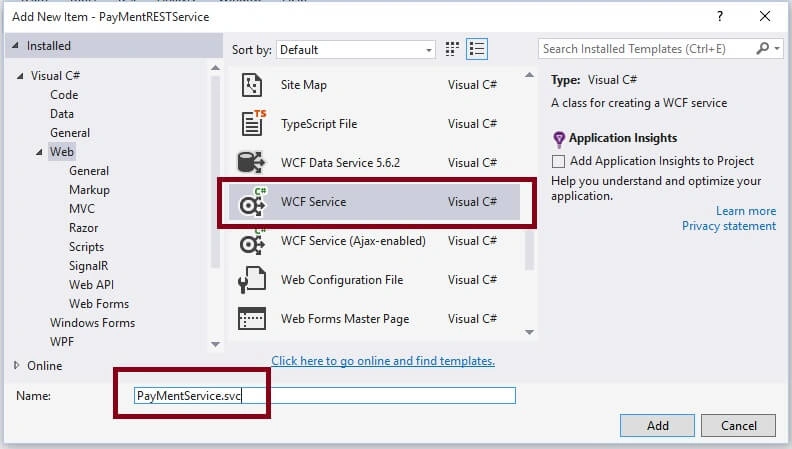
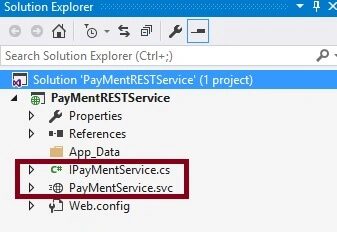
I hope you have followed the same steps and and learned how to add WCF Service. After adding Service file then the project solution explorer will look like the following:
Step 2: Configure REST Service Template.
Now open the IPaymentService.cs Interface file and write the following code for CRUD operation:
- using System.ServiceModel;
- using System.ServiceModel.Web;
- namespace PayMentRESTService
- {
- [ServiceContract]
- public interface IPayMentService
- {
- //To Insert or POST Records
- [OperationContract]
- [WebInvoke(Method = "POST",
- UriTemplate = "/AddPayee/{Name/{City}", BodyStyle = WebMessageBodyStyle.Wrapped, RequestFormat = WebMessageFormat.Json, ResponseFormat = WebMessageFormat.Json)]
- void AddPayee(string Name, string City);
- //To Get Records from database
- [OperationContract]
- [WebInvoke(Method = "GET",
- UriTemplate = "/PayBill/{PayId}",
- BodyStyle = WebMessageBodyStyle.Wrapped,RequestFormat = WebMessageFormat.Json,ResponseFormat = WebMessageFormat.Json)]
- string PayBill(string PayId);
- //To Update records
- [OperationContract]
- [WebInvoke(Method = "PUT",
- UriTemplate = "/UpdateBillPayment/{PayId}/{TransId}",
- BodyStyle = WebMessageBodyStyle.Wrapped, RequestFormat = WebMessageFormat.Json, ResponseFormat = WebMessageFormat.Json)]
- void UpdateBillPayment(string PayId,string TransId);
- //To delete records
- [OperationContract]
- [WebInvoke(Method = "DELETE",
- UriTemplate = "/RemovePayee/{Id}",
- BodyStyle = WebMessageBodyStyle.Wrapped, RequestFormat = WebMessageFormat.Json, ResponseFormat = WebMessageFormat.Json)]
- void RemovePayee(string Id);
- }
- }
- IPayMentService: REST Service interface name
- Method: HTTP methods types it can be GET,POST,PUT,DELETE and other
- UriTemplate: To Define url structure that how can be serice method accessed at client.
- BodyStyle: Allows to define message body style format such as Bare, Wrapped etc.
- RequestFormat: Defines in which message format does request come from client such xml or json.
- ResponseFormat: Defines what message format does service return to the client as a part of response such as xml or json.
Step 3: Implement IPaymentService.cs interface methods into PaymentService.svc.cs file as.
Now our REST Service Code is ready for CRUD operation with JSON Data. Let's complete other few steps.
- public class PayMentService : IPayMentService
- {
- public void AddPayee(string Name, string City)
- {
- //write database related insert logic here.
- }
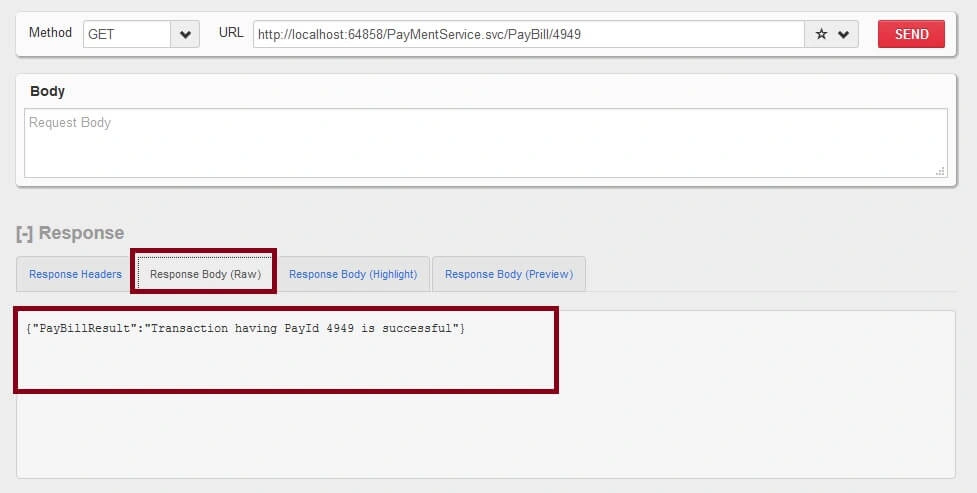
- public string PayBill(string PayId)
- {
- return "Transaction having PayId " + PayId + " is successful";
- //write database related data retrival logic here.
- }
- public void RemovePayee(string Id)
- {
- //write database related delete logic here.
- }
- public void UpdateBillPayment(string PayId, string TransId)
- {
- //write database related update logic here.
- }
- }
Step 4: Configure End Points and Service Behaviors in web.config file as:
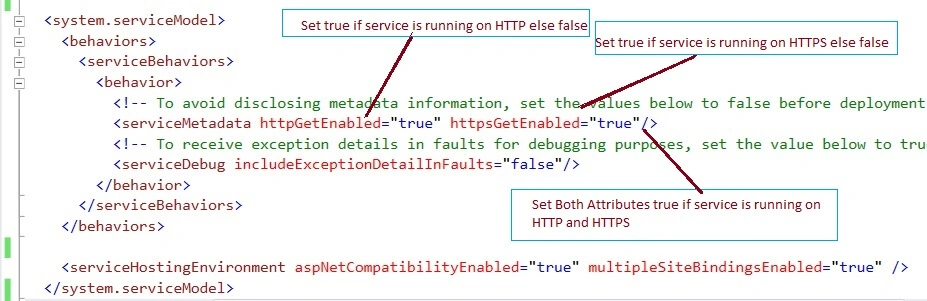
End Points and Service Behaviors configuration is very important in WCF Service. Many people saying that it is much complicated to configure but trust me its much easier and simple with powerful intellisense. Let's open web.config file and find system.serviceModel tag and here are the steps to follow:
Configure service behaviors as:
Configure End points as:
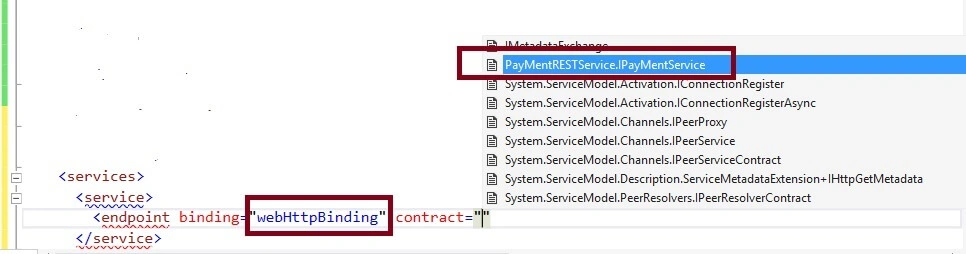
While configuring Endpoints Tag automatically show how to set and what contract, since it shows list of contract files (Interfaces) i.e. service contract.
I hope you got the basic idea about the End points configuration.
After configuring Endpoints and service behaviors the system.serviceModel tag section of web.config file will look like the following:
- <system.serviceModel>
- <behaviors>
- <serviceBehaviors >
- <behavior name="ServiceBehavior">
- <!-- To avoid disclosing metadata information, set the values below to false before deployment -->
- <serviceMetadata httpGetEnabled="true"/>
- <!-- To receive exception details in faults for debugging purposes, set the value below to true. Set to false before deployment to avoid disclosing exception information -->
- <serviceDebug includeExceptionDetailInFaults="false"/>
- </behavior>
- </serviceBehaviors>
- <endpointBehaviors>
- <behavior name="web">
- <webHttp/>
- </behavior>
- </endpointBehaviors>
- </behaviors>
- <services>
- <service name="PayMentRESTService.PayMentService" behaviorConfiguration="ServiceBehavior">
- <endpoint binding="webHttpBinding" contract="PayMentRESTService.IPayMentService" behaviorConfiguration="web">
- </endpoint>
- </service>
- </services>
- <serviceHostingEnvironment multipleSiteBindingsEnabled="true" />
- </system.serviceModel>
I hope you have done same configuration which i have done.
Step 5: Test REST Service.
Now our service is ready. Let's test it using REST client of browser extension as:
POST ( To insert records)
REST Service URL will be:
http://localhost:64858/PayMentService.svc/AddPayee/vithal Wadje/Latur
In the above url, the last two parameters are input parameters. Now test with REST client as:
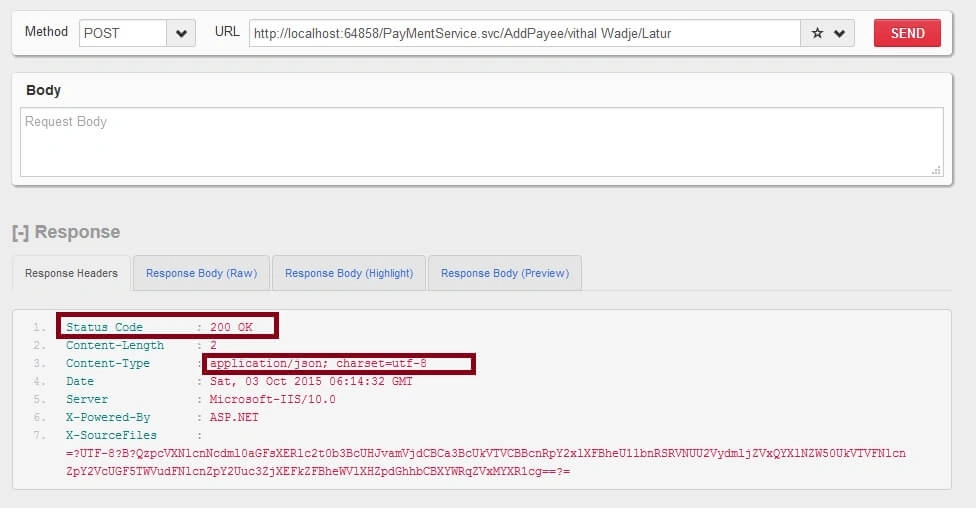
Using GET Method
Using PUT Method
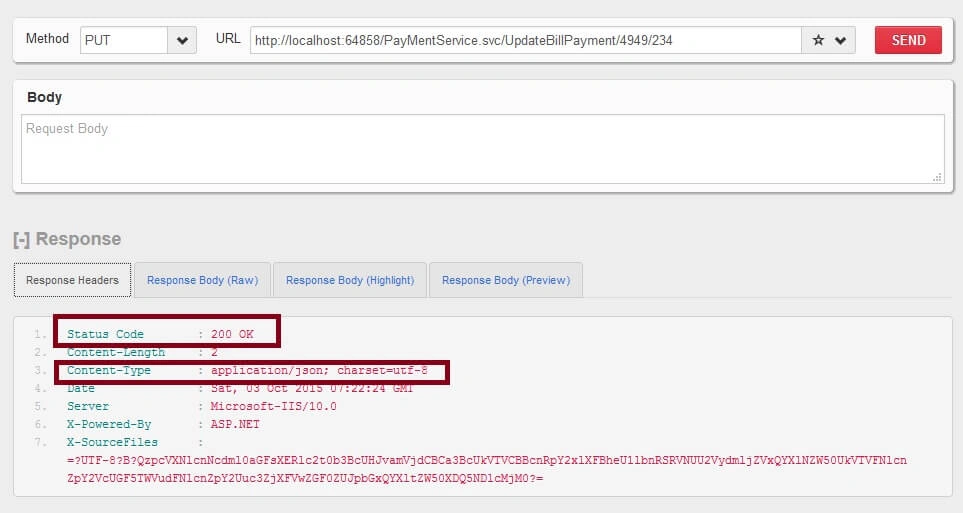
Using DELETE Method

Hope from preceding examples we have learned how to Implement CRUD operations in WCF REST Service.
Note:
- Download the Zip file of the sample application for a better understanding.
- Since this is a demo, it might not be using proper standards, so improve it depending on your skills.
- CRUD Stands for create, read, update and delete.
To learn the basics about the WCF Services please refer my previous articles
SummaryI hope this article is useful for all the readers. If you have any suggestion, then please contact me.


pramod gorityalaPosted Aug 24, 2021, 8:39 AM EDT
Am getting error like bellow The type 'PayMentRESTService.PayMentRESTService', provided as the Service attribute value in the ServiceHost directive, or provided in the configuration element system.serviceModel/serviceHostingEnvironment/serviceActivations could not be found.
pramod gorityalaPosted Aug 24, 2021, 8:39 AM EDT
Please solve my error
pramod gorityalaPosted Aug 24, 2021, 8:38 AM EDT
The type 'PayMentRESTService.PayMentRESTService', provided as the Service attribute value in the ServiceHost directive, or provided in the configuration element system.serviceModel/serviceHostingEnvironment/serviceActivations could not be found.
Jaime LeonPosted Nov 13, 2020, 10:11 AM EST
You has been save me, bro. A lot of Thanks.
RAJ VELLPosted May 27, 2019, 2:50 AM EDT
AddPayee/velu/velu, notworking, method not found
Sourav Kumar DasPosted Feb 15, 2019, 10:55 PM EST
Hi Vithal can you send me the full code of it with database using stored procedure as i am begineer in wcf service
Ashutosh SharmaPosted Jan 8, 2018, 2:37 AM EST
Typo in step 2: /AddPayee/{Name}/{City}
Umamaheswara Rao DasariPosted Jan 9, 2017, 8:20 PM EST
Hi....Good one. But images/screens are not getting.
Vithal WadjeTOP 100Posted Apr 25, 2016, 7:31 AM EDT
thanks
Ramakrishna BasagallaPosted Apr 25, 2016, 6:54 AM EDT
Nice One
Vithal WadjeTOP 100Posted Oct 5, 2015, 7:59 PM EDT
thanks
Santhakumar MunuswamyPosted Oct 5, 2015, 7:56 PM EDT
Good one
Vithal WadjeTOP 100Posted Oct 5, 2015, 4:14 AM EDT
Thanks Ankit Bansal sir
Vithal WadjeTOP 100Posted Oct 5, 2015, 4:13 AM EDT
Thanks Gowtham Rajamanickam sir
Vithal WadjeTOP 100Posted Oct 5, 2015, 4:12 AM EDT
Thanks Ajeet Mishra sir
Ankit BansalPosted Oct 5, 2015, 1:56 AM EDT
Nice..thanks for sharing with us..
Gowtham RajamanickamTOP 100Posted Oct 5, 2015, 12:59 AM EDT
useful....
Ajeet MishraPosted Oct 4, 2015, 11:07 PM EDT
nice
Vithal WadjeTOP 100Posted Oct 4, 2015, 8:36 PM EDT
thanks
Jaipal ReddyPosted Oct 4, 2015, 8:32 PM EDT
Nice article.
Vithal WadjeTOP 100Posted Oct 4, 2015, 7:30 PM EDT
Thanks Nilesh Jadav sir
Vithal WadjeTOP 100Posted Oct 4, 2015, 7:29 PM EDT
Thanks SAM ROCK sir
Vithal WadjeTOP 100Posted Oct 4, 2015, 7:29 PM EDT
Thanks N Vinodh sir
Vithal WadjeTOP 100Posted Oct 4, 2015, 7:28 PM EDT
Thanks Rakesh Chavda sir
Nilesh JadavPosted Oct 4, 2015, 4:51 PM EDT
Thank you for sharing sir !
SAM ROCKPosted Oct 4, 2015, 11:00 AM EDT
nice article
Vinodh NarayananPosted Oct 4, 2015, 8:53 AM EDT
Nice share
RakeshPosted Oct 4, 2015, 5:07 AM EDT
Good article share sir