Today, in this article let's play around with one of the good interesting features, stored procedures with EDM Framework.
Let's get this started now.
Create a New Database and Table in SQL SERVER 2008 .
Step 1: Database Name: Candidate.
Step 2: Table Name: Student.
The Design View of the Student Table looks like this:
Let's now work towards creating some SP's.
Step 3: The complete script of the Select Stored Procedure looks like this:
SQL
Use Candidate
Go
CreateProcedure Select_Student
AsBeginSelect StudentId, FirstName, LastName, Age from Student
End
Step 4: The complete script of the Insert Stored Procedure looks like this:
SQL
Use Candidate
Go
CreateProcedure insert_Student(@FirstName nvarchar(50), @LastName nvarchar(50), @Ageint)
AsBegininsert into Student(FirstName, LastName, Age)values (@FirstName, @LastName, @Age)
End
Step 5: The complete script of the Update Stored Procedure looks like this:
SQL
Use Candidate
Go
CreateProcedure update_Student(@Idint, @FirstName nvarchar(50), @LastName nvarchar(50), @Ageint)
AsBeginUpdate Student SET FirstName =@FirstName, LastName =@LastName, Age =@Agewhere StudentId =@IdEnd
Step 6: The complete script of the Delete Stored Procedure looks like this:
SQL
Use Candidate
Go
CreateProcedure delete_Student(@Idint)
AsBegindeletefrom Student where StudentId =@IdEnd
We are now done dealing with the SQL Server part.
Now let's get our Visual Studio started up.
The steps to add the EDM Framwork to our application is as below.
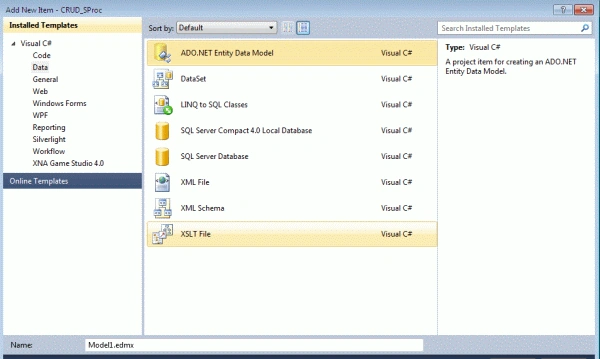
Step 7: Select the Entity Data Model Framework from the Data Tab.
Step 8: Click on Next and Select Generate from database.
Step 9: Select the Database and give a Specific Name for the Entity
Step 10: Click on Next and Select Respective Tables and SP's from List. Finally Click Finish.
Now, we haven't began the full bound code part. Let's also finish off the stored procedure mapping and function definition.
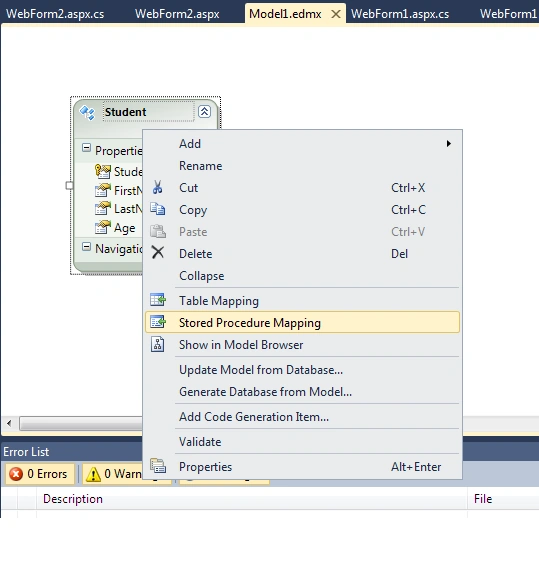
Step 11: Right-click on the Respective Table of the Model1.edmx designer and Select Stored Procedure Mapping.
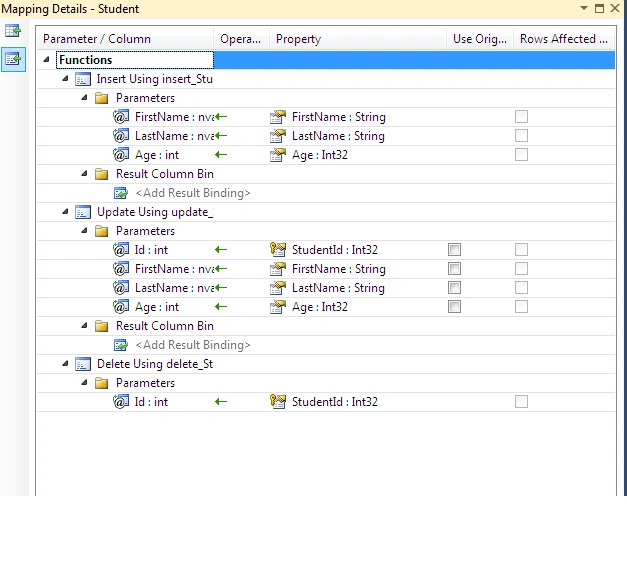
Step 12: Map the respective columns with the table definition.
Step 13: Let's import a function and create an insert function.
Step 14: Let's create a select function.
Step 15: Let's create an update function.
Step 16: Let's create a delete function.
Step 17: The complete code of the WebForm1.aspx looks like this:
Hi I unable to get the parameters in stored procedure mapping, I am using Mysql database can you help me. This is my routine in mysql
-- --------------------------------------------------------------------------------
-- Routine DDL
-- --------------------------------------------------------------------------------
DELIMITER $$
CREATE DEFINER=`root`@`%` PROCEDURE `uspInsertUsers1`(_Id varchar(50),
_Name varchar(50),_Address varchar(50))
BEGIN
insert into tblEntity(entityID,Name,Address)values(_Id,
_Name,_FirstName,_Address);
END








Sanjay KumarPosted Sep 16, 2013, 3:20 AM EDT
Thank you.
Santosh YadavPosted Mar 31, 2013, 7:20 AM EDT
great work.
Santosh YadavPosted Mar 31, 2013, 7:17 AM EDT
great work.
Santosh YadavPosted Mar 31, 2013, 6:18 AM EDT
great work thanks.
Dorababu MekaPosted Dec 7, 2012, 11:40 PM EST
Hi how we will get complex as per you did in order to select data
Dorababu MekaPosted Dec 7, 2012, 9:06 PM EST
Hi I unable to get the parameters in stored procedure mapping, I am using Mysql database can you help me. This is my routine in mysql -- -------------------------------------------------------------------------------- -- Routine DDL -- -------------------------------------------------------------------------------- DELIMITER $$ CREATE DEFINER=`root`@`%` PROCEDURE `uspInsertUsers1`(_Id varchar(50), _Name varchar(50),_Address varchar(50)) BEGIN insert into tblEntity(entityID,Name,Address)values(_Id, _Name,_FirstName,_Address); END
nallyaPosted Sep 5, 2012, 1:29 AM EDT
thanks
sandeep raju dantuluriPosted Mar 16, 2012, 1:52 AM EDT
good explanation..nice article
Manoj Singh PanwarPosted Feb 28, 2012, 12:23 AM EST
Its pleasure to find this article. Thanks for sharing.
sanjay guptaPosted Feb 27, 2012, 1:39 AM EST
Very Helpful
Adora KrausePosted Feb 26, 2012, 5:51 PM EST
Hi Vijay. You have presented your article in such a way that anyone can understand it easily.