
In this post we will discuss how we can apply jQuery. We all know that we cannot apply am important CSS property directly to an element. It does not work. But still there is a solution for that. Here I am going to share you that. I hope you will like this.
Background
Recently, I was going through a situation to apply a custom CSS to an element which already has some CSS styles and all. I wanted to overwrite those CSS in situation based, that is when some condition satisfies.
Using the code
Firstly, we will create a page and some div elements.
- <!DOCTYPE html>
- <html
- xmlns="http://www.w3.org/1999/xhtml">
- <head>
- <title>CSS Important In JQuery</title>
- <script src="jquery-2.0.2.min.js"></script>
- </head>
- <body>
- <div id="container">
- <div style="width: 25px;height: 28px;padding: 5px;background-color: green;margin: 3px;float: left;cursor: move;" ></div>
- <div style="width: 25px;height: 28px;padding: 5px;background-color: green;margin: 3px;float: left;cursor: move;" ></div>
- <div style="width: 25px;height: 28px;padding: 5px;background-color: green;margin: 3px;float: left;cursor: move;" ></div>
- </div>
- </body>
- </html>
You an see that I have loaded a jQuery reference and added some in-line CSS to the elements. As you all know, even if we give a custom css as in the following code snippet:
- <style>
- #container div {
- width:55px;
- }
- </style>
Now if you run your page and check your browser console you can get to know that.

Important CSS Property In JQuery And CSS
In this situation, we use !important tag in the css, so if you change your css styles as follows, you can see your new css is getting applied.
- <style>
- #container div {
- width:55px !important;
- }
- </style>
Now refresh your page and see the browser console.

Important CSS Property In JQuery And CSS
Now what if you need to change this CSS, when there is a jQuery action. For example, you need to change the css styles when user clicks on an element? Cool, we have a solution for that too. Now you will be thinking the solution is as follows.
- <script>
- $(function () {
- $('#click').click(function () {
- $("#container div").css('width', '75px;!important');
- });
- });
- </script>
- <a href="#" id="click">Click</a>
If you run that, you will know it didn’t work. No worries, I am going to share you a solution for this.
Now we will change our script as in the following code snippet:
- <script>
- $(function () {
- $('#click').click(function () {
- //$("#container div").css('width', '75px;!important');
- $("#container div").each(function () {
- this.style.setProperty('width', '75px', 'important');
- });
- });
- });
- </script>
And it is tie to run our page now.

Important CSS Property In JQuery And CSS
Just click on the href, and see the output and browser console.
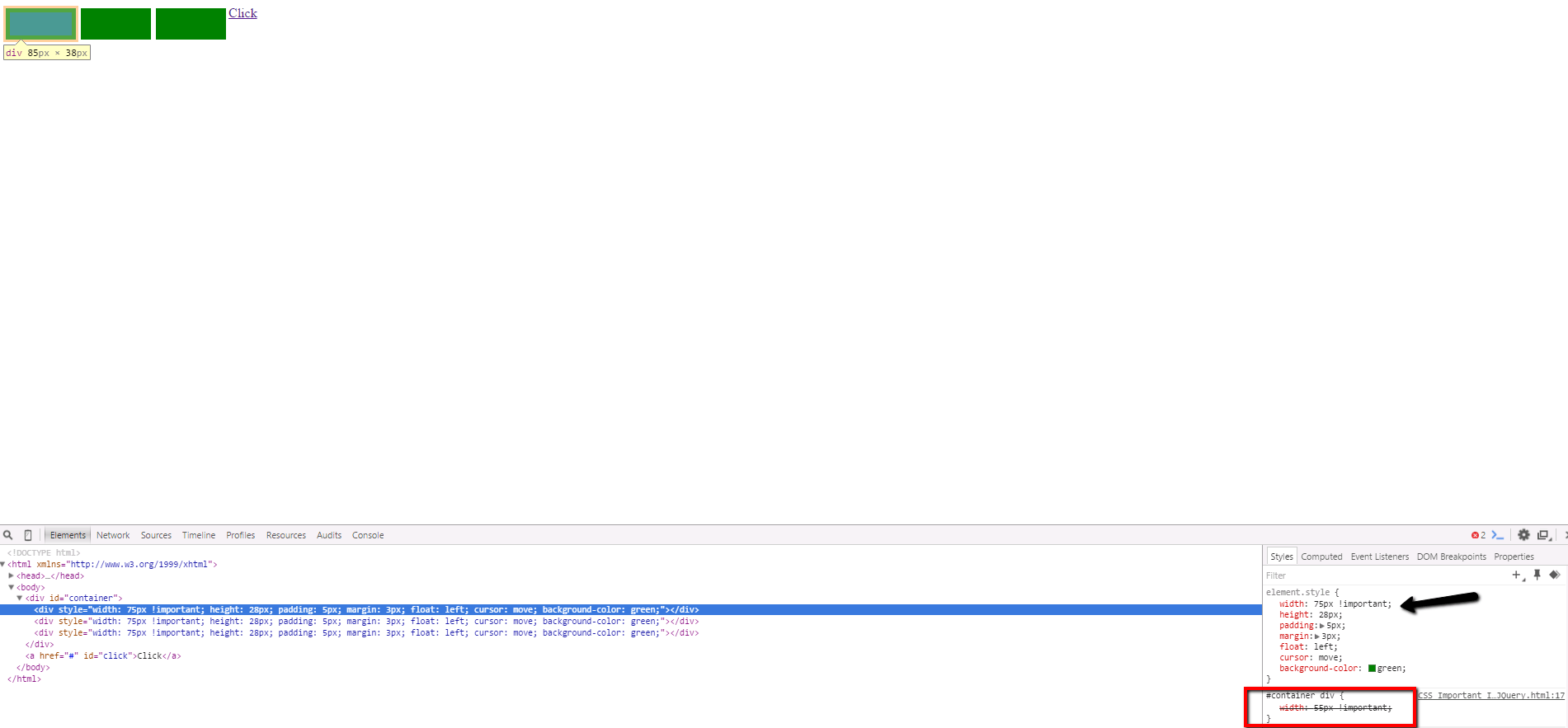
Important CSS Property In JQuery And CSS
We have done it finally.
Complete Code
- <!DOCTYPE html>
- <html
- xmlns="http://www.w3.org/1999/xhtml">
- <head>
- <title>CSS Important In JQuery</title>
- <script src="jquery-2.0.2.min.js"></script>
- <script>
- $(function () {
- $('#click').click(function () {
- //$("#container div").css('width', '75px;!important');
- $("#container div").each(function () {
- this.style.setProperty('width', '75px', 'important');
- });
- });
- });
- </script>
- <style>
- #container div {
- width:55px !important;
- }
- </style>
- </head>
- <body>
- <div id="container">
- <div style="width: 25px;height: 28px;padding: 5px;background-color: green;margin: 3px;float: left;cursor: move;" ></div>
- <div style="width: 25px;height: 28px;padding: 5px;background-color: green;margin: 3px;float: left;cursor: move;" ></div>
- <div style="width: 25px;height: 28px;padding: 5px;background-color: green;margin: 3px;float: left;cursor: move;" ></div>
- </div>
- <a href="#" id="click">Click</a>
- </body>
- </html>
Conclusion
Did I miss anything that you may think which is needed? Have you ever faced this issue in your programming life? I hope you liked this article. Please share me your valuable suggestions and feedback.
Your turn. What do you think?
A blog isn’t a blog without comments, but do try to stay on topic. If you have a questions and feedback, please mention it in the comment section below.


RakeshPosted Sep 26, 2015, 9:22 AM EDT
Good one
Sibeesh VenuTOP 100Posted Sep 25, 2015, 11:24 PM EDT
Debasis Saha Thanks buddy.
Sibeesh VenuTOP 100Posted Sep 25, 2015, 11:24 PM EDT
Ajeet Mishra Thanks buddy.
Sibeesh VenuTOP 100Posted Sep 25, 2015, 11:24 PM EDT
Ankit Bansal Thanks buddy.
Sibeesh VenuTOP 100Posted Sep 25, 2015, 11:23 PM EDT
Santhakumar Munuswamy Thanks buddy.
Sibeesh VenuTOP 100Posted Sep 25, 2015, 11:23 PM EDT
Pankaj Kumar Choudhary Thanks buddy.
Sibeesh VenuTOP 100Posted Sep 25, 2015, 11:22 PM EDT
Gopi Chand Thanks buddy.
Debasis SahaTOP 100Posted Sep 25, 2015, 10:51 PM EDT
Nice one
Ajeet MishraPosted Sep 25, 2015, 10:13 PM EDT
nice
Ankit BansalPosted Sep 25, 2015, 8:29 PM EDT
Awesome..thanks for sharing..
Santhakumar MunuswamyPosted Sep 25, 2015, 10:17 AM EDT
Nice Article
Pankaj Kumar ChoudharyTOP 100Posted Sep 25, 2015, 9:57 AM EDT
Short But useful article.........
Gopi ChandPosted Sep 25, 2015, 9:51 AM EDT
Nice one Sibeesh
Sibeesh VenuTOP 100Posted Sep 25, 2015, 8:29 AM EDT
Sujeet Suman Thank you
Sibeesh VenuTOP 100Posted Sep 25, 2015, 8:29 AM EDT
Shridhar Sharma Thank you buddy
Sujeet SumanPosted Sep 25, 2015, 8:20 AM EDT
Nice Article.................
Shridhar SharmaPosted Sep 25, 2015, 7:17 AM EDT
nice share sir :)
Sibeesh VenuTOP 100Posted Sep 25, 2015, 6:11 AM EDT
Nilesh Jadav Thanks buddy
Nilesh JadavPosted Sep 25, 2015, 5:39 AM EDT
Great Post sir !