
A compromised editor extension can reach much more than the source files in one project.
The Cursor security incident was a software supply chain attack that temporarily placed malicious copies of the Anthropic Claude Code extension in Cursor's VS Code extension marketplace on October 29, 2026. If you installed or updated Anthropic.claude-code version 2.1.312 or 2.1.313 from that marketplace on Windows or macOS during the affected window, check the machine immediately, remove any persistence left by the malware, and rotate credentials accessible from that machine. Cursor says the malicious builds were available for about 11 hours and may have reached at most 5,000 users.
Key takeaways
- The affected packages were
Anthropic.claude-code2.1.312 and 2.1.313 for Windows and macOS, served from Cursor's marketplace on October 29, 2026. - Cursor says the malicious extension was not created by Anthropic, and Microsoft says the official Visual Studio Marketplace and npm package were not affected.
- The injected code attempted to add an attacker SSH key, enable SSH, create a reverse SSH tunnel, persist across restarts, and send host details to attacker infrastructure.
- Removing the extension alone may not remove the SSH key, startup files, or processes that the malicious code attempted to create.
- Cursor says its production systems, customer code repositories, official app updates, and Privacy Mode prompts and code were not affected.
What happened in the Cursor security incident?
Cursor published its detailed incident update on November 13, 2026. According to Cursor's investigation, an attacker obtained an access key Cursor had issued to Fireworks. The key was exposed by Fireworks and gave the attacker read access to a storage bucket Cursor used to share data with that vendor.
That bucket held limited coding-agent traces, mostly from 2025, from sessions outside Cursor Privacy Mode and permitted for model training. Cursor says fewer than 0.05% of users had coding-agent traces exposed, and less than 0.01% of customers had API credentials exposed because a small number of those traces contained credentials that had not been redacted.
Those credentials led the attacker to selected SaaS tools used by Cursor. Cursor says the accessed data included selected archived non-production source repositories, some business contact information, limited support data and email conversations, product usage metrics, contact details, summaries of some coding-agent conversations, and credentials customers had sent to support.
The attacker later used a stolen credential from Cursor's internal environment to put unauthorized copies of Anthropic's Claude Code extension directly into the cache that served Cursor's VS Code extension marketplace. The affected versions were 2.1.312 and 2.1.313. Cursor took the marketplace offline, removed the builds, and worked with the hosting provider to take down the attacker server.
Cursor's account matters because it narrows the affected distribution path. The malware was not in Open VSX, according to Cursor. Microsoft independently reported that the packages were never published or distributed through Microsoft Visual Studio Marketplace or npm, and Anthropic confirmed its systems were not compromised.
How a software supply chain attack works
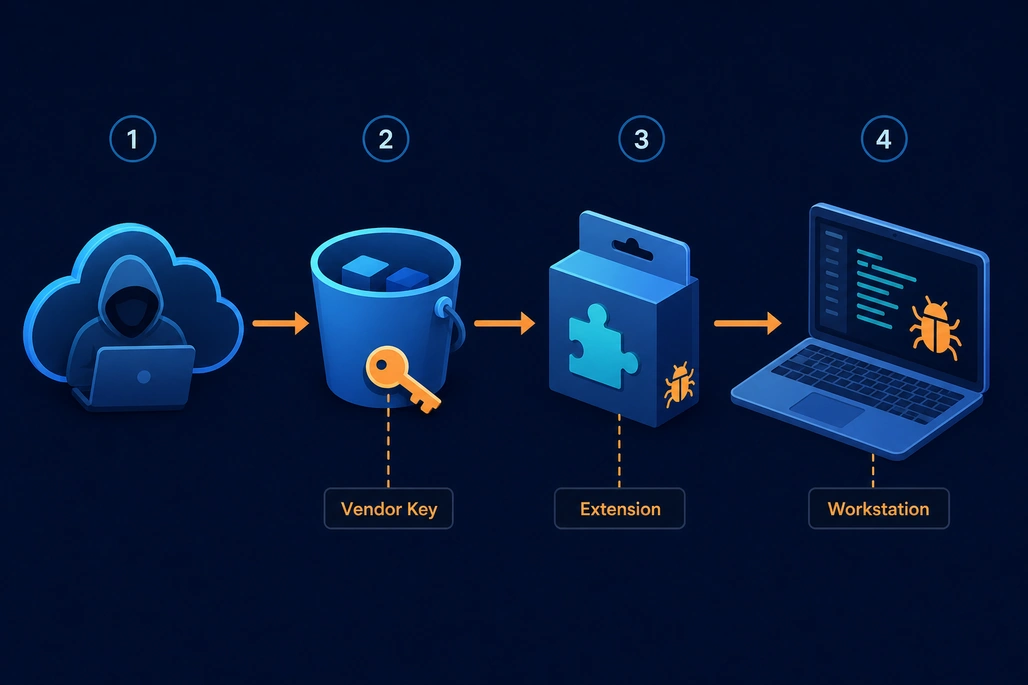
The incident moved from an exposed vendor key to data access and then to a tampered marketplace package.
A supply chain attack targets something you already trust instead of trying to trick you into downloading an obviously suspicious file. In this case, the target was a developer extension marketplace. The extension looked like a known developer tool, but its package had been altered.
An editor extension can be powerful. It may read workspace files, call command-line tools, make network requests, and work with credentials available to your development environment. That access is useful for coding assistants. It also means a compromised extension can have a large blast radius.
| Part of the attack | What it means for a beginner | What Cursor and Microsoft reported |
|---|---|---|
| Exposed vendor access key | A secret used by one service to access another service became available to an attacker. | The attacker copied data from a read-only bucket shared with Fireworks. |
| Unredacted credential in historical data | A token or key was present in data that should not have included it. | Cursor says some traces had unredacted credentials, which enabled access to selected SaaS tools. |
| Marketplace cache tampering | A trusted download path served a changed package. | Malicious Claude Code extension copies were served through Cursor's marketplace. |
| Persistence attempt | The malware tried to stay active after the extension was removed or the computer restarted. | It attempted SSH key installation, reverse tunneling, and startup persistence. |
This incident is also a reminder that source code is only one part of a development supply chain. Extensions, CI services, package registries, cloud accounts, support systems, data exports, and vendors can all hold secrets or provide a path into developer systems.
What the malicious extension tried to do
Cursor's October 29 security notice and Microsoft Threat Intelligence both describe an injected JavaScript loader that ran when the extension module loaded. The code tried to collect machine details such as hostname, username, operating system, architecture, home directory, working directories, configured Git email, public IP address, and environment-variable names.
Microsoft notes an important distinction: the malware searched for environment-variable names containing terms such as KEY, TOKEN, SECRET, PASS, AWS, or GCP. Its analysis found that it sent matching variable names rather than the variable values. But the malicious code also tried to establish remote access, so you should treat an affected workstation as potentially exposed and rotate secrets it could access.
The loader attempted to append an attacker-controlled public key labeled svc-telemetry to SSH authorized keys. SSH, or Secure Shell, is a normal tool developers use to securely sign in to remote machines. Adding an unauthorized public key can let somebody else authenticate as you if SSH is available and other required conditions are met.
The code also attempted to enable the local SSH service, create reverse SSH forwarding to the attacker infrastructure, and add startup persistence. A reverse SSH tunnel is an outbound connection from your machine to a remote server that can make later remote access easier. The use of an outbound connection matters because outbound traffic is often allowed where inbound traffic is blocked.
Cursor said the malicious code had errors and that, in most normal situations where Cursor was not started with administrator privileges, attempts to enable local SSH would fail. Microsoft made the same practical point in more careful language: remote access success depended on the machine's privileges, SSH configuration, and attacker server configuration. The attempts could still leave behind keys and persistence artifacts even when the tunnel itself failed.
Who was affected and who was not?
The exposure window was approximately 2:27 a.m. to 1:35 p.m. Pacific Daylight Time on October 29, 2026. The direct machine-level concern applies to people who installed or updated the specific extension versions from the Cursor VS Code extension marketplace during that period on Windows or macOS.
| Item | Cursor's reported status |
|---|---|
| Anthropic.claude-code 2.1.312 and 2.1.313 from Cursor marketplace on October 29 | Potentially affected. Follow Cursor's detection and remediation guidance. |
| Claude Code from Microsoft Visual Studio Marketplace or npm | Microsoft says these distributions were not affected. |
| Other Cursor marketplace extensions | Cursor says it validated them as authentic and rebuilt the marketplace store. |
| Cursor app and official updates | Cursor says they were not affected and release signing keys were not exposed. |
| Customer code repositories | Cursor says they were not affected. |
| Prompts and code from Privacy Mode users | Cursor says they were not affected. |
| Current live Cursor traffic and active inference requests | Cursor says they were not affected. |
Cursor says it contacted affected customers directly. If you did not receive a notification, Cursor says your data was not among the exposed historical traces. That does not replace checking your machine if you match the extension version and installation window. The extension event and the historical trace exposure are related parts of the same incident, but they are different kinds of impact.
How to check your computer safely
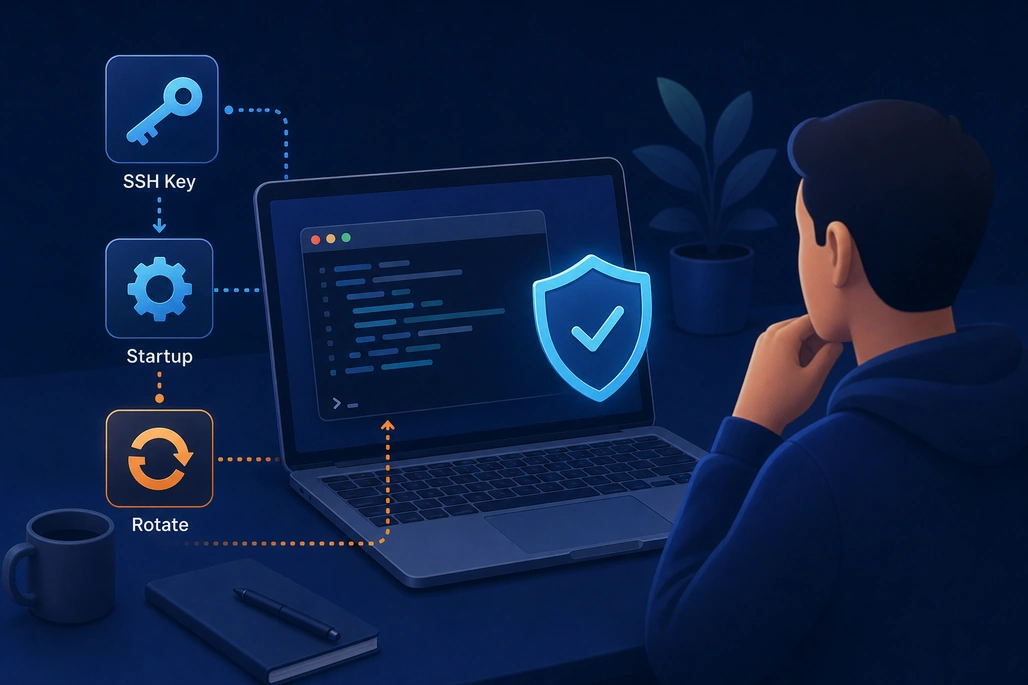
Detection, cleanup, and credential rotation are separate steps after a compromised extension.
Start by confirming where you obtained Claude Code and when you installed or updated it. Focus on the Cursor VS Code extension marketplace, Windows or macOS, versions 2.1.312 or 2.1.313, and October 29, 2026. If you use a company-managed machine, contact your security or IT team before deleting forensic evidence or running cleanup commands.
Cursor's official security notice provides scripts, indicators of compromise, and full remediation guidance. Use the instructions from the official Cursor security notice, not a script copied from a social-media post or an unknown repository.
Check for the unauthorized SSH key on macOS
Cursor says the malicious extension appended a public key with the comment svc-telemetry to SSH authorized keys. On macOS, run this command in Terminal:
grep -qs svc-telemetry ~/.ssh/authorized_keys && echo "svc-telemetry key found" || echo "No key found; machine not impacted"A result saying the key was found means you should treat the machine as impacted. Do not stop after deleting the extension. Cursor says the payload could add separate persistence files and running processes.
Check for the unauthorized SSH key on Windows
Open PowerShell and run the following check. It examines the normal user SSH key file and the administrator SSH key file when they exist.
$files = "$HOME\.ssh\authorized_keys", "C:\ProgramData\ssh\administrators_authorized_keys" | Where-Object { Test-Path $_ }
if ($files -and (Select-String svc-telemetry $files)) { "svc-telemetry key found" } else { "No key found; machine not impacted" }
Cursor's notice lists other indicators, including persistence artifacts and the attacker endpoint. For example, it identifies a macOS LaunchAgent named com.apple.sysmond and a Windows scheduled task named SysMon. Do not assume that a clean result from one quick command proves every artifact is absent. Use the full vendor guidance, and let an incident-response professional handle affected work devices where possible.
What to do if your machine is affected
- Disconnect the machine from networks if your organization tells you to do so or if you see evidence of payload execution. This can stop an active outbound tunnel.
- Preserve relevant evidence for your security team. Record the extension version, install time, detection result, and any files or scheduled tasks found.
- Run the official Cursor remediation script for your operating system as instructed in its security notice. Cursor says the scripts remove the extension, persistence mechanisms, tunnel processes, and attacker SSH key.
- Rotate API keys, cloud keys, Git hosting tokens, SSH keys, passwords, and authenticated sessions that were accessible from the affected machine. Do this from a trusted machine.
- Review account activity, source-control audit logs, cloud audit logs, and endpoint or network telemetry. An SSH backdoor can be one path to later credential access.
- Consider rebuilding the workstation if your security team cannot establish its state with confidence. Cursor's own guidance says to assess whether the host should be rebuilt.
Cursor says it removed the malicious extension, rebuilt the marketplace, rotated exposed Cursor credentials, redeployed production infrastructure as a precaution, expanded network restrictions for service providers, added secret scanning, and moved inference traffic away from Fireworks. Fireworks separately reported that it revoked and replaced credentials and service accounts, reduced elevated privileges, isolated affected systems, tightened storage controls, and improved logging and monitoring.
What beginners can learn from this incident
Keep secrets out of prompts, logs, support tickets, and repositories
An API key pasted into a chat, terminal transcript, bug report, or support ticket can become a security problem long after you forget it. Use a secret manager, local environment variables, or your platform's protected secret store. Add secret scanning to repositories and rotate a key immediately when it appears in a place it should not be.
Privacy settings also matter. Cursor says the shared trace data was from sessions outside Privacy Mode, while Privacy Mode prompts and code were not affected in this incident. Read what a product's privacy mode does, what data it retains, and what it does not cover before putting proprietary code or credentials into an AI tool.
Manage editor extensions as software dependencies
Extensions deserve the same attention you give NuGet, npm, Python, or container dependencies. Install only extensions you need. Remove dormant extensions. Prefer verified publishers and official distribution channels. Turn off automatic updates if your team needs a review or staged rollout process.
For a team, keep an inventory of editor extensions and their versions. That makes incident scoping much faster. Instead of asking every developer what might be installed, you can identify systems with a matching extension ID and version.
Use least privilege on developer machines
Do daily development work with a standard user account when possible. The malicious extension attempted actions that commonly require elevated rights, such as enabling local SSH services or creating higher-privilege scheduled tasks. Fewer local privileges reduce what a compromised extension can change.
Also separate credentials by purpose. A personal development token should not have production administrator access. A cloud key used for a local experiment should have only the permissions it needs and an expiration date where supported.
Plan the response before there is an incident
A short runbook helps. Write down who owns endpoint response, how to isolate a device, where to rotate Git and cloud credentials, and how to reach your security contact. You do not need a large enterprise security team to start. A clear checklist is much better than trying to remember the right order when a security notice arrives.
Frequently asked questions
Was Anthropic's Claude Code product compromised?
Cursor says the malicious extension copies were not published by Anthropic and that this was not a vulnerability in Anthropic's product. Microsoft says the affected packages were limited to Cursor's marketplace and were not distributed through Microsoft Visual Studio Marketplace or npm.
Which Cursor extension versions were malicious?
The affected versions were Anthropic.claude-code 2.1.312 and 2.1.313 for Windows and macOS when installed or updated from the Cursor VS Code extension marketplace during the October 29, 2026 exposure window.
Is uninstalling the affected extension enough?
No. Cursor says uninstalling alone may not be sufficient because the payload attempted to create standalone persistence scripts, processes, and an unauthorized SSH key. Follow Cursor's official remediation steps and rotate credentials from a trusted machine.
Did the incident expose Cursor customer code repositories?
Cursor says customer code repositories were not affected. It also says current live traffic, active inference requests, official Cursor updates, and Privacy Mode prompts and code were not affected.
What should a team do after finding an affected developer machine?
Isolate the device according to the team's incident process, preserve evidence, run the official remediation guidance, remove malicious artifacts, rotate accessible credentials and sessions from a trusted system, and review endpoint, network, cloud, and source-control logs for follow-on access.
Based on reporting by Cursor, Microsoft Security Blog, Fireworks AI and BleepingComputer.

Join the conversation! Your thoughts help the community grow.