
The incident shows why editor extensions belong in a developer's supply chain security plan.
Cursor reported that malicious builds of the Anthropic.claude-code extension, versions 2.1.312 and 2.1.313, were served only through the Cursor VS Code Extension Marketplace on October 29, 2026. They were available for about 11 hours and could attempt to add an attacker SSH key, create persistence, and open a reverse SSH tunnel. If you installed or updated that extension in Cursor during that window, check the machine immediately, use Cursor's official remediation steps, and rotate credentials that the machine could access.
Key takeaways
- The affected extension builds were Anthropic.claude-code 2.1.312 and 2.1.313 for Windows and macOS, served from Cursor's marketplace on October 29, 2026.
- Cursor says the official Anthropic distribution, Open VSX, Microsoft Visual Studio Marketplace, Cursor app updates, customer repositories, and other marketplace extensions were not affected.
- The malicious code tried to place an SSH key labeled
svc-telemetry, then create a remote access path and persistence on the developer's computer. - Removing the extension alone may leave files, scheduled tasks, or startup items behind, so affected systems need a proper cleanup and credential review.
- Cursor's November 13, 2026 update says the last attacker activity it observed was blocked on November 1, 2026, and the company believes the incident is contained.
What happened in the Cursor security incident?
According to Cursor's November 13, 2026 incident update, the attack began when an attacker obtained a Cursor access key that Cursor had issued to Fireworks. Cursor says that key was exposed by Fireworks and used to copy data from a read-only storage bucket used to share data with the vendor for model training.
That bucket contained limited coding-agent traces, mostly from 2025, from users who were not using Privacy Mode. Cursor says a small number of traces contained credentials that had not been redacted, and that API credentials were exposed for less than 0.01% of customers. The attacker then used exposed credentials to reach selected Cursor SaaS tools and archived, non-production repositories.
On October 29, 2026, the attacker used a stolen credential from Cursor's internal environment to put altered copies of the Claude Code extension into the cache that served Cursor's VS Code extension marketplace. Cursor says Anthropic did not publish those copies, Anthropic's product was not the source of the problem, and Open VSX never hosted the malware.
Cursor estimates that at most 5,000 users who requested the specific cached extension versions could have received a malicious build. The company removed the builds, took its extension marketplace offline, rebuilt the marketplace, rotated credentials, and contacted customers it identified as affected.
Why this is a software supply chain attack
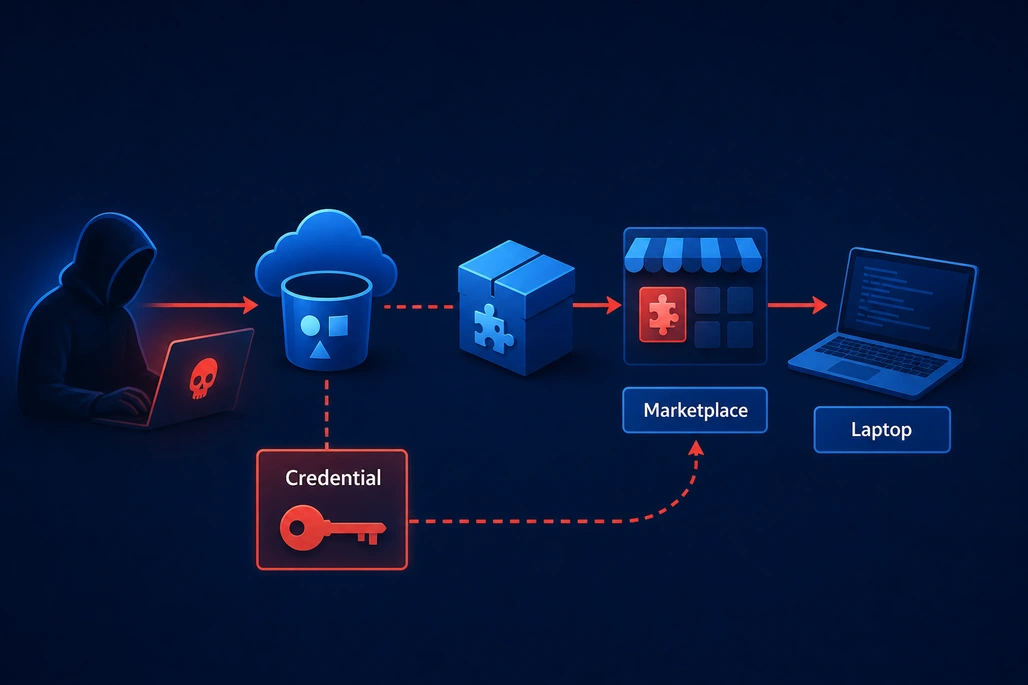
A stolen credential can create a path from a service provider to a developer workstation.
A software supply chain attack happens when an attacker changes something you trust on the path to your computer. That could be a package, a build server, a signing process, an update service, or an extension marketplace. You may install the item from a familiar editor and see an expected publisher name, but the downloaded code is still harmful.
That distinction matters here. The incident was not a bug in the Claude Code feature itself. The unsafe artifact was a tampered extension package distributed by one downstream marketplace during a limited period. Microsoft Security Research says the malicious packages were never published through Microsoft Visual Studio Marketplace or the npm @anthropic-ai/claude-code package, and that available evidence limited the incident to the Cursor marketplace.
For beginners, the lesson is simple: a marketplace is useful, but it is part of your security boundary. An extension has code execution rights within your development environment. Depending on its design and the permissions of the current user, that code may read project files, inspect environment variables, start processes, access Git configuration, and make network connections.
| Trusted component | What a developer normally expects | What went wrong in this incident |
|---|---|---|
| Extension publisher identity | The publisher name identifies code made by that company. | The package looked like Anthropic's extension but was not built or published by Anthropic. |
| Extension marketplace | The marketplace serves the package requested by the editor. | A cached marketplace copy was replaced with a malicious build. |
| Extension update | An update improves the installed tool. | An installation or update during the exposure period could run attacker code when the extension loaded. |
| Uninstall action | Removing the extension removes its effect. | The payload tried to create separate persistence files, so uninstalling alone might not remove them. |
How the malicious Claude Code extension worked
Microsoft's analysis found injected JavaScript that ran before the extension's expected code. This loader collected information about the computer and user, attempted to add an attacker-controlled SSH public key, tried to enable the local SSH service, and attempted reverse SSH forwarding.
SSH, or Secure Shell, is a standard way to remotely log in to a computer. Developers use it every day to connect to servers and Git hosts. An authorized_keys file lists public keys that are allowed to log in to a local SSH service. If an attacker can add their own key and make SSH reachable, they may have a way to return later without knowing your password.
A reverse SSH tunnel changes the connection direction. Instead of the attacker initiating a connection straight to a computer on your home or office network, the affected machine makes an outbound connection to an attacker-controlled server. This can sometimes get around network rules that block inbound connections.
The malicious loader also attempted persistence. Persistence means setting up something that starts again after a reboot or after you remove the original program. On macOS, the payload tried to use a LaunchAgent. On Windows, it tried to create a scheduled task named SysMon and had a Startup-folder fallback. It retried its tunnel attempt roughly every 60 seconds.
There is one point that needs careful reading. Cursor and Microsoft both say errors in the malicious SSH setup code, along with the need for administrator privileges to enable local SSH in typical configurations, prevented remote access on many macOS and Windows machines. That does not make an affected machine safe to ignore. Microsoft notes that the loader could still write SSH keys and persistence artifacts even if its tunnel did not work.
Who needs to check a machine?
You should investigate if all of these statements are true: you used Cursor on macOS or Windows, you installed or updated Anthropic.claude-code version 2.1.312 or 2.1.313 through the Cursor VS Code Extension Marketplace, and the installation or update happened between about 2:27 AM and 1:35 PM Pacific Time on October 29, 2026.
Do not confuse the Cursor marketplace with other distribution channels. Cursor says its official app and official updates were not affected, nor were customer code repositories, current live traffic, plugins downloaded from the Cursor Marketplace, or other extensions in the marketplace. Microsoft also says the Microsoft Visual Studio Marketplace and npm package were not affected.
Cursor says prompts and code from Privacy Mode were not part of the exposed training traces. For people who were not using Privacy Mode, Cursor says coding-agent traces were exposed for fewer than 0.05% of users and that it contacted each identified user. Still, a developer should not use the absence of an email as a substitute for checking a machine that meets the known install conditions.
How to check Windows and macOS for the SSH key
Cursor's first check looks for the attacker key comment, svc-telemetry. Run the command only on a machine that meets the exposure criteria. A result that says no key was found is useful, but it is not a complete incident investigation. Cursor also provides platform-specific remediation scripts and indicators of compromise.
Check on macOS
grep -qs svc-telemetry ~/.ssh/authorized_keys && echo "svc-telemetry key found" || echo "No key found; machine not impacted"If the command reports that the key is found, treat the machine as affected. Disconnect it from sensitive networks if your organization's policy allows, avoid using it to rotate secrets, and notify your security or IT team.
Check on Windows
Open PowerShell and run the official check below. It looks in the normal user SSH key file and the administrator SSH key file when those files exist.
$files = "$HOME\.ssh\authorized_keys", "C:\ProgramData\ssh\administrators_authorized_keys" | Where-Object { Test-Path $_ }
if ($files -and (Select-String svc-telemetry $files)) { "svc-telemetry key found" } else { "No key found; machine not impacted" }
If you find the key, do not stop after deleting one line from one file. The reported payload attempted standalone persistence. Manual cleanup can miss a scheduled task, a startup script, a process, or an artifact in a temporary directory.
What to do if your machine is affected
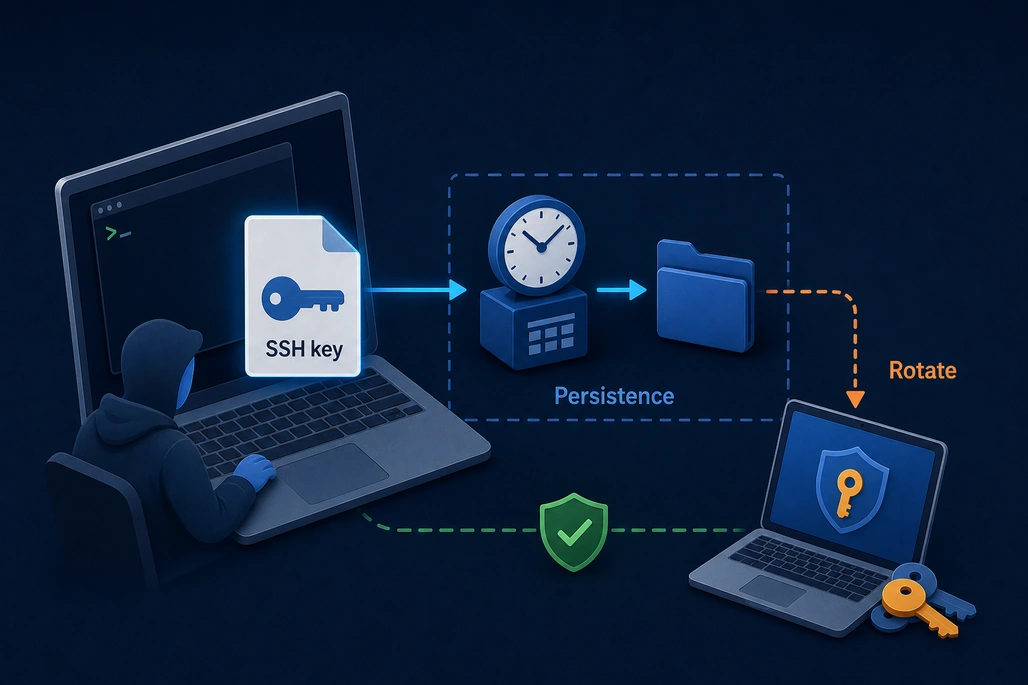
Cleanup must address both the extension and any separate persistence artifacts.
Start with the exact remediation guidance in Cursor's October 29, 2026 security notice. Cursor provides a macOS script and a Windows PowerShell script intended to remove the malicious extension, persistence mechanisms, active tunnel processes, and the unauthorized SSH key. The scripts return a non-zero status if an artifact remains.
- Isolate the device if you see evidence of the payload. For a work device, follow your company's incident-response process rather than making uncoordinated changes.
- Preserve useful evidence before cleanup when your security team requests it. Microsoft recommends identifying affected installations, preserving evidence, reviewing endpoint and network telemetry, and removing confirmed artifacts.
- Run the appropriate official remediation script. On Windows, Cursor says to run its script from PowerShell opened with Run as Administrator. On macOS, Cursor says to run the script as the affected user, not as root.
- Rotate secrets and invalidate sessions that were accessible from the computer, using a known-safe system. This can include GitHub or Azure DevOps tokens, cloud credentials, package registry tokens, database connection strings, SSH private keys, and service credentials stored in local environment files.
- Assess whether the computer should be rebuilt from a trusted image. This is often the cleanest choice when a persistent remote-access payload executed on a development device with valuable credentials.
Cursor says the attacker's server was taken offline, which disrupted the reverse shell and host-detail reporting. That is good news, but it does not undo keys and files that may already have been written locally. Cleanup and credential rotation are still the right response.
What developers can learn from this incident
Do not put secrets in prompts, terminals, or support tickets
API keys and tokens can spread farther than expected when they appear in command output, coding-agent traces, screenshots, support conversations, and diagnostic bundles. Use environment variables, secret stores, or local secret-management tools instead of pasting credentials into a prompt or source file. If a key appears in a chat or terminal transcript, rotate it.
Use least privilege for developer credentials
A token should have only the access it needs and should expire when practical. A read-only token is safer than a write-capable token, but it can still expose private data. Separate personal credentials from organization credentials, and do not use a broad cloud administrator key for routine local development.
Review extensions like code dependencies
Keep the extension list small. Remove tools you no longer use. For work machines, record the publisher, version, source marketplace, and approval owner for extensions that can run code. Teams should monitor extension-installation events and maintain an inventory so they can answer a basic incident question quickly: which computers installed a given version?
Keep endpoint protections and logs enabled
This incident was detected through monitoring, according to Cursor. Endpoint detection, operating-system event logs, proxy logs, and identity-provider logs help a team determine what actually happened on a device. They also make it possible to look for known indicators, such as unexpected SSH changes, scheduled tasks, or unusual outbound connections.
How Cursor and Fireworks responded
Cursor says it deactivated the vendor key, cut off access to shared data, rotated exposed credentials, then rotated credentials across its internal systems as a precaution. It also says it moved inference traffic off Fireworks, added secret scanning and protections across repositories and internal data sources, redeployed production infrastructure, and engaged external forensics experts.
Fireworks' November 2026 update says it revoked and replaced credentials and service accounts, removed unnecessary elevated privileges, restricted network paths, tightened access to storage and analytics systems, and enhanced logging and monitoring with support from Palo Alto Networks Unit 42. Fireworks also says its investigation remains ongoing and may reveal additional information.
For an individual developer, the practical point is not to wait for every forensic detail before acting. If the version, marketplace, platform, and October 29 exposure window match your machine, check it. If the key or another indicator appears, treat the device as an incident and rotate reachable credentials from a separate trusted device.
Frequently asked questions
Was the official Anthropic Claude Code extension compromised?
No. Cursor says Anthropic did not develop or publish the malicious builds, and Microsoft says the affected packages were not distributed through Microsoft Visual Studio Marketplace or npm. The known malicious copies were served from the Cursor VS Code Extension Marketplace.
Which Claude Code versions were affected?
Cursor identified Anthropic.claude-code versions 2.1.312 and 2.1.313 for Windows and macOS. The relevant exposure period was approximately 2:27 AM to 1:35 PM Pacific Time on October 29, 2026.
Is uninstalling the extension enough?
No. Cursor says uninstalling alone may not be enough because the payload attempted to leave separate persistence scripts, SSH key changes, and processes behind. Use Cursor's official remediation guidance and review credentials that the affected device could access.
What does the svc-telemetry key mean?
It is the label attached to the unauthorized SSH public key that the malicious extension attempted to add to SSH authorized-key files. Cursor provides macOS and Windows commands that search for this label.
Should I rotate my API keys if I installed the affected extension?
Yes, if the extension executed on your machine, rotate credentials and invalidate sessions that the device could access, using a trusted computer. Cursor specifically recommends this because environment-variable collection does not rule out later credential access through a backdoor.
Based on reporting by Cursor, Microsoft Security, Fireworks AI and BleepingComputer.

Join the conversation! Your thoughts help the community grow.