
Introduction:
In this article we will explore the custom action on Business Data List Web Part in SharePoint 2013. The action includes edit and delete options on the popped up display form.
Scenario:
For performing edit/delete operations on the list item of external Lists, which is on Business Data List Web Part, we need to fetch the external list item ID. A lot of people face difficulty in finding the external item ID. We have an external List and Business Data List Web Part with custom hyperlink to fetch the display form.
Solution:
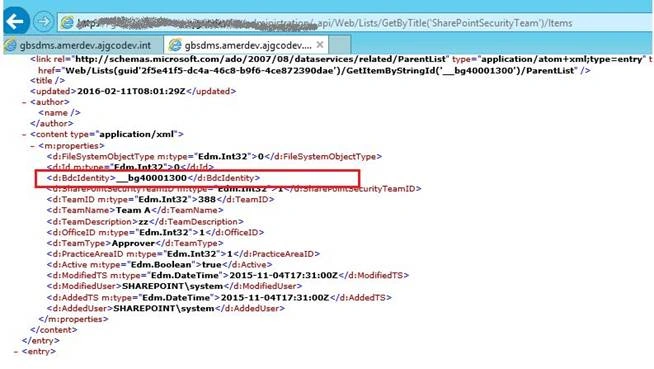
The external list item ID for the edit/delete option on the display form can be found by fetching the value of BdcIdentity column. This value can be fetched by writing the REST API code, which generates the response and the value for which can be fetched and is shown in the following screenshot:
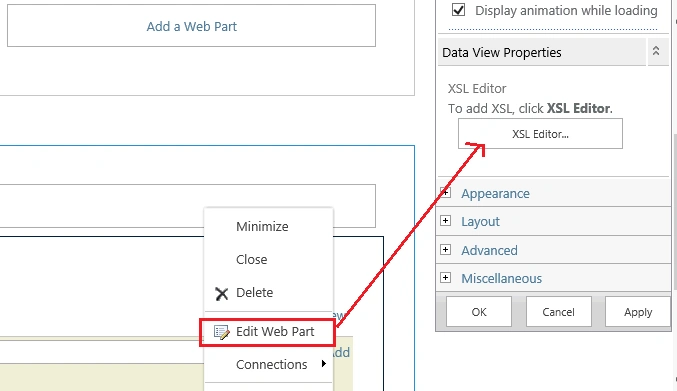
You need edit the web part and add XSLT code,
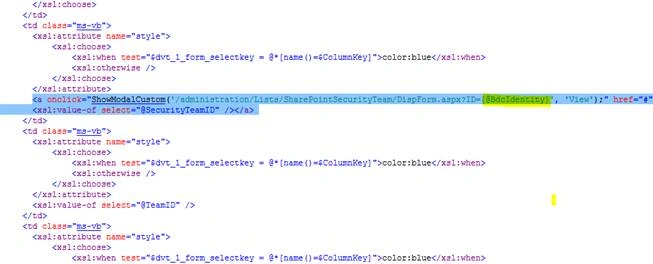
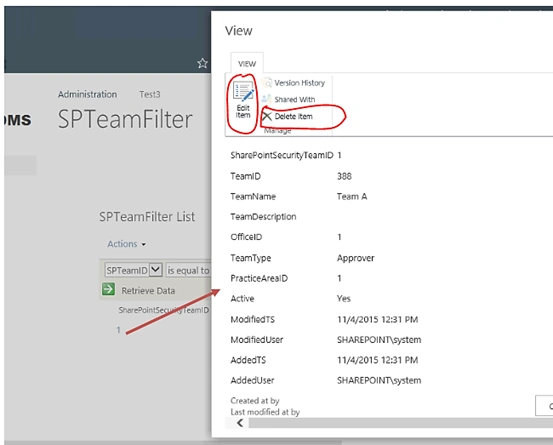
The edit/delete option now comes on the Display form.
Read more articles on SharePoint:


Prashant VermaPosted Mar 7, 2016, 10:50 PM EST
very rare useful
Rupali ShindePosted Feb 23, 2016, 12:23 AM EST
nice
Santhakumar MunuswamyPosted Feb 12, 2016, 9:55 PM EST
Thanks for nice share
Shubham KumarPosted Feb 11, 2016, 7:35 PM EST
nice one sir
Sibeesh VenuTOP 100Posted Feb 11, 2016, 7:35 PM EST
Nice Share
Mohammed IbrahimPosted Feb 11, 2016, 8:12 AM EST
nice