
Hello friends!
I am here with another article for you where I am going to share something simple but interesting. Recently, I used a prompt of JavaScript to get username but somehow it showed some title on the top of the prompt box, like "Page says...". I have searched through many sites but couldn't found any solution to remove this title. As per some security reasons, Chrome must display this title in JavaScript's Alert, Prompt, and Confirm Box. So, I have decided to create a custom popup for all three types.
Please have a look at the functionality of all these three types of popup available in JavaScript.
Alert
If we ensure a piece of information through a user, we often use an alert box. When an alert box pops up, the user has to click on "OK" to proceed.
Confirm
A confirm box is often used if you want the user to verify or accept something. When a confirmation box pops up, the user has to either click "OK" or "Cancel" to proceed. If the user clicks on "OK", then the box is correct. If the user clicks on "cancel", the box returns incorrectly.
Prompt
A prompt box is often used if you want to give input functionality to the user before entering the page. When a signal box pops up, the user clicks on either "OK" or "Cancel" to proceed with entering the input value. If the user clicks "OK", then the box returns the input value. If the user clicks "Cancel", the box gets the null field.
For creating custom pop-ups, we need to include jQuery and Bootstrap. I have used a CDN path for this. You can also install this with npm or just use this CDN.
Here is the code of Index.html file.
- <html>
- <head>
- <title>Bootstrap Example</title>
- <meta charset="utf-8">
- <meta name="viewport" content="width=device-width, initial-scale=1">
- <link rel="stylesheet"href="https://maxcdn.bootstrapcdn.com/bootstrap/3.3.7/css/bootstrap.min.css">
- <script src="https://ajax.googleapis.com/ajax/libs/jquery/3.3.1/jquery.min.js"></script>
- <script src="https://maxcdn.bootstrapcdn.com/bootstrap/3.3.7/js/bootstrap.min.js"></script>
- </head>
- <style>
- .btns {
- margin: 250px auto 50px;
- width: 600px;
- }
- </style>
- <body>
- <div class="btns text-center">
- <button type="button" class="btn btn-warning" onClick="createModal('We aware', 'some text here which want to show as warning..', 'alert')">Alert Modal</button>
- <button type="button" class="btn btn-primary" onClick="createModal('Enter your name', 'Name', 'prompt')">Prompt Modal</button>
- <button type="button" class="btn btn-danger" onClick="createModal('Are you sure!!', 'Some message here...', 'confirm')">Confirm Modal</button>
- </div>
- <!-- modal-dialog -->
- <div class="modal fade" tabindexrole="dialog" id="custom-modal">
- <div class="modal-dialog modal-sm" role="document">
- <div class="modal-content">
- <!-- modal-header -->
- <div class="modal-header" id="modal-head"></div>
- <!-- modal-body -->
- <div class="modal-body" id="modal-body"></div>
- <!-- modal-footer -->
- <div class="modal-footer" id="modal-footer"></div>
- </div>
- </div>
- </div>
- <h1 id="user-name" class="text-center"></h1>
- <script>
- function createModal(title, message, type) {
- customModal(title, message, type);
- }
- function customModal(head, body, type) {
- if(type == 'prompt') {
- $('#modal-head').html('
- <h4 class="modal-title">'+head+'</h4>');
- $('#modal-body').html('
- <div class="row">
- <label class="col-sm-3">Name</label>
- <div class="col-md-9">
- <input class="form-control" type="text" id="name-input">
- </div>
- </div>');
- $('#modal-footer').html('
- <button type="button" class="btn btn-primary" id="done-btn">Done</button>
- <button type="button" class="btn btn-danger" id="cancel-btn">Cancel</button>');
- $('#custom-modal').modal('show');
- $('#cancel-btn').on('click', function() {
- return response('cancel');
- });
- $('#done-btn').on('click', function() {
- return response('done');
- });
- } else if( type == 'alert') {
- $('#modal-head').html('
- <h4 class="modal-title">'+head+'</h4>');
- $('#modal-body').html('
- <p>' + body + '</p>');
- $('#modal-footer').html('
- <button type="button" class="btn btn-primary" data-dismiss="modal">Ok</button>');
- $('#custom-modal').modal('show');
- } else if( type == 'confirm') {
- $('#modal-head').html('
- <h4 class="modal-title">'+ head +'</h4>');
- $('#modal-body').html('
- <p>' + body + '</p>');
- $('#modal-footer').html('
- <button type="button" class="btn btn-primary" id="ok-btn">Ok</button>/
- <button type="button" class="btn btn-danger" id="cancel-btn">Cancel</button>');
- $('#custom-modal').modal('show');
- $('#cancel-btn').on('click', function() {
- return response('cancel');
- });
- $('#ok-btn').on('click', function() {
- return response('ok');
- });
- }
- }
- function response(type) {
- if(type == 'done') {
- if(document.getElementById('name-input').value != '') {
- $('#user-name').html( 'Welcome '+ document.getElementById('name-input').value);
- $('#custom-modal').modal('hide');
- return document.getElementById('name-input').value;
- } else {
- alert('Please Enter your name');
- }
- } else if(type == 'cancel') {
- $('#custom-modal').modal('hide');
- return false;
- } else if(type == 'ok') {
- $('#custom-modal').modal('hide');
- return true;
- }
- }
- </script>
- </body>
- </html>
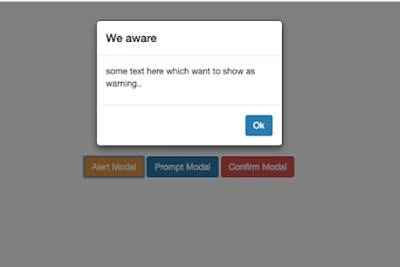
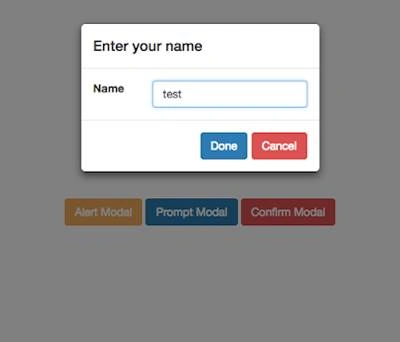
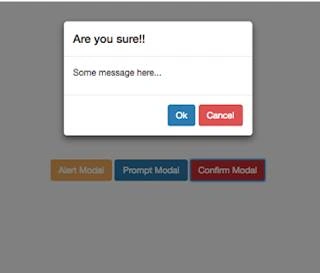
Here, you can see the screenshots which show all the three types of custom pop-ups developed by us.
Initial loading screen

Alert Box popup
Prompt Box popup
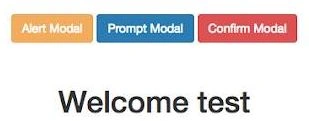
Here, we have inserted some name in the input and on the next screen, this will be shown in HTML.
Confirm Box popup


Ronald HaringPosted Feb 27, 2021, 9:35 AM EST
Thanks any chance you have it somewhere as git or other copy-able source?
Jeffrey RudeloffPosted May 2, 2020, 5:27 AM EDT
Nice bit of coding and exactly what I was looking for! Thanks...
Sudheshwer RaiPosted May 18, 2019, 3:07 AM EDT
Nice airticle