
HTML Custom Helpers
HTML helper is a method that returns a HTML string. Then this string is rendered in view. MVC provides many HTML helper methods. It also provides facility to create your own HTML helper methods. Once you create your helper method you can reuse it many times.
There are two ways in MVC to create custom Html helpers as below.
- Adding extension method for HtmlHelper class
- Using static method
Adding extension method for HtmlHelper class
We can create our own HTML helper by writing extension method for HTML helper class. These helpers are available to Helper property of class and you can use then just like inbuilt helpers.
Example
Add new class in MVC application and give it meaningful name. In this example we create new folder “CustomHelper” in application and then we add class “CustomHelpers” in that folder. As we are going to create extension method make this class static. Write the following code in class:
- using System;
- using System.Collections.Generic;
- using System.Linq;
- using System.Web;
- using System.Web.Mvc;
- namespace CustomeHelper.CustomHelper
- {
- public static class CustomHelpers
- {
- public static IHtmlString File(this HtmlHelper helper, string id)
- {
- TagBuilder tb = new TagBuilder("input");
- tb.Attributes.Add("type", "file");
- tb.Attributes.Add("id", id);
- return new MvcHtmlString(tb.ToString());
- }
- }
- }
- @using CustomeHelper.CustomHelper
- @ {
- ViewBag.Title = "Index";
- }
- < h2 > Index < /h2>
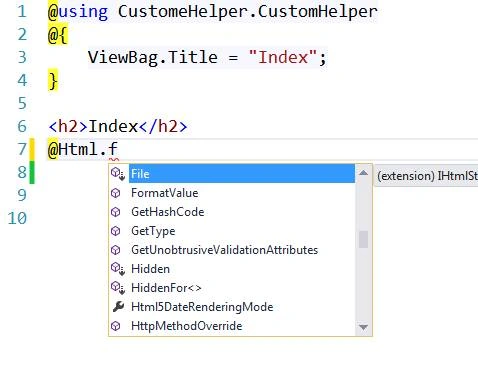
Add this method and pass id parameter. And run your view, you will get output as below.

Using static method
In this method we don’t create any extension method for HtmlHelper class. We create new class as “CustomHelper”. Write the following code in class:
- using System;
- using System.Collections.Generic;
- using System.Linq;
- using System.Web;
- using System.Web.Mvc;
- namespace CustomeHelper.CustomHelper
- {
- public class CustomHelper
- {
- public static IHtmlString File(string id)
- {
- TagBuilder tb = new TagBuilder("input");
- tb.Attributes.Add("type", "file");
- tb.Attributes.Add("id", id);
- return new MvcHtmlString(tb.ToString());
- }
- }
- }

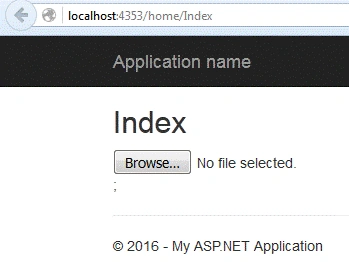
Add this method and pass id parameter. And run your view, you will get output as below.
Conclusion
In this article we learned to create custom html helpers. By creating custom html helper we can eliminate the repeating html code fragments from application.


Bimal DasPosted Apr 27, 2017, 5:14 AM EDT
If we rename namespace "System.Web.Mvc" instead of namespace "CustomeHelper.CustomHelper" , then we don't have to use @using System.Web.Mvc in razor view!!!!
Manav PandyaPosted Dec 7, 2016, 11:30 PM EST
So how to find different interface for more custom html helper's , thanks for all replies sir
Manav PandyaPosted Dec 7, 2016, 10:05 PM EST
Just tell me what is IHtmlString bcoz im trying to change this its not working properly
Manav PandyaPosted Dec 7, 2016, 10:04 PM EST
Ok sir read it carefully thanks Ranjit Powar sir
Manav PandyaPosted Dec 7, 2016, 1:18 AM EST
But where to write extention file code , you specified to write in class but where to put that class file ?
Manav PandyaPosted Dec 7, 2016, 1:18 AM EST
Nicely explained article sir Ranjit Powar
Ranjit PowarPosted Feb 26, 2016, 1:39 AM EST
thanks rajeev
Rajeev PunhaniPosted Feb 26, 2016, 1:16 AM EST
Thanks for sharing
Ehsan SajjadPosted Feb 5, 2016, 6:58 AM EST
Informative
Ranjit PowarPosted Feb 3, 2016, 7:51 PM EST
Thank you all
Humayun Kabir MamunPosted Feb 3, 2016, 6:12 PM EST
Nice...
Ankit SaxenaPosted Feb 3, 2016, 7:14 AM EST
Thanks for sharing. Usefull info.
Ranjit PowarPosted Feb 1, 2016, 9:41 PM EST
Thanks
Dhanik SahniPosted Feb 1, 2016, 6:43 PM EST
Good
Debasis SahaTOP 100Posted Feb 1, 2016, 6:41 PM EST
Nice article...
Ranjit PowarPosted Feb 1, 2016, 5:57 PM EST
Thanks
Raja TPosted Feb 1, 2016, 5:25 PM EST
Nice, Thanks for sharing