
In my previous tutorial we learned CRUD operation using EntityFramework in ASP.NET MVC. When we work with Entity Framework it creates Views (For creation,insert,delete,update) automatically. So the output of the application is,

Changes in Index View
Suppose when we get output where Header name is common for two fields then we need to change their header name for recognition. Here if we change StudentName as “Name” then StudentName and DepartmentName has same header name as “Name" then we need to customize in index view. These header names are the same as database table column name.
Means o/p is like below:
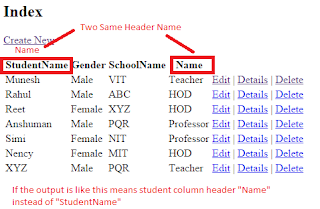
So here I want to change the Header to “student Name” instead of “Name”,
Step 1: How header generates.

So here I want to change the Header to “student Name” instead of “Name”,
Step 1: How header generates.
When we create a application using entityFramework we add a EntityDataModal then we gives connection and select tables that time it creates a class in modal (Designer class).
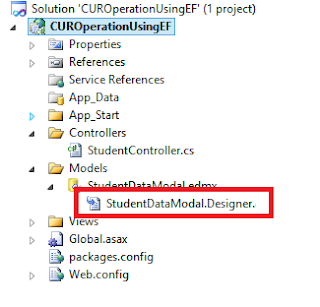
When we go to this class we see that it’s a partial class, And this is an auto generated class. This contains all the properties (In region “#region Primitive Properties); These property names match with the Table column Name.
Step 2: How to change Header name.

When we go to this class we see that it’s a partial class, And this is an auto generated class. This contains all the properties (In region “#region Primitive Properties); These property names match with the Table column Name.
Step 2: How to change Header name.
We can change this header name either change column name in database table or change the properties name in Student class which is auto generated class.
If we change in auto generated student class is not good because due this we can loss all the changes , So we have to customization in different class.
This auto generated class is a partial class so we can create a another student partial class and we can make changes there.
So in modal folder add a class and give the name as “Student.cs” and write the following code in this class.
- [MetadataType(typeof(StudentMetaData))]
- public partial class Student
- {}
- public class StudentMetaData
- {
- [Display(Name = "Student Name")]
- public string Name
- {
- get;
- set;
- }
- }
This display attribute present in “"System.ComponentModel.DataAnnotations" namespace.
When we run this application it will generate a Header name As “StudentName” instead of Name.
Changes in Edit View
When we run this application and click on edit link then we see that “Gender” is not in dropdown and Department does not have default text.
Go to the create view and replace following code.
- @Html.DropDownList("DepartmentId", String.Empty)
- WITH
- @Html.DropDownList("DepartmentId", "Select Department")
- For Gender
- @Html.EditorFor(model => model.Gender)
- WITH
- @Html.DropDownList("Gender", new List<SelectListItem>
- {
- new SelectListItem { Text = "Male", Value="Male" },
- new SelectListItem { Text = "Female", Value="Female" }
- }, "Select Gender")
For making Name as read only make following changes,
- @Html.EditorFor(model => model.Name)
- TO
- @Html.DisplayFor(model => model.Name)
- @Html.HiddenFor(model => model.Name)
Changes in create View
Here any field is not required in create, which means if we click on create button it saves NULL in database for all fields that is wrong, So for that we need to make require field using [Required] attribute that present in “using System.ComponentModel.DataAnnotations;” namespace.
So lets make changes in Student class which we create as partial class,
- using System;
- using System.Collections.Generic;
- using System.Linq;
- using System.Web;
- using System.ComponentModel.DataAnnotations;
- namespace CUROperationUsingEF.models
- {
- [MetadataType(typeof(StudentMetaData))]
- public partial class Student
- {}
- public class StudentMetaData
- {
- [Required]
- public string Name
- {
- get;
- set;
- }
- [Required]
- public string Gender
- {
- get;
- set;
- }
- [Required]
- public string City
- {
- get;
- set;
- }
- [Required]
- [Display(Name = "Department")]
- public int DepartmentId
- {
- get;
- set;
- }
- }
- }
Replace the following code in Create view also,
- @Html.DropDownList("DepartmentId", String.Empty)
- WITH
- @Html.DropDownList("DepartmentId", "Select Department")
- For Gender
- @Html.EditorFor(model => model.Gender)
- WITH
- @Html.DropDownList("Gender", new List<SelectListItem>
- {
- new SelectListItem { Text = "Male", Value="Male" },
- new SelectListItem { Text = "Female", Value="Female" }
- }, "Select Gender")


Manav PandyaPosted Jan 17, 2017, 9:35 PM EST
Can we make direct chages to "StudentDataModel.edmx" file
Manav PandyaPosted Jan 17, 2017, 9:34 PM EST
Thanks for sharing this one sir
Munesh SharmaPosted May 22, 2016, 7:54 AM EDT
thank you all
Kuppurasu NagarajTOP 100Posted May 17, 2016, 7:18 AM EDT
Nice sharing..
Sonu ChaudharyPosted May 16, 2016, 11:28 AM EDT
good one...
Pankaj Kumar ChoudharyTOP 100Posted May 16, 2016, 10:39 AM EDT
Nice Article Sir...........
Munesh SharmaPosted May 16, 2016, 7:49 AM EDT
thank you all
Prasanna MuraliPosted May 16, 2016, 6:01 AM EDT
Nice one...
Debasis SahaTOP 100Posted May 15, 2016, 9:02 PM EDT
Nice one..
Bhavik PatelPosted May 15, 2016, 5:15 PM EDT
Nice