
We are going to discuss about displaying data in table format by using the following 3 ways,
- Using foreach loop
- Uisng WebGrid
- Using Jquery with Json Result Object
Firstly, we are going to create MVC Solution.
Select Empty Template and add MVC Folder Reference.

Add New Controller in Controller Folder.

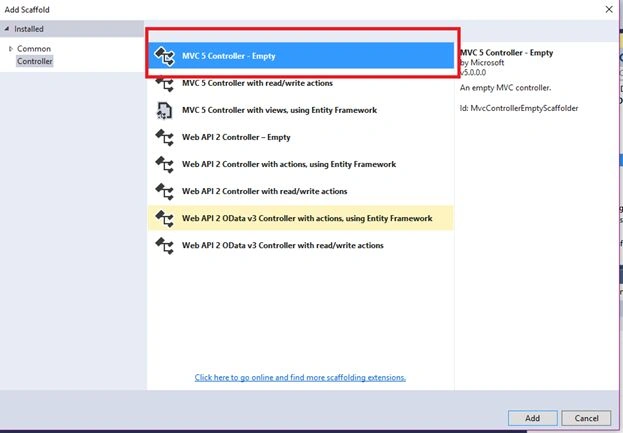
Select MVC 5 Controller - Empty.
Give Controller Name as Home.

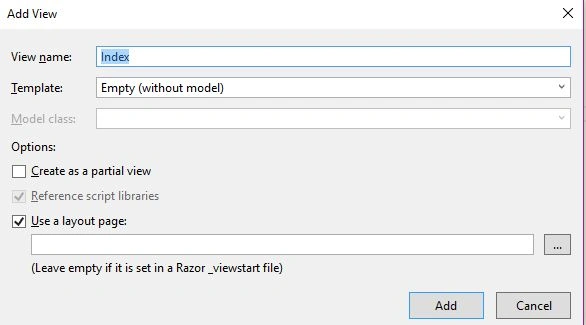
Add a View.
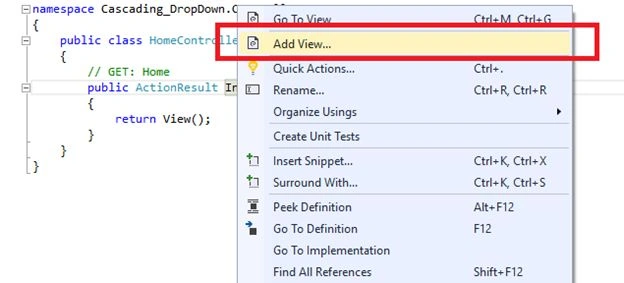
Right click on the Action Name and add view.
Add Employee Class in Model folder.
- class Employee
- {
- public int EmployeeId { get; set; }
- public string FirstName { get; set; }
- public string LastName { get; set; }
- public string Email { get; set; }
- public int Salary { get; set; }
- public string Company { get; set; }
- public string Dept { get; set; }
- }
- public class HomeController : Controller
- {
- private List<Employee> emp;
- public HomeController()
- {
- emp = new List<Employee>()
- {
- new Employee()
- { EmployeeId =1,FirstName="Rakesh",LastName="Kalluri", Email="[email protected]", Salary=30000, Company="Summit", Dept="IT" },
- new Employee()
- { EmployeeId =2,FirstName="Naresh",LastName="C", Email="[email protected]", Salary=50000, Company="IBM", Dept="IT" },
- new Employee()
- { EmployeeId =3,FirstName="Madhu",LastName="K", Email="[email protected]", Salary=20000, Company="HCl", Dept="IT" },
- new Employee()
- { EmployeeId =4,FirstName="Ali",LastName="MD", Email="[email protected]", Salary=26700, Company="Tech Mahindra", Dept="BPO" },
- new Employee()
- { EmployeeId =5,FirstName="Chithu",LastName="Raju", Email="[email protected]", Salary=25000, Company="Dell", Dept="BPO" },
- new Employee()
- { EmployeeId =6,FirstName="Nani",LastName="Kumar", Email="[email protected]", Salary=24500, Company="Infosys", Dept="BPO" },
- };
- }
- public ActionResult Index()
- {
- return View(emp);
- }
Index.Cshtml
- @model IEnumerable<List_Data_Binding_in_MVC.Models.Employee>
- @{
- ViewBag.Title = "Index";
- }
- <div><b>Table Format Data Displaying in ForEach</b><br /></div>
- <table class="table table-bordered table-responsive table-hover">
- <tr>
- <th>Employee Id </th>
- <th>First Name </th>
- <th>Last Name </th>
- <th>Email</th>
- <th>Salary</th>
- <th>Company</th>
- <th>Department</th>
- </tr>
- @foreach (var d in Model)
- {
- <tr>
- <td>@d.EmployeeId</td>
- <td>@d.FirstName</td>
- <td>@d.LastName</td>
- <td>@d.Email</td>
- <td>@d.Salary</td>
- <td>@d.Company</td>
- <td>@d.Dept</td>
- </tr>
- }
- </table>
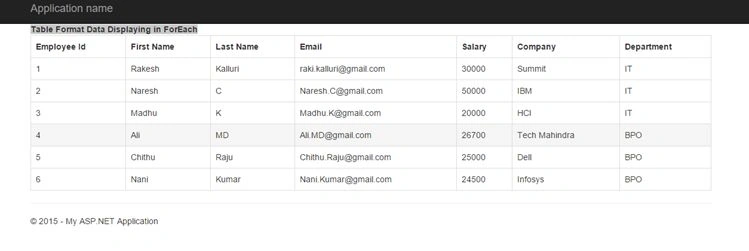
Table Format Data Displaying Using WebGrid
In this format we use WebGrid Action Method for data displaying.
Add Another Action Method for Web Grid in Home Controller and also add separate view for WebGrid Action Method.
- public ActionResult WebGrid()
- {
- return View(emp);
- }
- @model IEnumerable<List_Data_Binding_in_MVC.Models.Employee>
- @{
- ViewBag.Title = "WebGrid";
- }
- <div><b>Table Format Data Displaying Using WebGrid</b><br /></div>
- @{ var grid = new WebGrid(Model, canPage: false);}
- <div>
- @grid.GetHtml(tableStyle: "table table-bordered table-responsive table-hover",
- columns: grid.Columns(
- grid.Column("EmployeeId", "Employee Id"),
- grid.Column("FirstName", "First Name"),
- grid.Column("LastName", "Last Name"),
- grid.Column("Email", "Email"),
- grid.Column("Salary", "Salary"),
- grid.Column("Company", "Company"),
- grid.Column("Dept", "Department")
- )
- )
- </div>

Run the Solution
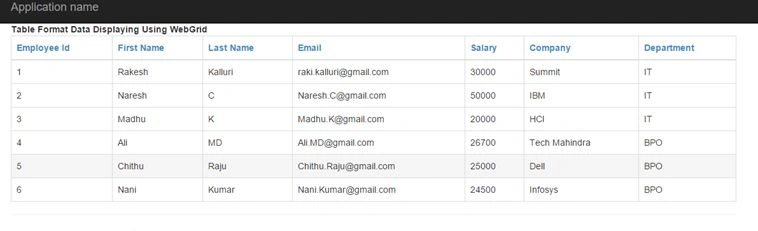
Table Format Data Displaying Using Jquery
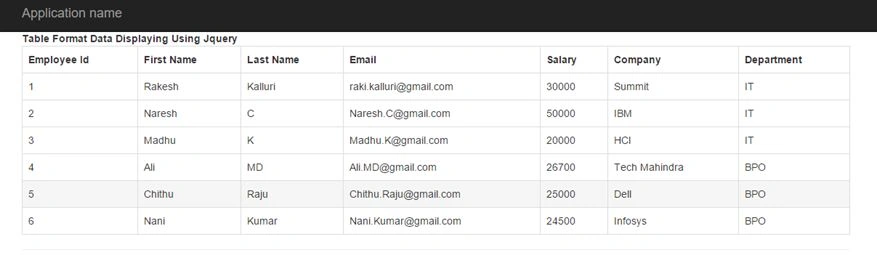
In this format we are using JQuery for data displaying.
Add Another Controller for JsonView and also separate view for JsonView Action method in Hone Controller.
Add JsonResult Method for retrieving data from jquery ajax calls.
- public ActionResult JsonView()
- {
- return View();
- }
- public JsonResult EmployeeData()
- {
- return Json(emp, JsonRequestBehavior.AllowGet);
- }
- @{
- ViewBag.Title = "JsonView";
- }
- <div><b>Table Format Data Displaying Using Jquery</b><br /></div>
- <div>
- <table class="table table-bordered table-responsive table-hover" id="tblEmployee">
- <tr>
- <th>Employee Id </th>
- <th>First Name </th>
- <th>Last Name </th>
- <th>Email</th>
- <th>Salary</th>
- <th>Company</th>
- <th>Department</th>
- </tr>
- </table>
- </div>
- <script src="~/scripts/jquery-1.10.2.js"></script>
- <script type="text/javascript">
- $(document).ready(function () {
- GetEmployeeData();
- });
- function GetEmployeeData() {
- $.get('/Home/EmployeeData', {}, function (data) {
- var tblEmployee = $("#tblEmployee");
- $.each(data, function (index, item) {
- var tr = $("<tr></tr>");
- tr.html(("<td>"+item.EmployeeId+"</td>")
- + " " + ("<td>" + item.FirstName + "</td>")
- + " " + ("<td>" + item.LastName + "</td>")
- + " " + ("<td>" + item.Email + "</td>")
- + " " + ("<td>" + item.Salary + "</td>")
- + " " + ("<td>" + item.Company + "</td>")
- + " " + ("<td>" + item.Dept + "</td>"));
- tblEmployee.append(tr);
- });
- });
- }

Run the Solution
Output


Akshay DalviPosted Nov 5, 2019, 7:41 PM EST
Your efforts are appreciated. Good work!
Sajid HussainPosted Jun 24, 2019, 9:44 PM EDT
Which one is best among three?
Hitanshi MehtaPosted Dec 21, 2018, 9:00 PM EST
Very useful!! Thanks!!
Dee PedroPosted Aug 30, 2018, 11:07 PM EDT
Very useful article, thanks
subista maharjanPosted Jun 27, 2018, 9:23 PM EDT
But how fetch the data from the table?
Dr.Ajay KashyapPosted Feb 14, 2017, 3:06 AM EST
Can we implement searching and sorting in this
Jaco ZwartsPosted Jan 19, 2016, 8:01 PM EST
Rakesh, this is really good thank you.
Sridhar SharmaPosted Dec 24, 2015, 1:07 AM EST
Super Good...
Banketeshvar NarayanPosted Dec 22, 2015, 5:56 AM EST
Nice Share
Santhakumar MunuswamyPosted Dec 22, 2015, 3:27 AM EST
Can you upload source code it will be helpful for the beginner
Santhakumar MunuswamyPosted Dec 22, 2015, 3:26 AM EST
Thanks for nice article
Manas MohapatraPosted Dec 22, 2015, 1:44 AM EST
Good one Rakesh. It is nice to know: different ways to bind data in Table format.
Humayun Kabir MamunPosted Dec 22, 2015, 12:55 AM EST
Nice...