
Before I start explaining what is DebuggerDisplay attribute, let me describe the problem description.
Let’s say you have a Person class having a complex structure. As a developer, while debugging you like to know which instance of Person class is used in a class.
One way of finding the required information, however complex, is to look in to the object tree in the debugger dialogue box.
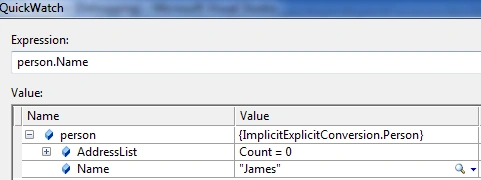
What if we just want to know the value of Name property of the instance on mouse hovering on the person instance?
Well, technically, what is shown as a value next to person is the return value from toString() method that returns the name of the type (Person in this case). As a developer you could have overridden toString() method and return the property name of the instance. But doing so, would affect both Debug and Release builds and of course as a developer you would not want it.
To the rescue comes the DebuggerDispay attribute from System.Diagnostic namespace.
The DebuggerDisplayAttribute (System.Diagnostics.DebuggerDisplayAttribute) controls how a class or field is displayed in the debugger variable window. DebuggerDisplay attribute class has several overloads. Let’s look at them one by one. But before we delve into it, let us first see how can we achieve the required behavior from our problem description.
- [DebuggerDisplay("Name")]
- public class Person
- {
- public string Name;
- public List < Addres > AddressList = new List < Addres > ();
- }
- Person person = new Person()
- {
- Name = ”James”
- };
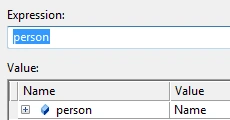
Oops, we got only the “Name” as a string passed to DisplayDebugger in the debugger window; why not instance Name value as “James”. The answer is you got what you passed in to DisplayDebugger.
In order to get the value of Name field / property of the instance, you should pass the field / Property name within curly braces “{Name}”.
- [DebuggerDisplay("{Name}")]
- public class Person
- {
- public string Name;
- public List < Address > AddressList = new List < Address > ();
- }

Another variant from DebuggerDisplay is to call a function to display string value in debugger dialogue window.
[DebuggerDisplay("Display String value is {DisplayString()}")].
Output:
Display String value is [7, 8, 9]
To summarise, the DebuggerDisplay controls how a class or field is displayed in the debugger variable windows. This attribute can be applied to:
- Classes
- Structs
- Delegates
- Enums
- Fields
- Properties
- Assemblies
For more information. Please refer to Microsoft documentation (link below):


Sibeesh VenuTOP 100Posted Nov 27, 2015, 9:38 PM EST
Nice Share
Santhakumar MunuswamyPosted Nov 27, 2015, 8:07 PM EST
Good One
Harshad PansuriyaPosted Nov 27, 2015, 6:08 PM EST
Nice one
Ajay GandhiPosted Nov 26, 2015, 11:14 PM EST
Nice One
Muhammad Aqib ShehzadPosted Nov 26, 2015, 10:47 PM EST
good one
Ankur MistryTOP 100Posted Nov 26, 2015, 10:45 PM EST
Nice Share
Raja TPosted Nov 26, 2015, 10:04 PM EST
Nice,Thanks for sharing
Anu VPosted Nov 26, 2015, 9:42 PM EST
nice article