
Introduction
Sometimes we need to decompile the .dll & .exe files created in C# or VB.NET. There are multiple reasons why we need to compile the .NET .dll & .exe files.
We can decompile it to know the structure of the code or behavior of the class or interface used inside this assembly.
About 2 years ago, my friend came to me and told me that he created a website in ASP.NET with C# and hosted it on a server, but he had deleted the source code accidentally and only had assemblies but no source code. I helped him to decompile the code and somehow hosted the website built from a decompiled source code.
If you are looking for some solution or searching for internal behavior of any .NET class, many times people say that they decompiled the code and say their finding.
To decompile the.NET assembly, we need a decompiler, that’s all. There are a lot of decompilers available in the market.
Some popular decompilers are
- Dotnet IL Editor (DILE)
- dotPeek
- NET CodeReflect
- RedGate Reflector
- telerik JustDecompile
- IL.View
- ILSpy
- ILDasm
And many more decompilers are available in the market.
But I am going to explain only 2 decompilers ILDasm & dotpeek. Because both are very popular and widely used.
What is ILDASM?
The IL Disassembler (Ildasm.exe) is a Microsoft product and an in-built disassembler for .NET, which is automatically installed with Visual Studio.
Open the Developer Command Prompt for Visual Studio 2013 or 2015 & type ILDASM
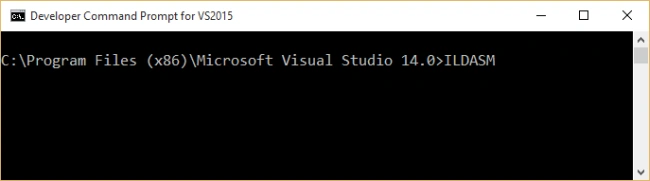
Press enter it will open a new window.
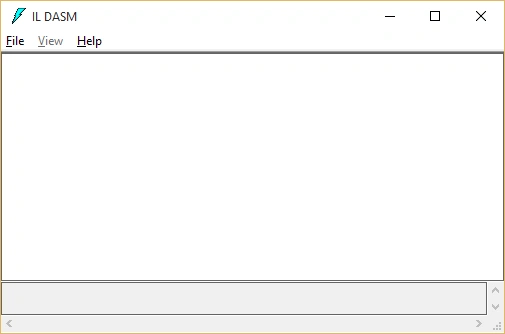
Go to the File menu, open – choose a .dll or .exe file that you want to open. It will load the dll as in the following image.
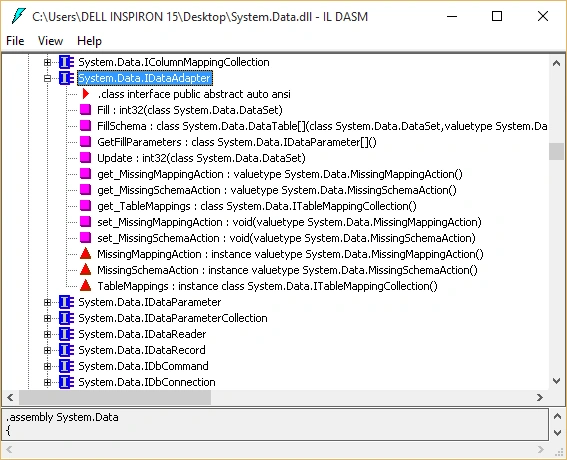
You can expand and explore here for Namespaces, Classes, Interfaces, Value Classes, Enums, Methods, Static methods, Fields, Static fields, Events, Properties, etc.
You can find the complete list of symbols here.
Decompile a DLL using dotPeek
dotPeek is a free-of-charge .NET decompiler and Assembly Browser from JetBrains. Download and install the dotPeek from here.
Open the dotPeek and choose any assembly I have chosen System.Data.dll.

Right-click on and choose – Go to Implementation (Ctrl+F12),
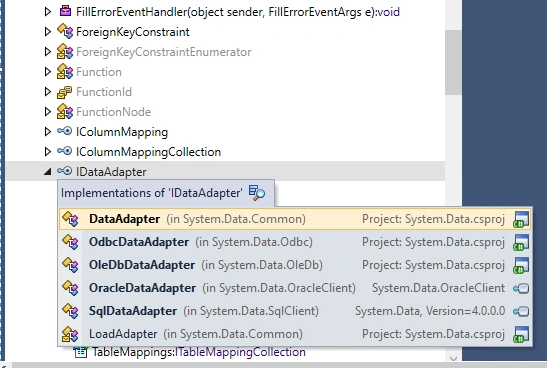
You can also extract the source code from it.
Let’s create a console application. The complete source code of the console application is.
using System;
using System.Collections.Generic;
using System.Linq;
using System.Text;
using System.Threading.Tasks;
namespace ConsoleApplication1
{
    class Program
    {
        static void Main(string[] args)
        {
            int a = 10;
            Console.WriteLine(a.ToString());
            Console.WriteLine("This is source code before decompile....");
        }
    }
}
Open the Console application exe in dotPeek, right-click on it, and choose Export to Project.
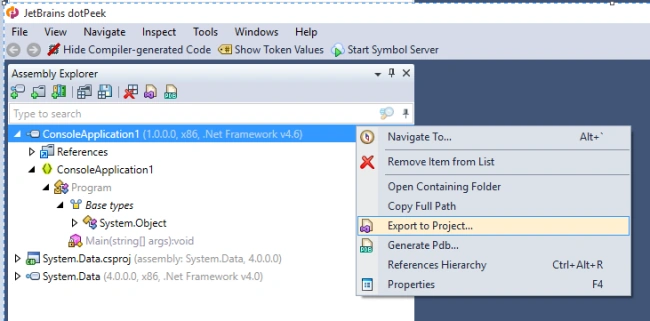
Give a complete path where you want to extract it.
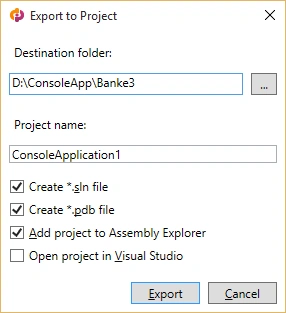
Click on export. The following is the decompiled code.
// Decompiled with JetBrains decompiler
// Type: ConsoleApplication1.Program
// Assembly: ConsoleApplication1, Version=1.0.0.0, Culture=neutral, PublicKeyToken=null
// MVID: E2CA63A0-82BB-4E27-B72C-2F21C6F75931
// Assembly location: D:\DotNetSchoolsBlogExamples\AdaptorDemo\ConsoleApplication1\ConsoleApplication1\bin\Debug\ConsoleApplication1.exe
using System;
namespace ConsoleApplication1
{
    internal class Program
    {
        private static void Main(string[] args)
        {
            Console.WriteLine(10. ToString());
            Console.WriteLine("This is source code before decompile....");
        }
    }
}

Web TransPosted Jun 30, 2021, 1:49 AM EDT
Hello Mr. Narayan, hope you an end my search. Can you de-compile chkdsk.exe (64bit) and make it better? Like say not checking the whole disk, but specific Dir or folder and repair or only delete the sector to prevent BOSD? I think that would help a lot of people with 4-16TB of data ... Maybe you can also find out why it stalls at 11% (even with the latest W10 version in Jun.2020.
Onkar SharmaPosted Apr 3, 2021, 1:01 PM EDT
Thank you, for posting a useful article...
Micah ParkerPosted Nov 3, 2019, 1:24 PM EST
Hi! Do you have any source code..? Meaning, do you know how to decompile a .exe, without installing a third-party program? I want users to be able to decompile with the click of a button :)
Shadow SPosted Jul 31, 2019, 4:52 AM EDT
The was great, but for me it doesn't work. Can you help me with this?
ashok kumarPosted Jun 26, 2018, 3:05 AM EDT
How can we get designer from decompiled code
Banketeshvar NarayanPosted Nov 30, 2015, 10:48 PM EST
Thanks Suman Verma
Suman VermaPosted Nov 30, 2015, 12:48 AM EST
nice one
Banketeshvar NarayanPosted Nov 29, 2015, 9:28 PM EST
Thanks Aishwarya
Aishwarya DPosted Nov 29, 2015, 8:46 PM EST
Nice one
Banketeshvar NarayanPosted Nov 27, 2015, 10:44 PM EST
Thanks Tony Yang
Tony YangPosted Nov 24, 2015, 7:36 PM EST
That's easy
Banketeshvar NarayanPosted Nov 23, 2015, 6:08 AM EST
Thanks Sridhar Sharma
Sridhar SharmaPosted Nov 23, 2015, 5:00 AM EST
Super..Thanks for sharing
Banketeshvar NarayanPosted Nov 20, 2015, 5:15 AM EST
Thanks Santhakumar
Santhakumar MunuswamyPosted Nov 20, 2015, 4:17 AM EST
Good One
Banketeshvar NarayanPosted Nov 18, 2015, 11:30 PM EST
Thanks Mukesh...
Mukesh KumarPosted Nov 18, 2015, 8:59 PM EST
Good Job Banketeshvar Narayan
Banketeshvar NarayanPosted Nov 18, 2015, 8:02 PM EST
Thanks Gul Md Ershad
Former memberPosted Nov 18, 2015, 8:31 AM EST
good
Banketeshvar NarayanPosted Nov 18, 2015, 5:53 AM EST
Thanks Yaduveer
Yaduveer SainiPosted Nov 18, 2015, 4:25 AM EST
Nice Article
Banketeshvar NarayanPosted Nov 18, 2015, 3:13 AM EST
Thanks Sibeesh
Banketeshvar NarayanPosted Nov 18, 2015, 3:12 AM EST
Humayun Kabir Mamun thank you
Sibeesh VenuTOP 100Posted Nov 18, 2015, 2:27 AM EST
Nice Share
Humayun Kabir MamunPosted Nov 18, 2015, 12:13 AM EST
Nice...
Banketeshvar NarayanPosted Nov 17, 2015, 10:03 PM EST
Thanks Aishwarya
Banketeshvar NarayanPosted Nov 17, 2015, 10:03 PM EST
Thanks Suman
Banketeshvar NarayanPosted Nov 17, 2015, 10:03 PM EST
Thanks Harshad
Aishwarya DPosted Nov 17, 2015, 9:36 PM EST
nice one
Suman VermaPosted Nov 17, 2015, 9:25 PM EST
Nice article..Thanks for sharing
Harshad PansuriyaPosted Nov 17, 2015, 9:24 PM EST
Nice one