
In this article we can explore a problem raised by using Note Board web part and the solution for it.
Note Board Web Part
Note Board web part can be associated with any page. The web part allows comments to be typed by the user.
The Problem
Problem arises when a deleted page is recreated with same name; the old comments also got restored. For generating the problem:
- Create a wiki page
- Add some comments against it
- Delete the wiki page
- Recreate new wiki page with same name
- You can see the comments appearing back

Solution
The internal class name for Note Board web part is SocialCommentWebPart. SharePoint store the comment information in Social database along with the page URL.
We need to delete the comment from the database. For this we have to use the SocialCommentManager class. Another challenge is there is no public method to delete the comments. We have to use reflection to call the private method.
Code
Following is the code which performs the same. You need to input the URL and a reference site object.
- public static bool DeleteComments(SPSite site, string url)
- {
- bool result = true;
- SPServiceContext serviceContext = SPServiceContext.GetContext(site);
- SocialCommentManager manager = new SocialCommentManager(serviceContext);
- SocialComment[] comments = manager.GetComments(new Uri(url), 1000);
- foreach (SocialComment sc in comments)
- {
- try
- {
- PropertyInfo propertyInfo = typeof(SocialComment).GetProperty("CommentID", BindingFlags.NonPublic | BindingFlags.Instance);
- object o = propertyInfo.GetValue(sc, null);
- if (o != null)
- {
- Type t = manager.GetType();
- MethodInfo mi = typeof(SocialCommentManager).GetMethod("DeleteComment",
BindingFlags.NonPublic | BindingFlags.Instance, - null,
- new Type[] { typeof(long) },
- null);
- long id = Convert.ToInt64(o.ToString());
- mi.Invoke(manager, new object[] { id });
- }
- }
- catch
- {
- result = false;
- }
- }
- return result;
- }
References
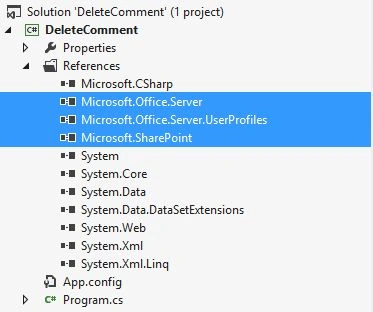
You need to refer the following assemblies:
Running the Code
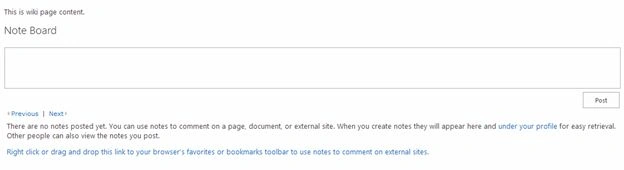
After running the code I can see the comments are deleted for the given URL.
Note
You can connect the deletion code to a custom event handler for your list/library.
References
http://bit.ly/1rVoo1Z
Summary
In this article we have explored how to delete the comments of a Note Board web part. Please see the console application code attached.


Gowtham RajamanickamTOP 100Posted Aug 7, 2015, 1:52 AM EDT
can anyone having idea ,how to retriv ethe noteboard comments uisng client side(javascript,jquery).?
Kaviya BalasubramanianPosted Sep 23, 2014, 9:21 PM EDT
Hi Prahasam .. I want to use newsfeed webpart in sharepoint hosted app
Prasham SabadraPosted Sep 21, 2014, 11:37 PM EDT
Hi Kaviya, Please share more details what you want to use. Thanks!
Kaviya BalasubramanianPosted Sep 21, 2014, 8:56 PM EDT
Sure Thanks Prahasam. Could pls also tell how to use the News Feed in Share Point Hosted app?
Prasham SabadraPosted Sep 19, 2014, 4:58 AM EDT
Hi I have added blog on this http://www.c-sharpcorner.com/Blogs/46386/getting-comment-count-based-on-url.aspx please have a look once. May be it helps.
Prasham SabadraPosted Sep 18, 2014, 11:20 PM EDT
Hi, is it possible to share details, how are you calling the rest service. Thanks!
Kaviya BalasubramanianPosted Sep 18, 2014, 10:36 PM EDT
thanks jean..but i am getting internal server error in SharePoint Hosted App
Jean PaulTOP 100Posted Sep 18, 2014, 7:54 AM EDT
Kaviya, In the above URL provided by Prasham there is a CountCommentsOnUrl() method which should provide your purpose.
Kaviya BalasubramanianPosted Sep 17, 2014, 9:02 PM EDT
Hi Jean, Could please give some idea about how to get number of comments in note board web part in SharePoint Hosted app?
Jean PaulTOP 100Posted Sep 17, 2014, 3:54 AM EDT
Thank You for sharing Prasham.
Prasham SabadraPosted Sep 17, 2014, 3:38 AM EDT
Hi Jean, there is one more possible way is to use Rest Service - http://server/_vti_bin/socialdataservice.asmx?op=DeleteComment, this Deletecomment API requires two parameters URL and last modified time. We can give time of very before the site created.
Jean PaulTOP 100Posted Aug 27, 2014, 6:00 AM EDT
Thank You Kaviya! :)
Kaviya BalasubramanianPosted Aug 27, 2014, 5:42 AM EDT
Nice Article Jean :)
Jean PaulTOP 100Posted Aug 23, 2014, 5:39 PM EDT
Thank you Dear Lakshmanan! :)
Lakshmanan Sethu SankaranarayanPosted Aug 20, 2014, 9:29 PM EDT
Good one Jean :)
Jean PaulTOP 100Posted Aug 20, 2014, 5:44 PM EDT
Thank You dear Vijai! :)
Vijai Anand RamalingamTOP 10Posted Aug 20, 2014, 5:43 PM EDT
Nice article!!!
Jean PaulTOP 100Posted Aug 20, 2014, 5:39 PM EDT
Thank You Mahesh! I changed the headings styles.. :)
Mahesh ChandTOP 10Posted Aug 20, 2014, 2:16 PM EDT
Very nice, Jean. Liked the headings :)