
Background
When you upgrade your operating system from Windows 7 to Windows 8 8.1 or 10 then you can find an additional folder in your C drive called Windows.old. This folder is nothing but just backup of your old operating system software. In case if you do not like the updated version, then you can revert back to old version of operating system. The file size of this folder depends upon how much software you have installed on your OS.

If you want to delete the Windows. old folder then here are the steps.
Step 1. Right-click on c: drive and click on property.
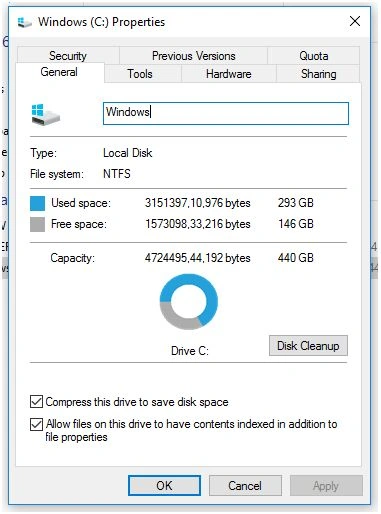
If you are using Windows 10, then you can type free up disc space and enter.
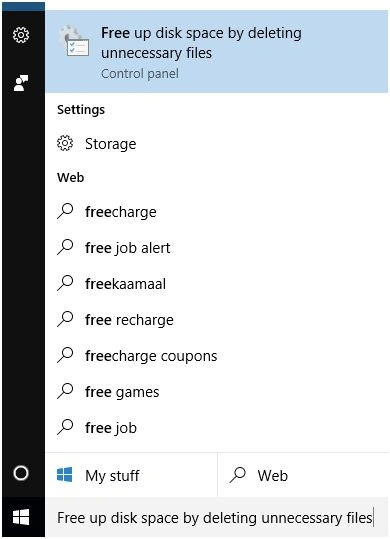
Click on this.
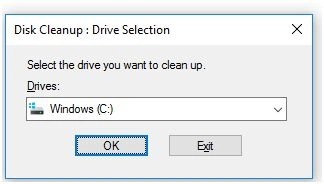
Click on OK.
Step 2. Click on Disk Cleanup
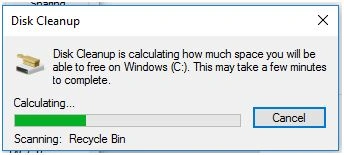
Step 3. Click OK.
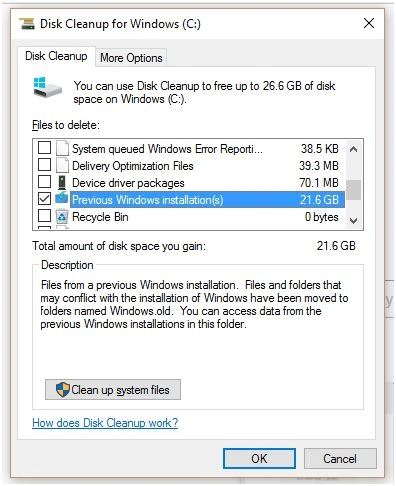
Step 4. Click on Clean up system files
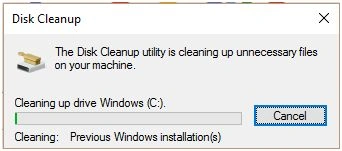
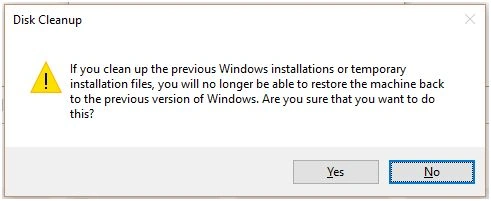
Step 5. Click Yes.
I hope this is helpful.


Santhakumar MunuswamyPosted Jan 5, 2016, 5:53 PM EST
Thanks for nice article
Debasis SahaTOP 100Posted Jan 4, 2016, 11:58 PM EST
Good one..
Humayun Kabir MamunPosted Jan 4, 2016, 10:48 PM EST
Nice...
Arul RPosted Jan 4, 2016, 9:36 PM EST
Nice share!
Nilesh JadavPosted Jan 4, 2016, 8:58 PM EST
This is great sir !1
Yashwant VishwakarmaPosted Jan 4, 2016, 8:52 PM EST
Great article , thanks for sharing !!
Ankit BansalPosted Jan 4, 2016, 8:44 PM EST
nice..