
Introduction
Hi everyone, welcome back to a new article.
In the last article on bubbling events, we learned everything about bubbling events, and now you're telling me there is one more type of event: tunneling? No worries, tunneling events are exactly the opposite of bubbling events.
- Bubbling is a Bottom-Up approach. (i.e. From control which fires the event to the topmost control in the live-visual tree.) For example, from button to Window/UserControl. Where tunneling is a Top-Down approach. i.e. From the topmost control to the control which fires the event. For example, from Window/UserControl to the button.
- How do we differentiate in XAML: every tunneling event is prefixed by the preview keyword. Bubbling: MouseDoubleClick, Tunneling: PreviewMouseDoubleClick
This theory may be a bit confusing, but it will be clear once we understand the code execution flow. Go ahead and create a new WPF project. Here is what we are going to do:
- Add one label
- Add an Outer Button named OuterButton
- Add an Inner Button inside an Outer button named InnerButton.
This is how your MainWindow.xaml looks for tunneling events:
- <Window x:Class="A.MainWindow"
- xmlns="http://schemas.microsoft.com/winfx/2006/xaml/presentation"
- xmlns:x="http://schemas.microsoft.com/winfx/2006/xaml"
- xmlns:d="http://schemas.microsoft.com/expression/blend/2008"
- xmlns:mc="http://schemas.openxmlformats.org/markup-compatibility/2006"
- xmlns:local="clr-namespace:A"
- mc:Ignorable="d"
- Title="MainWindow" Height="450" Width="800">
- <Grid>
- <Label x:Name="LabelDisplay" HorizontalAlignment="Center" VerticalAlignment="Bottom"/>
- <Button x:Name="OuterButton"
- Height="70"
- Width="350"
- PreviewMouseDoubleClick="OuterButton_Click">
- <Button x:Name="InnerButton"
- Content="Inner Button"
- Height="35"
- Width="175"
- PreviewMouseDoubleClick="InnerButton_Click" >
- </Button>
- </Button>
- </Grid>
- </Window>
Pretty good - Now MainWindow.xaml.cs:
- using System.Windows;
- namespace A
- {
- /// <summary>
- /// Interaction logic for MainWindow.xaml
- /// </summary>
- public partial class MainWindow : Window
- {
- public MainWindow()
- {
- InitializeComponent();
- }
- private void OuterButton_Click(object sender, RoutedEventArgs e)
- {
- LabelDisplay.Content += "OuterButton Cliked, ";
- }
- private void InnerButton_Click(object sender, RoutedEventArgs e)
- {
- LabelDisplay.Content += "InnerButton Cliked";
- }
- }
- }
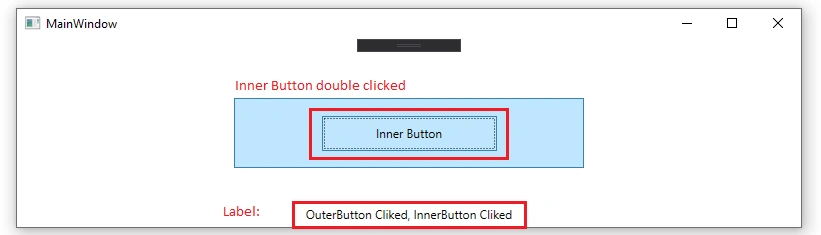
Explanation
When the user double-clicked on the Inner button, what happens first it goes to the OuterButton_Click event, as its following Top-Down approach and OuterButton is the parent of InnerButton. After successfully executing that event, it goes to the InnerButton_Click event and executes that event.
Now let's see how it would look like in a bubbling event:
Just remove the keyword preview in Xaml:
- <Window x:Class="A.MainWindow"
- xmlns="http://schemas.microsoft.com/winfx/2006/xaml/presentation"
- xmlns:x="http://schemas.microsoft.com/winfx/2006/xaml"
- xmlns:d="http://schemas.microsoft.com/expression/blend/2008"
- xmlns:mc="http://schemas.openxmlformats.org/markup-compatibility/2006"
- xmlns:local="clr-namespace:A"
- mc:Ignorable="d"
- Title="MainWindow" Height="450" Width="800">
- <Grid>
- <Label x:Name="LabelDisplay" HorizontalAlignment="Center" VerticalAlignment="Bottom"/>
- <Button x:Name="OuterButton"
- Height="70"
- Width="350"
- MouseDoubleClick="OuterButton_Click">
- <Button x:Name="InnerButton"
- Content="Inner Button"
- Height="35"
- Width="175"
- MouseDoubleClick="InnerButton_Click" >
- </Button>
- </Button>
- </Grid>
- </Window>
Now run the project:
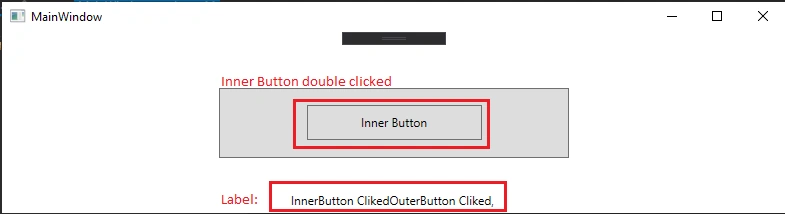
Explanation
Now, as we are following the bubbling event, it follows a Bottom-Up approach. So here, InnerButton_Click event comes first in the bottom so it executes that event first then it moves up in the hierarchy and found OuterButton_Click event and executes that event.
You can do a lot with routing events. executes multiple this at once or combine 2 events together.
I hope you explore WPF to its full potential.
If you have any queries, you can find me at:
Thank you, and Happy Coding!

Join the conversation! Your thoughts help the community grow.