
Introduction
In this article we will learn about some SQL functions Row_Number() ,Rank(), and Dense_Rank() and the difference between them.
Creating a table in SQL Server
Here I have an Employe table, the following is the sample data for the Employe Table.
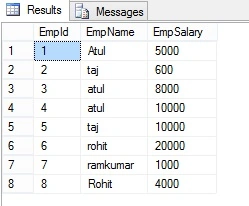
ROW_NUMBER() Function without Partition By clause
Row_number plays a very important role in SQL server. Row_Number function can help to perform more complex ordering of row in the report format that allow the over clause in SQL standard.
Syntax
ROW_NUMBER () OVER ([PARTITION BY value_exp, ... [ n ]] ORDER BY_clause)
Here we will play with the above Employe table. Let's see how we can use Row_Number() function.
Over specified the order of the row and Order by sort order for the record. By default order by sort in ascending order.
Example
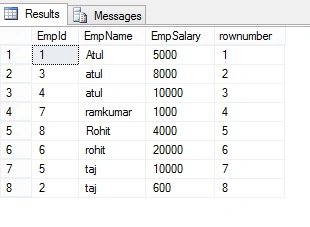
- select *, ROW_NUMBER() over(order by EmpName) as rownumber from Employe
The following is the output of the above query.
ROW_NUMBER() Function with Partition By clause
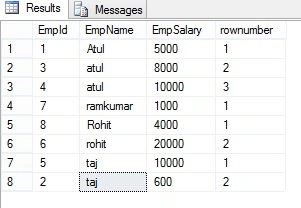
If we want to add row number to each group, and it is reset for every group, let's take a look at the Employe table
Example
- Select *, ROW_NUMBER() over(partition by Empname order by Empname ) as rownumber from Employe
The following is the OUTPUT of the above query
Rank() Function in SQL Server
This function will assign a unique value to each distinct Row, but it leaves a group between the groups.
Example
- SELECT EmpName, EmpSalary ,rank() over(order by EmpName) as rankID from Employe
The following is the OUTPUT of the above query.
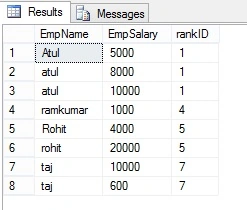
Gap represents number of occurrence example - EmpName="atul" is repeated 3 times and has rank "1", the next rank will be 1+3=4 and same with the next value.
Dense_Rank() Function in SQL Server
Dense_Rank() Function is similar to Rank with only difference, this will not leave gaps between groups.
Example
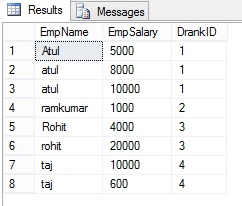
- SELECT EmpName ,EmpSalary ,DENSE_RANK() over(order by EmpName) as DrankID from Employe
The following is the OUTPUT of the above query:
Summary
In this article we learned Row_Number() ,Rank(), and Dense_Rank() in SQL Server.


Dharamvir SinghPosted Oct 21, 2020, 11:31 AM EDT
Nicely explain.. thanks
Samiran DeyPosted Feb 10, 2020, 1:30 AM EST
Really good explanation...Thanks
Sachin KaliaPosted Jul 4, 2018, 9:19 PM EDT
Its really simple and ease to udnerstand the concept .majorly while you are giving an interview this is one the FAQ..Thanks Atul Ji
Prakash ChasiyaPosted Jun 22, 2018, 4:00 AM EDT
Nice........
Shamim AnsariPosted Jan 29, 2018, 7:34 PM EST
WITH CTE AS( select *,ROW_NUMBER() over(partition by Designation order by salary desc) as RN from Employee ) SELECT EmpName, Salary,Designation FROM CTE WHERE RN < 3
Shyamsunder KashyapPosted Dec 14, 2017, 8:57 PM EST
Nice explanation in so easy way.........Thanks
charu upadhyayPosted Sep 14, 2017, 1:29 AM EDT
Very easily explained
SubashPosted Aug 20, 2016, 11:09 PM EDT
Good xplanation
Upendra Pratap ShahiPosted Oct 29, 2015, 12:56 AM EDT
nice one...
Humayun Kabir MamunPosted Sep 29, 2015, 3:18 AM EDT
Nice...
Nilesh JadavPosted Sep 28, 2015, 8:25 PM EDT
Great Article
Shridhar SharmaPosted Sep 28, 2015, 11:06 AM EDT
nice post Atul
Santhakumar MunuswamyPosted Sep 28, 2015, 10:05 AM EDT
Good one
Sujeet SumanPosted Sep 28, 2015, 6:35 AM EDT
Nice Article.............
Pankaj Kumar ChoudharyTOP 100Posted Sep 28, 2015, 5:35 AM EDT
Nice Explain Atul Sir....... Why you left Ntile function it will be better if you also provided information about NTile function.......
Muhammad Aqib ShehzadPosted Sep 28, 2015, 1:58 AM EDT
fantastic approach used for better understanding. thanks for sharing.
Sibeesh VenuTOP 100Posted Sep 28, 2015, 1:42 AM EDT
Nice Share
Vipul MalhotraPosted Sep 28, 2015, 1:08 AM EDT
nice share
Priyaranjan K STOP 100Posted Sep 28, 2015, 12:43 AM EDT
Good One .
RakeshPosted Sep 28, 2015, 12:41 AM EDT
Good Information share
Harshad PansuriyaPosted Sep 28, 2015, 12:18 AM EDT
Nice One