
In this article we will be seeing how to change the document id provider from
default to custom and vice-versa.
I have created a class library which is inherited from
Microsoft.Office.Document.DocumentIDProvider for implementing the custom
document id provider.
Create a class library for implementing custom document id provider:
- Open Visual Studio 2010.
- Go to File=> New =>Project.
- Select Class Library template from the installed templates.
- Enter the name and click on Ok.
- Add the following references.
- Microsoft.SharePoint.dll
- Microsoft.Office.DocumentManagement.dll
- Add the following namespaces.
- Using Microsoft.SharePoint;
- Using Microsoft.Office.DocumentManagement;
- Replace the code with the following
using System;
using System.Collections.Generic;
using System.Linq;
using System.Text;
using Microsoft.SharePoint;
using Microsoft.Office.DocumentManagement;namespace anavijai.DocumentIDProvider
{
public class CustomDocumentIDProvider : Microsoft.Office.DocumentManagement.DocumentIdProvider
{
private string idFormat = "{0} - {1}- {2}";public override string[] GetDocumentUrlsById(SPSite site, string documentId)
{
string itemUrl = string.Empty;
// Only proceed if we have the site and document id
if (site != null && !string.IsNullOrEmpty(documentId))
{
string[] splits = documentId.Split('@', ' ');
string webName = splits.Length > 0 ? splits[0] : null;
string itemId = splits.Length > 1 ? splits[1] : null;
try
{
SPWeb web = string.IsNullOrEmpty(webName) ? site.OpenWeb() : site.OpenWeb(webName);
SPListItem item = null;
Guid itemGuid = new Guid(itemId);
// Find the item among the lists on the specified web
foreach (SPList list in web.Lists)
{
try
{
item = list.Items[itemGuid];
}
catch
{
//if it's not in this list, go to the next one
continue;
}
if (item != null)
{
itemUrl = web.Url + "/";
itemUrl += item.Url;
}
}
}
catch (Exception) { /* item not found, return an empty array*/ }
}if (string.IsNullOrEmpty(itemUrl))
{
return null;
}
else
{
return new string[] { itemUrl };
}
}public override string GenerateDocumentId(SPListItem listItem)
{
if (listItem == null)
{
throw new ArgumentNullException("listItem");
}
return string.Format(this.idFormat, listItem.ParentList.Title, listItem.Web.Title, listItem.ID.ToString());
}public override string GetSampleDocumentIdText(SPSite site)
{
return string.Format(this.idFormat, "/", "0");
}public override bool DoCustomSearchBeforeDefaultSearch
{
get { return false; }
}
}
}
- The solution looks like the following
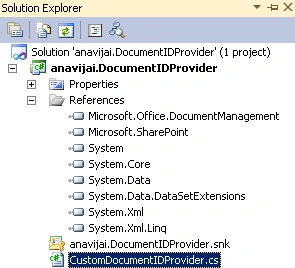
Create a windows form to change the document id provider:
- Open Visual Studio 2010.
- Go to File=> New =>Project.
- Select Windows Forms Application template from the installed templates.
- Enter the name as DocumentID and click on Ok.
- Add the following references.
o Microsoft.SharePoint.dll
o Microsoft.Office.DocumentManagement.dll
o Anavijai.DocumentIDProvider.dll
- Add the following namespaces.
o Using Microsoft.SharePoint;
o Using Microsoft.Office.DocumentManagement;
o Using anavijai.DocumentIDProvider
- DocumentID.cs[Design] looks like the
following
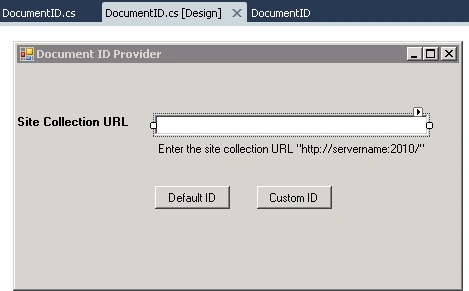
- Button click events:

- The entire solution looks like the
following
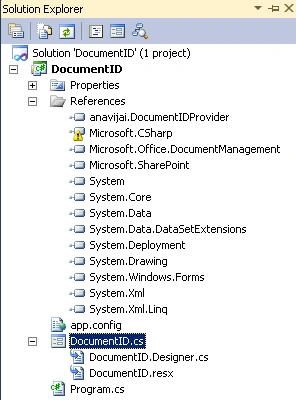
- Build the solution and Hit F5.
- Enter the site collection URL in the form
where you want to change the document ID.
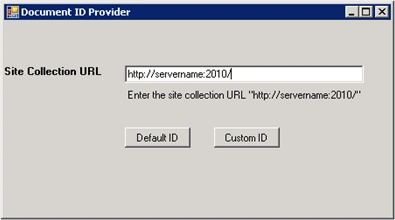
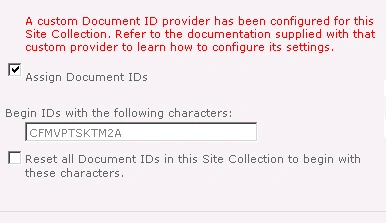
- Click on Custom ID.
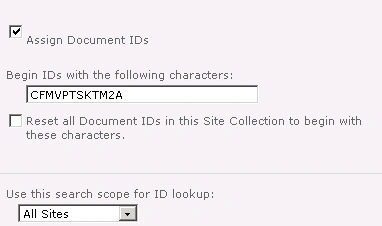
- Click on Default ID.

Join the conversation! Your thoughts help the community grow.