
What is Curl?
Curl is a command line utility to transfer data from or to a server designed to work without user interaction. With Curl, you can download or upload data or files using one of the supported protocols including HTTP, HTTPS, SCP, SFTP, and FTP. Curl provides a number of options allowing you to resume transfers, limit the bandwidth, proxy support, user authentication and much more.
Example

Cause
SharePoint Online uses claims-based authentication and direct NTLM based Curl commands are not allowed.
Resolution
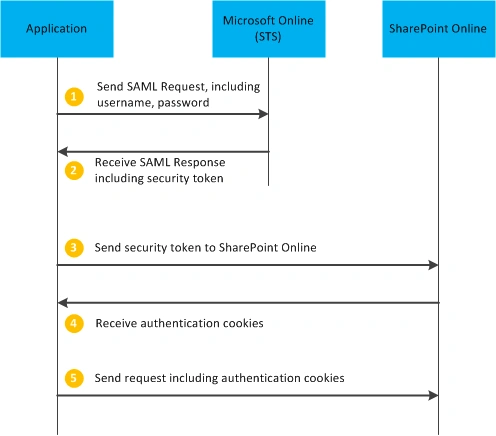
SPOL allows remote applications to call the REST API with user impersonation. This article demonstrates how to access SPOL REST API and download the files from a tenant using Apple Bash Script and Curl commands. However, outside of .NET the authentication piece is not so straightforward. App authentication solves this issue for registered apps but in this document you will see how remote user authentication can be achieved, regardless of platform.
The below diagram illustrates the HTTP requests which need to be made in order to authenticate SharePoint Online.
Applies To
Office 365 Tenant connected with Active Directory Federated Service(ADFS) and MAC OS
Execution Steps
- Download the BashSPOLFileDownload.sh file from here.
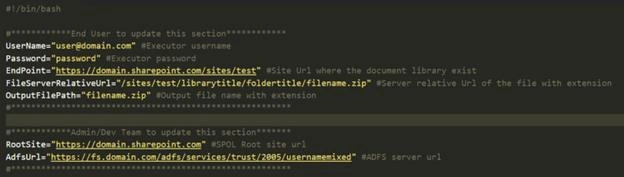
- Open BashSPOLFileDownload.sh file in a text editor(TextWrangler/TextMate) and update the UserName (Line #4) and Password (Line #5).
Note
The username & password provided should have access to download the file from SharePoint Online.
- To download the file from a different SharePoint Online site/library/folder/file where the account has access, change the values of EndPoint(Line #6) and FileServerRelativeUrl(Line #7) values.
- Save the BashSPOLFileDownload.sh file
- Open Terminal (command line tool) and go to the path where BashSPOLFileDownload.sh file is saved
- Execute the following command to convert the BashSPOLFileDownload.sh file executable chmod 700 BashSPOLFileDownload.sh
- Run the script using just the name of the script(Example : ./ BashSPOLFileDownload.sh)
- If all goes well, you should be able to see the downloaded file in the output path given in OutputFilePath(Line #9).
Failure Chances
- Username and Password provided might be wrong
- Access denied from SharePoint Online for the UserName and Password provided
- Provided Site/Document Library/Folder/File is not available in SharePoint Online or wrong
- Text Editor might have changed or corrupted the BashSPOLFileDownload.sh file while saving
I hope you will find this information useful. Please let me know if you have any questions.


Otto FitPosted Jun 15, 2020, 5:09 AM EDT
Any insights on how to download externally shared files from SharePoint online, for URL protected with a password?
Muthu KumarPosted Feb 13, 2019, 6:17 PM EST
Nice Article..
Muthu KumarPosted Feb 13, 2019, 6:16 PM EST
Nice one. Thanks for sharing... Keep doing well...