
Introduction
Today we will learn how to create a drag-able legend and maintain that position in the chart area, so that once we drag and drop the legend, even if we reload the chart again, it will take the legend position from the session storage, where we have set the values when dropping the legend. Cool, right?
Please see this article in my blog
Background
For the past few weeks I have been working in Charts, so a few days ago I got a requirement to make a drag-able legend and maintain the position. As you all know, everyone expects the best from their products, so I began working to satisfy my client by giving them all the feasible options in the chart. Once I was done with that it was good.
Load the required files
To start, we must load some files, you can determine the files below.
- <script src="Scripts/jquery-1.11.1.min.js"></script>
- <script src="Scripts/highcharts.js"></script>
- <script src="Scripts/highcharts-more.js"></script>
- <script src="Scripts/draggable-legend.js"></script>
Now we need some UI elements to load the chart and show the drag and drop position. We will show the position values while the user drags and drops the legend so that it looks more active.
- <div id="container" >"min-width: 310px; height: 400px; margin: 0 auto"></div>
- Legend X: <input id="txtLegendX" type="number" /> <br />
- Legend X: <input id="txtLegendY" type="number" />
The next step we need is to set the options for the chart. Please find the following settings.
- var options = {
- title: {
- text: 'Worked hours in a week'
- },
- xAxis: {
- categories: ['Developing', 'Maitenance', 'Marketing', 'Business', 'Admin']
- },
- series: [{
- type: 'column',
- name: 'Monday',
- data: [3, 2, 1, 3, 4]
- }, {
- type: 'column',
- name: 'Tuesday',
- data: [2, 3, 5, 7, 6]
- }, {
- type: 'column',
- name: 'Wednesday',
- data: [4, 3, 3, 9, 0]
- }, {
- type: 'column',
- name: 'Thursday',
- data: [4, 3, 3, 9, 0]
- }, {
- type: 'column',
- name: 'Friday',
- data: [4, 3, 3, 9, 0]
- }, {
- type: 'spline',
- name: 'Thursday',
- data: [3, 2.67, 3, 6.33, 3.33],
- marker: {
- lineWidth: 2,
- lineColor: Highcharts.getOptions().colors[3],
- fillColor: 'white'
- }
- }],
- legend: {
- enabled: true,
- layout: 'vertical',
- backgroundColor: 'white',
- align: 'left',
- verticalAlign: 'top',
- y: 50,
- x: 50,
- borderWidth: 1,
- borderRadius: 0,
- title: {
- text: '::Drag Me'
- },
- floating: true,
- draggable: true,
- zIndex: 20
- }
- };
- floating: true,
- draggable: true,
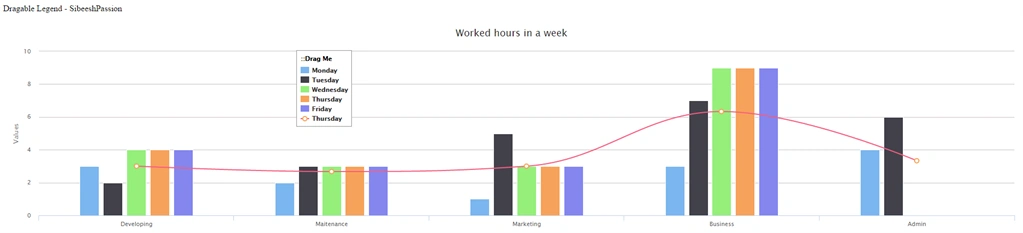
So our application is working fine, isn't it?
Changes in draggable-legend.js
To continue with the process, we must make some changes in the draggable-legend.js. You can see the changes below. If you download the source code attached, you can see the changes by default.
- addEvent(chart.container, 'mousemove', function (e) {
- });
- $("#txtLegendX").val(options.x);
- $("#txtLegendY").val(options.y);
- sessionStorage.setItem("legendx", options.x);
- sessionStorage.setItem("legendy", options.y);
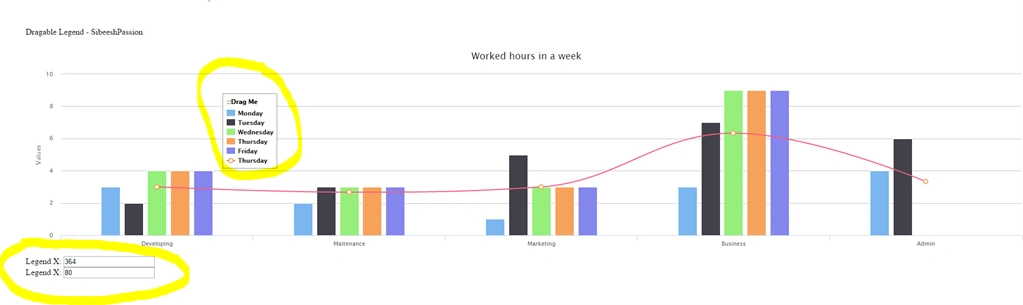
Now if you drag and drop the legend somewhere else, you can see that the values specified in the text boxes have changed.
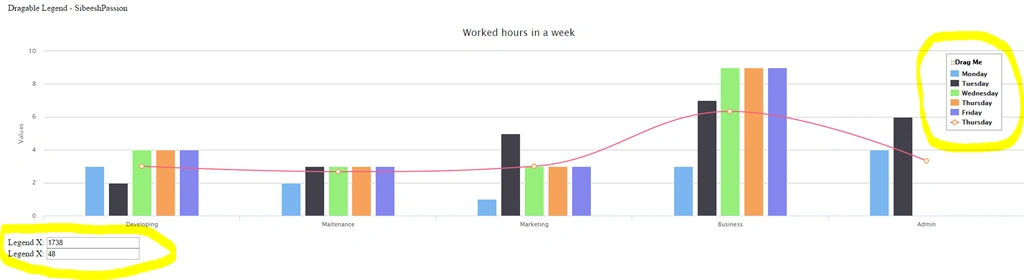
No, we will check whether the values are updated to the session storage in the browser console.
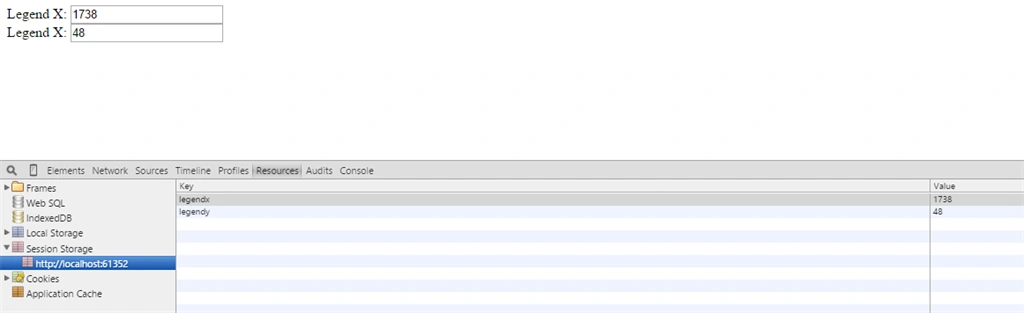
Cool, it is updated, we are happy.
Now we need to retain this position even if the user reloads the chart, right? Normally what happens is, the chart will be loaded with the initial settings we have set in the option.
Maintain the legend position
To maintain the legend position, we must apply the legend position to the chart, we can take the values from the session storage where we already set the values.
- if (sessionStorage.getItem("legendx") != null && typeof sessionStorage.getItem("legendx") != 'undefined' && sessionStorage.getItem("legendy") != null && typeof sessionStorage.getItem("legendy") != 'undefined') {
- options.legend.x = parseInt(sessionStorage.getItem("legendx"));
- options.legend.y = parseInt(sessionStorage.getItem("legendy"));
- $("#txtLegendX").val(sessionStorage.getItem("legendx"));
- $("#txtLegendY").val(sessionStorage.getItem("legendy"));
- }
- $('#container').highcharts(options);
Complete code
- <!DOCTYPE html>
- <html xmlns="http://www.w3.org/1999/xhtml">
- <head>
- <title>Dragable Legend - SibeeshPassion</title>
- <script src="Scripts/jquery-1.11.1.min.js"></script>
- <script src="Scripts/highcharts.js"></script>
- <script src="Scripts/highcharts-more.js"></script>
- <script src="Scripts/draggable-legend.js"></script>
- <script>
- $(function () {
- var options = {
- title: {
- text: 'Worked hours in a week'
- },
- xAxis: {
- categories: ['Developing', 'Maitenance', 'Marketing', 'Business', 'Admin']
- },
- series: [{
- type: 'column',
- name: 'Monday',
- data: [3, 2, 1, 3, 4]
- }, {
- type: 'column',
- name: 'Tuesday',
- data: [2, 3, 5, 7, 6]
- }, {
- type: 'column',
- name: 'Wednesday',
- data: [4, 3, 3, 9, 0]
- }, {
- type: 'column',
- name: 'Thursday',
- data: [4, 3, 3, 9, 0]
- }, {
- type: 'column',
- name: 'Friday',
- data: [4, 3, 3, 9, 0]
- }, {
- type: 'spline',
- name: 'Thursday',
- data: [3, 2.67, 3, 6.33, 3.33],
- marker: {
- lineWidth: 2,
- lineColor: Highcharts.getOptions().colors[3],
- fillColor: 'white'
- }
- }],
- legend: {
- enabled: true,
- layout: 'vertical',
- backgroundColor: 'white',
- align: 'left',
- verticalAlign: 'top',
- y: 50,
- x: 50,
- borderWidth: 1,
- borderRadius: 0,
- title: {
- text: '::Drag Me'
- },
- floating: true,
- draggable: true,
- zIndex: 20
- }
- };
- if (sessionStorage.getItem("legendx") != null && typeof sessionStorage.getItem("legendx") != 'undefined' && sessionStorage.getItem("legendy") != null && typeof sessionStorage.getItem("legendy") != 'undefined') {
- options.legend.x = parseInt(sessionStorage.getItem("legendx"));
- options.legend.y = parseInt(sessionStorage.getItem("legendy"));
- $("#txtLegendX").val(sessionStorage.getItem("legendx"));
- $("#txtLegendY").val(sessionStorage.getItem("legendy"));
- }
- $('#container').highcharts(options);
- });
- </script>
- </head>
- <body>
- Dragable Legend - SibeeshPassion
- <br />
- <br />
- <div id="container" s>"min-width: 310px; height: 400px; margin: 0 auto"></div>
- Legend X: <input id="txtLegendX" type="number" /> <br />
- Legend X: <input id="txtLegendY" type="number" />
- </body>
- </html>
Conclusion
I hope you liked this article. Please provide your valuable suggestions. It matters a lot. Please download the source code to determine more.
Points of interest
Legend, Chart, Drag legend, Drop legend, Drag and drop legend in chart.


Abhishek JaiswalPosted Aug 13, 2015, 9:37 AM EDT
Interesting, thanks for sharing! :)
Sibeesh VenuTOP 100Posted Aug 12, 2015, 11:33 PM EDT
Nilesh Jadav Thank you :)
Sibeesh VenuTOP 100Posted Aug 12, 2015, 11:33 PM EDT
Shridhar Sharma Thank you :)
Sibeesh VenuTOP 100Posted Aug 12, 2015, 11:33 PM EDT
Debasis Saha Thank you :)
Sibeesh VenuTOP 100Posted Aug 12, 2015, 11:33 PM EDT
Chervine Bhiwoo Thank you :)
Sibeesh VenuTOP 100Posted Aug 12, 2015, 11:33 PM EDT
Ankit Bansal Thank you :)
Nilesh JadavPosted Aug 12, 2015, 11:04 PM EDT
100th article sir :) keep it up
Shridhar SharmaPosted Aug 12, 2015, 3:11 PM EDT
nice article.
Debasis SahaTOP 100Posted Aug 12, 2015, 11:16 AM EDT
nice one..
Chervine BhiwooPosted Aug 12, 2015, 6:55 AM EDT
Good job!
Ankit BansalPosted Aug 12, 2015, 4:53 AM EDT
good one..
Sibeesh VenuTOP 100Posted Aug 12, 2015, 4:12 AM EDT
Jaipal Reddy Thanks dude
Sibeesh VenuTOP 100Posted Aug 12, 2015, 4:12 AM EDT
Gopi Chand Thanks buddy
Sibeesh VenuTOP 100Posted Aug 12, 2015, 4:12 AM EDT
Vaikesh K P Thank you
Jaipal ReddyPosted Aug 12, 2015, 4:02 AM EDT
good one sir
Gopi ChandPosted Aug 12, 2015, 3:39 AM EDT
Great work done by you...:)
Vaikesh K PPosted Aug 12, 2015, 2:59 AM EDT
Good article
Sibeesh VenuTOP 100Posted Aug 12, 2015, 2:01 AM EDT
Rajeesh Menoth Thank you so much
Rajeesh MenothPosted Aug 12, 2015, 1:55 AM EDT
NIce one
Sibeesh VenuTOP 100Posted Aug 12, 2015, 1:40 AM EDT
Karthikeyan K Thank you
Karthikeyan KPosted Aug 12, 2015, 1:31 AM EDT
Good one sir..Thanks for sharing
Sibeesh VenuTOP 100Posted May 14, 2015, 4:57 AM EDT
Santhakumar Munuswamy Thank you so much
Santhakumar MunuswamyPosted May 13, 2015, 12:24 PM EDT
keep it up...
Santhakumar MunuswamyPosted May 13, 2015, 12:23 PM EDT
Thanks for nice article
NitinPosted May 13, 2015, 8:09 AM EDT
nice
Sibeesh VenuTOP 100Posted May 13, 2015, 4:21 AM EDT
Gowtham Rajamanickam thank you
Gowtham RajamanickamTOP 100Posted May 13, 2015, 4:16 AM EDT
good one
Sibeesh VenuTOP 100Posted May 12, 2015, 11:54 PM EDT
Gopi Chand thank you
Gopi ChandPosted May 12, 2015, 11:24 PM EDT
Good presentation along with description.