
Background
I have read many forum posts regarding how to calculate duration between two dates, such as year, months, days and hours but no single post provided the proper solutions so I decided to. So let us start creating a web application as:
- "Start" - "All Programs" - "Microsoft Visual Studio 2010".
- "File" - "New WebSite" - "C#" - "Empty WebSite" (to avoid adding a master page).
- Provide the website a name such as "CalculateDuration"or another as you wish and specify the location.
- Then right-click on Solution Explorer - "Add New Item" - Add Web Form.
- Drag and drop one button and two textBoxes on the <form> section of the Default.aspx page.
- Add Ajax Calender Extender for two text boxes (optional). (If do not want to use a calendar then enter date manually.)
- Now the default.aspx Page source code will look such as follows.
- <%@ Page Language="C#" AutoEventWireup="true" CodeFile="Default.aspx.cs" Inherits="_Default" %>
- <%@ Register Assembly="AjaxControlToolkit" Namespace="AjaxControlToolkit" TagPrefix="asp" %>
- <!DOCTYPE html PUBLIC "-//W3C//DTD XHTML 1.0 Transitional//EN" "http://www.w3.org/TR/xhtml1/DTD/xhtml1-transitional.dtd">
- <html xmlns="http://www.w3.org/1999/xhtml">
- <head runat="server">
- <title></title>
- </head>
- <body style="background-color: #000080">
- <form id="form1" runat="server">
- <asp:ScriptManager ID="ScriptManager1" runat="server">
- </asp:ScriptManager>
- <table style="padding: 30px; color: White; margin-top: 30px">
- <tr>
- <td>
- From Date
- </td>
- <td>
- <asp:TextBox ID="FromYearTxt" runat="server"></asp:TextBox>
- <asp:CalendarExtender ID="FromYearTxt_CalendarExtender" runat="server" Enabled="True"
- TargetControlID="FromYearTxt" Format="dd/MM/yyyy">
- </asp:CalendarExtender>
- </td>
- <td>
- To Date
- </td>
- <td>
- <asp:TextBox ID="ToYearTxt" runat="server"></asp:TextBox>
- <asp:CalendarExtender ID="ToYearTxt_CalendarExtender" runat="server" Enabled="True"
- TargetControlID="ToYearTxt">
- </asp:CalendarExtender>
- </td>
- </tr>
- </table>
- <div style="margin-left: 180px">
- <asp:Button ID="btncalculate" runat="server" Text="Calculate" OnClick="btncalculate_Click" />
- </div>
- <table style="background-color: #0000FF; color: White; padding: 30px; margin-top: 20px;
- margin-left: 15px" id="tblResults" runat="server">
- <tr>
- <td>
- Years
- </td>
- <td id="tdYear" runat="server">
- </td>
- </tr>
- <tr>
- <td>
- Total Months
- </td>
- <td id="tdMonths" runat="server">
- </td>
- </tr>
- <tr>
- <td>
- Total Days
- </td>
- <td id="tdDays" runat="server">
- </td>
- </tr>
- <tr>
- <td>
- Total Hours
- </td>
- <td id="tdHrs" runat="server">
- </td>
- </tr>
- <tr>
- <td>
- Total Minutes
- </td>
- <td id="tdminuts" runat="server">
- </td>
- </tr>
- <tr>
- <td>
- Total Seconds
- </td>
- <td id="tdseconds" runat="server">
- </td>
- </tr>
- <tr>
- <td>
- Total MileSesonds
- </td>
- <td id="tdmileSec" runat="server">
- </td>
- </tr>
- </table>
- </form>
- </body>
- </html>
Now switch to design mode; it will look such as follows.
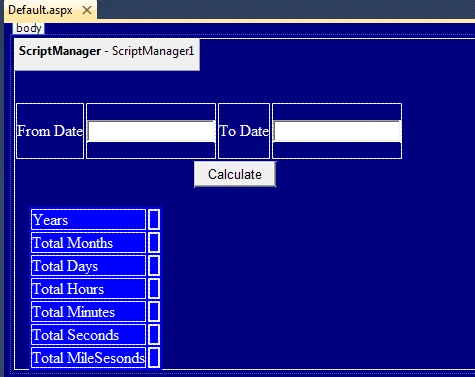
Now open the default.aspx page and add the following code in the calculate button click event.
Read two input TextBox texts and assign them to a DateTime data type variable as in the following:
- //Storing input Dates
- DateTime FromYear = Convert.ToDateTime(FromYearTxt.Text);
- DateTime ToYear = Convert.ToDateTime(ToYearTxt.Text);
- //years
- int Years = ToYear.Year - FromYear.Year;
- //months
- int month = ToYear.Month - FromYear.Month;
- //Total Months
- int TotalMonths = (Years * 12) + month;
- //Creating object of TimeSpan Class
- TimeSpan objTimeSpan = ToYear - FromYear;
- //Total Hours
- double TotalHours = objTimeSpan.TotalHours;
- //Total Minutes
- double TotalMinutes = objTimeSpan.TotalMinutes;
- //Total Seconds
- double TotalSeconds = objTimeSpan.TotalSeconds;
- //Total Mile Seconds
- double TotalMileSeconds = objTimeSpan.TotalMilliseconds;
- //Assining values to td tags
- tdYear.InnerText = Years + " Year " + month + " Months";
- tdMonths.InnerText = Convert.ToString(TotalMonths);
- tdDays.InnerText = Convert.ToString(Days);
- tdHrs.InnerText = Convert.ToString(TotalHours);
- tdminuts.InnerText = Convert.ToString(TotalMinutes);
- tdseconds.InnerText = Convert.ToString(TotalSeconds);
- tdmileSec.InnerText = Convert.ToString(TotalMileSeconds);
Now in default.aspx.cs the entire code will look such as follows:
- using System;
- using System.Collections.Generic;
- using System.Linq;
- using System.Web;
- using System.Web.UI;
- using System.Web.UI.WebControls;
- public partial class _Default : System.Web.UI.Page
- {
- protected void Page_Load(object sender, EventArgs e)
- {
- tblResults.Visible = false;
- }
- protected void btncalculate_Click(object sender, EventArgs e)
- {
- if (FromYearTxt.Text != "" && ToYearTxt.Text != "")
- {
- //Storing input Dates
- DateTime FromYear = Convert.ToDateTime(FromYearTxt.Text);
- DateTime ToYear = Convert.ToDateTime(ToYearTxt.Text);
- //Creating object of TimeSpan Class
- TimeSpan objTimeSpan = ToYear - FromYear;
- //years
- int Years = ToYear.Year - FromYear.Year;
- //months
- int month = ToYear.Month - FromYear.Month;
- //TotalDays
- double Days = Convert.ToDouble(objTimeSpan.TotalDays);
- //Total Months
- int TotalMonths = (Years * 12) + month;
- //Total Hours
- double TotalHours = objTimeSpan.TotalHours;
- //Total Minutes
- double TotalMinutes = objTimeSpan.TotalMinutes;
- //Total Seconds
- double TotalSeconds = objTimeSpan.TotalSeconds;
- //Total Mile Seconds
- double TotalMileSeconds = objTimeSpan.TotalMilliseconds;
- //Assining values to td tags
- tdYear.InnerText = Years + " Year " + month + " Months";
- tdMonths.InnerText = Convert.ToString(TotalMonths);
- tdDays.InnerText = Convert.ToString(Days);
- tdHrs.InnerText = Convert.ToString(TotalHours);
- tdminuts.InnerText = Convert.ToString(TotalMinutes);
- tdseconds.InnerText = Convert.ToString(TotalSeconds);
- tdmileSec.InnerText = Convert.ToString(TotalMileSeconds);
- tblResults.Visible = true;
- }
- }
- }
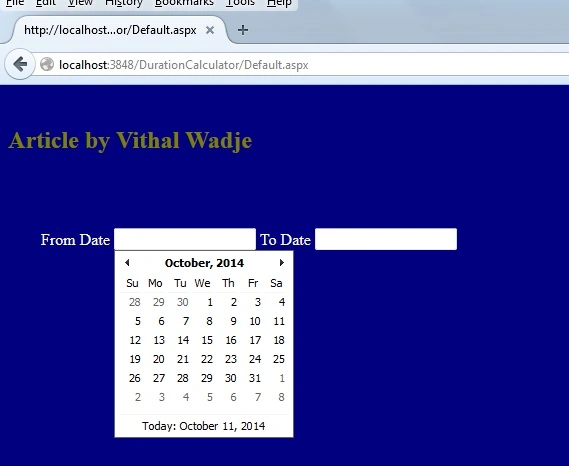
I have entered the following dates:
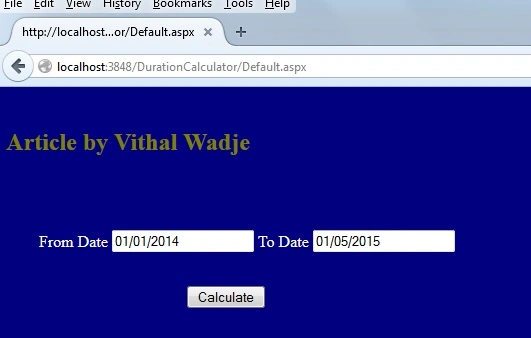
Now click on the Calculate button. It will display the following output:
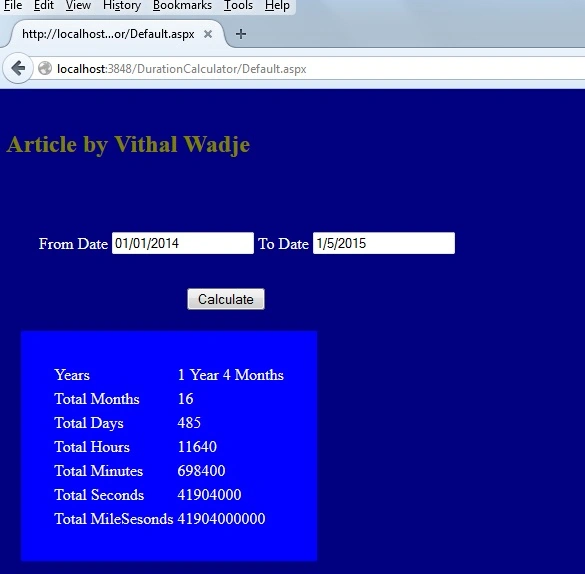
Now from all the preceding examples, we have learned how to calculate the years, months, days, minutes, seconds & milliseconds between two dates
Note:
- For detailed code please download the sample Zip file.
- Do Proper Validation such as date input values when implementing.
- Use the ScriptManager if you are using the Ajax Calender Extender that I used in the preceding demo application.
Summary
From all the examples above, we have learned how to calculate the duration between two dates. I hope this article is useful for all readers, if you have a suggestion then please contact me.


Subhasis TripathyPosted Aug 21, 2020, 4:49 AM EDT
If i am taking date from database then it is not calculating getting error.
Jinish GandhiPosted Oct 13, 2015, 10:41 AM EDT
String was not recognized as a valid DateTime. error..plz help me
Vithal WadjeTOP 100Posted Sep 9, 2015, 3:48 AM EDT
thanks
Vinodh NarayananPosted Sep 9, 2015, 3:26 AM EDT
good one thanks a lot u saved me today
vineeth sPosted Sep 6, 2015, 9:11 PM EDT
it can't work while uploading..why?
Vithal WadjeTOP 100Posted Oct 15, 2014, 1:46 AM EDT
add ajax control toolkit reference to ur project from ajaxcontrol toolkit website or remove that two textboxes and add new one and enter date manually
Herry JonathanPosted Oct 15, 2014, 1:15 AM EDT
i got error when i am run the application, it says that "Element 'CalendarExtender' is not a known element. This can occur if there is a compilation error in the Web site, or the web.config file is missing". i have no idea what this is about, please need your help. i am new to ajaxcontrol kit. really appreciate for your help
Herry JonathanPosted Oct 15, 2014, 1:14 AM EDT
i got wr