
In the previous article we learned how to create a business object modal and how to insert data in database. In this article we will learn how to Edit data modal on edit click event. Before proceeding this tutorial will do the following,
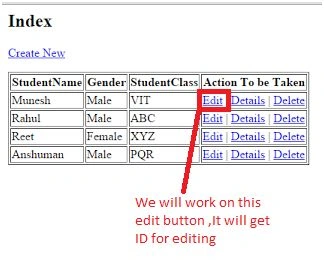
Editing Data modal
We want that when we click on EDIT link it should render to the Index Action method of StudentController, with specific ID.
So for that first create an Action method for this and create a view for editing these data.
Action method will be like,
- [HttpGet]
- public ActionResult Edit(int ID)
- {
- Student student = new Student();
- BusinessLogic BL = new BusinessLogic();
- Student _student = BL.student.Where(c => c.StudentID == ID).SingleOrDefault();
- return View(student);
- }
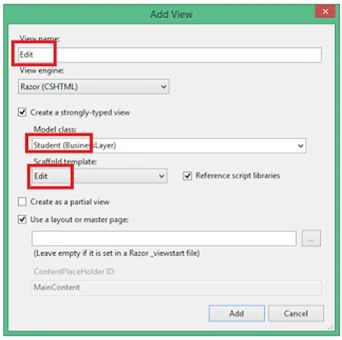
Delete the following script from the view:
- @section Scripts
- {
- @Scripts.Render("~/bundles/jqueryval")
- }
- @model BusinessLayer.Student
- @
- {
- ViewBag.Title = "Edit";
- } <
- h2 > Edit < /h2> <
- div style = "font-family:Arial>
- @using(Html.BeginForm())
- {
- @Html.ValidationSummary(true) <
- fieldset >
- <
- legend > Student < /legend>
- @Html.HiddenFor(model => model.StudentID) <
- div class = "editor-label" >
- @Html.LabelFor(model => model.StudentName) <
- /div> <
- div class = "editor-field" >
- @Html.EditorFor(model => model.StudentName)
- @Html.ValidationMessageFor(model => model.StudentName) <
- /div> <
- div class = "editor-label" >
- @Html.LabelFor(model => model.Gender) <
- /div> <
- div class = "editor-field" >
- @Html.DropDownList("Gender", new List < SelectListItem >
- {
- new SelectListItem
- {
- Text = "Male", Value = "Male"
- },
- new SelectListItem
- {
- Text = "Female", Value = "Female"
- }
- }, "Select Gender") <
- /div> <
- div class = "editor-label" >
- @Html.LabelFor(model => model.StudentClass) <
- /div> <
- div class = "editor-field" >
- @Html.EditorFor(model => model.StudentClass)
- @Html.ValidationMessageFor(model => model.StudentClass) <
- /div> <
- p >
- <
- input type = "submit"
- value = "Save" / >
- <
- /p> <
- /fieldset>
- } <
- div >
- @Html.ActionLink("Back to List", "Index") <
- /div> <
- /div>
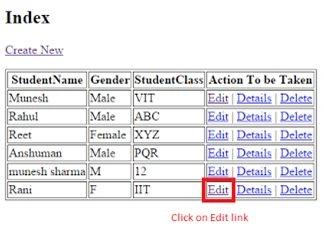
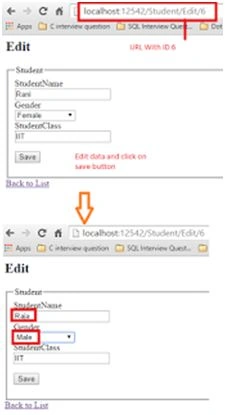
When we will click on Edit link it will redirect to EDIT View and look like that,
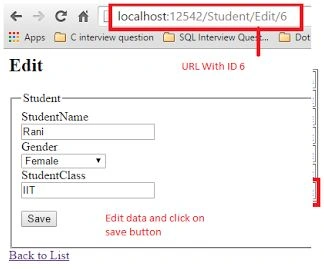
Here you edit the data and click on Save button you will see updated value.
Updating Datamodal
- Step 1: Now if we click on Save button it gives error because the edit method is using “[HttpGet]” attribute which means that this action resulting in Edit method is only accepting get request.
- @StudentID int,
- @StudentName nvarchar(50),
- @Gender nvarchar(10),
- @SchoolName nvarchar(50)
- as
- Begin
- Update StudentInfo Set
- StudentName = @StudentName,
- Gender = @Gender,
- SchoolName = @SchoolName
- Where StudentID = @StudentID
- End
- public void SaveStudentInfo(Student student)
- {
- string connectionString =
- ConfigurationManager.ConnectionStrings["Connect"].ConnectionString;
- using(SqlConnection con = new SqlConnection(connectionString))
- {
- SqlCommand cmd = new SqlCommand("UpdateStudentInfo", con);
- cmd.CommandType = CommandType.StoredProcedure;
- SqlParameter studentId = new SqlParameter();
- studentId.ParameterName = "@StudentID";
- studentId.Value = student.StudentID;
- cmd.Parameters.Add(studentId);
- SqlParameter studentName = new SqlParameter();
- studentName.ParameterName = "@StudentName";
- studentName.Value = student.StudentName;
- cmd.Parameters.Add(studentName);
- SqlParameter Gender = new SqlParameter();
- Gender.ParameterName = "@Gender";
- Gender.Value = student.Gender;
- cmd.Parameters.Add(Gender);
- SqlParameter schoolname = new SqlParameter();
- schoolname.ParameterName = "@SchoolName";
- schoolname.Value = student.StudentClass;
- cmd.Parameters.Add(schoolname);
- con.Open();
- cmd.ExecuteNonQuery();
- }
- }
- [HttpPost]
- public ActionResult Edit()
- {
- if (ModelState.IsValid)
- {
- Student student = new Student();
- UpdateModel < Student > (student);
- BusinessLogic BL = new BusinessLogic();
- BL.SaveStudentInfo(student);
- return RedirectToAction("Index");
- }
- return View();
- }
For updating the Edit value in database, first create the stored procedure for updating on, So Stored procedure will be like following,
Create procedure UpdateStudentInfo,
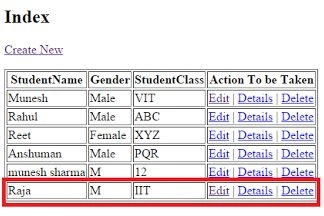
After saving edited value it will look like this:


Subhasis TripathyPosted Jul 17, 2020, 10:57 AM EDT
Hi i have a bootstrap modal and i am trying to fetch the particular row data to the dropdown control how i can do that
Munesh SharmaPosted May 18, 2016, 8:37 PM EDT
thank you all
Pradeep SahooPosted May 18, 2016, 1:10 PM EDT
Nice share .........
Kuppurasu NagarajTOP 100Posted May 17, 2016, 7:18 AM EDT
Nice sharing..
Rajeev PunhaniPosted May 17, 2016, 12:33 AM EDT
Nice.
Sonu ChaudharyPosted May 16, 2016, 11:29 AM EDT
good one...