
Introduction
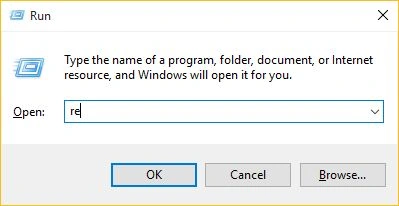
It is more pathetic when you have to write one command, again and again, it is worthy if it gets saved at someplace and by typing it comes out and we can easily access the command. In the Run window, it sometimes happens that the history disables and we can’t access some simple commands like regedit or CMD or notepad. We have to write the full command, what if the run is enabling the history, from that we can easily access it by typing one letter of the command. After typing one letter, it gets auto-complete, in the same way, like autocomplete extender in ASP.NET.
Run
It is not showing anything since it is not showing any history.
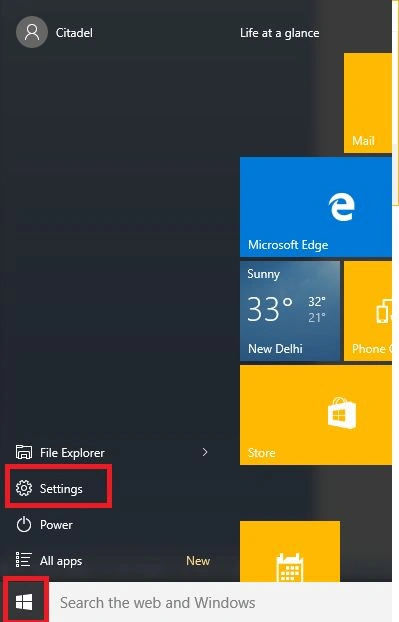
 1. To access this point. Just go to Start, then Settings.
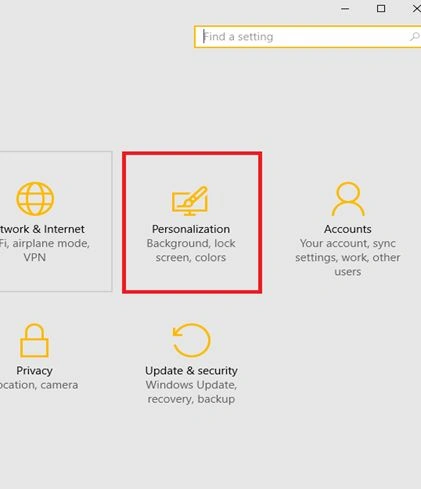
 2. From Settings, go to Personalization, then click Start.
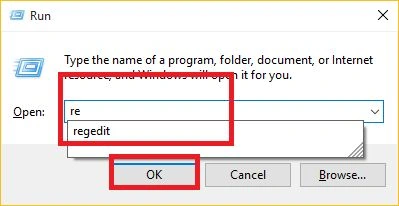
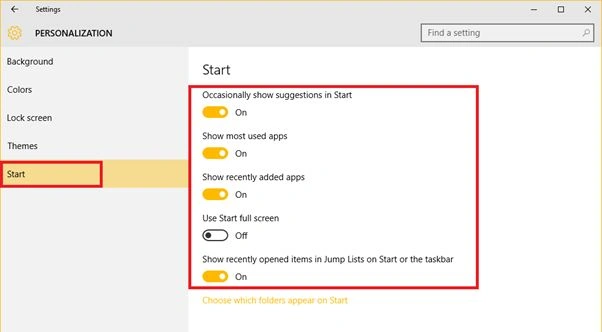 Now try to type some command in run. It will automatically and gives you options like an autocomplete textbox. Very helpful at the time when we don't have time to write the whole command.
Run enables history.
Summary
In this article, we learned about enable run history In Windows 10.


Arul RPosted Oct 28, 2015, 1:29 AM EDT
Good one !!!
Santhakumar MunuswamyPosted Oct 17, 2015, 11:50 PM EDT
Good one
Priyaranjan K STOP 100Posted Oct 12, 2015, 9:02 AM EDT
Good One Nilesh Jadav
Sujeet SumanPosted Oct 12, 2015, 8:18 AM EDT
Nice one.............
Mohammed IbrahimPosted Oct 12, 2015, 8:09 AM EDT
nice
RakeshPosted Oct 12, 2015, 7:35 AM EDT
Good share
Sibeesh VenuTOP 100Posted Oct 12, 2015, 4:26 AM EDT
Nice Share
Mukesh KumarPosted Oct 12, 2015, 4:12 AM EDT
Great, thanks for sharing
Yashwant VishwakarmaPosted Oct 12, 2015, 3:51 AM EDT
Nice one Nilesh !!
Harshad PansuriyaPosted Oct 12, 2015, 3:41 AM EDT
Nice one