
In this article we will be seeing how to enable "Self-Service Site creation"
which is used to enable users to create their own site collections at a
specified URL namespace in SharePoint 2010.
It is used to allow users to create sites that have the Use Self-Service Site
Creation permission.
When I was trying to create a new site collection in the Tenant Administration
(Manage Site Collections => click on "New" that is present in the ribbon UI)
through UI,
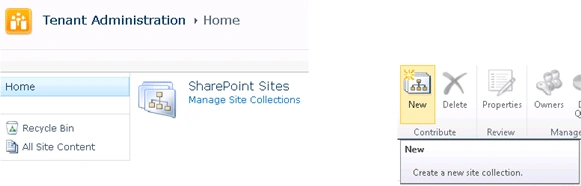
I was getting the following error.
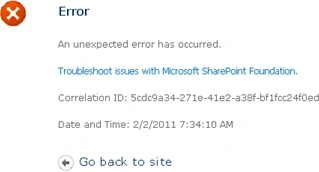
The reason for the error is I didn't enable the Self - Service Site creation for
the web application.
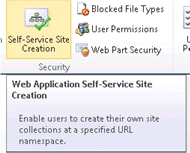
Enable Self-Service Site creation:
Go to Central Administration => Application Management => Manage web
applications =>select the web application for which you want to enable
"Self-Service Site creation".
Select "On" and click on "Ok".
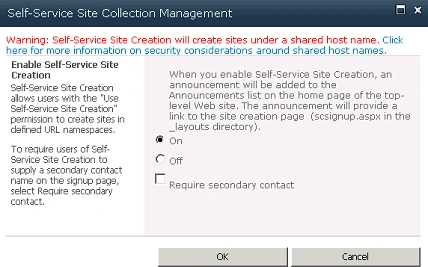
I was getting the following error.
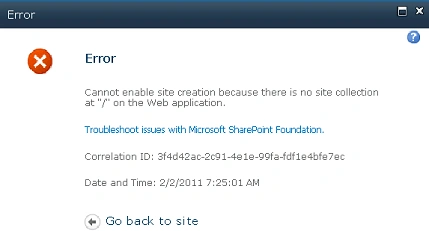
Actually I was not having any site collection at "/" on the web application.
Create a site collection at "/" on the web application and then enable Self -
Service Site Creation.
Now try creating a new site collection in the Tenant administration.
2 comments
Join the conversation! Your thoughts help the community grow.

Join to leave a comment
Members earn 10 SHARP for a comment, 10 SHARP for a reaction, and 1,000 SHARP for every article they publish.

Dinesh BeniwalTOP 10Posted Feb 2, 2011, 1:52 AM EST
Your all sharepoint articles are very good and very useful resource.