
AES Algorithm

The Advanced Encryption Standard (AES) is a symmetric encryption algorithm.
The algorithm was developed by the two Belgian cryptographers Joan Daemen and Vincent Rijmen.
AES was designed to be efficient in both hardware and software and supports a block length of 128 bits and key lengths of 128, 192 and 256 bits. Best of all, AES Crypt is a completely free open source software.
Since it is open source, several people have contributed to the software and have reviewed the software source code to ensure that it works properly to secure information. The definition is taken from: http://aesencryption.net/ .
Where to use ASE
In today's world web based applications are often used where we are vulnerable to various attacks. To prevent them we can use the technique of getting data encrypted at the client side and when the user posts the information to the server the data will be decrypted at the server side.
Procedure
- Creating solution.
- Adding AES JavaScript file.
- Adding controls on Forms.
- Writing JavaScript for Encryption of fields value.
- Adding AESEncrytDecry code for decrypting.
- Finally decrypting on button click event and getting plain text value from it.
Let's start.
Step 1
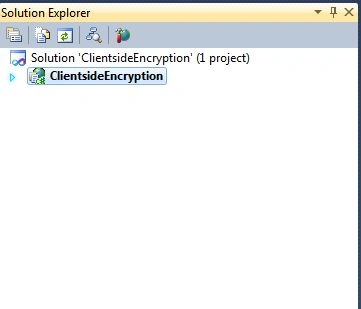
Create a new ASP.Net solution project with the name ClientsideEncryption as in the following snapshot.
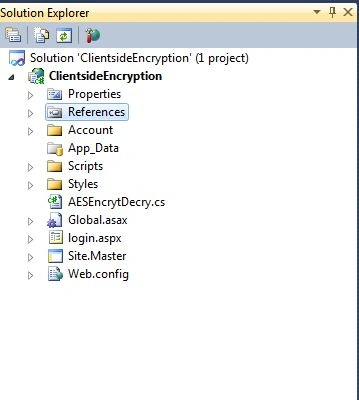
Then I have added a page with the name login.aspx in which we will do encryption and decryption as in the following snapshot.
Step 2
After adding login page I will add a reference of AES JavaScript to the login page for encryption.
If you want tp download this file you can download it from the following link:
http://crypto-js.googlecode.com/svn/tags/3.1.2/build/rollups/aes.js
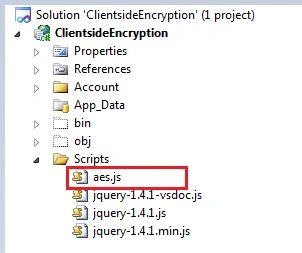
And after downloading just add this to your script folder.
See in the following snapshot.
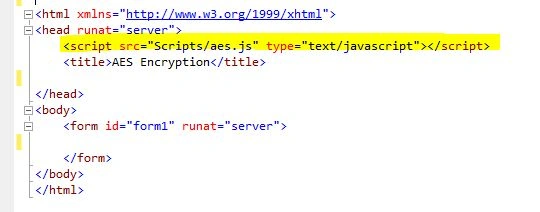
After adding aes.js to the script folder just reference on the login page where we will encrypt the data.
Step 3
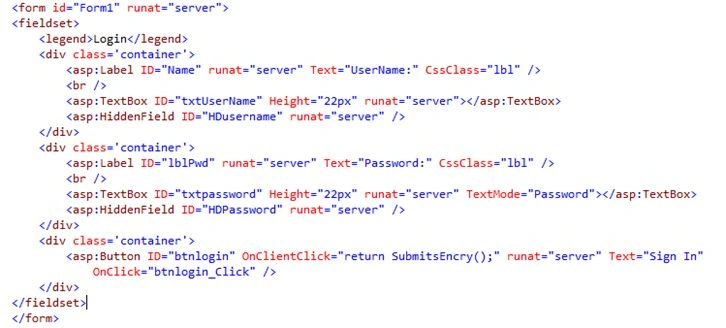
Now I am adding fields to the form.
I have added 2 TextBoxes and 2 hidden fields and a button on page.
Step 4
After adding that I am adding fields to the forms. Now to write JavaScript code for encrypting data on the button submit.
<script type="text/javascript">
    function SubmitsEncry() {
        debugger;
        var txtUserName = document.getElementById("<%=txtUserName.ClientID %>").value.trim();
        var txtpassword = document.getElementById("<%=txtpassword.ClientID %>").value.trim();

        if (txtUserName == "") {
            alert('Please enter UserName');
            return false;
        }
        else if (txtpassword == "") {
            alert('Please enter Password');
            return false;
        }
        else {
            var key = CryptoJS.enc.Utf8.parse('8080808080808080');
            var iv = CryptoJS.enc.Utf8.parse('8080808080808080');

            var encryptedlogin = CryptoJS.AES.encrypt(CryptoJS.enc.Utf8.parse(txtUserName), key,
            {
                keySize: 128 / 8,
                iv: iv,
                mode: CryptoJS.mode.CBC,
                padding: CryptoJS.pad.Pkcs7
            });

            document.getElementById("<%=HDusername.ClientID %>").value = encryptedlogin;

            var encryptedpassword = CryptoJS.AES.encrypt(CryptoJS.enc.Utf8.parse(txtpassword), key,
            {
                keySize: 128 / 8,
                iv: iv,
                mode: CryptoJS.mode.CBC,
                padding: CryptoJS.pad.Pkcs7
            });

            document.getElementById("<%=HDPassword.ClientID %>").value = encryptedpassword;

            alert('encrypted login :' + encryptedlogin);
            alert('encrypted password :' + encryptedpassword);
        }
    }
</script>
Here in this code I am getting the value from the TextBox that the user entered into the username and password fields.
var txtUserName = document.getElementById("<%=txtUserName.ClientID %>").value;
var txtpassword = document.getElementById("<%=txtpassword.ClientID %>").value;
Then encrypting a key and Initialization Vector (IV) assigning and it should be of 16 charaters.
var key = CryptoJS.enc.Utf8.parse('8080808080808080');
var iv = CryptoJS.enc.Utf8.parse('8080808080808080');
Now encrypting the value for Username and storing the value in the hidden fields of HDusername.
var encryptedlogin = CryptoJS.AES.encrypt(CryptoJS.enc.Utf8.parse(txtUserName), key,
{
   keySize: 128 / 8,
   iv: iv,
   mode: CryptoJS.mode.CBC,
   padding: CryptoJS.pad.Pkcs7
});
document.getElementById("<%=HDusername.ClientID %>").value = encryptedlogin;
Now do the same for encrypting the value for Password and storing the value in hidden fields of HDPassword.
var encryptedpassword = CryptoJS.AES.encrypt(CryptoJS.enc.Utf8.parse(txtpassword), key,
{
keySize: 128 / 8,
iv: iv,
mode: CryptoJS.mode.CBC,
padding: CryptoJS.pad.Pkcs7
});

document.getElementById("<%=HDPassword.ClientID %>").value = encryptedpassword;
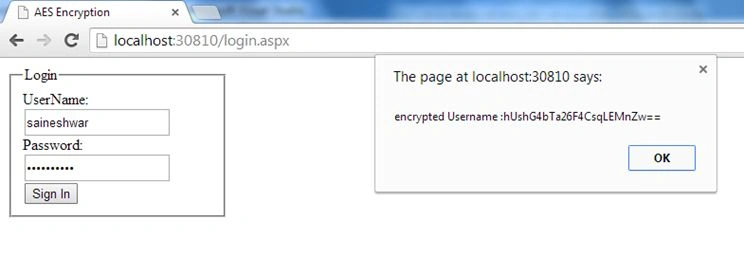
After Encrypting values I used an alert to show an Encrypted version of text.
alert('encrypted login :' + encryptedlogin);
alert('encrypted password :' + encryptedpassword);
Now we have completed the JavaScript part (the client side part) and are now moving to the server side.
Step 5
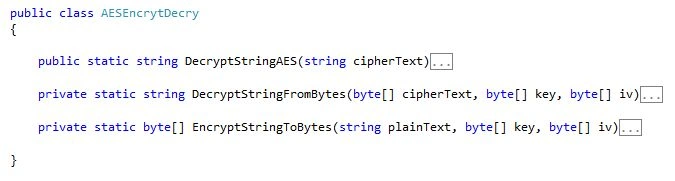
For that we need to add a Class that will decrypted fields that we have encrypted.
For that I have created a class with the name AESEncrytDecry.cs.
It has the following 2 methods:
- DecryptStringFromBytes
- EncryptStringToBytes
And DecryptStringAES is custom-created for decrypting the values.
DecryptStringFromBytes Method
private static string DecryptStringFromBytes(byte[] cipherText, byte[] key, byte[] iv)
{
   // Check arguments.
   if (cipherText == null || cipherText.Length <= 0)
   {
      throw new ArgumentNullException("cipherText");
   }
   if (key == null || key.Length <= 0)
   {
      throw new ArgumentNullException("key");
   }
   if (iv == null || iv.Length <= 0)
   {
      throw new ArgumentNullException("key");
   }
   // Declare the string used to hold
   // the decrypted text.
   string plaintext = null;
   // Create an RijndaelManaged object
   // with the specified key and IV.
   using (var rijAlg = new RijndaelManaged())
   {
      //Settings
      rijAlg.Mode = CipherMode.CBC;
      rijAlg.Padding = PaddingMode.PKCS7;
      rijAlg.FeedbackSize = 128;
      rijAlg.Key = key;
      rijAlg.IV = iv;
      // Create a decrytor to perform the stream transform.
      var decryptor = rijAlg.CreateDecryptor(rijAlg.Key, rijAlg.IV);
      try
      {
         // Create the streams used for decryption.
         using (var msDecrypt = new MemoryStream(cipherText))
         {
            using (var csDecrypt = new CryptoStream(msDecrypt, decryptor, CryptoStreamMode.Read))
            {
               using (var srDecrypt = new StreamReader(csDecrypt))
               {
                  // Read the decrypted bytes from the decrypting stream
                  // and place them in a string.
                  plaintext = srDecrypt.ReadToEnd();
               }
            }
         }
      }
      catch
      {
         plaintext = "keyError";
      }
   }
   return plaintext;
}
EncryptStringToBytes Method
private static byte[] EncryptStringToBytes(string plainText, byte[] key, byte[] iv)
{
   // Check arguments.
   if (plainText == null || plainText.Length <= 0)
   {
      throw new ArgumentNullException("plainText");
   }
   if (key == null || key.Length <= 0)
   {
      throw new ArgumentNullException("key");
   }
   if (iv == null || iv.Length <= 0)
   {
      throw new ArgumentNullException("key");
   }
   byte[] encrypted;
   // Create a RijndaelManaged object
   // with the specified key and IV.
   using (var rijAlg = new RijndaelManaged())
   {
      rijAlg.Mode = CipherMode.CBC;
      rijAlg.Padding = PaddingMode.PKCS7;
      rijAlg.FeedbackSize = 128;

      rijAlg.Key = key;
      rijAlg.IV = iv;

      // Create a decrytor to perform the stream transform.
      var encryptor = rijAlg.CreateEncryptor(rijAlg.Key, rijAlg.IV);

      // Create the streams used for encryption.
      using (var msEncrypt = new MemoryStream())
      {
         using (var csEncrypt = new CryptoStream(msEncrypt, encryptor, CryptoStreamMode.Write))
         {
            using (var swEncrypt = new StreamWriter(csEncrypt))
            {
               //Write all data to the stream.
               swEncrypt.Write(plainText);
            }
            encrypted = msEncrypt.ToArray();
         }
      }
   }
   // Return the encrypted bytes from the memory stream.
   return encrypted;
}
DecryptStringAES Method
public static string DecryptStringAES(string cipherText)
{
   var keybytes = Encoding.UTF8.GetBytes("8080808080808080");
   var iv = Encoding.UTF8.GetBytes("8080808080808080");

   var encrypted = Convert.FromBase64String(cipherText);
   var decriptedFromJavascript = DecryptStringFromBytes(encrypted, keybytes, iv);
   return string.Format(decriptedFromJavascript);
}
Now on the button's OnClientClick="return SubmitsEncry();" submit I will call first JavaScript to encrypt the data.
And then OnClick="btnlogin_Click" I will decrypt data.
<asp:Button ID="btnlogin" OnClientClick="return SubmitsEncry();" runat="server" Text="Sign In"
OnClick="btnlogin_Click" />
Here on the Button click event I am taking values from hidden fields and then passing them to the class AESEncrytDecry and the method DecryptStringAES where I will get the decrypted value of it .
The value is passed to this method as in the following:
public static string DecryptStringAES(string cipherText)
{
   var keybytes = Encoding.UTF8.GetBytes("8080808080808080");
   var iv = Encoding.UTF8.GetBytes("8080808080808080");

   var encrypted = Convert.FromBase64String(cipherText);
   var decriptedFromJavascript = DecryptStringFromBytes(encrypted, keybytes, iv);
   return string.Format(decriptedFromJavascript);
}
And you will see that the key and Initialization Vector (IV) that we are passing must be similar to what we passed from JavaScript. Then it will only decrypt values else gives an error.
Step 6
using System;
using System.Collections.Generic;
using System.Linq;
using System.Web;
using System.Web.UI;
using System.Web.UI.WebControls;

namespace ClientsideEncryption
{
    public partial class login : System.Web.UI.Page
    {
        protected void Page_Load(object sender, EventArgs e)
        {

        }
        protected void btnlogin_Click(object sender, EventArgs e)
        {
            if (Page.IsValid)
            {
                if (string.IsNullOrEmpty(HDusername.Value))
                {
                    ScriptManager.RegisterStartupScript(this, this.GetType(), "alert", "alert('Enter Username');", true);
                }
                else if (string.IsNullOrEmpty(HDPassword.Value))
                {
                    ScriptManager.RegisterStartupScript(this, this.GetType(), "alert", "alert('Enter Password !');", true);
                }
                else
                {
                    var username = AESEncrytDecry.DecryptStringAES(HDusername.Value);
                    var password = AESEncrytDecry.DecryptStringAES(HDPassword.Value);
                }
                if (username == "keyError" && password == "keyError")
                {
                    ScriptManager.RegisterStartupScript(this, this.GetType(), "alert", "alert('Not vaild login');", true);
                }
                else
                {
                    ScriptManager.RegisterStartupScript(this, this.GetType(), "alert", "alert('login successfully');", true);
                }
            }
        }
    }
}
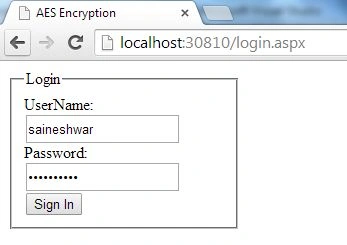
Now just run the application and check the values.
The page view.
Username encrypted value.
Password encrypted value.
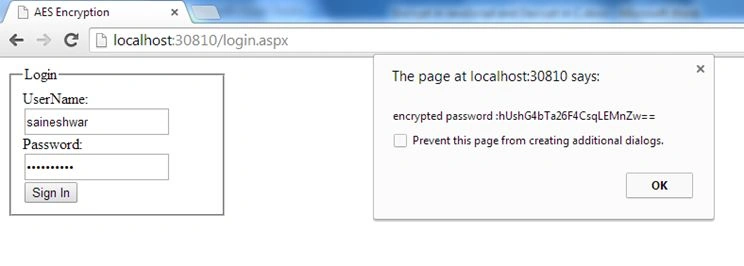
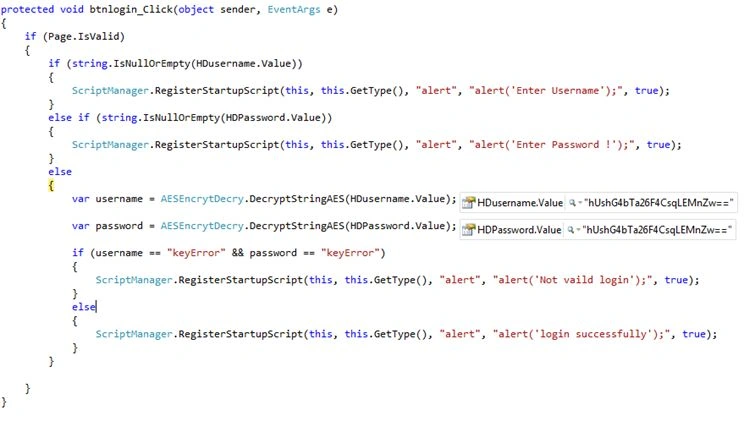
The value of the client side is posted to the server side. The following is the snapshot.
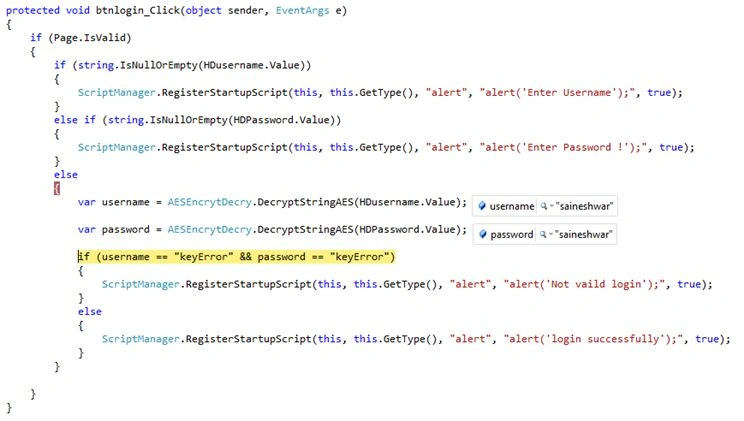
After decryption the value is show as in the following snapshot.
Finally we have some ways to secure client-side fields using the AES algorithm.


hill allPosted Oct 9, 2021, 8:35 AM EDT
Hi, will you have code for Encrypt in JavaScript and Decrypt in VB With AES Algorithm
Saurabh SoniPosted Jul 24, 2020, 10:23 AM EDT
Sir, What about decryption on the client-side. I need to decode encoded string (from backend) into js response method.
Amman VermaPosted Jul 10, 2020, 2:15 AM EDT
Hi, will you have code for Encrypt in C# and Decrypt in JavaScript(html page) With AES Algorithm
Aniket NarvankarPosted Apr 29, 2020, 5:31 PM EDT
I am getting key error,what key should I use,not understanding this
Tamil GroupPosted Apr 17, 2020, 8:43 AM EDT
Hi Sir, Small doubt, Key and iv is mentioned "8080808080808080" in javascript. After run a page, if anyone go to browser and click "Source", they can easily know the key and iv right? then can decrypt using this right? then there is no security right? please suggest
desai balvantPosted Apr 7, 2020, 8:43 PM EDT
Its working fine but how to use 256 encryption
Biju KrishnanPosted Mar 30, 2020, 3:16 AM EDT
I tried this with this example.But I got exception "Padding is inavalid and cannot be removed"
Ravi KumarPosted Mar 4, 2020, 9:57 PM EST
I have changed the "8080808080808080" to "7676876876786234" but encrypt string of same input value is same .. Here no any sense of use key because after change of key ... Same output. I am not like this process
Dinesh PeriyasamyPosted Aug 21, 2019, 5:54 PM EDT
Whats the use encryption on client side, we can decrypt this password in client side because we know encryption logic and keys.
Sanjay YadavPosted Jul 23, 2019, 9:29 PM EDT
Very helpful for understanding the implementation of AES with client side and access with server side.
Mega AnaskaPosted Jun 18, 2019, 9:20 PM EDT
Why File is not Found ?
Pratik GohilPosted Jun 10, 2018, 11:54 PM EDT
Why String with curly brace do not decrypt ??
Gopi KrishnanPosted May 29, 2018, 10:57 PM EDT
I got error like "Invalid length for a Base-64 char array or string." plz give the solution
it iwantPosted May 10, 2018, 6:48 PM EDT
Hi, Thanks for your share, but i'm wondering that how to secure when the thief know keybytes and iv, and he has this script C#, can you clear problem for me? thank you.
Satriyo PrakosoPosted May 7, 2018, 1:39 AM EDT
It works like a charm. thanks mate !
Mohan KamargiriPosted Mar 27, 2018, 9:37 PM EDT
I'm unable to find aes.js file. Can anyone please provide that file? I'm getting page not found when browse the URL to get aes.js file
Karayanni KarayanniPosted Feb 21, 2018, 4:25 AM EST
I Have this JS file that encypts how to decrypt in C# -------------- function encrypt(text) { var hexKey = 'E8E9277F7A2696F29EDAAE6EC29F659F'; var key = aesjs.utils.hex.toBytes(hexKey); while ((text.length % 32) !== 0) { text += ' '; } var textBytes = aesjs.utils.utf8.toBytes(text); var aesEcb = new aesjs.ModeOfOperation.ecb(key); var encryptedBytes = aesEcb.encrypt(textBytes); // To print or store the binary data, you may convert it to hex var encryptedHex = aesjs.utils.hex.fromBytes(encryptedBytes); return encryptedHex }
Karayanni KarayanniPosted Feb 21, 2018, 4:23 AM EST
Please Help, I have javascript code that encrypt
Sanjay ShekhawatPosted Jan 9, 2018, 11:51 PM EST
Working perfectly, thanks :)
kim hsuPosted Oct 25, 2017, 6:55 PM EDT
Why needs "string.Format(decriptedFromJavascript); "
Shruthi SreedharPosted Sep 13, 2017, 2:09 AM EDT
I am getting an error while decrypting using c# : 'padding is invalid and cannot be removed'. Please help.
Eric WijayaPosted Sep 12, 2017, 12:02 AM EDT
Thanks a lot, really really appreciate
lari johnPosted Jul 18, 2017, 12:03 AM EDT
Very helpful and implemented in my project.
Mrinal JhaPosted Jun 26, 2017, 11:50 PM EDT
How to decrypt the cipher text using this library in javascript?Thanks
saikumar GodaluPosted Jun 7, 2017, 10:27 AM EDT
To Decrypt on client side : var decryptedData = CryptoJS.AES.decrypt(encrypted, key, { keySize: 128 / 8, iv: iv, mode: CryptoJS.mode.CBC, padding: CryptoJS.pad.Pkcs7 } ); console.log('Original Text : '+decryptedData.toString(CryptoJS.enc.Utf8)) // outputs "Hello world"
saikumar GodaluPosted Jun 7, 2017, 10:26 AM EDT
To Encrypt in C# : AESEncrytDecry.EncryptStringAES("Hello world");
raviPosted May 18, 2017, 5:48 AM EDT
Good. encryption in c# and decryption in javascript is available ??
Milap ShahPosted Apr 12, 2017, 3:55 AM EDT
How can I download this JS?
Milap ShahPosted Apr 12, 2017, 3:55 AM EDT
Http://crypto-js.googlecode.com/svn/tags/3.1.2/build/rollups/aes.js Not working..
Tabarak HussainPosted Mar 23, 2017, 4:33 AM EDT
Excellent work, very very thax for help
Kham DucPosted Nov 30, 2016, 8:57 PM EST
System.Security.Cryptography.CryptographicException: Length of the data to decrypt is invalid.
Virbhadrasinh GohilPosted Sep 28, 2016, 2:10 AM EDT
This is the best example and one of the highly secured way of client-side encryption.Thanks for the best stuff.
Saineshwar BageriPosted Jun 22, 2016, 4:29 AM EDT
Please check your Script reference and see browser console for errors
Ratish NairPosted Jun 22, 2016, 3:51 AM EDT
var encryptedlogin = CryptoJS.AES.encrypt(CryptoJS.enc.Utf8.parse(txtUserName), key, Is giving me an error of undefined when oublished it on the server
Ratish NairPosted Jun 22, 2016, 3:51 AM EDT
var encryptedlogin = CryptoJS.AES.encrypt(CryptoJS.enc.Utf8.parse(txtUserName), key,
vighnesh sawantPosted Apr 12, 2016, 9:27 AM EDT
how to see the decrypted value ??
Deepak TiwariPosted Feb 17, 2016, 2:53 AM EST
Is vice versa available? Mean we can encrypt in C# and decrypt using CryptoJS
Robin LiPosted Dec 9, 2015, 8:18 PM EST
great example, thanks a lot ^_^
Naresh YadavPosted Sep 18, 2015, 2:20 AM EDT
Hey thankyou so much for the valuable articale sharing. its working !!
Yashwanth MuthineniPosted Aug 26, 2015, 11:17 PM EDT
Nice Share
Ray LevronPosted Jul 16, 2015, 12:22 PM EDT
Nevermind. I got it working. I was able to use this code sample successfully in our app. Thanks for this
Ray LevronPosted Jul 15, 2015, 8:49 AM EDT
What do I do to get different encrypted data? If I pass "1830" or "1840", I get the same encrypted data
ashok kumarPosted Jul 8, 2015, 4:38 AM EDT
How to prevent from Man-in-the-Middle attack?
Dinesh BeniwalTOP 10Posted Feb 28, 2015, 7:37 PM EST
Congrats Saineshwar Bageri Article of the day on ASP.NET
Saineshwar BageriPosted Feb 26, 2015, 6:26 AM EST
its not MD5 Narendra Bisht sir it will just Encrypt in JavaScript and Decrypt in C#
Narendra BishtPosted Feb 26, 2015, 1:02 AM EST
Hi..everytime is generating the same password for all users...
Saineshwar BageriPosted Jan 18, 2015, 7:39 PM EST
thanks vithal sir
Vithal WadjeTOP 100Posted Jan 18, 2015, 9:53 AM EST
nice keep it up