
Introduction
Today we are going to learn how to encrypt the logic of a view from the end user or others. There are several reasons to hide the logic of a view. The most important reason is security. We encrypt the view using the "with encryption" keyword.
I assume you have a basic understanding of views. For more help visit, View in SQL Server. In my previous article I described how to encrypt a Stored Procedure; for that you can visit Encryption of Stored Procedure in SQL Server.
First of all we create a table named student. After that we create a view named view1 without encryption. Then we show the logic of that view with the help of a command. After that we create another encrypted view named view2. And show that we can't see the logic of the encrypted view.
Creation of table:
create table emp(empId int, empName varchar(15), empAdd varchar(15))
Insertion of data:
insert into emp
select 1,'d','canada'union all
select 2,'e','la'union all
select 3,'f','usa'
Output:

Creation of unencrypted View:
create view view1
as
select * from emp
Executing this View:
SELECT * from view1
Output: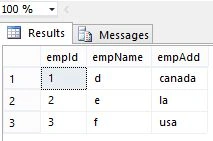
Logic of this View:
exec sp_helptext view1
Output: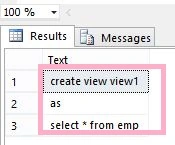
Creation of encrypted View:
create view view2
with encryption
as
select * from emp
Executing of this View:
select * from view2
Output:

We can't see the logic of the encrypted View.
Output:
If we try to see the logic of the encrypted message it shows the following message:
exec sp_helptext view2

Summary
In this article I described encryption of views in SQL Server. I hope this article has helped you to understand this topic. Please share if you know more about this. Your feedback and constructive contributions are welcome.


Deepak MiddhaPosted Nov 27, 2012, 12:12 AM EST
Thanks Georige..
Georgie WebberPosted Nov 26, 2012, 9:23 PM EST
Very nice conscription Deepak
Deepak MiddhaPosted Nov 19, 2012, 5:56 PM EST
Thanks sir..
Rohatash KumarTOP 100Posted Nov 18, 2012, 9:05 PM EST
Nice Article. Keep it up.. Deepak