
Error : WebForms UnobtrusiveValidationMode requires a ScriptResourceMapping for jquery. Please add a ScriptResourceMapping named jquery(case-sensitive).
This article explains that how can remove an error that is title of article in .Net Framework 4.5. This error comes when you used the RequiredFieldValidator control on any other server control. Let’s see with an example.
Create Web Form
You need to create a web form that has one textbox for user input and a button. The TextBox control has a required field validator control.
- <%@ Page Language="C#" AutoEventWireup="true" CodeBehind="Default.aspx.cs" Inherits="ValidationApplication.Default" %>
- <!DOCTYPE html>
- <html xmlns="http://www.w3.org/1999/xhtml">
- <head id="Head1" runat="server">
- <title>Required Field example</title>
- </head>
- <body>
- <form id="form1" runat="server">
- <div>
- Name :
- <asp:TextBox ID="txtName" runat="server"></asp:TextBox>
- <asp:RequiredFieldValidator ID="reqName" runat="server" Display="Dynamic" ControlToValidate="txtName"
- Text="Name is empty" Style="color: red"></asp:RequiredFieldValidator>
- <asp:Button ID="btnSubmit" Text="Submit" runat="server" OnClick="btnSubmit_Click" />
- </div>
- </form>
- </body>
- </html>
Server Side Code
You need to create a click event of button that shows input values.
- using System;
- using System.Web.UI;
- namespace ValidationApplication
- {
- public partial class Default : System.Web.UI.Page
- {
- protected void Page_Load(object sender, EventArgs e)
- {
- }
- protected void btnSubmit_Click(object sender, EventArgs e)
- {
- if (Page.IsValid)
- {
- Response.Write("My name is :" + txtName.Text);
- }
- }
- }
- }
Run the Application
Now run the application and leave input field blank and click on submit button. You get below error message as figure 1.1.
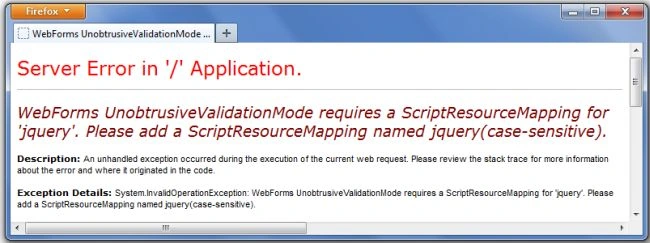
Figure 1.1 : Error Message After submit button click
Resolve Error
Now add key for Unobtrusive under <appSettings> tag as following code.
- <?xml version="1.0"?>
- <configuration>
- <system.web>
- <compilation debug="true" targetFramework="4.5" />
- <httpRuntime targetFramework="4.5" />
- </system.web>
- <appSettings>
- <add key="ValidationSettings:UnobtrusiveValidationMode" value="None" />
- </appSettings>
- </configuration>
Validation Message
After that again run the application leave blank input field and click on submit button the you get a validation message as figure 1.2
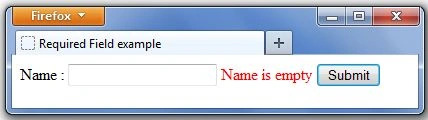
Figure 1.2 Validation message
Now insert value in input field and run the application. You get result as figure 1.3.
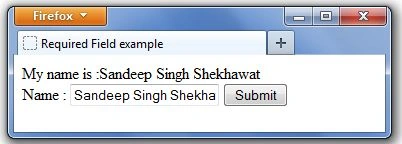
Figure 1.3 Successful submits data


Jawed ShaikhPosted Mar 13, 2020, 6:10 AM EDT
Does the solution cause any security issue?
manish joshiPosted Oct 11, 2018, 6:37 AM EDT
Another solution is to register the script: In Global.asax Application_Start add mapping to your jQuery file path: void Application_Start(object sender, EventArgs e) { // Code that runs on application startup ScriptManager.ScriptResourceMapping.AddDefinition("jquery", new ScriptResourceDefinition { Path = "~/scripts/jquery-1.7.2.min.js", DebugPath = "~/scripts/jquery-1.7.2.min.js", CdnPath = "http://ajax.aspnetcdn.com/ajax/jQuery/jquery-1.4.1.min.js", CdnDebugPath = "http://ajax.aspnetcdn.com/ajax/jQuery/jquery-1.4.1.js" }); } Some details from MSDN: ValidationSettings:UnobtrusiveValidationMode Specifies how ASP.NET globally enables the built-in validator controls to use unobtrusive JavaScript for client-side validation logic. If this key value is set to "None" [default], the ASP.NET application will use the pre-4.5 behavior (JavaScript inline in the pages) for client-side validation logic. If this key value is set to "WebForms", ASP.NET uses HTML5 data-attributes and late bound JavaScript from an added script reference for client-side validation logic.
manish joshiPosted Oct 11, 2018, 6:30 AM EDT
Check this link for more details
manish joshiPosted Oct 11, 2018, 6:30 AM EDT
Http://connect.microsoft.com/VisualStudio/feedback/details/735928/in-asp-net-web-application-visual-basic-the-requiredfieldvalidator-doest-work
Gopi PPosted Sep 2, 2018, 11:06 PM EDT
It's really helpful. But, if you explain the causes of the issue that would be more help to understand it well.
narasimha asaPosted May 8, 2018, 2:17 AM EDT
Good Answer sir for update more doubts
sachin thorkarPosted Apr 13, 2018, 2:13 AM EDT
Thanks a Lot Sir .....it saved my time
Malik BismaPosted Jan 30, 2018, 2:07 AM EST
It was helpful.Thank you Very Much.
Malik BismaPosted Jan 30, 2018, 2:06 AM EST
Thank You Very Much.
Shubham AgrawalPosted Sep 19, 2017, 12:03 AM EDT
But i have still error.
Vishnu ReddyPosted Sep 5, 2017, 10:36 PM EDT
Thanks and very helpful for me
Rana Asif NaseerPosted Sep 5, 2016, 1:19 AM EDT
It's really helpful thank you so much!
Lai AmassakPosted Jul 1, 2016, 2:47 AM EDT
Great, it works but next time please be more specific in your explanation like mentioning which file to edit i.e 'Web.config'. Not everyone knows where '<appSettings>' is. Thanks.
Vinay SinghPosted Jun 9, 2016, 10:33 PM EDT
Nice thanks very helpful…
Sandeep Singh ShekhawatPosted May 26, 2016, 8:02 PM EDT
Thank all :)
Suresh MolabantiPosted May 25, 2016, 9:47 PM EDT
thank you sir it's very helpful
Kuppurasu NagarajTOP 100Posted Feb 16, 2016, 1:47 AM EST
nice
Debendra DashPosted Nov 11, 2015, 12:24 AM EST
Thanks...work for me....
sandeep tripathiPosted Nov 4, 2015, 8:24 PM EST
Really Helpful! Thank you so much
Sunny SharmaPosted Jun 23, 2015, 10:30 PM EDT
Nice Share!
saham sasidharanPosted Jun 14, 2015, 12:24 AM EDT
Thankzz broo :D
RamakrishnaPosted Apr 3, 2015, 11:10 AM EDT
Really Helpful!
Saber ShaikhPosted Feb 1, 2015, 11:09 PM EST
thanks
Saber ShaikhPosted Feb 1, 2015, 11:08 PM EST
good
brajesh singhPosted Jan 12, 2015, 11:45 AM EST
thanks it really helpful ....
shubhamPosted Aug 18, 2014, 8:08 AM EDT
it still shows the same error!! please help!