
Overview
Sometimes, there is a situation when we need to get the data by consuming SQL Server Stored Procedure. SQL Server Stored Procedures have parameters that we need to pass dynamically.
Power BI provides functionality to execute a Stored Procedure using Managed Parameters.
In this article, we will talk about the following.
- How to create a Manage Parameter
- How to pass manage parameter to a Stored Procedure
- Invoke Query Result and load data to Power BI Desktop
Limitation
This feature will work only for Import Mode.
Example
I have one procedure in SQL Server named “sp_getEmpshiftDetails” which has two parameters named “vStartDate” and “vEndDate”. I want to use this procedure and load the data into Power BI Desktop. I have attached the file with this article for practice purposes.
So, now let’s get started!
Step 1. Create Manage Parameter in Power BI Desktop.
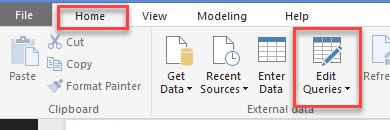
- Open Power BI Desktop and from the Home tab, select “Edit Queries”.
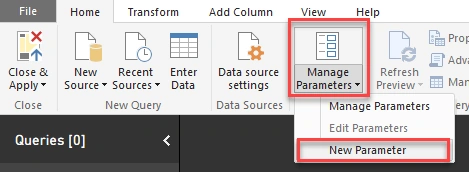
- Click on “Manage Parameters” and select “New Parameter”.
- It will open a popup to create a new parameter. Select “New”.
It will ask for the following information.
- Name: Name of the parameter
- Description: Description of Parameter
- Required checkbox
- Type: Datatype of a parameter
- Suggested value
- Current value
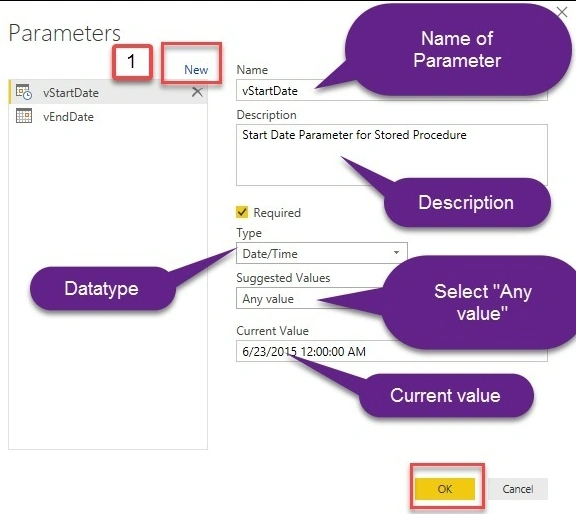
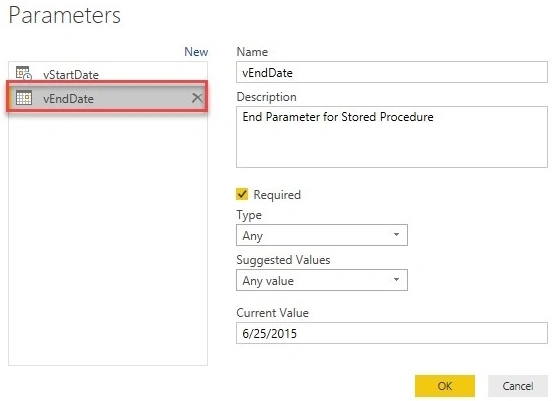
I created parameters “vStartDate” and “vEndDate”, as shown in the screenshot.
Step 2. Load (Execute Stored Procedure).
- Now, from “Home”, select “New source”.
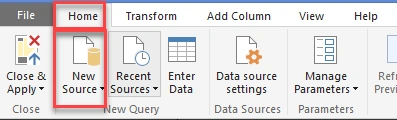
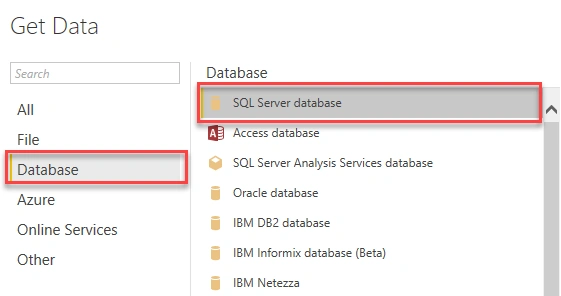
- Select “Databases”, select “SQL Server Database”.
- Fill in the required fields and in the command window use the below line to execute the procedure.
Bash
EXEC sp_getEmpshiftDetails '2015-06-23','2015-06-25'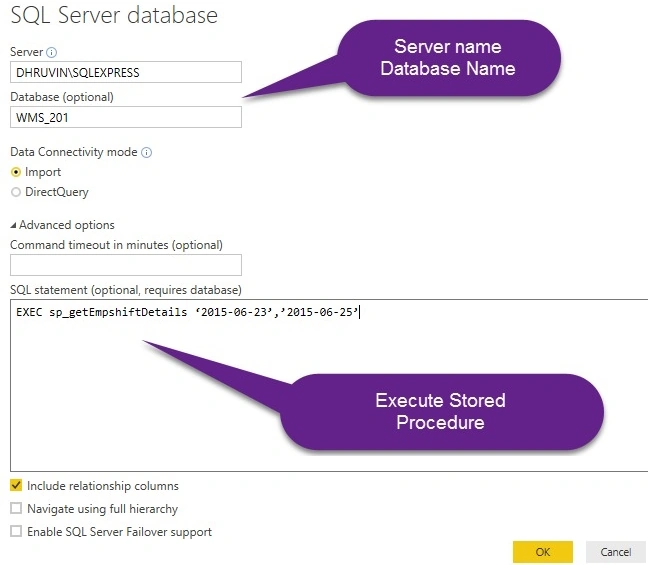
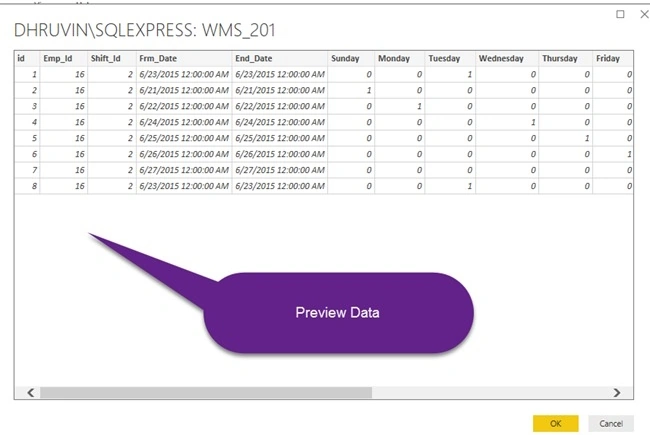
- It will preview the data. Click on “Load”.
Step 3. Change Query in Advance Editor
Select Query and click on “Advanced Editor”.
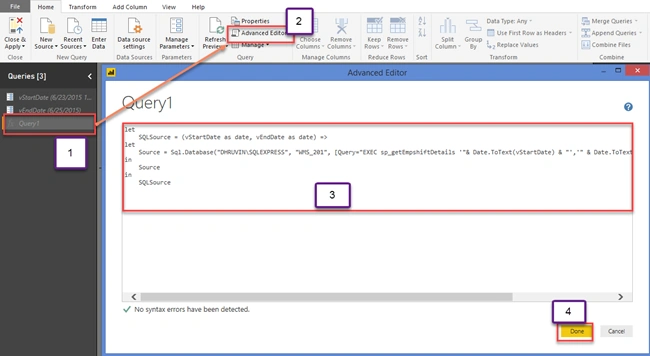
Replace the existing query with a new query.
let
    SQLSource = (vStartDate as date, vEndDate as date) =>
    let
        Source = Sql.Database("DHRUVIN\SQLEXPRESS", "WMS_201", [Query="EXEC sp_getEmpshiftDetails '" & Date.ToText(vStartDate) & "','" & Date.ToText(vEndDate) & "' #(lf)#(lf)#(lf) #(lf)"])
    in
        Source
in
SQLSource- Declare Parameter
- Pass Parameter to Procedure
The below screenshot shows a comparison of both queries.
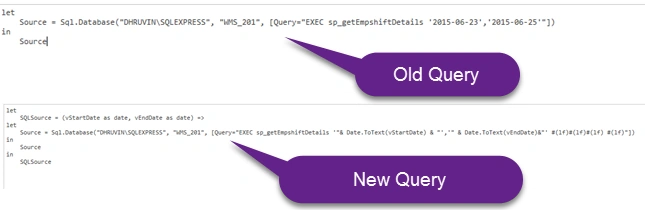
Step 4.Invoke Result
- Select Query and enter the start date and end date. Click “Invoke”.
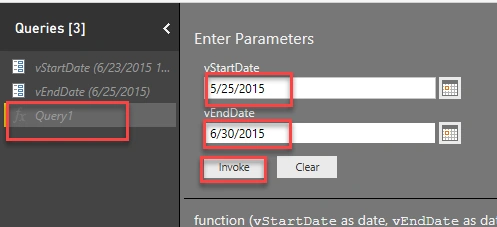
- It will show a warning like this. Click “Edit Permission”.

- It will show a warning to run the query in Native Mode. Click “Run”.
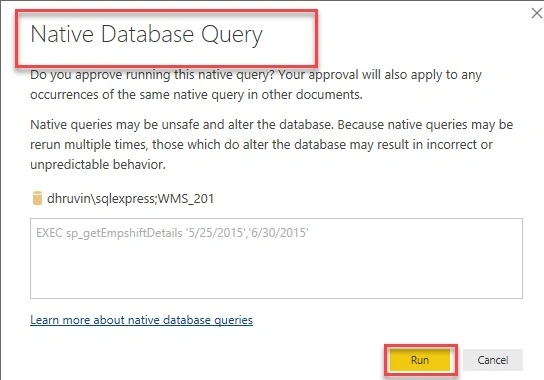
- It will load all the data.
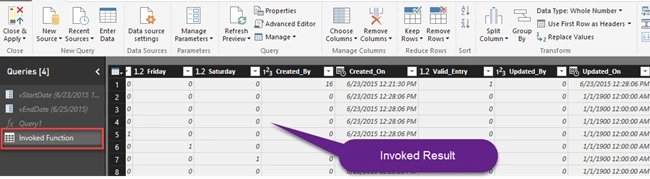
- Click “Close and Apply”.
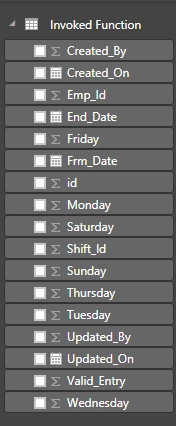
- Our data has been added to a Model.
Conclusion
Now, I hope you have got a better idea of “Managed Parameters” in Power BI. We can pass the dynamic parameters to SQL Server Stored procedures using this feature. Try this on your own and share your opinion with me.


SandeepPosted Mar 1, 2025, 2:54 AM EST
Thanks for sharing above info for connection build. It helps a lot but how to enable users to select dynamic values using slicers?
SandeepPosted Mar 1, 2025, 2:53 AM EST
Hi Dhruvin,
SandeepPosted Mar 1, 2025, 2:53 AM EST
Hi Dhruvin, Thanks
MaduPosted Jan 28, 2025, 11:32 AM EST
I've created the Parameters and created a test report. Now how I can run for different parameters as well as when I hand over this to Business users in PowerBI Service, will it prompt them to input the parameters when they try to run?
MaduPosted Jan 28, 2025, 10:49 AM EST
HI Dhruvin, thanks for sharing this article, very informative. Currently I have the same requirement to convert Cognos to PowerBI which has a SP with parameters, will definitely try this out. Can you please help here how we can do Burst in the powerBI service the same way we do in the cognos, Burst to a shared folder.
Ruslan OsmanovPosted Dec 7, 2024, 6:36 PM EST
Hi. Is it possible to run SQL procedure with parametrs - when I click on the controls of the dashboard report in Power BI? I mean when I click differnt controls - procedure gets differnt parameters and run when I click on last button- for expample with name 'Get actual Data'
Kuppu SwamiPosted Jan 30, 2024, 9:27 AM EST
Can u pls share ur contact number
Kuppu SwamiPosted Jan 30, 2024, 9:26 AM EST
Hi Bro i have try this once published how to select the from and todate
Allard BonPosted Apr 21, 2023, 4:02 AM EDT
Thanks for your explanation, Dhruvin Shah. The point is: the real benefit of parameterization would be that slicers on your dashboard change the value of the parameters and fire the stored procedure with new values every time you change them, in directQuery mode. That seems to be pretty complicated in PowerBI.
Nirdesh MohanPosted Dec 23, 2021, 7:19 AM EST
Can we pass dropdown selected value to a native big query?
Jonathan SimonsPosted Aug 27, 2021, 6:44 PM EDT
Can we pass parameters into the query from a visualization?
Rajashree KamathPosted May 6, 2021, 10:24 AM EDT
Hi Dhruvin, We are showing Power BI report in powerapps portal. Here we pass parameter to a flow where the stored procedure gets executed. But unfortunately dataset is not getting refreshed with new data associated with the parameters. Please help
ఫణి కుమార్Posted Oct 29, 2020, 1:20 AM EDT
I followed the same approach, instead 2 inputs, mine is only one input to SP, that too it is a string. But the value which is given at time of invoke only giving the report, if i pass another value via filter it is not getting applied and the report is empty for new values.
Jai RamPosted Jun 17, 2020, 7:07 PM EDT
Hi Dhruvin, This is JaiRam. The above parameters concept is working fine in Power BI Desktop only. However after publishing the report to Power BI Service or Report Server, i could not find any option asking to pass the parameter values like an SSRS report. Can you please help me on this !! Thank you.
Vishpravasi VenkatachalamPosted Jan 3, 2020, 12:23 AM EST
I want to pass two dates and one text to a stored procedure please help me
Vishpravasi VenkatachalamPosted Jan 3, 2020, 12:22 AM EST
What does (lf)#(lf)#(lf) #(lf)" this value refer
Anurag ShuklaPosted Dec 4, 2019, 12:59 AM EST
Hi, Dhruvin After Embedding the report to the application after that I'm unable to see the parameters box on my application.
Girish GuptaPosted Oct 30, 2019, 9:49 PM EDT
Hi Dhruvi, I am getting the error in SQL server too. Microsoft SQL: Incorrect syntax near the keyword 'exec'.Incorrect syntax near ')'.
loupot elizabethPosted Oct 2, 2019, 12:20 AM EDT
Bonjour, Comment faire pour que l'utilisateur change lui m?me les valeurs de param?tre? Merci par avance
Girish GuptaPosted Jun 27, 2019, 3:31 AM EDT
Hi Dhruvin, i am unbale to do this in Oracle data base it shows me the error Details: "Oracle: ORA-00900: invalid SQL statement"
Andy ToddPosted Jun 19, 2019, 1:06 AM EDT
Hi Dhruvin, just wanted to say thanks for putting this together - nice and clear and saved me a lot of time.
Santhu ycsPosted Apr 5, 2019, 1:38 AM EDT
Hi Dhruvin, It's one of the best article ever i seen. it's so simple and easy. I have question that how i can make dynamic selection of date? For example I have created startdate and enddate and created the gateway connection. Pulled the data from 1st Feb'19 to 28th Feb'19. Now suppose if i want to pull the data for March month but i don't want give date again. it should take current month date. How can I do this?
రాగి ఆకాష్Posted Mar 8, 2019, 8:50 AM EST
Will there be any problem in running native sql server because it shows it can alter database?
Usman JalilPosted Feb 7, 2019, 4:13 AM EST
Let Source = Sql.Database(MyServer, MyDatabase, [Query="EXEC [dbo].[spEmployeesRead] '" & ActionCode & "', '" & UserID & "', NULL, NULL, NULL, NULL, '" & Alphabet & "'"]) in Source Above is my Stored Procedure in Query Editor its running fine and gettting data as i am passing all parameters dynamically. My Question I have Saved and Publish the Report to Power BI Service and then Open the Report and from File Menu get Embed Code and pass parameters to this Report URL so i can access this from other Applications and that Application will pass the parameter values dynamically but seems like things are not working correctly. Can you check where i am wrong. https://app.powerbi.com/reportEmbed?reportId=341f891b-93f8-490a-9a91-62f12f783e2c&groupId=4791121d-01f2-49ad-99fc-9fa3bab7fc3f&autoAuth=true&filter=MyServer eq 'MSSQLSERVER2017' and MyDatabase eq 'TestDB' and EmployeesList/ActionCode eq '1' and EmployeesList/UserID eq '1' and EmployeesList/Alphabet eq 'All'
Anand RbPosted Jan 6, 2019, 8:26 PM EST
Can i pass parameter to procedure directly through URL and return data to power bi ?Let me know if there is any other way to achieve this. Thanks in Advance!!!
Nikita PatelPosted Jul 11, 2018, 8:48 PM EDT
How can I pass startdate as firstdate of the year and enddate alway as today's date?
Gourangi BangeraPosted Jun 7, 2018, 11:54 PM EDT
Hi, first of all thanks for the article and step by step info. I have followed your steps and able to get the data however i have a slicer control which acts as a Month dropdown and all the data is being filtered based on the month selection. My question is how do I make sure that the selected Month is also passed to stored procedure ? Or how do I make sure that the selected month value is being passed to parameter?? Please assist. Thanks in advance.
Vinod AbrahamPosted May 20, 2018, 5:39 AM EDT
Can we Pass parameter from Any Web Application
Pedro FigueiredoPosted May 17, 2018, 4:59 AM EDT
Hello, have you found a way to pass the authenticated user?
Challice GenestPosted May 15, 2018, 7:23 AM EDT
Is there a way to set the date to today's current date? It seems you can't set vStartDate = DateTime.Date(DateTime.LocalNow()) in the function parameter page easily
Abayomi ArowosegbePosted May 14, 2018, 11:32 PM EDT
I find the blog really helpful Thanks. Is there a way to display store procedure with multiple result set?
Shahriar NikkhahPosted May 2, 2018, 5:43 PM EDT
I really loved your blog, simple and easy, and i loved the way you run and test the SP as in OLD and NEW, and changing the code line by line (not rushing into it)
VenkatPosted Feb 28, 2018, 11:46 PM EST
This is very informative article.How to add this in webapi
Mohamed IbrahimPosted Feb 28, 2018, 8:57 AM EST
Thanx sir is a very good article , can you help me to connect with web service and pass a parameters