
My application looks like Figure 1 where you can see I have some data in a DataGridView control on a Windows Forms application. I also have a Button called Export to Excel. When you click Export To Excel button, the application will export DataGridView data to an Excel document.
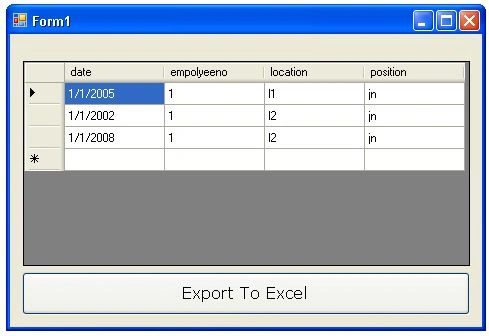
Figure 1
The Excel document will look like Figure 2.
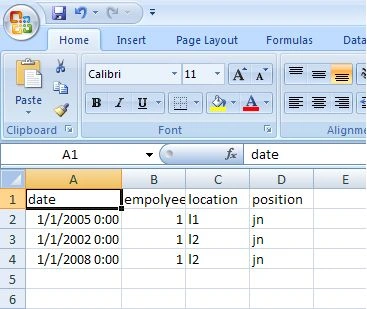
Figure 2
Before you write code, you must add a reference to the Microsoft Excel object library.
Right click on your project and select Add Reference menu. After that go to COM tab and select and add Microsoft Excel 12.0 object library.
Now here is my Button click event handler where I create Excel object and document, get data from DataGridView and add rows and columns to the document.
Sample Code
- private void button1_Click_1(object sender, EventArgs e) {
- // creating Excel Application
- Microsoft.Office.Interop.Excel._Application app = new Microsoft.Office.Interop.Excel.Application();
- // creating new WorkBook within Excel application
- Microsoft.Office.Interop.Excel._Workbook workbook = app.Workbooks.Add(Type.Missing);
- // creating new Excelsheet in workbook
- Microsoft.Office.Interop.Excel._Worksheet worksheet = null;
- // see the excel sheet behind the program
- app.Visible = true;
- // get the reference of first sheet. By default its name is Sheet1.
- // store its reference to worksheet
- worksheet = workbook.Sheets["Sheet1"];
- worksheet = workbook.ActiveSheet;
- // changing the name of active sheet
- worksheet.Name = "Exported from gridview";
- // storing header part in Excel
- for (int i = 1; i < dataGridView1.Columns.Count + 1; i++) {
- worksheet.Cells[1, i] = dataGridView1.Columns[i - 1].HeaderText;
- }
- // storing Each row and column value to excel sheet
- for (int i = 0; i < dataGridView1.Rows.Count - 1; i++) {
- for (int j = 0; j < dataGridView1.Columns.Count; j++) {
- worksheet.Cells[i + 2, j + 1] = dataGridView1.Rows[i].Cells[j].Value.ToString();
- }
- }
- // save the application
- workbook.SaveAs("c:\\output.xls", Type.Missing, Type.Missing, Type.Missing, Type.Missing, Type.Missing, Microsoft.Office.Interop.Excel.XlSaveAsAccessMode.xlExclusive, Type.Missing, Type.Missing, Type.Missing, Type.Missing);
- // Exit from the application
- app.Quit();
- }
Note this part of code gets data from DataGridView and fills cells.
- // storing Each row and column value to excel sheet
- for (int i = 0; i < dataGridView1.Rows.Count - 1; i++) {
- for (int j = 0; j < dataGridView1.Columns.Count; j++) {
- worksheet.Cells[i + 2, j + 1] = dataGridView1.Rows[i].Cells[j].Value.ToString();
- }
- }
I have taken dataGridView1.Rows.Count-1, because in datagridview it contains empty row at the last. (See in the figure of datagridview.)
I hope you like this article. Feel free to post questions or comments.


The TheoryPosted Aug 19, 2021, 1:23 PM EDT
Not functional, either the poster did not test their code or posted incomplete code.
Mohamed ElasriPosted May 19, 2021, 12:11 PM EDT
System.Runtime.InteropServices.COMException: 'Index non valide. (Exception de HRESULT : 0x8002000B (DISP_E_BADINDEX))'on( worksheet = workbook.Sheets["Sheet1"];)
kiran saiPosted Sep 15, 2020, 9:01 PM EDT
Microsoft Office Excel cannot access the file 'c:\62317500'. There are several possible reasons:
vadim mustafinPosted May 1, 2020, 9:10 PM EDT
Exports to exel, but error appears when saving
Amna KhalidPosted Apr 21, 2020, 1:29 AM EDT
Data is not exported in excel file. It is showing The name 'dataGridView1' does not exist in the current context. the data where i want to export is kendo grid.
Jan ManipolPosted Oct 8, 2019, 6:47 PM EDT
I have an error where if I change the Row to Items , I get an error on the Cells part./////// worksheet.Cells[i + 2, j + 1] = Grid.Items[i].Cells[j].Value.ToString(); it says that Grid does not contain definition fro Cells
narendra parasharPosted Aug 25, 2019, 9:48 PM EDT
Error message "Object reference not set to an instance of an object." on worksheet.Cells[1, i] = dg.Columns[i - 1].HeaderText;
Dharmendra Kumar PanditPosted Aug 23, 2019, 5:32 PM EDT
// storing Each row and column value to excel sheet for (int i = 0; i < dataGridView1.Rows.Count - 1; i++) { for (int j = 0; j < dataGridView1.Columns.Count; j++) { worksheet.Cells[i + 2, j + 1] = dataGridView1.Rows[i].Cells[j].Value.ToString(); }
Rahul PPosted Aug 3, 2019, 10:11 PM EDT
how to export the particular data values not entire datagridview?
Prabukiran GanesanPosted May 16, 2019, 1:51 AM EDT
Error in (worksheet = workbook.Sheets["Sheet1"]; worksheet = workbook.ActiveSheet; ) as Error 2 Cannot implicitly convert type 'object' to 'Microsoft.Office.Interop.Excel._Worksheet'. An explicit conversion exists (are you missing a cast?)
Hawk eyePosted Apr 17, 2019, 3:11 AM EDT
How to add a footer ie last column added by cell formatting
Hawk eyePosted Apr 17, 2019, 2:59 AM EDT
Https://stackoverflow.com/a/45268787/10132451
Dharmendra Kumar PanditPosted Feb 1, 2019, 10:29 PM EST
Thank you working fine.
Aye MonPosted Jan 13, 2019, 4:17 PM EST
Thanks a lot
Aye MonPosted Jan 13, 2019, 4:17 PM EST
Thanks a lot. That's so effective for me.
Kumar AryanPosted Sep 15, 2018, 1:17 AM EDT
Getting error in below line:-// store its reference to worksheet worksheet = workbook.Sheets["Sheet1"]; worksheet = workbook.ActiveSheet;
Rami SPosted Feb 25, 2016, 12:13 PM EST
// Copy all to clipboard dataGridViewLocationMst.SelectAll(); DataObject dataObj = dataGridViewLocationMst.GetClipboardContent(); if (dataObj != null) Clipboard.SetDataObject(dataObj); // Paste in Excel Microsoft.Office.Interop.Excel.Application xlexcel; Microsoft.Office.Interop.Excel.Workbook xlWorkBook; Microsoft.Office.Interop.Excel.Worksheet xlWorkSheet; object misValue = System.Reflection.Missing.Value; xlexcel = new Microsoft.Office.Interop.Excel.Application(); xlexcel.Visible = true; xlWorkBook = xlexcel.Workbooks.Add(misValue); xlWorkSheet = (Microsoft.Office.Interop.Excel.Worksheet)xlWorkBook.Worksheets.get_Item(1); Microsoft.Office.Interop.Excel.Range CR = (Microsoft.Office.Interop.Excel.Range)xlWorkSheet.Cells[1, 1]; CR.Select(); xlWorkSheet.PasteSpecial(CR, Type.Missing, Type.Missing, Type.Missing, Type.Missing, Type.Missing, true);
Rami SPosted Feb 25, 2016, 12:12 PM EST
(dataGridViewLocationMst) is my datagridview object. Didn't have time to rename for this paste.
Rami SPosted Feb 25, 2016, 12:11 PM EST
There is a much faster and more efficient way of doing this so limit the loading time to almost 0.
Cefora KajaPosted Oct 26, 2015, 6:44 AM EDT
Good Work. Working fine for me.
Sudheer KumarPosted Aug 30, 2015, 9:21 PM EDT
can i use the same code for web forms??
abhishek makkarPosted Nov 25, 2013, 8:46 PM EST
getting error like Exception from HRESULT: 0x800AC472
taqi uddinPosted Sep 1, 2013, 11:15 PM EDT
How to change the datatype of excel column as time span at the time of exporting the data
Pramod LawatePosted Aug 8, 2013, 8:12 PM EDT
Yes Bruce is the same thing i was did it in my project, Otherwise there is no another way to do.
Bruce WaynePosted Aug 8, 2013, 8:27 AM EDT
pramod, I received the same error. I got whenever I would try to do anything with the worksheet while it was still loading. So to fix it, I moved the app.Visible=true; till after the for loops. However, this entire method is still really slow for me. I'm exporting 1418 rows and it takes 17 seconds
Alex SerbanescuPosted Jul 14, 2013, 7:13 AM EDT
to be more explicit i want to save it where the .exe file is :) (i want the same that you can do with the data base ... if you put it in the same folder with the .exe file you don't have to give the path to it ... just the name)
Alex SerbanescuPosted Jul 14, 2013, 7:06 AM EDT
any idea how can i make it save the file in the bin/debug directory ? except giving the full path... if i use "output.xls" instead of "c:\\output.xls" it saves the file to MyDocuments
pramod lavtePosted Jul 5, 2013, 8:07 PM EDT
Yes i got it the error actually i was trying to scroll it vertically while filling the excel sheet because i am using this code as it is ......but it take to much time to fill excel sheet i have approximately more than 1 Lakh record in datagridview
manesh aryanPosted Jul 5, 2013, 5:57 PM EDT
once close the solution and re open it pramod even itoo got it
pramod lavtePosted Jul 5, 2013, 12:44 AM EDT
getting error like Exception from HRESULT: 0x800AC472
aisha javedPosted Jul 2, 2013, 3:04 AM EDT
plz any one help me?
aisha javedPosted Jul 1, 2013, 1:26 AM EDT
i m getting an error when i embed it in my project worksheet = workbook.Sheets["Sheet1"];worksheet = workbook.ActiveSheet;it Generate Error Cannot implicitly convert type 'object' to 'Microsoft.Office.Interop.Excel._Worksheet'. An explicit conversion exists (are you missing a cast?) Please help me with this problem........... but when i use this separately than it works well... .
yuvieditedPosted Mar 6, 2013, 6:47 AM ESTEdited Mar 6, 2013, 5:48 PM EST
hi....am using sql server 2005 as my back end...am trying to export excel file from gridview...it works well....but the date field is not displaying the date instead of that displays like ###### in excel sheet and phone no displays like exponential notation .....how can i solve this problem...
chandana sPosted Feb 13, 2013, 2:13 AM EST
If i fill gridview from sql database, then how i can i modify the code. i tried in several ways. but i failed to export. only header text is visible in excel. please help me
Shourya VerdhaneditedPosted Feb 7, 2013, 3:19 PM ESTEdited Feb 7, 2013, 3:20 PM EST
Thanks for this post but when i use this code i got problem with these lines,worksheet = workbook.Sheets["Sheet1"];worksheet = workbook.ActiveSheet;it Generate Error Cannot implicitly convert type 'object' to 'Microsoft.Office.Interop.Excel._Worksheet'. An explicit conversion exists (are you missing a cast?) Please help me with this problem. Thanks & Regards, Shourya V. Sengar
moo nacupPosted Oct 18, 2012, 6:16 PM EDT
Thank
Vilas GiteeditedPosted Jul 22, 2012, 2:35 AM EDTEdited Jul 22, 2012, 2:35 AM EDT
Hi Hiren Useful Article..Thanks for sharing :)
selva kuamrPosted Jul 1, 2012, 10:38 PM EDT
while i using this above code, i have got problem in the cell alignments. i have four columns in a table , one column for date and others for data. but during the excel transfer the date column is not in proper alignment .. first 12 date in right alignment and balance dates are in left alignment .. how can i make it even.
Rakshith KumarPosted May 8, 2012, 9:51 PM EDT
here is the better way... Public Sub user_autosave_game_all() Dim lsz_exportallpath As String = My.Computer.FileSystem.SpecialDirectories.Desktop Grd_Table.ExportToXls(lsz_exportallpath & "\ xls111.xls") System.Diagnostics.Process.Start(lsz_exportallpath & "\ xls111.xls") frm_main.bb_start.Enabled = True End Sub email: [email protected]
saasPosted Jan 24, 2012, 9:19 PM EST
How can we save the data to the same excel worksheet and ignore duplicates in the excel worksheet?
manesh aryanPosted Nov 10, 2011, 4:13 AM EST
one problem here is that in the above program where is the "saveFileExcel" declared Contents added by Duong on Dec 02, 2010 please give some clarity
venice solivenPosted Jun 20, 2011, 5:22 AM EDT
it worked!... how about cell size and merging of cells...???
venice solivenPosted Jun 20, 2011, 5:22 AM EDT
it worked!... how about cell size and merging of cells...???
venice solivenPosted Jun 20, 2011, 5:22 AM EDT
it worked!... how about cell size and merging of cell...???
Suman OjhaPosted May 5, 2011, 6:20 PM EDT
After adding reference to COM object as shown above........include using Excel = Microsoft.Office.Interop.Excel; and then just copy and paste this code....it surely works....i too tried Microsoft.Office.Interop.Excel.Application wapp; Microsoft.Office.Interop.Excel.Worksheet wsheet; Microsoft.Office.Interop.Excel.Workbook wbook; wapp = new Microsoft.Office.Interop.Excel.Application(); wapp.Visible = false; wbook = wapp.Workbooks.Add(true); wsheet = (Excel.Worksheet)wbook.ActiveSheet; try { //int iX; //int iY; int i; for (i = 0; i < this.dataGridView1.Columns.Count; i++) { wsheet.Cells[1, i + 1] = this.dataGridView1.Columns[i].HeaderText; //System.Drawing.FontStyle.Bold; } wsheet.get_Range(wsheet.Cells[1, 1], wsheet.Cells[1, i]).Font.Bold = true; for (i = 0; i < this.dataGridView1.Rows.Count; i++) { DataGridViewRow row = this.dataGridView1.Rows[i]; for (int j = 0; j < row.Cells.Count; j++) { DataGridViewCell cell = row.Cells[j]; try { wsheet.Cells[i + 2, j + 1] = (cell.Value == null) ? "" : cell.Value.ToString(); } catch (Exception ex) { MessageBox.Show(ex.Message); } } } wapp.Visible = true; } catch (Exception ex1) { MessageBox.Show(ex1.Message); }
vishnuvardhan diyyalaeditedPosted Mar 10, 2011, 10:02 PM ESTEdited Mar 10, 2011, 10:04 PM EST
I m beginer in this field, So i got some eror related to this article. That was name space error. Please help me to solve this error .Thanks in advance. my code is using System; using System.Collections.Generic; using System.ComponentModel; using System.Data; using System.Drawing; using System.Linq; using System.Text; using System.Windows.Forms; using System.Data.OleDb; using Excel = Microsoft.Office.Interop.Excel; namespace datagridview { public partial class Form1 : Form { int cntr = 0; OleDbConnection con =new OleDbConnection("provider=microsoft.jet.oledb.4.0;data source=E:\\datagridview\\db1.mdb"); public Form1() { InitializeComponent(); } private void Form1_Load(object sender, EventArgs e) { // TODO: This line of code loads data into the 'db1DataSet.tokendetails' table. You can move, or remove it, as needed. this.tokendetailsTableAdapter.Fill(this.db1DataSet.tokendetails); } private void dataGridView1_ColumnHeaderMouseClick(object sender, DataGridViewCellMouseEventArgs e) { if (cntr % 2 == 0) dataGridView1.Sort(dataGridView1.Columns[e.ColumnIndex], ListSortDirection.Ascending); else dataGridView1.Sort(dataGridView1.Columns[e.ColumnIndex], ListSortDirection.Descending); cntr++; } private void button4_Click(object sender, EventArgs e) { // creating Excel Application Microsoft.Office.Interop.Excel._Application app = new Microsoft.Office.Interop.Excel.Application(); // creating new WorkBook within Excel application Microsoft.Office.Interop.Excel._Workbook workbook = app.Workbooks.Add(Type.Missing); // creating new Excelsheet in workbook Microsoft.Office.Interop.Excel._Worksheet worksheet = null; // see the excel sheet behind the program //Funny app.Visible = true; // get the reference of first sheet. By default its name is Sheet1. // store its reference to worksheet try { //Fixed:(Microsoft.Office.Interop.Excel.Worksheet) worksheet = (Microsoft.Office.Interop.Excel.Worksheet)workbook.Sheets["Sheet1"]; worksheet = (Microsoft.Office.Interop.Excel.Worksheet)workbook.ActiveSheet; // changing the name of active sheet worksheet.Name = "Exported from Ketoan"; // storing header part in Excel for (int i = 1; i < dataGridView1 .Columns .Count + 1; i++) { worksheet.Cells[1, i] = dataGridView1 .Columns [i - 1].HeaderText; } // storing Each row and column value to excel sheet for (int i = 0; i < dataGridView1 .Rows .Count - 1; i++) { for (int j = 0; j < dataGridView1 .Columns .Count; j++) { worksheet.Cells[i + 2, j + 1] = dataGridView1 .Rows [i].Cells[j].Value.ToString(); } } // save the application string fileName = String.Empty; //SaveFileDialog saveFileDialog1 = new SaveFileDialog(); SaveFileDialog saveExcel = new saveExcel(); // SaveFileDialog saveFileExcel = new saveFileExcel(); saveExcel .Filter = "Excel files | *.xls|All files(*.*)|*.*"; saveExcel.FilterIndex = 2; saveExcel .RestoreDirectory = true; //saveFileExcel.Filter = "Excel files |*.xls|All files (*.*)|*.*"; //saveFileExcel.FilterIndex = 2; //saveFileExcel.RestoreDirectory = true; if (saveExcel .ShowDialog() == DialogResult.OK) { fileName = saveExcel .FileName; //Fixed-old code :11 para->add 1:Type.Missing workbook.SaveAs("export", Type.Missing, Type.Missing, Type.Missing, Type.Missing, Type.Missing, Microsoft.Office.Interop.Excel.XlSaveAsAccessMode.xlExclusive, Type.Missing, Type.Missing, Type.Missing, Type.Missing, Type.Missing); } else return; // Exit from the application //app.Quit(); } catch (System.Exception ex) { } finally { app.Quit(); workbook = null; app = null; } } } }
sekhar somuPosted Feb 21, 2011, 4:04 AM EST
nice article, it helps me alot
nithya ssPosted Nov 25, 2010, 8:40 PM EST
I am a beginner in this field so i got a few error related to this article . so please cleare my doubt . when i use this code like worksheet = workbook.Sheets["Sheet1"]; worksheet = workbook.ActiveSheet; i got Error Cannot implicitly convert type 'object' to 'Microsoft.Office.Interop.Excel._Worksheet'. An explicit conversion exists (are you missing a cast?) when i use save command the error like it takes 11 argument. my big doubt is i used sql datatatable to select query from table then i got Error 'DataTable' is an ambiguous reference between 'System.Data.DataTable' and 'Microsoft.Office.Interop.Excel.DataTable' how i remove this error . its very urgent