
Introduction
Download source code here : HTML Table Export
Background
This article explains how to export a HTML table using jQuery. It covers exporting to the following formats:
- Excel
- Image
- CSV
- PPT
- Word
- TXT
- XML
Why
In my project, we are doing 80% of our work in the client side. So I decided to implement the export feature in the client side itself. The same can be done using server-side code also but I prefer the client-side one.
What you must know
Using the code
Before you start, you need to download the necessary files from: TableExport.jquery.plugin.
Once you have download the files, you need to include those in your project. Here I am using a MVC4 web application.
- <script src="~/Contents/jquery-1.9.1.js"></script>
- <script src="~/Contents/tableExport.js"></script> @*Main file which does export feature *@
- <script src="~/Contents/jquery.base64.js"></script> @*Main file which does convert the content to base64 *@
- <script src="~/Contents/html2canvas.js"></script> @*Main file which does export to image feature *@
- <script src="~/Contents/jspdf/libs/base64.js"></script> @*Main file which does convert the content to base64 for pdf *@
- <script src="~/Contents/jspdf/libs/sprintf.js"></script> @*Main file which does export feature for pdf *@
- <script src="~/Contents/jspdf/jspdf.js"></script> @*Main file which does export feature for pdf *@
- <table id="activity" >
- <thead>
- <tr>
- <th>Name</th>
- <th>Activity on Code Project (%)</th>
- <th>Activity on C# Corner (%)</th>
- <th>Activity on Asp Forum (%)</th>
- </tr>
- </thead>
- <tbody>
- <tr>
- <td>Sibeesh</td>
- <td>100</td>
- <td>98</td>
- <td>80</td>
- </tr>
- <tr>
- <td>Ajay</td>
- <td>90</td>
- <td>0</td>
- <td>50</td>
- </tr>
- <tr>
- <td>Ansary</td>
- <td>100</td>
- <td>20</td>
- <td>10</td>
- </tr>
- <tr>
- <td>Aghil</td>
- <td>0</td>
- <td>30</td>
- <td>90</td>
- </tr>
- <tr>
- <td>Arya</td>
- <td>0</td>
- <td>0</td>
- <td>95</td>
- </tr>
- </tbody>
- </table>
- <table>
- <tr id="footerExport">
- <td id="exportexcel"><img src="~/icons/xls.png" title="Export to Excel" /></td>
- <td id="exportpdf"><img src="~/icons/pdf.png" title="Export to PDF" /></td>
- <td id="exportimage"><img src="~/icons/png.png" title="Export to PNG" /></td>
- <td id="exportcsv"><img src="~/icons/csv.png" title="Export to CSV" /></td>
- <td id="exportword"><img src="~/icons/word.png" title="Export to Word" /></td>
- <td id="exporttxt"><img src="~/icons/txt.png" title="Export to TXT" /></td>
- <td id="exportxml"><img src="~/icons/xml.png" title="Export to XML" /></td>
- <td id="exportppt"><img src="~/icons/ppt.png" title="Export to PPT" /></td>
- </tr>
- </table>
- <style>
- #activity {
- text-align:center;border:1px solid #ccc;
- }
- #activity td{
- text-align:center;border:1px solid #ccc;
- }
- #footerExport td{
- cursor:pointer;
- text-align:center;border:1px solid #ccc;
- border:none;
- }
- </style>
- <script>
- $(document).ready(function () {
- $('#exportexcel').bind('click', function (e) {
- $('#activity').tableExport({ type: 'excel', escape: 'false' });
- });
- $('#exportpdf').bind('click', function (e) {
- $('#activity').tableExport({ type: 'pdf', escape: 'false' });
- });
- $('#exportimage').bind('click', function (e) {
- $('#activity').tableExport({ type: 'png', escape: 'false' });
- });
- $('#exportcsv').bind('click', function (e) {
- $('#activity').tableExport({ type: 'csv', escape: 'false' });
- });
- $('#exportppt').bind('click', function (e) {
- $('#activity').tableExport({ type: 'powerpoint', escape: 'false' });
- });
- $('#exportxml').bind('click', function (e) {
- $('#activity').tableExport({ type: 'xml', escape: 'false' });
- });
- $('#exportword').bind('click', function (e) {
- $('#activity').tableExport({ type: 'doc', escape: 'false' });
- });
- $('#exporttxt').bind('click', function (e) {
- $('#activity').tableExport({ type: 'txt', escape: 'false' });
- });
- });
- </script>
Explanation
Now its time go deeper into that plugin. In the downloaded files you can see a file called tableExport.js. just open that file, you can see some conditions for specific formats. And the default property for exporting as follows.
- var defaults = {
- separator: ',',
- ignoreColumn: [],
- tableName:'yourTableName',
- type:'csv',
- pdfFontSize:7,
- pdfLeftMargin:20,
- escape:'true',
- htmlContent:'false',
- consoleLog:'false'
- };
- var varpdfFontSize= '7';
- $('#activity').tableExport({ type: 'excel', escape: 'false',pdfFontSize:varpdfFontSize});
Now in that file you can see an if else if condition that is satisfied for multiple formats. Let me explain for Excel formatting alone.
- var excel="<table>";
- // Header
- $(el).find('thead').find('tr').each(function() {
- excel += "<tr>";
- $(this).filter(':visible').find('th').each(function(index,data) {
- if ($(this).css('display') != 'none'){
- if(defaults.ignoreColumn.indexOf(index) == -1){
- excel += "<td>" + parseString($(this))+ "</td>";
- }
- }
- });
- excel += '</tr>';
- });
- // Row Vs Column
- var rowCount=1;
- $(el).find('tbody').find('tr').each(function() {
- excel += "<tr>";
- var colCount=0;
- $(this).filter(':visible').find('td').each(function(index,data) {
- if ($(this).css('display') != 'none'){
- if(defaults.ignoreColumn.indexOf(index) == -1){
- excel += "<td>"+parseString($(this))+"</td>";
- }
- }
- colCount++;
- });
- rowCount++;
- excel += '</tr>';
- });
- excel += '</table>'
- if(defaults.consoleLog == 'true'){
- console.log(excel);
- }
- var excelFile = "<html xmlns:o='urn:schemas-microsoft-com:office:office' xmlns:x='urn:schemas-microsoft-com:office:"+defaults.type+"' xmlns='http://www.w3.org/TR/REC-html40'>";
- excelFile += "<head>";
- excelFile += "<!--[if gte mso 9]>";
- excelFile += "<xml>";
- excelFile += "<x:ExcelWorkbook>";
- excelFile += "<x:ExcelWorksheets>";
- excelFile += "<x:ExcelWorksheet>";
- excelFile += "<x:Name>";
- excelFile += "{worksheet}";
- excelFile += "</x:Name>";
- excelFile += "<x:WorksheetOptions>";
- excelFile += "<x:DisplayGridlines/>";
- excelFile += "</x:WorksheetOptions>";
- excelFile += "</x:ExcelWorksheet>";
- excelFile += "</x:ExcelWorksheets>";
- excelFile += "</x:ExcelWorkbook>";
- excelFile += "</xml>";
- excelFile += "<![endif]-->";
- excelFile += "</head>";
- excelFile += "<body>";
- excelFile += excel;
- excelFile += "</body>";
- excelFile += "</html>";
- var base64data = "base64," + $.base64.encode(excelFile);
- window.open('data:application/vnd.ms-'+defaults.type+';filename=exportData.doc;' + base64data);
- Find the UI element (in this case it is our HTML table).
- Loop through the rows of the thread for the header information.
- Apply a filter to avoid the UI elements that has a display as none (filter(':visible')).
- If the UI is visible, append it to the variable (excel += "<td>" + parseString($(this))+ "</td>";)
The same procedure is done for the row vs column values also. The only difference is, here we are looping through the tbody instead of thread.
- After the data is manipulated, data is formulated in the Excel format.
Output
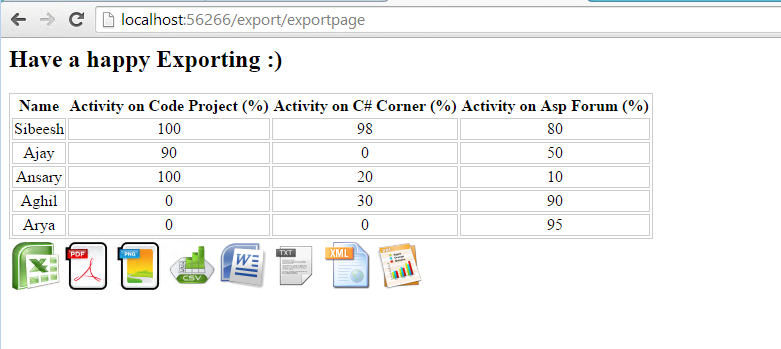
Points of Interest
JQuesry, CSS, HTML, Export
History
- 1st version: 18-11-2014
- 2nd Version : 24-11-2014
Changes done
- Added Images to UI elements
- Added some export feature
Please be noted that I have taken the images from plugin author's website (http://ngiriraj.com/pages/htmltable_export/demo.php) . You can find out more from that website.
Conclusion
Your turn. What do you think?
Kindest Regards
Sibeesh Venu


Irma CarballoPosted Jul 21, 2017, 4:51 PM EDT
Hi! It worked like a charm; however, I'm using jQuery DataTables and I have pagination on my result, Table export is only exporting the first page out of 10 from the actual result, is there a way to export the entire list and not just page 1? Thank you!
Sibeesh VenuTOP 100Posted Feb 8, 2017, 7:04 PM EST
D Donthu Hi, Can you please share what error you are getting and also please check your browser console too.
D DonthuPosted Feb 8, 2017, 12:08 AM EST
I am got some error in above code
Sibeesh VenuTOP 100Posted Oct 12, 2016, 2:31 AM EDT
Sinraj V Thanks
Sibeesh VenuTOP 100Posted Oct 12, 2016, 2:31 AM EDT
Prasanna Murali Thanks
Sinraj VPosted Oct 12, 2016, 12:59 AM EDT
Thanks to share
Prasanna MuraliPosted Jul 5, 2016, 8:11 AM EDT
Nice one...
Sibeesh VenuTOP 100Posted Jul 5, 2016, 3:38 AM EDT
Aqib Shehzad Thanks
Muhammad Aqib ShehzadPosted Jul 5, 2016, 2:56 AM EDT
Very nice share
Sibeesh VenuTOP 100Posted Jul 5, 2016, 1:35 AM EDT
Upendra Pratap Shahi Thanks
Sibeesh VenuTOP 100Posted Jul 5, 2016, 1:35 AM EDT
kalu singh rao Thanks
Sibeesh VenuTOP 100Posted Jul 5, 2016, 1:35 AM EDT
Sr Karthiga Thank you
Sibeesh VenuTOP 100Posted Jul 5, 2016, 1:35 AM EDT
Victor Ruiz Can you please translate to English?
Sibeesh VenuTOP 100Posted Jul 5, 2016, 1:35 AM EDT
Vivek Kumar Thank you
Upendra Pratap ShahiPosted Jul 5, 2016, 1:03 AM EDT
Nice one sir...
kalu singh raoPosted Jul 5, 2016, 12:37 AM EDT
Nice...
Sr KarthigaPosted Feb 23, 2016, 2:45 PM EST
good one
Sr KarthigaPosted Feb 23, 2016, 2:45 PM EST
Nice explanation
Victor RuizPosted Feb 22, 2016, 6:02 PM EST
se puede exportar a pdf con un estilo css?
Vivek KumarPosted Feb 4, 2016, 9:33 AM EST
Nice article
Sibeesh VenuTOP 100Posted Nov 17, 2015, 10:41 PM EST
Harshad Pansuriya Thank you
Harshad PansuriyaPosted Nov 17, 2015, 9:26 PM EST
Nice one
Ashok KeshriPosted Oct 22, 2015, 11:30 PM EDT
csv file not open in csv format
Rupali ShindePosted Oct 22, 2015, 8:08 PM EDT
same q, is there way to generate chart from data for excel ??
Mary SlocumPosted Jul 3, 2015, 4:20 PM EDT
Is there any way to generate a chart from data for Excel using jQuery? Basically, I would like the data in a table in Excel along with a chart using the data beside it.
ishwarPosted May 29, 2015, 1:41 AM EDT
How change file to be downloaed.by default it Show "Download"
Sibeesh VenuTOP 100Posted Jan 8, 2015, 1:53 AM EST
vinoth kumar Hi , Have you checked the css style of those columns?
vinoth kumarPosted Jan 7, 2015, 9:27 PM EST
hi i have 10 columns but in my pdf only 4 columns is visible..
Sibeesh VenuTOP 100Posted Jan 7, 2015, 3:38 AM EST
poorna gowri Hi I have not faced that issue yet. Can you please open that in excel and verify whether it is there also?
Sibeesh VenuTOP 100Posted Jan 7, 2015, 3:28 AM EST
poorna gowri Hi , Have you checked the css style of those columns? Please verify whether its display is none or not.
poorna gowriPosted Jan 7, 2015, 1:17 AM EST
If I open this files in notepad or wordpad it showing %2C displayed instead of comma and %u20B9 displayed for rupees symbol and %20 for space. My output is collapsed. I think its regarding encoding. How to solve this?
poorna gowriPosted Jan 7, 2015, 1:13 AM EST
I tried that. working awesome. But when exporting as pdf only 4 columns are displayed. My table has 6 columns. I want to retrieve all columns. Can Anyone help pls?
Sibeesh VenuTOP 100Posted Jan 7, 2015, 1:10 AM EST
vamsi pandu Actually this approach is for generating pdf from a HTML table , as in the title. Is your image inside that HTML table?
vamsi panduPosted Jan 6, 2015, 11:42 PM EST
in your approach images are nt exporting to pdf,can you explain how to get images also in pdf file
Sibeesh VenuTOP 100Posted Dec 30, 2014, 9:36 PM EST
Sumit Jolly I will do it as you said. Once again thank you so much.
Sibeesh VenuTOP 100Posted Dec 30, 2014, 1:46 AM EST
Sumit Jolly Thanks a lot for your valuable suggestion.
Guest UserPosted Dec 30, 2014, 12:23 AM EST
And, you can save it as say 1.xls file and open in Excel. So, Excel will shout for bad file but it'll open eventually.
Guest UserPosted Dec 30, 2014, 12:23 AM EST
For ex- <html><body> <table> <th>1</th> <th>2</th> <tr><td>12</td> <td>22</td></tr> </table> </body> </html>
Guest UserPosted Dec 30, 2014, 12:23 AM EST
This is good Sibeesh Venu! I applied "a-hack" long time back before OpenXML rose to popularity index, i.e., to export data as html and keep extension as ".xls". Now. dont use this because its a hack.
Sibeesh VenuTOP 100Posted Dec 2, 2014, 9:29 PM EST
gopichand n Will look on it.
gopichand nPosted Dec 2, 2014, 8:35 PM EST
ngiriraj.com is working fine but borders and styles what i applied is not working when i download pdf....please help me ...i have a question posted for this in asp forums please look it once.. http://forums.asp.net/t/2022373.aspx?How+to+Export+HTML+Table+to+PNG+JPEG+BMP+or+PDF
Sibeesh VenuTOP 100Posted Nov 24, 2014, 5:03 AM EST
Mukesh Kumar Tiwari Thank you :)
Mukesh Kumar TiwariPosted Nov 24, 2014, 4:10 AM EST
very nice..
Sibeesh VenuTOP 100Posted Nov 24, 2014, 2:06 AM EST
Manish Kumar Choudhary Thank you :)
Sibeesh VenuTOP 100Posted Nov 24, 2014, 2:06 AM EST
Joginder Banger Thank you :) . You can call me sibi :)
Manish Kumar ChoudharyPosted Nov 24, 2014, 2:02 AM EST
Gud once Sibi..
Joginder BangerPosted Nov 24, 2014, 1:52 AM EST
Gud job..sir