
Background
There often is a need in a project's reporting module to show records of a GridView in an Excel sheet, so to do that I decided to write this article, especially focusing on beginners and those who want to learn how to export a GridView to Excel Using ASP.Net C#.
Now before creating the application, let us create a table named employee in a database with records for the GridView, the table has the following fields (shown in the following image):
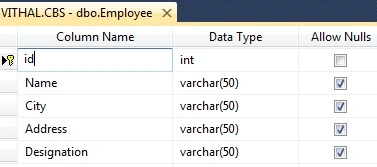
I hope you have created the same type of table.
Now create the project as:
- "Start" - "All Programs" - "Microsoft Visual Studio 2010".
- "File" - "New Project" - "C#" - "Empty Project" (to avoid adding a master page).
- Provide the Project name such as "ExportGridToExcel" or another as you wish and specify the location.
- Then right-click on the Solution Explorer and select "Add New Item" - "Default.aspx" page.
- Then add one button, one label and a GridView to the page.
Now let us create a function to bind the records to the GridView from the database. If you are beginner and don’t know the details of how to bind a GridView from a database then refer the following article.
Now for this article, create the following function in the default.aspx.cs page to bind the GridView:
private void Bindgrid()
{
    connection();
    query = "select *from Employee";//not recommended this i have written for example,write stored procedure for security
    com = new SqlCommand(query, con);
    SqlDataReader dr = com.ExecuteReader();
    GridView1.DataSource = dr;
    GridView1.DataBind();
    con.Close();
}
Now, call this function on page load as in the following:
protected void Page_Load(object sender, EventArgs e)
{
    if (!IsPostBack)
    {
        Bindgrid();
    }
}
Now run the application, we then can see the following records in the GridView as in the following:
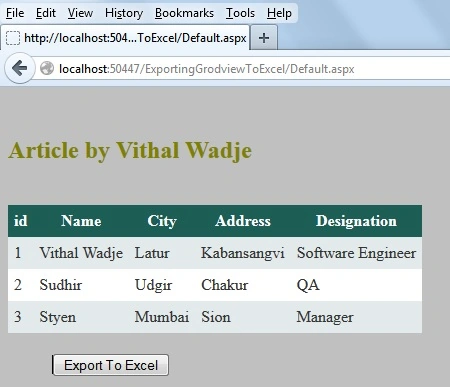
Now, we have a record to export to Excel, let us start coding for our actual requirements. Add the VerifyRenderingInServerForm event after the page load that is required while exporting the GridView to Excel,Word and PDF formt to avoid the runtime error that occurrs, such as "GridView' must be placed inside a form tag with runat=server.".
public override void VerifyRenderingInServerForm(Control control)
{
    //required to avoid the run time error "
    //Control 'GridView1' of type 'Grid View' must be placed inside a form tag with runat=server."
}
Now create the following function to Export the GridView to Excel as in the following:
private void ExportGridToExcel()
{
    Response.Clear();
    Response.Buffer = true;
    Response.ClearContent();
    Response.ClearHeaders();
    Response.Charset = "";
    string FileName ="Vithal"+DateTime.Now+".xls";
    StringWriter strwritter = new StringWriter();
    HtmlTextWriter htmltextwrtter = new HtmlTextWriter(strwritter);
    Response.Cache.SetCacheability(HttpCacheability.NoCache);
    Response.ContentType ="application/vnd.ms-excel";
    Response.AddHeader("Content-Disposition","attachment;filename=" + FileName);
    GridView1.GridLines = GridLines.Both;
    GridView1.HeaderStyle.Font.Bold = true;
    GridView1.RenderControl(htmltextwrtter);
    Response.Write(strwritter.ToString());
    Response.End();
}
Now double-click on the "Export to Excel" button and call the preceding function in "onclick" as in the following:
protected void Button1_Click(object sender, EventArgs e)
{
    ExportGridToExcel();
}
Now the entire code of the Default.aspx.cs page will be as follows:
using System;
using System.Web.UI;
using System.Web.UI.WebControls;
using System.Configuration;
using System.Data.SqlClient;
using System.IO;
using System.Web;

public partial class _Default : System.Web.UI.Page
{
    private SqlConnection con;
    private SqlCommand com;
    private string constr,query;
    private void connection()
    {
        constr = ConfigurationManager.ConnectionStrings["getconn"].ToString();
        con = new SqlConnection(constr);
        con.Open();

    }
    protected void Page_Load(object sender, EventArgs e)
    {
        if (!IsPostBack)
        {
            Bindgrid();
        }
    }

    public override void VerifyRenderingInServerForm(Control control)
    {
        //required to avoid the runtime error "
        //Control 'GridView1' of type 'GridView' must be placed inside a form tag with runat=server."
    }
    private void Bindgrid()
    {
        connection();
        query = "select *from Employee";//not recommended this i have wrtten just for example,write stored procedure for security
        com = new SqlCommand(query, con);
        SqlDataReader dr = com.ExecuteReader();
        GridView1.DataSource = dr;
        GridView1.DataBind();
        con.Close();
    }
    protected void Button1_Click(object sender, EventArgs e)
    {
        ExportGridToExcel();
    }
    private void ExportGridToExcel()
    {
        Response.Clear();
        Response.Buffer = true;
        Response.ClearContent();
        Response.ClearHeaders();
        Response.Charset = "";
        string FileName ="Vithal"+DateTime.Now+".xls";
        StringWriter strwritter = new StringWriter();
        HtmlTextWriter htmltextwrtter = new HtmlTextWriter(strwritter);
        Response.Cache.SetCacheability(HttpCacheability.NoCache);
        Response.ContentType ="application/vnd.ms-excel";
        Response.AddHeader("Content-Disposition","attachment;filename=" + FileName);
        GridView1.GridLines = GridLines.Both;
        GridView1.HeaderStyle.Font.Bold = true;
        GridView1.RenderControl(htmltextwrtter);
        Response.Write(strwritter.ToString());
        Response.End();
    }
}
Now run the application and click on the "Export to Excel" button, the following popup is shown:

Now click on the "Open with" option, all the GridView records are exported into Excel as in the following:
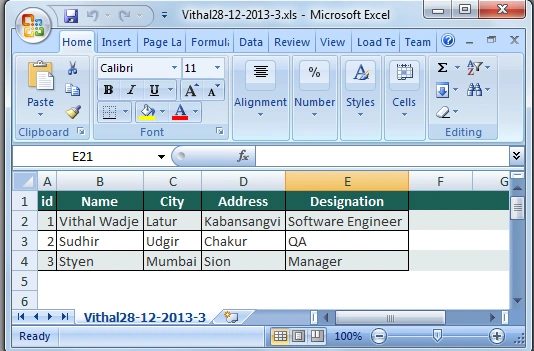
Notes
- Download the Zip file from the attachment for the full source code of an application.
- Change the connection string in the web.config file to specify your server location.
Summary
I hope this article is useful for all readers, if you have any suggestion then please contact me, including beginners.


Sibi BabuPosted Apr 19, 2023, 5:52 AM EDT
Hello, When i create excel file from .net and try to open it says the file you are trying to open filname.xls is in a different format than specified by the file extension. Please help. It seems the excel file is having too much rows when i only have 3000 rows in my gridview. later it is showing out of memory when the excel sheet opens and suddenly crash and close the file.
S AblePosted Jul 22, 2019, 6:27 AM EDT
I'm having trouble with a gridview export; at some point, it stopped exporting and opening in excel. I assumed it was because the code was still exporting it to .XLS. So, I changed it to .XLSX and it still doesn't work. It is returning the error "The file format and extension of ... don't match. The file could be corrupted or unsafe.". I tried many suggestions for how to resolve this issue, but nothing has worked. I tried your example and I still get the same error. Do you know what might be causing this?
Dharmendra Kumar PanditPosted Jun 28, 2019, 7:20 AM EDT
Great article ....
Dharmendra Kumar PanditPosted Jun 28, 2019, 7:20 AM EDT
Thank you sir.....
Shea LeonardPosted May 27, 2019, 12:26 AM EDT
Hi Vithal, Great post and walkthrough! I am having some problems with the styling of my Worksheet, any tips?
vigneshwari ananthanPosted Jan 16, 2019, 8:55 PM EST
Best one easily understood thanq for this great article
Ramzanali MominPosted Oct 17, 2018, 10:54 PM EDT
Nice article
Greg JamesPosted Sep 11, 2018, 7:32 AM EDT
I Found the answer for myself. I had to add EnableEventValidation="false" to the Page declaration of the aspx. I also found I had to add this line in the c# Page_Load ScriptManager.GetCurrent(Page).RegisterPostBackControl(Button1);
Greg JamesPosted Sep 11, 2018, 6:30 AM EDT
Still no answer to 'RegisterForEventValidation can only be called during Render(); ??
Paramjeet PatroPosted Jul 20, 2018, 5:31 AM EDT
Showing some error "System.InvalidOperationException: 'RegisterForEventValidation can only be called during Render();'" in line no 66 of your code. Please help me on this
ankit shuklaPosted May 11, 2018, 3:53 AM EDT
Not work with multiple grid export .....
Sire ChakrabortyPosted Mar 8, 2018, 12:15 AM EST
Here there is an issue of Permission at Production Server. Locally this works quite ok, but in production allowing full write permission is vulnerable. What to do under such circumstances. Please reply
Abbas NaqviPosted Jan 18, 2018, 10:14 PM EST
Does not work even GridView.Pagging is false
Abbas NaqviPosted Jan 12, 2018, 9:21 PM EST
How to avoid paging print inside exel file
Iswarya RengarajanPosted Jul 5, 2017, 9:46 PM EDT
Hi vithal, How to export gridview1 and gridview2 in same excel sheet but different page like gridview1 in Page1 and gridview2 in Page2 please guide me to do this
Mayur KhairnarPosted Jun 3, 2017, 3:52 AM EDT
Thanks You Vitthal Sir. Your Tutorial and Videos always helpful for me
Ochaya GeraldPosted May 19, 2017, 1:28 PM EDT
Object reference not set to an instance of an object. constr = ConfigurationManager.ConnectionStrings["getconn"].ToString();
shahnid kPosted Apr 3, 2017, 12:56 AM EDT
Error: "RegisterForEventValidation can only be called during Render(); " How to resolve this.
murugan92 MuruganPosted Nov 6, 2016, 1:09 AM EST
Thanks sir.I like this code....
Vithal WadjeTOP 100Posted Mar 29, 2016, 6:32 AM EDT
Thanks Sir
Humayun Kabir MamunPosted Mar 29, 2016, 1:47 AM EDT
Nice...
AbedElHamid AlWahidyPosted Feb 14, 2016, 12:31 AM EST
dear vithal when i export the file and save it and opent it i face the msg in excel file : Server Error in '/ExportingGrodviewToExcel' Application.
Vithal WadjeTOP 100Posted Dec 25, 2015, 2:40 AM EST
Thanks Maria Engel
Vithal WadjeTOP 100Posted Dec 25, 2015, 2:38 AM EST
Nisha Khurana its depend on browser
Nisha KhuranaPosted Dec 24, 2015, 8:47 PM EST
Hello sir, nice code, it does not give any error but i don't get any popup after execution. please advise
Maria EngelPosted Nov 16, 2015, 2:15 AM EST
Thanks! Great tutorial for something that I thought would be much more complicated!
khurram khanPosted Nov 2, 2015, 9:10 PM EST
Responce.clear(); is not working ...
khurram khanPosted Nov 2, 2015, 9:10 PM EST
Dear Vithal Wadje ,
Vithal WadjeTOP 100Posted Oct 21, 2015, 6:43 AM EDT
what error you are getting
Srujan KumarPosted Oct 20, 2015, 11:43 PM EDT
Please help me.
Srujan KumarPosted Oct 20, 2015, 11:43 PM EDT
i am unable to do with Server.MapPath("~/App_Data/"+EXcelFile.xls).
Srujan KumarPosted Oct 20, 2015, 11:42 PM EDT
Hi Thanks for this code. But, i want to store the excel file in project folder like App_Data/ExcelFile.xls.
Vithal WadjeTOP 100Posted Aug 22, 2015, 9:30 PM EDT
Thanks
Yashwanth MuthineniPosted Aug 22, 2015, 3:18 AM EDT
Nice Share
Vithal WadjeTOP 100Posted Aug 8, 2015, 3:08 AM EDT
welcome Shashank Rane sir
Shashank RanePosted Aug 6, 2015, 8:55 PM EDT
Thank You very much..You solved my problem..
Vithal WadjeTOP 100Posted Jul 17, 2015, 8:00 PM EDT
Thanks Nilesh Jadav
Vithal WadjeTOP 100Posted Jul 17, 2015, 8:00 PM EDT
hi santhosh B write code in content page
Vithal WadjeTOP 100Posted Jul 17, 2015, 7:59 PM EDT
Thanks safihur rahuman sir
Vithal WadjeTOP 100Posted Jul 17, 2015, 7:58 PM EDT
Thanks Terry
Nilesh JadavPosted Jul 10, 2015, 4:52 AM EDT
Nice one sir
santhosh BPosted Jul 10, 2015, 4:49 AM EDT
it will not work with master files
safihur rahumanPosted Jun 4, 2015, 2:10 AM EDT
Thank You very Much Usefull your Post.,
TerryPosted Apr 17, 2015, 11:41 PM EDT
Thank you
Vithal WadjeTOP 100Posted Apr 15, 2015, 9:52 AM EDT
welcome
vivek upadhyayPosted Apr 14, 2015, 10:14 PM EDT
than you
Vithal WadjeTOP 100Posted Apr 13, 2015, 8:43 AM EDT
yes thats version issues but it has solution wait for my next article
TerryPosted Apr 13, 2015, 3:02 AM EDT
Why the same thing is not being achieved in ListView. I have Linkbutton in <thead>, that is causing error. Also all examples are showing using Gridview or DataList only, why not ListView !!! Is it not possible or very difficult to implement ???
TerryPosted Apr 13, 2015, 2:58 AM EDT
Thanks Vithal Wadje for this article. Everything works well, just when I open the Excel file, I get Error saying " The file is in different format then specified by file extension. Verify the file is not corrupt or trust....... Do you want to open the file now ?" If I click "Yes" it does opens nicely. Bus is there a way to avoid this error. I tried saving file in xls and xlsx also. I have Excel 2007. I also tried setting ContentType as just "application/excel", yet same error. Is there any solution for this problem ???
Vithal WadjeTOP 100Posted Jan 15, 2015, 8:12 PM EST
welcome
vivek upadhyayPosted Jan 14, 2015, 7:38 PM EST
Thanks vithal
Vithal WadjeTOP 100Posted Jan 12, 2015, 7:40 AM EST
We are exporting control (gridview) not a page ,so their is no dependency of page,if you got any error send me your code
Robin LupinPosted Jan 12, 2015, 4:02 AM EST
What if the page if content page and we cannot use form tag in that? Please suggest what to do in that case.
Vithal WadjeTOP 100Posted Jan 7, 2015, 9:53 PM EST
Thansks Vivek sir
vivek upadhyayPosted Jan 7, 2015, 9:35 PM EST
Good
Chandan KoleyPosted Nov 13, 2014, 12:26 AM EST
In this code how can I make the downloaded excel file read only specifically for some row?.... Please help me....