
The following is my data table: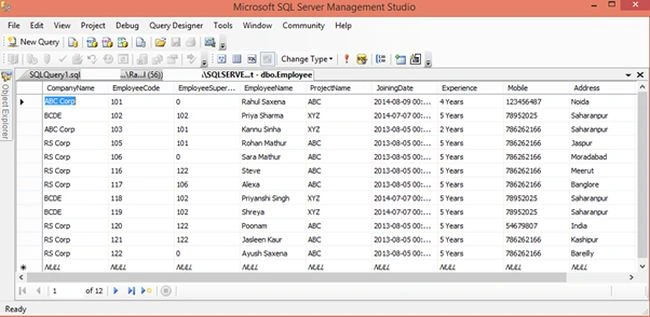
Image 1
- My table in design mode:
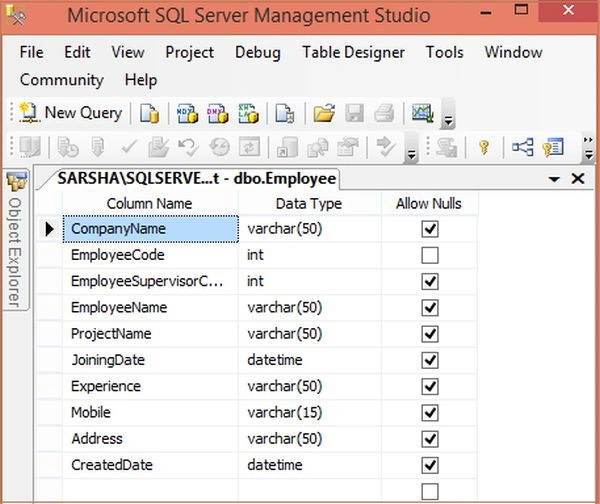
Image 2
- Now my aspx code:
- <%@ Page Language="C#" AutoEventWireup="true" CodeFile="Default.aspx.cs" Inherits="_Default" %>
- <!DOCTYPE html PUBLIC "-//W3C//DTD XHTML 1.0 Transitional//EN" "http://www.w3.org/TR/xhtml1/DTD/xhtml1-transitional.dtd">
- <html xmlns="http://www.w3.org/1999/xhtml">
- <head runat="server">
- <title>Export Record To PDF using iTextSharp</title>
- </head>
- <body>
- <form id="form1" runat="server">
- <div>
- <table cellpadding="10" cellspacing="10" style="border: solid 10px red; background-color: Skyblue;"
- width="90%" align="center">
- <tr>
- <td style="height: 35px; background-color: Yellow; font-weight: bold; font-size: 16pt;
- font-family: Times New Roman; color: Red" align="center">
- Export Record To PDF
- </td>
- </tr>
- <tr>
- <td>
- <asp:GridView ID="GridViewRecord" HeaderStyle-BackColor="#3AC0F2" HeaderStyle-ForeColor="White"
- RowStyle-BackColor="#A1DCF2" runat="server" AutoGenerateColumns="False"
- BackColor="White" BorderColor="#CC9966" BorderStyle="None" BorderWidth="1px"
- CellPadding="4">
- <RowStyle BackColor="White" ForeColor="#330099"></RowStyle>
- <Columns>
- <asp:TemplateField>
- <ItemTemplate>
- <asp:CheckBox ID="chkSelect" runat="server" />
- </ItemTemplate>
- </asp:TemplateField>
- <asp:BoundField DataField="EmployeeName" HeaderText="Employee Name" ItemStyle-Width="150px" />
- <asp:BoundField DataField="CompanyName" HeaderText="Company Name" ItemStyle-Width="120px" />
- <asp:BoundField DataField="ProjectName" HeaderText="Project Name" ItemStyle-Width="100px" />
- <asp:BoundField DataField="JoiningDate" HeaderText="Joining Date" ItemStyle-Width="150px" />
- <asp:BoundField DataField="Address" HeaderText="Address" ItemStyle-Width="100px" />
- </Columns>
- <FooterStyle BackColor="#FFFFCC" ForeColor="#330099" />
- <PagerStyle BackColor="#FFFFCC" ForeColor="#330099" HorizontalAlign="Center" />
- <SelectedRowStyle BackColor="#FFCC66" Font-Bold="True" ForeColor="#663399" />
- <HeaderStyle BackColor="#990000" ForeColor="#FFFFCC" Font-Bold="True"></HeaderStyle>
- </asp:GridView>
- </td>
- </tr>
- <tr>
- <td>
- <asp:Button ID="btnExportGridRecord" runat="server" Text="Export To PDF" OnClick="btnExportGridRecord_Click" />
- </td>
- </tr>
- </div>
- </form>
- </body>
- </html>
- Now my aspx.cs code:
- using System;
- using System.Configuration;
- using System.Data;
- using System.Linq;
- using System.Web;
- using System.Web.Security;
- using System.Web.UI;
- using System.Web.UI.HtmlControls;
- using System.Web.UI.WebControls;
- using System.Web.UI.WebControls.WebParts;
- using System.Xml.Linq;
- using System.IO;
- using System.Data.SqlClient;
- using iTextSharp.text;
- using iTextSharp.text.html.simpleparser;
- using iTextSharp.text.pdf;
- public partial class _Default : System.Web.UI.Page
- {
- protected void Page_Load(object sender, EventArgs e)
- {
- if (!IsPostBack)
- {
- this.BindGridData();
- }
- }
- private void BindGridData()
- {
- SqlConnection con = new SqlConnection(@"Server=MyPC\SqlServer2k8;database=Test;Integrated Security=true;");
- SqlCommand cmd = new SqlCommand("SELECT TOP 15 * FROM Employee");
- SqlDataAdapter da = new SqlDataAdapter(cmd);
- cmd.Connection = con;
- DataTable dt = new DataTable();
- da.Fill(dt);
- GridViewRecord.DataSource = dt;
- GridViewRecord.DataBind();
- }
- protected void btnExportGridRecord_Click(object sender, EventArgs e)
- {
- using (StringWriter sw = new StringWriter())
- {
- using (HtmlTextWriter hw = new HtmlTextWriter(sw))
- {
- GridViewRecord.Columns[0].Visible = false;
- foreach (GridViewRow row in GridViewRecord.Rows)
- {
- if (row.RowType == DataControlRowType.DataRow)
- {
- row.Visible = (row.FindControl("chkSelect") as CheckBox).Checked;
- }
- }
- GridViewRecord.RenderControl(hw);
- StringReader sr = new StringReader(sw.ToString());
- Document pdfDoc = new Document(PageSize.A4, 10f, 10f, 10f, 0f);
- HTMLWorker htmlparser = new HTMLWorker(pdfDoc);
- PdfWriter.GetInstance(pdfDoc, Response.OutputStream);
- pdfDoc.Open();
- htmlparser.Parse(sr);
- pdfDoc.Close();
- Response.ContentType = "application/pdf";
- Response.AddHeader("content-disposition", "attachment;filename=Records.pdf");
- Response.Cache.SetCacheability(HttpCacheability.NoCache);
- Response.Write(pdfDoc);
- Response.End();
- }
- }
- }
- public override void VerifyRenderingInServerForm(Control control)
- {
- /* Verifies that the control is rendered */
- }
- }
- Now run the application:
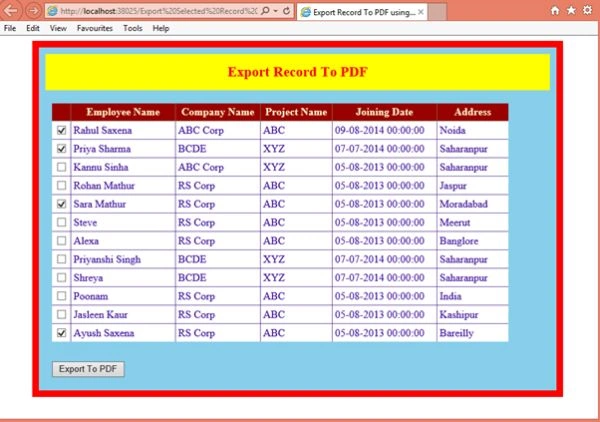
Image 3
- Select records here and click on the Export to PDF button:
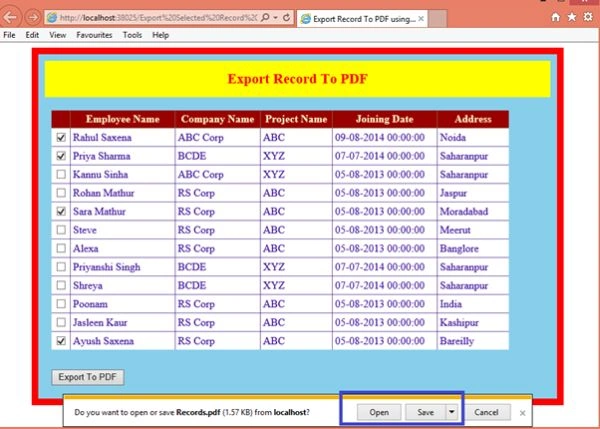
Image 4
- From here you can open or save the PDF file. Now view your PDF file:
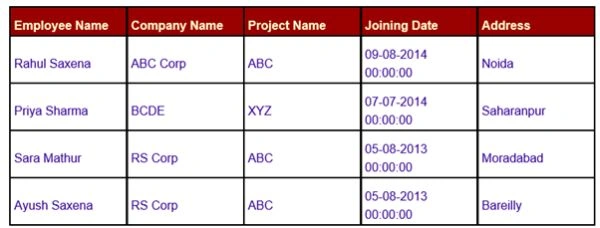
Image 5


paras saxenaPosted May 31, 2016, 3:47 AM EDT
i want merge and view pdf files into one files in asp.net c#
Rahul Kumar SaxenaTOP 100Posted Feb 27, 2015, 6:50 PM EST
Thanks...
Vinu P TomyPosted Dec 11, 2014, 11:10 PM EST
would above solution export all items in grid to pdf, if grid having paging and data present in multiple pages.?