
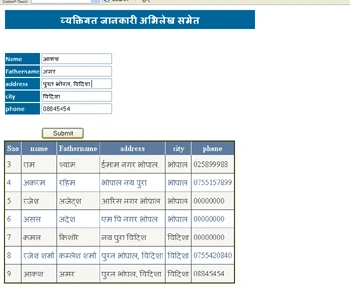
Firstly do this task . . download the Unicode generator software HINID Indic IME 1 V 5.0 then install this software on your PC . . not difficult to do .. installed in your PC . . then start ASP.NET.
In SQL
In SQL create a table with required data entry. And since you want to add Hindi in a column the data type should be NVARCHAR. The columns NAME, Father Name, Address and City are NVARCHAR data type.
In aspx page
In the aspx page, draw a textbox and button control. Then write the following code for saving the data to a SQL Database.
Write this code for the button's Click event:
protected void btnSubmit_Click(object sender, EventArgs e)
{
localclass1.myconnection();
string sql = "insert into hindi (name,Fathername,address,city,phone)values(N'" + TextBox1.Text + "',N'" + TextBox2.Text + "',N'" + TextBox3.Text + "',N'" + TextBox4.Text + "',N'" + TextBox5.Text + "')";
cmd = new SqlCommand(sql, localclass1.mycon);
int res;
res = cmd.ExecuteNonQuery();
GridView1.DataBind();
}
Since the insert query has Unicode data, character data needs to be prefixed with an N like this .... N'"+ TextBox4.Text +"' .... to support saving Unicode to Nvarchar data type.
Many Language Types Can Be Used
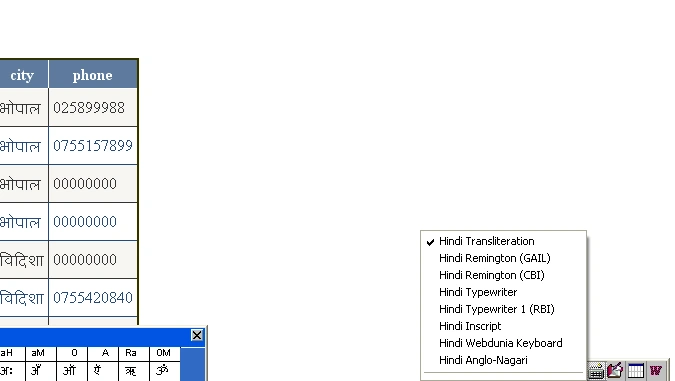
There are many options to use many languages; change in setting by clicking right side Alt + Shift button. A Hindi keyboard option can be generated using Right Side then you choosing a language, such as Hindi transliteration, Hindi Remington, Hindi Typewriter, Hinidi Inscript, Hindi Web Duniya KeyBoard, Hindi Anglo Nagri.
Change the language as you require . . and enjoy this code.
Conclusion
With this code I am trying to solve the HINDI language problem short out. Many times we want to use the Hindi language in a application but we don't know an easy way to do this, but with this code using the Hindi language will be easy in applicationa & databases . . Enjoy it.....


Sneha KumarPosted Sep 22, 2018, 3:19 AM EDT
Instead of insert statement, how can we do this by passing values to a stored procedure using cmd.parameters.add()
vijayPosted Feb 21, 2013, 12:49 AM EST
very nice , can you send completed code
MUJI GOPINATHPosted Mar 26, 2012, 11:49 PM EDT
Thanks for excellent post on hindi could you post the same with oracle 9i as backend and rest of example is same. thanks in advance
Krishna GaradPosted Apr 26, 2011, 3:56 AM EDT
From Where we can download this hindi indic any link please.
Krishna GaradPosted Apr 5, 2011, 2:21 AM EDT
What about client they complusary install that third party tool or no need to install?
Suthish NairTOP 100Posted Apr 4, 2011, 10:49 AM EDT
Store by HINDI? How the data getting saved, in which language Hindi or English? You didn't explained how the third party tool works with .Net?
Mayur GujrathiPosted Apr 4, 2011, 4:32 AM EDT
what do you mean by this "In sql create a table with required data entry. And u want to add hindi in column so such data type NVARCHAR . must be NAME, Father Name, Address, City, are NVARCHAR data type……"