
Introduction
In this article, we will learn how to copy files from Windows to Linux and download files from Linux to Windows. Here I am using Visual Studio 2019 and .NetFrameWork 4.7 and WinSCP. WinSCP .NET assembly winscp.dll is a .NET wrapper around WinSCP’s scripting interface that allows your code to connect to a remote machine and manipulate remote files over SFTP, SCP, and FTP sessions from .NET languages, such as C#, VB.NET, PowerShell, etc. Here I am using SFTP. SFTP is an interactive program that lets us upload and download files between a Windows and Linux Server.
For this operation, we need the following details of the Linux server.
- HostName :
- UserName :
- Password :
- SshHostKeyFingerprint :
- SshHostKeyFingerprint looks like
ssh-rsa 1024 xx:xx:xx:xx:xx:xx:xx:xx:xx:xx:xx:xx:xx:xx:xx:xx
or
ssh-rsa 2048 xx:xx:xx:xx:xx:xx:xx:xx:xx:xx:xx:xx:xx:xx:xx:xx
Step 1
- Open Visual Studio 2019 click on create a new project.
- Select Windows Form App from templates and click on “Next”.
- Then give the project name as “FileTransfer” and then click “Create”.
Before coding add WinSCP reference to the project.
Creating Master Form and Child Forms
Step 2
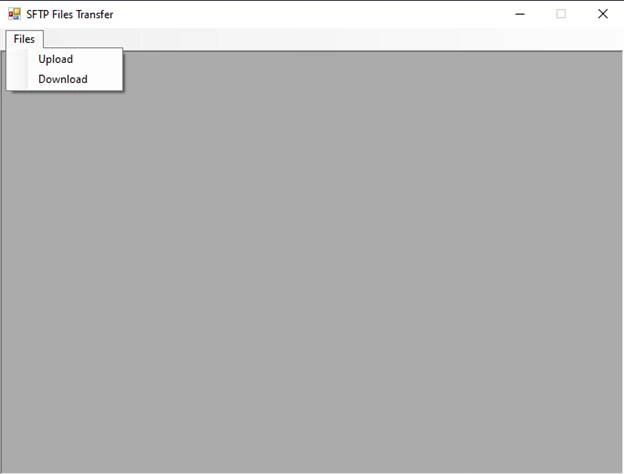
Rename the form “Form1” to “FilesTransfer” and set “IsMdiContainer” property of the form to true and create two new forms, “FileUpload” and “FileDownload”.
The FilesTransfer form will look like the below image,
Code for FilesTransfer.Designer.cs
- namespace FileTransfer
- {
- partial class FilesTransfer
- {
- /// <summary>
- /// Required designer variable.
- /// </summary>
- private System.ComponentModel.IContainer components = null;
- /// <summary>
- /// Clean up any resources being used.
- /// </summary>
- /// <param name="disposing">true if managed resources should be disposed; otherwise, false.</param>
- protected override void Dispose(bool disposing)
- {
- if (disposing && (components != null))
- {
- components.Dispose();
- }
- base.Dispose(disposing);
- }
- #region Windows Form Designer generated code
- /// <summary>
- /// Required method for Designer support - do not modify
- /// the contents of this method with the code editor.
- /// </summary>
- private void InitializeComponent()
- {
- this.menuStrip1 = new System.Windows.Forms.MenuStrip();
- this.filesToolStripMenuItem = new System.Windows.Forms.ToolStripMenuItem();
- this.uploadToolStripMenuItem = new System.Windows.Forms.ToolStripMenuItem();
- this.downloadToolStripMenuItem = new System.Windows.Forms.ToolStripMenuItem();
- this.menuStrip1.SuspendLayout();
- this.SuspendLayout();
- //
- // menuStrip1
- //
- this.menuStrip1.Items.AddRange(new System.Windows.Forms.ToolStripItem[] {
- this.filesToolStripMenuItem});
- this.menuStrip1.Location = new System.Drawing.Point(0, 0);
- this.menuStrip1.Name = "menuStrip1";
- this.menuStrip1.Size = new System.Drawing.Size(684, 24);
- this.menuStrip1.TabIndex = 1;
- this.menuStrip1.Text = "menuStrip1";
- //
- // filesToolStripMenuItem
- //
- this.filesToolStripMenuItem.DropDownItems.AddRange(new System.Windows.Forms.ToolStripItem[] {
- this.uploadToolStripMenuItem,
- this.downloadToolStripMenuItem});
- this.filesToolStripMenuItem.Name = "filesToolStripMenuItem";
- this.filesToolStripMenuItem.Size = new System.Drawing.Size(42, 20);
- this.filesToolStripMenuItem.Text = "Files";
- //
- // uploadToolStripMenuItem
- //
- this.uploadToolStripMenuItem.Name = "uploadToolStripMenuItem";
- this.uploadToolStripMenuItem.Size = new System.Drawing.Size(180, 22);
- this.uploadToolStripMenuItem.Text = "Upload";
- this.uploadToolStripMenuItem.Click += new System.EventHandler(this.UploadToolStripMenuItem_Click);
- //
- // downloadToolStripMenuItem
- //
- this.downloadToolStripMenuItem.Name = "downloadToolStripMenuItem";
- this.downloadToolStripMenuItem.Size = new System.Drawing.Size(180, 22);
- this.downloadToolStripMenuItem.Text = "Download";
- this.downloadToolStripMenuItem.Click += new System.EventHandler(this.DownloadToolStripMenuItem_Click);
- //
- // FilesTransfer
- //
- this.AutoScaleDimensions = new System.Drawing.SizeF(7F, 17F);
- this.AutoScaleMode = System.Windows.Forms.AutoScaleMode.Font;
- this.ClientSize = new System.Drawing.Size(684, 490);
- this.Controls.Add(this.menuStrip1);
- this.Font = new System.Drawing.Font("Segoe UI", 9.75F, System.Drawing.FontStyle.Regular, System.Drawing.GraphicsUnit.Point, ((byte)(0)));
- this.IsMdiContainer = true;
- this.MainMenuStrip = this.menuStrip1;
- this.Margin = new System.Windows.Forms.Padding(3, 4, 3, 4);
- this.MaximizeBox = false;
- this.Name = "FilesTransfer";
- this.StartPosition = System.Windows.Forms.FormStartPosition.CenterScreen;
- this.Text = "SFTP Files Transfer";
- this.Load += new System.EventHandler(this.FilesTransfer_Load);
- this.menuStrip1.ResumeLayout(false);
- this.menuStrip1.PerformLayout();
- this.ResumeLayout(false);
- this.PerformLayout();
- }
- #endregion
- private System.Windows.Forms.MenuStrip menuStrip1;
- private System.Windows.Forms.ToolStripMenuItem filesToolStripMenuItem;
- private System.Windows.Forms.ToolStripMenuItem uploadToolStripMenuItem;
- private System.Windows.Forms.ToolStripMenuItem downloadToolStripMenuItem;
- }
- }
Code for FilesTransfer.cs
- using System;
- using System.Windows.Forms;
- namespace FileTransfer
- {
- public partial class FilesTransfer : Form
- {
- FileUpload FU = null;
- FileDownload FD = null;
- public FilesTransfer()
- {
- InitializeComponent();
- }
- private void UploadToolStripMenuItem_Click(object sender, EventArgs e)
- {
- if (FU == null)
- {
- FU = new FileUpload();
- FU.ShowDialog();
- }
- else if (FU.Visible == true)
- {
- FU.WindowState = FormWindowState.Normal;
- FU.ShowDialog();
- FU.Focus();
- }
- else
- {
- FU = new FileUpload();
- FU.ShowDialog();
- }
- }
- private void DownloadToolStripMenuItem_Click(object sender, EventArgs e)
- {
- if (FD == null)
- {
- FD = new FileDownload();
- FD.ShowDialog();
- }
- else if (FD.Visible == true)
- {
- FD.WindowState = FormWindowState.Normal;
- FD.ShowDialog();
- FD.Focus();
- }
- else
- {
- FD = new FileDownload();
- FD.ShowDialog();
- }
- }
- }
- }
FileUpload form.
Step 3
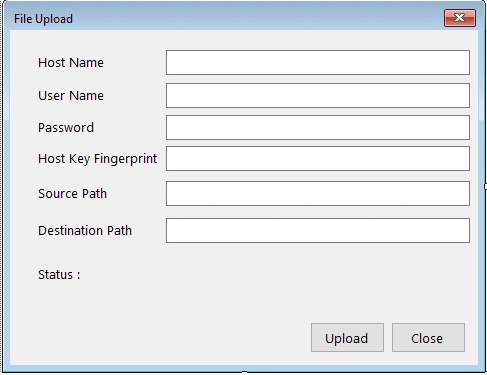
By using “FileUpload” form we can upload files from Windows to Linux Server.
Code for FileUpload.Designer.cs
- namespace FileTransfer
- {
- partial class FileUpload
- {
- /// <summary>
- /// Required designer variable.
- /// </summary>
- private System.ComponentModel.IContainer components = null;
- /// <summary>
- /// Clean up any resources being used.
- /// </summary>
- /// <param name="disposing">true if managed resources should be disposed; otherwise, false.</param>
- protected override void Dispose(bool disposing)
- {
- if (disposing && (components != null))
- {
- components.Dispose();
- }
- base.Dispose(disposing);
- }
- #region Windows Form Designer generated code
- /// <summary>
- /// Required method for Designer support - do not modify
- /// the contents of this method with the code editor.
- /// </summary>
- private void InitializeComponent()
- {
- this.label1 = new System.Windows.Forms.Label();
- this.label2 = new System.Windows.Forms.Label();
- this.label3 = new System.Windows.Forms.Label();
- this.label4 = new System.Windows.Forms.Label();
- this.label5 = new System.Windows.Forms.Label();
- this.label6 = new System.Windows.Forms.Label();
- this.lblStatus = new System.Windows.Forms.Label();
- this.btnUpload = new System.Windows.Forms.Button();
- this.btnClose = new System.Windows.Forms.Button();
- this.txtHostName = new System.Windows.Forms.TextBox();
- this.txtUserName = new System.Windows.Forms.TextBox();
- this.txtPassword = new System.Windows.Forms.TextBox();
- this.txtHostKey = new System.Windows.Forms.TextBox();
- this.txtSourcePath = new System.Windows.Forms.TextBox();
- this.txtDestinationPath = new System.Windows.Forms.TextBox();
- this.SuspendLayout();
- //
- // label1
- //
- this.label1.AutoSize = true;
- this.label1.Location = new System.Drawing.Point(25, 23);
- this.label1.Name = "label1";
- this.label1.Size = new System.Drawing.Size(74, 17);
- this.label1.TabIndex = 0;
- this.label1.Text = "Host Name";
- //
- // label2
- //
- this.label2.AutoSize = true;
- this.label2.Location = new System.Drawing.Point(25, 56);
- this.label2.Name = "label2";
- this.label2.Size = new System.Drawing.Size(74, 17);
- this.label2.TabIndex = 1;
- this.label2.Text = "User Name";
- //
- // label3
- //
- this.label3.AutoSize = true;
- this.label3.Location = new System.Drawing.Point(25, 88);
- this.label3.Name = "label3";
- this.label3.Size = new System.Drawing.Size(64, 17);
- this.label3.TabIndex = 2;
- this.label3.Text = "Password";
- //
- // label4
- //
- this.label4.AutoSize = true;
- this.label4.Location = new System.Drawing.Point(25, 119);
- this.label4.Name = "label4";
- this.label4.Size = new System.Drawing.Size(127, 17);
- this.label4.TabIndex = 3;
- this.label4.Text = "Host Key Fingerprint";
- //
- // label5
- //
- this.label5.AutoSize = true;
- this.label5.Location = new System.Drawing.Point(25, 154);
- this.label5.Name = "label5";
- this.label5.Size = new System.Drawing.Size(77, 17);
- this.label5.TabIndex = 4;
- this.label5.Text = "Source Path";
- //
- // label6
- //
- this.label6.AutoSize = true;
- this.label6.Location = new System.Drawing.Point(25, 191);
- this.label6.Name = "label6";
- this.label6.Size = new System.Drawing.Size(102, 17);
- this.label6.TabIndex = 5;
- this.label6.Text = "Destination Path";
- //
- // lblStatus
- //
- this.lblStatus.Location = new System.Drawing.Point(25, 231);
- this.lblStatus.Name = "lblStatus";
- this.lblStatus.Size = new System.Drawing.Size(435, 25);
- this.lblStatus.TabIndex = 6;
- this.lblStatus.Text = "Status :";
- this.lblStatus.TextAlign = System.Drawing.ContentAlignment.MiddleLeft;
- //
- // btnUpload
- //
- this.btnUpload.Location = new System.Drawing.Point(300, 292);
- this.btnUpload.Name = "btnUpload";
- this.btnUpload.Size = new System.Drawing.Size(75, 31);
- this.btnUpload.TabIndex = 7;
- this.btnUpload.Text = "Upload";
- this.btnUpload.UseVisualStyleBackColor = true;
- this.btnUpload.Click += new System.EventHandler(this.BtnUpload_Click);
- //
- // btnClose
- //
- this.btnClose.Location = new System.Drawing.Point(381, 292);
- this.btnClose.Name = "btnClose";
- this.btnClose.Size = new System.Drawing.Size(75, 31);
- this.btnClose.TabIndex = 8;
- this.btnClose.Text = "Close";
- this.btnClose.UseVisualStyleBackColor = true;
- this.btnClose.Click += new System.EventHandler(this.BtnClose_Click);
- //
- // txtHostName
- //
- this.txtHostName.Location = new System.Drawing.Point(156, 20);
- this.txtHostName.Name = "txtHostName";
- this.txtHostName.Size = new System.Drawing.Size(304, 25);
- this.txtHostName.TabIndex = 9;
- //
- // txtUserName
- //
- this.txtUserName.Location = new System.Drawing.Point(156, 53);
- this.txtUserName.Name = "txtUserName";
- this.txtUserName.Size = new System.Drawing.Size(304, 25);
- this.txtUserName.TabIndex = 10;
- //
- // txtPassword
- //
- this.txtPassword.Location = new System.Drawing.Point(156, 85);
- this.txtPassword.Name = "txtPassword";
- this.txtPassword.PasswordChar = '*';
- this.txtPassword.Size = new System.Drawing.Size(304, 25);
- this.txtPassword.TabIndex = 11;
- //
- // txtHostKey
- //
- this.txtHostKey.Location = new System.Drawing.Point(156, 116);
- this.txtHostKey.Name = "txtHostKey";
- this.txtHostKey.Size = new System.Drawing.Size(304, 25);
- this.txtHostKey.TabIndex = 12;
- //
- // txtSourcePath
- //
- this.txtSourcePath.Location = new System.Drawing.Point(156, 151);
- this.txtSourcePath.Name = "txtSourcePath";
- this.txtSourcePath.Size = new System.Drawing.Size(304, 25);
- this.txtSourcePath.TabIndex = 13;
- //
- // txtDestinationPath
- //
- this.txtDestinationPath.Location = new System.Drawing.Point(156, 188);
- this.txtDestinationPath.Name = "txtDestinationPath";
- this.txtDestinationPath.Size = new System.Drawing.Size(304, 25);
- this.txtDestinationPath.TabIndex = 14;
- //
- // FileUpload
- //
- this.AutoScaleDimensions = new System.Drawing.SizeF(7F, 17F);
- this.AutoScaleMode = System.Windows.Forms.AutoScaleMode.Font;
- this.ClientSize = new System.Drawing.Size(468, 335);
- this.Controls.Add(this.txtDestinationPath);
- this.Controls.Add(this.txtSourcePath);
- this.Controls.Add(this.txtHostKey);
- this.Controls.Add(this.txtPassword);
- this.Controls.Add(this.txtUserName);
- this.Controls.Add(this.txtHostName);
- this.Controls.Add(this.btnClose);
- this.Controls.Add(this.btnUpload);
- this.Controls.Add(this.lblStatus);
- this.Controls.Add(this.label6);
- this.Controls.Add(this.label5);
- this.Controls.Add(this.label4);
- this.Controls.Add(this.label3);
- this.Controls.Add(this.label2);
- this.Controls.Add(this.label1);
- this.Font = new System.Drawing.Font("Segoe UI", 9.75F, System.Drawing.FontStyle.Regular, System.Drawing.GraphicsUnit.Point, ((byte)(0)));
- this.FormBorderStyle = System.Windows.Forms.FormBorderStyle.FixedDialog;
- this.Margin = new System.Windows.Forms.Padding(3, 4, 3, 4);
- this.MaximizeBox = false;
- this.MinimizeBox = false;
- this.Name = "FileUpload";
- this.StartPosition = System.Windows.Forms.FormStartPosition.CenterParent;
- this.Text = "File Upload";
- this.ResumeLayout(false);
- this.PerformLayout();
- }
- #endregion
- private System.Windows.Forms.Label label1;
- private System.Windows.Forms.Label label2;
- private System.Windows.Forms.Label label3;
- private System.Windows.Forms.Label label4;
- private System.Windows.Forms.Label label5;
- private System.Windows.Forms.Label label6;
- private System.Windows.Forms.Label lblStatus;
- private System.Windows.Forms.Button btnUpload;
- private System.Windows.Forms.Button btnClose;
- private System.Windows.Forms.TextBox txtHostName;
- private System.Windows.Forms.TextBox txtUserName;
- private System.Windows.Forms.TextBox txtPassword;
- private System.Windows.Forms.TextBox txtHostKey;
- private System.Windows.Forms.TextBox txtSourcePath;
- private System.Windows.Forms.TextBox txtDestinationPath;
- }
- }
Code for FileUpload.cs
- using System;
- using System.Windows.Forms;
- using WinSCP;
- namespace FileTransfer
- {
- public partial class FileUpload : Form
- {
- public FileUpload()
- {
- InitializeComponent();
- }
- private void BtnUpload_Click(object sender, EventArgs e)
- {
- if (string.IsNullOrEmpty(txtHostName.Text))
- {
- lblStatus.Text = string.Format("Status : {0}", "Enter Host Name !");
- txtHostName.Select();
- }
- else if (string.IsNullOrEmpty(txtUserName.Text))
- {
- lblStatus.Text = string.Format("Status : {0}", "Enter User Name !");
- txtUserName.Select();
- }
- else if (string.IsNullOrEmpty(txtPassword.Text))
- {
- lblStatus.Text = string.Format("Status : {0}", "Enter Password !");
- txtPassword.Select();
- }
- else if (string.IsNullOrEmpty(txtHostKey.Text))
- {
- lblStatus.Text = string.Format("Status : {0}", "Enter Host Key !");
- txtHostKey.Select();
- }
- else if (string.IsNullOrEmpty(txtSourcePath.Text))
- {
- lblStatus.Text = string.Format("Status : {0}", "Enter Source Path !");
- txtSourcePath.Select();
- }
- else if (string.IsNullOrEmpty(txtDestinationPath.Text))
- {
- lblStatus.Text = string.Format("Status : {0}", "Enter Destination Path !");
- txtDestinationPath.Select();
- }
- else
- {
- lblStatus.Text = "Status : ";
- try
- {
- // Setup session options
- SessionOptions sessionOptions = new SessionOptions
- {
- Protocol = Protocol.Sftp,
- HostName = txtHostName.Text,
- UserName = txtUserName.Text,
- Password = txtPassword.Text,
- SshHostKeyFingerprint = txtHostKey.Text
- };
- using (Session session = new Session())
- {
- // Connect
- session.Open(sessionOptions);
- // Upload files
- TransferOptions transferOptions = new TransferOptions
- {
- TransferMode = TransferMode.Binary
- };
- TransferOperationResult transferResult;
- transferResult =
- session.PutFiles(txtSourcePath.Text, txtDestinationPath.Text, false, transferOptions);
- // Throw on any error
- transferResult.Check();
- // Print results
- foreach (TransferEventArgs transfer in transferResult.Transfers)
- {
- lblStatus.Text = string.Format("Upload of {0} succeeded", transfer.FileName);
- }
- }
- }
- catch (Exception ex)
- {
- lblStatus.Text = string.Format("Error: {0}", ex);
- }
- }
- }
- private void BtnClose_Click(object sender, EventArgs e)
- {
- this.Close();
- }
- }
- }
The “FileUpload” form looks like the below image.
FileDownload form.
Step 4
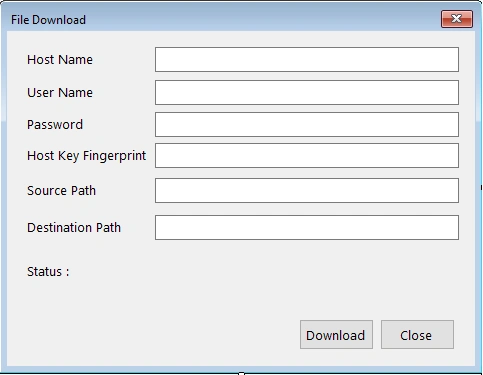
By using "FileDownload" form we can download files from Linux to Windows.
Code for FileDownload.Designer.cs
- namespace FileTransfer
- {
- partial class FileDownload
- {
- /// <summary>
- /// Required designer variable.
- /// </summary>
- private System.ComponentModel.IContainer components = null;
- /// <summary>
- /// Clean up any resources being used.
- /// </summary>
- /// <param name="disposing">true if managed resources should be disposed; otherwise, false.</param>
- protected override void Dispose(bool disposing)
- {
- if (disposing && (components != null))
- {
- components.Dispose();
- }
- base.Dispose(disposing);
- }
- #region Windows Form Designer generated code
- /// <summary>
- /// Required method for Designer support - do not modify
- /// the contents of this method with the code editor.
- /// </summary>
- private void InitializeComponent()
- {
- this.txtDestinationPath = new System.Windows.Forms.TextBox();
- this.txtSourcePath = new System.Windows.Forms.TextBox();
- this.txtHostKey = new System.Windows.Forms.TextBox();
- this.txtPassword = new System.Windows.Forms.TextBox();
- this.txtUserName = new System.Windows.Forms.TextBox();
- this.txtHostName = new System.Windows.Forms.TextBox();
- this.btnClose = new System.Windows.Forms.Button();
- this.btnDownload = new System.Windows.Forms.Button();
- this.lblStatus = new System.Windows.Forms.Label();
- this.label6 = new System.Windows.Forms.Label();
- this.label5 = new System.Windows.Forms.Label();
- this.label4 = new System.Windows.Forms.Label();
- this.label3 = new System.Windows.Forms.Label();
- this.label2 = new System.Windows.Forms.Label();
- this.label1 = new System.Windows.Forms.Label();
- this.SuspendLayout();
- //
- // txtDestinationPath
- //
- this.txtDestinationPath.Location = new System.Drawing.Point(148, 184);
- this.txtDestinationPath.Name = "txtDestinationPath";
- this.txtDestinationPath.Size = new System.Drawing.Size(304, 25);
- this.txtDestinationPath.TabIndex = 29;
- //
- // txtSourcePath
- //
- this.txtSourcePath.Location = new System.Drawing.Point(148, 147);
- this.txtSourcePath.Name = "txtSourcePath";
- this.txtSourcePath.Size = new System.Drawing.Size(304, 25);
- this.txtSourcePath.TabIndex = 28;
- //
- // txtHostKey
- //
- this.txtHostKey.Location = new System.Drawing.Point(148, 112);
- this.txtHostKey.Name = "txtHostKey";
- this.txtHostKey.Size = new System.Drawing.Size(304, 25);
- this.txtHostKey.TabIndex = 27;
- //
- // txtPassword
- //
- this.txtPassword.Location = new System.Drawing.Point(148, 81);
- this.txtPassword.Name = "txtPassword";
- this.txtPassword.PasswordChar = '*';
- this.txtPassword.Size = new System.Drawing.Size(304, 25);
- this.txtPassword.TabIndex = 26;
- //
- // txtUserName
- //
- this.txtUserName.Location = new System.Drawing.Point(148, 49);
- this.txtUserName.Name = "txtUserName";
- this.txtUserName.Size = new System.Drawing.Size(304, 25);
- this.txtUserName.TabIndex = 25;
- //
- // txtHostName
- //
- this.txtHostName.Location = new System.Drawing.Point(148, 16);
- this.txtHostName.Name = "txtHostName";
- this.txtHostName.Size = new System.Drawing.Size(304, 25);
- this.txtHostName.TabIndex = 24;
- //
- // btnClose
- //
- this.btnClose.Location = new System.Drawing.Point(373, 288);
- this.btnClose.Name = "btnClose";
- this.btnClose.Size = new System.Drawing.Size(75, 31);
- this.btnClose.TabIndex = 23;
- this.btnClose.Text = "Close";
- this.btnClose.UseVisualStyleBackColor = true;
- this.btnClose.Click += new System.EventHandler(this.BtnClose_Click);
- //
- // btnDownload
- //
- this.btnDownload.Location = new System.Drawing.Point(292, 288);
- this.btnDownload.Name = "btnDownload";
- this.btnDownload.Size = new System.Drawing.Size(75, 31);
- this.btnDownload.TabIndex = 22;
- this.btnDownload.Text = "Download";
- this.btnDownload.UseVisualStyleBackColor = true;
- this.btnDownload.Click += new System.EventHandler(this.BtnDownload_Click);
- //
- // lblStatus
- //
- this.lblStatus.Location = new System.Drawing.Point(17, 227);
- this.lblStatus.Name = "lblStatus";
- this.lblStatus.Size = new System.Drawing.Size(435, 25);
- this.lblStatus.TabIndex = 21;
- this.lblStatus.Text = "Status :";
- this.lblStatus.TextAlign = System.Drawing.ContentAlignment.MiddleLeft;
- //
- // label6
- //
- this.label6.AutoSize = true;
- this.label6.Location = new System.Drawing.Point(17, 187);
- this.label6.Name = "label6";
- this.label6.Size = new System.Drawing.Size(102, 17);
- this.label6.TabIndex = 20;
- this.label6.Text = "Destination Path";
- //
- // label5
- //
- this.label5.AutoSize = true;
- this.label5.Location = new System.Drawing.Point(17, 150);
- this.label5.Name = "label5";
- this.label5.Size = new System.Drawing.Size(77, 17);
- this.label5.TabIndex = 19;
- this.label5.Text = "Source Path";
- //
- // label4
- //
- this.label4.AutoSize = true;
- this.label4.Location = new System.Drawing.Point(17, 115);
- this.label4.Name = "label4";
- this.label4.Size = new System.Drawing.Size(127, 17);
- this.label4.TabIndex = 18;
- this.label4.Text = "Host Key Fingerprint";
- //
- // label3
- //
- this.label3.AutoSize = true;
- this.label3.Location = new System.Drawing.Point(17, 84);
- this.label3.Name = "label3";
- this.label3.Size = new System.Drawing.Size(64, 17);
- this.label3.TabIndex = 17;
- this.label3.Text = "Password";
- //
- // label2
- //
- this.label2.AutoSize = true;
- this.label2.Location = new System.Drawing.Point(17, 52);
- this.label2.Name = "label2";
- this.label2.Size = new System.Drawing.Size(74, 17);
- this.label2.TabIndex = 16;
- this.label2.Text = "User Name";
- //
- // label1
- //
- this.label1.AutoSize = true;
- this.label1.Location = new System.Drawing.Point(17, 19);
- this.label1.Name = "label1";
- this.label1.Size = new System.Drawing.Size(74, 17);
- this.label1.TabIndex = 15;
- this.label1.Text = "Host Name";
- //
- // FileDownload
- //
- this.AutoScaleDimensions = new System.Drawing.SizeF(7F, 17F);
- this.AutoScaleMode = System.Windows.Forms.AutoScaleMode.Font;
- this.ClientSize = new System.Drawing.Size(468, 335);
- this.Controls.Add(this.txtDestinationPath);
- this.Controls.Add(this.txtSourcePath);
- this.Controls.Add(this.txtHostKey);
- this.Controls.Add(this.txtPassword);
- this.Controls.Add(this.txtUserName);
- this.Controls.Add(this.txtHostName);
- this.Controls.Add(this.btnClose);
- this.Controls.Add(this.btnDownload);
- this.Controls.Add(this.lblStatus);
- this.Controls.Add(this.label6);
- this.Controls.Add(this.label5);
- this.Controls.Add(this.label4);
- this.Controls.Add(this.label3);
- this.Controls.Add(this.label2);
- this.Controls.Add(this.label1);
- this.Font = new System.Drawing.Font("Segoe UI", 9.75F, System.Drawing.FontStyle.Regular, System.Drawing.GraphicsUnit.Point, ((byte)(0)));
- this.FormBorderStyle = System.Windows.Forms.FormBorderStyle.FixedDialog;
- this.Margin = new System.Windows.Forms.Padding(3, 4, 3, 4);
- this.MaximizeBox = false;
- this.MinimizeBox = false;
- this.Name = "FileDownload";
- this.StartPosition = System.Windows.Forms.FormStartPosition.CenterParent;
- this.Text = "File Download";
- this.ResumeLayout(false);
- this.PerformLayout();
- }
- #endregion
- private System.Windows.Forms.TextBox txtDestinationPath;
- private System.Windows.Forms.TextBox txtSourcePath;
- private System.Windows.Forms.TextBox txtHostKey;
- private System.Windows.Forms.TextBox txtPassword;
- private System.Windows.Forms.TextBox txtUserName;
- private System.Windows.Forms.TextBox txtHostName;
- private System.Windows.Forms.Button btnClose;
- private System.Windows.Forms.Button btnDownload;
- private System.Windows.Forms.Label lblStatus;
- private System.Windows.Forms.Label label6;
- private System.Windows.Forms.Label label5;
- private System.Windows.Forms.Label label4;
- private System.Windows.Forms.Label label3;
- private System.Windows.Forms.Label label2;
- private System.Windows.Forms.Label label1;
- }
- }
Code for FileDownload.cs
- using System;
- using System.Windows.Forms;
- using WinSCP;
- namespace FileTransfer
- {
- public partial class FileDownload : Form
- {
- public FileDownload()
- {
- InitializeComponent();
- }
- private void BtnDownload_Click(object sender, EventArgs e)
- {
- if (string.IsNullOrEmpty(txtHostName.Text))
- {
- lblStatus.Text = string.Format("Status : {0}", "Enter Host Name !");
- txtHostName.Select();
- }
- else if (string.IsNullOrEmpty(txtUserName.Text))
- {
- lblStatus.Text = string.Format("Status : {0}", "Enter User Name !");
- txtUserName.Select();
- }
- else if (string.IsNullOrEmpty(txtPassword.Text))
- {
- lblStatus.Text = string.Format("Status : {0}", "Enter Password !");
- txtPassword.Select();
- }
- else if (string.IsNullOrEmpty(txtHostKey.Text))
- {
- lblStatus.Text = string.Format("Status : {0}", "Enter Host Key !");
- txtHostKey.Select();
- }
- else if (string.IsNullOrEmpty(txtSourcePath.Text))
- {
- lblStatus.Text = string.Format("Status : {0}", "Enter Source Path !");
- txtSourcePath.Select();
- }
- else if (string.IsNullOrEmpty(txtDestinationPath.Text))
- {
- lblStatus.Text = string.Format("Status : {0}", "Enter Destination Path !");
- txtDestinationPath.Select();
- }
- else
- {
- lblStatus.Text = "Status : ";
- try
- {
- // Setup session options
- SessionOptions sessionOptions = new SessionOptions
- {
- Protocol = Protocol.Sftp,
- HostName = txtHostName.Text,
- UserName = txtUserName.Text,
- Password = txtPassword.Text,
- SshHostKeyFingerprint = txtHostKey.Text
- };
- using (Session session = new Session())
- {
- // Connect
- session.Open(sessionOptions);
- // Upload files
- TransferOptions transferOptions = new TransferOptions
- {
- TransferMode = TransferMode.Binary
- };
- TransferOperationResult transferResult;
- transferResult =
- session.GetFiles(txtSourcePath.Text, txtDestinationPath.Text, false, transferOptions);
- // Throw on any error
- transferResult.Check();
- // Print results
- foreach (TransferEventArgs transfer in transferResult.Transfers)
- {
- lblStatus.Text = string.Format("Upload of {0} succeeded", transfer.FileName);
- }
- }
- }
- catch (Exception ex)
- {
- lblStatus.Text = string.Format("Error: {0}", ex);
- }
- }
- }
- private void BtnClose_Click(object sender, EventArgs e)
- {
- this.Close();
- }
- }
- }
The “FileUpload” form looks like the below image.


Eam ChetPosted Nov 15, 2020, 5:21 PM EST
Hi I can't use Host Key Fingerprint with RSA Key. Can you help me?
Deepak MPosted Oct 21, 2019, 8:21 PM EDT
Nice article.