
This article shows various ways to find the occurrence of a string in another string, or how to find a substring in a string. We are using the C# language to do this demo. At times, you may have encountered this requirement. This article is for those who don't know how to do this. We will be explaining two methods here. I hope you will like it.
Please see this article in my blog.
See demo.
Background
Today I got the requirement to create a function that does some operations depending on the occurrence of a string in a given string. Like, if a string pattern exists more than once in a given string, it must do some actions and if it occurs just once then it should do somethng else. I have done this in two ways, here I am sharing them. I hope you will find this useful.
Using the code
We will explain the following two ways to satisfy this requirement.
- Using Regex Class
- Using Custom Function
We will start with a Regex class first.
To start with Regex, you need to add another namespace as in the following:
- using System.Text.RegularExpressions;
- <div>
- <table >
- <tr>
- <td>
- <asp:Label ID="lblInputString" runat="server" Text="Input String"></asp:Label>
- </td>
- <td>
- <textarea id="txtInputString" runat="server"></textarea>
- </td>
- </tr>
- <tr>
- <td>
- <asp:Label ID="lblPattern" runat="server" Text="Pattern String"></asp:Label>
- </td>
- <td>
- <textarea id="txtPattern" runat="server"></textarea>
- </td>
- </tr>
- <tr>
- <td colspan="2">
- <asp:Button ID="btnCheckOccurance" runat="server" Text="Check Occurance" OnClick="btnCheckOccurance_Click" />
- </td>
- </tr>
- <tr>
- <td colspan="2">
- <asp:Label ID="lblOutput" runat="server" Text="See Output Here!!!
- <i> Thank you for visiting. Please Visit Again!!! </i>">
- </asp:Label>
- </td>
- </tr>
- </table>
- </div>
And some CSS styles as follows.
- <style type="text/css">
- textarea {
- width: 630px;
- height: 100px;
- }
- table {
- border: 1px solid #ccc;
- padding: 10px;
- width: 800px;
- text-align: center;
- }
- tr {
- border: 1px solid #999;
- border-radius: 5px;
- }
- td {
- border: 1px solid #999;
- padding: 10px;
- border-radius: 5px;
- }
- </style>
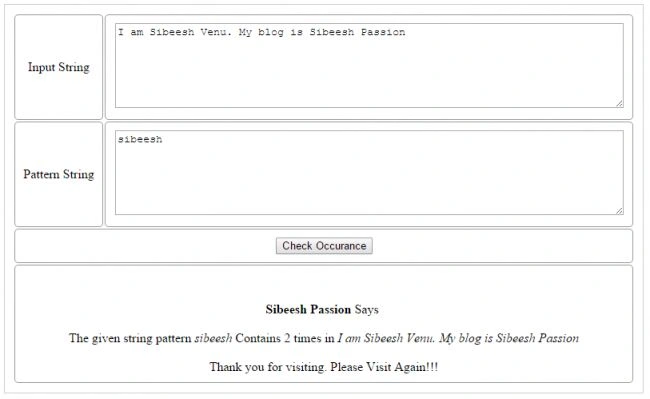
If you add the preceding code and CSS, your page may look such as in the preceding image.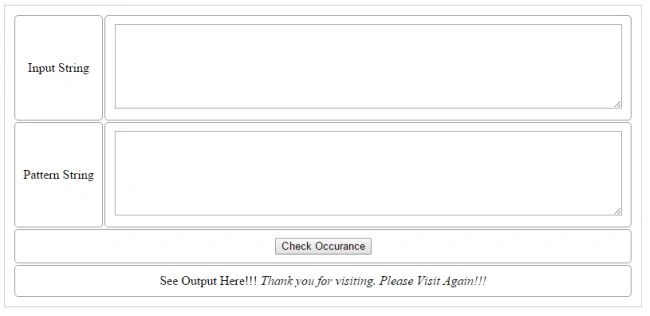
Now we will see our C# code. Please add the following lines of code on the button click event.
- protected void btnCheckOccurance_Click(object sender, EventArgs e)
- {
- int occuranceCount = 0;
- //Checking Occurance
- occuranceCount = Regex.Matches(txtInputString.Value.ToLower().Trim(), txtPattern.Value.ToLower().Trim()).Count;
- if (occuranceCount > 0)
- {
- lblOutput.Text = "<br/><br/><b>Sibeesh Passion </b>Says <br/><br/>The given string pattern <i>" + txtPattern.Value + "</i> Contains " + occuranceCount + " times in <i>" + txtInputString.Value + "</i><br/><br/> Thank you for visiting. Please Visit Again!!!";
- }
- else
- {
- lblOutput.Text = "<br/>
- <br/><b>Sibeesh Passion </b>Says <br/><br/>The given string pattern <i>" + txtPattern.Value + "</i> Is not occured s in <i>" + txtInputString.Value + "</i><br/><br/> Thank you for visiting. Please Visit Again!!!";
- //End
- }
- }
In the preceding code, we are finding the occurrence of a string using a Regex.Matches function. TheRegex.Matches function expects two parameters.
- Input String (the string to be searched)
- Pattern String (What we need to search for in the string)
We are getting those two values from our textarea and pass as follows.
- Regex.Matches(txtInputString.Value.ToLower().Trim(), txtPattern.Value.ToLower().Trim()).Count;
Now if you run the application, you will get the following output: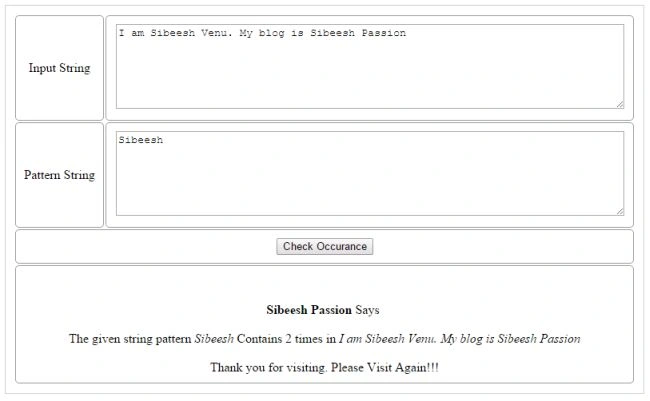
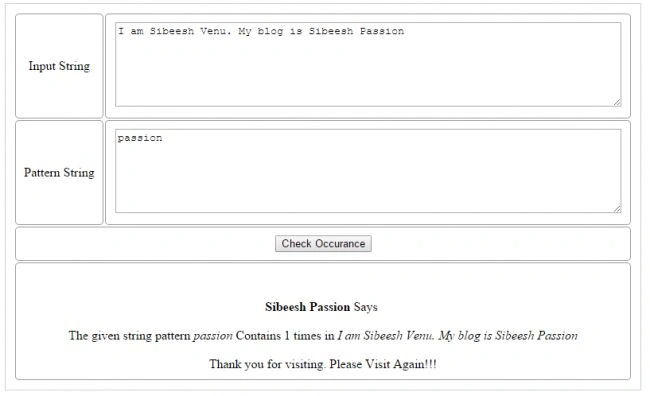
As you can see I have given the words, “Sibeesh” and “passion” for testing and it gave the correct number of occurrences.
Now we will see how to do this using a Custom Function.
The following is our function call.
- occuranceCount = FindOccurrences(txtInputString.Value.ToLower().Trim(), txtPattern.Value.ToLower().Trim());
And here's the function body:
- #region FindOccurrences
- /// <summary>
- /// This method is used to get the Count of Occurrences of a string in a string
- /// </summary>
- /// <param name="InputString"></param>
- /// <param name="patternString"></param>
- /// <returns>Int</returns>
- public int FindOccurrences(string InputString, string patternString) {
- // Here we are looping through InputString
- int intCount = 0;
- int i = 0;
- while ((i = InputString.IndexOf(patternString, i)) != -1) {
- i += patternString.Length;
- intCount++;
- }
- return intCount;
- }
- #endregion
Now if you run it you will get the same output as we got using a Regex function.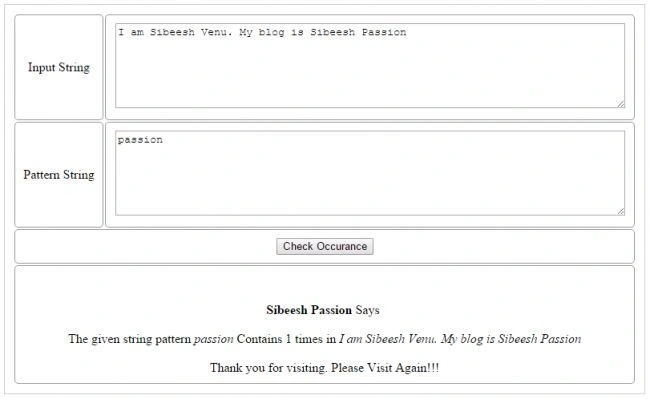
Now we will see the complete code.
Complete Code
Default.aspx.cs
- using System;
- using System.Collections.Generic;
- using System.Linq;
- using System.Text.RegularExpressions;
- using System.Web;
- using System.Web.UI;
- using System.Web.UI.WebControls;
- public partial class _Default: System.Web.UI.Page {
- protected void Page_Load(object sender, EventArgs e) {}
- protected void btnCheckOccurance_Click(object sender, EventArgs e) {
- int occuranceCount = 0;
- //Checking Occurance
- //occuranceCount = Regex.Matches(txtInputString.Value.ToLower().Trim(), txtPattern.Value.ToLower().Trim()).Count;
- occuranceCount = FindOccurrences(txtInputString.Value.ToLower().Trim(), txtPattern.Value.ToLower().Trim());
- if (occuranceCount > 0) lblOutput.Text = "<br/><br/><b>Sibeesh Passion </b>Says <br/><br/>The given string pattern <i>" + txtPattern.Value + "</i> Contains " + occuranceCount + " times in <i>" + txtInputString.Value + "</i><br/><br/> Thank you for visiting. Please Visit Again!!!";
- else lblOutput.Text = "<br/><br/><b>Sibeesh Passion </b>Says <br/><br/>The given string pattern <i>" + txtPattern.Value + "</i> Is not occured s in <i>" + txtInputString.Value + "</i><br/><br/> Thank you for visiting. Please Visit Again!!!";
- //End
- }#region FindOccurrences
- /// <summary>
- /// This method is used to get the Count of Occurrences of a string in a string
- /// </summary>
- /// <param name="InputString"></param>
- /// <param name="patternString"></param>
- /// <returns>Int</returns>
- public int FindOccurrences(string InputString, string patternString) {
- // Here we are looping through InputString
- int intCount = 0;
- int i = 0;
- while ((i = InputString.IndexOf(patternString, i)) != -1) {
- i += patternString.Length;
- intCount++;
- }
- return intCount;
- }#endregion
- }
Default.aspx
- <%@ Page Language="C#" AutoEventWireup="true" CodeFile="Default.aspx.cs" Inherits="_Default" %>
- <!DOCTYPE html>
- <html
- xmlns="http://www.w3.org/1999/xhtml">
- <head runat="server">
- <title>Find Occurrence of String,Find String Form String,Regex,String Contains Substring - Sibeesh Passion</title>
- <style type="text/css">
- textarea {
- width: 630px;
- height: 100px;
- }
- table {
- border: 1px solid #ccc;
- padding: 10px;
- width: 800px;
- text-align:center;
- }
- tr {
- border: 1px solid #999;
- border-radius: 5px;
- }
- td {
- border: 1px solid #999;
- padding: 10px;
- border-radius: 5px;
- }
- </style>
- </head>
- <body>
- <form id="form1" runat="server">
- <div>
- <table >
- <tr>
- <td>
- <asp:Label ID="lblInputString" runat="server" Text="Input String"></asp:Label>
- </td>
- <td>
- <textarea id="txtInputString" runat="server">
- <asp:label id="lblPattern" runat="server" text="Pattern String"></asp:label>
- <textarea id="txtPattern" runat="server">
- <asp:button id="btnCheckOccurance" runat="server" text="Check Occurance" onclick="btnCheckOccurance_Click">
- <asp:label id="lblOutput" runat="server" text="See Output Here!!! > Thank you for visiting. Please Visit Again!!! </i>">
- </asp:label>
- </asp:button>
- <asp:label id="lblOutput" runat="server" text="See Output Here!!!
- <i> Thank you for visiting. Please Visit Again!!! </i>">
- </asp:label>
- </td>
</tr>
</table>
</div>
</form>
</body>
</htm>
Validation
You can also add some basic validation to your code on the server-side and the client-side. I will always recommend you to do both the validations.
Server-Side
- if (txtInputString.Value.ToLower().Trim() != "" && txtPattern.Value.ToLower().Trim() != "")
- {
- }
Place the button click event code inside this if condition.
Client-Side
Add a jQuery reference.
- <script src="jquery-2.0.2.min.js"></script>
And add the following scripts:
- < script >
- $(document).ready(function() {
- $('#btnCheckOccurance').click(function() {
- if ($('#txtInputString').val() == "" || $('#txtPattern').val() == "") {
- alert('Values can not be empty');
- return false;
- }
- });
- });
- < /script>
Conclusion
I hope someone found this article useful. Please share with me your valuable thoughts and comments. Your feedback is always welcomed.


Sibeesh VenuTOP 100Posted Aug 6, 2015, 4:02 AM EDT
Rahul Prajapat Thanks Buddy
Sibeesh VenuTOP 100Posted Aug 6, 2015, 4:02 AM EDT
Amol Sarkate Thanks Buddy
Sibeesh VenuTOP 100Posted Aug 6, 2015, 4:02 AM EDT
Neeraj Kumar Thanks Buddy
Rahul PrajapatPosted Aug 6, 2015, 3:59 AM EDT
Nice Sir
Amol SarkatePosted Aug 6, 2015, 1:14 AM EDT
nice
Neeraj KumarPosted Aug 5, 2015, 1:43 PM EDT
Nice Article
Sibeesh VenuTOP 100Posted Aug 4, 2015, 9:04 PM EDT
Debasis Saha Thank you
Debasis SahaTOP 100Posted Aug 4, 2015, 9:03 PM EDT
Nice one..
Sibeesh VenuTOP 100Posted Aug 4, 2015, 8:55 PM EDT
Santhakumar Munuswamy Thank you
Sibeesh VenuTOP 100Posted Aug 4, 2015, 8:55 PM EDT
Nilesh Jadav Thank you
Sibeesh VenuTOP 100Posted Aug 4, 2015, 8:55 PM EDT
Sam Hobbs Yes I do use it.
Sibeesh VenuTOP 100Posted Aug 4, 2015, 8:54 PM EDT
Rahul Saxena Thank you Buddy
Sibeesh VenuTOP 100Posted Aug 4, 2015, 8:54 PM EDT
Rakesh Chavda Thank you
Sibeesh VenuTOP 100Posted Aug 4, 2015, 8:54 PM EDT
Chervine Bhiwoo Thank you
Nilesh JadavPosted Aug 4, 2015, 8:48 PM EDT
Nice article, thanks for a good share
Santhakumar MunuswamyPosted Aug 4, 2015, 6:03 PM EDT
Good Article. Thanks for sharing :)
Sam HobbsPosted Aug 4, 2015, 10:40 AM EDT
Have you tried using the String.Split method?
Rahul Kumar SaxenaTOP 100Posted Aug 4, 2015, 10:31 AM EDT
Gud show
RakeshPosted Aug 4, 2015, 10:06 AM EDT
Good explain
Chervine BhiwooPosted Aug 4, 2015, 9:51 AM EDT
Nice work!
Sibeesh VenuTOP 100Posted Aug 4, 2015, 6:32 AM EDT
Manas Mohapatra Thank you
Manas MohapatraPosted Aug 4, 2015, 6:00 AM EDT
Good one. Thanks for sharing..
Sibeesh VenuTOP 100Posted Aug 4, 2015, 4:29 AM EDT
Mohammed Ibrahim Thank you
Mohammed IbrahimPosted Aug 4, 2015, 3:55 AM EDT
nice
Sibeesh VenuTOP 100Posted Aug 4, 2015, 3:01 AM EDT
Manoj Kulkarni Thank you
Sibeesh VenuTOP 100Posted Aug 4, 2015, 3:01 AM EDT
Pankaj Kumar Choudhary Thank you :)
Manoj KulkarniPosted Aug 4, 2015, 2:41 AM EDT
Nice article. Thank you for sharing
Pankaj Kumar ChoudharyTOP 100Posted Aug 4, 2015, 2:40 AM EDT
Nice Explain Sir............
Sibeesh VenuTOP 100Posted Aug 4, 2015, 2:36 AM EDT
Gopi Chand Thanks buddy
Sibeesh VenuTOP 100Posted Aug 4, 2015, 2:35 AM EDT
Nihal Ahmed Thanks buddy
Sibeesh VenuTOP 100Posted Aug 4, 2015, 2:35 AM EDT
Rajeesh Menoth Thanks buddy
Sibeesh VenuTOP 100Posted Aug 4, 2015, 2:35 AM EDT
Upendra Pratap Shahi Thanks buddy
Gopi ChandPosted Aug 4, 2015, 2:15 AM EDT
Interesting one :)
Nihal AhmedPosted Aug 4, 2015, 2:01 AM EDT
nice sir, It is really useful to me.
Rajeesh MenothPosted Aug 4, 2015, 1:32 AM EDT
Good Explanation,Really nice one
Upendra Pratap ShahiPosted Aug 4, 2015, 1:27 AM EDT
nice sir