
If your bundles are not getting configured properly in your server, I have fixed this issue, and here I am going to share with you how you can also fix this error. I hope you will like this.
Background
Recently, I hosted one of my MVC applications to Microsoft Azure cloud. And we usually publish our application in release mode, right? So here comes the problem. You can replicate the same issue in your local machine itself. Just make the debug attribute to false in your Web.config as follows.
- <compilation debug="false" targetFramework="4.5" />
And when you run, you will get a prompt as follows.
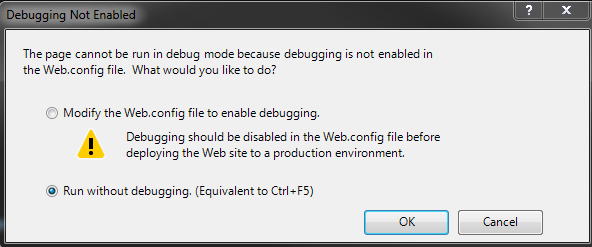
Run without debugging
Just select Run without debugging option. Now once after your application is run, you can see some script errors in your browser console saying that the references are not loaded correctly.

Release more error in console
And finally I found the solution. Here we will see that.
"Bundles Are Not Working After Hosting To MVC Application"
As I said, the problem is with your bundle config settings. There are few things you must check before going to the last fix.
- Please make sure that you have used StyleBundle for creating the style bundle.
- Please make sure that you have used ScriptBundle for creating the style bundle.
- Make sure that you are loading the styles using @Styles.Render.
- Make sure that you are loading the scripts using @Scripts.Render.
- Make sure that the folder structure is same as you have in local system.
If none of the above solution works, you can try the last one. - Make sure that virtual path of bundles doesn’t contains the folder names you have in your solution.
I will explain it. In my case my bundles were as follows.
- @Styles.Render("~/Scripts/JQWidgets/CSS")
- @Scripts.Render("~/Scripts/JQWidgets")
And I have the folders JQWidgets in my root script folder. This was making the issue.

Folder structure
Now what I did is, I just changed my bundle config settings in BundleConfig.cs as follows(Renaming the folder),
- bundles.Add(new ScriptBundle("~/Scripts/Grid")
- bundles.Add(new StyleBundle("~/Scripts/Grid/Styles")
And I referenced the same bundles as follows in my views.
- @Styles.Render("~/Scripts/Grid/Styles")
- @Scripts.Render("~/Scripts/Grid")
Please try these steps and build your application. Once that is done you can publish your application to cloud. I hope this will solve your issue. Have a happy coding.
Conclusion
Did I miss anything that you may think is needed? Did you find this post useful? I hope you liked this article. Please share with me your valuable suggestions and feedback.
Your turn. What do you think?
A blog isn’t a blog without comments, but do try to stay on topic. If you have a question unrelated to this post, you’re better off posting it on C# Corner, Code Project, Stack Overflow, ASP.NET Forum instead of commenting here. Tweet or email me a link to your question there and I’ll definitely try to help if I can.


Sibeesh VenuTOP 100Posted May 4, 2016, 8:36 AM EDT
Jaipal Reddy Thanks a lot
Jaipal ReddyPosted May 4, 2016, 2:19 AM EDT
Nice. .
Sibeesh VenuTOP 100Posted May 3, 2016, 9:18 PM EDT
Bhavik Patel Thanks much
Sibeesh VenuTOP 100Posted May 3, 2016, 9:17 PM EDT
Munesh Sharma Thanks much
Bhavik PatelPosted May 3, 2016, 5:41 PM EDT
useful
Munesh SharmaPosted May 3, 2016, 10:17 AM EDT
good one
Sibeesh VenuTOP 100Posted May 3, 2016, 7:36 AM EDT
Debasis Saha Thanks much
Sibeesh VenuTOP 100Posted May 3, 2016, 7:36 AM EDT
Vignesh Mani Thank you
Sibeesh VenuTOP 100Posted May 3, 2016, 7:36 AM EDT
Pankaj Kumar Choudhary Thanks dude
Sibeesh VenuTOP 100Posted May 3, 2016, 7:36 AM EDT
Bhuvanesh Mohankumar As I am using jQwidgets in my project, I just named like that dude.
Debasis SahaTOP 100Posted May 3, 2016, 5:32 AM EDT
Good One..
Vignesh ManiTOP 100Posted May 3, 2016, 4:40 AM EDT
Good one
Pankaj Kumar ChoudharyTOP 100Posted May 3, 2016, 4:20 AM EDT
Nice Information Sir.......
Bhuvanesh MohankumarPosted May 3, 2016, 4:14 AM EDT
Is that "JQWidget" is a kind of reserved name or that folder accessibility is the reason?
Sibeesh VenuTOP 100Posted May 3, 2016, 3:51 AM EDT
Amit Dave Thanks a lot
Amit DavePosted May 3, 2016, 2:51 AM EDT
Good share!