
Have you ever been working on a Web Forms project and you made a change only to build your project and find that the designer.cs file related to one of your forms had suddenly vanished or become corrupted; well here is a fix for that.
The Problem
One or more of the designer.cs files within your application is either missing or inaccessible due to unforeseen corruption.

The Solution
If the designer.cs file is inaccessible due to corruption or any other types of errors that could prevent you from accessing it, delete it. Don’t worry the next step will get it back.
Once the file is deleted or if it was already missing, you can easily resolve this issue by simply right-clicking on the Web Form in question and selecting Convert to Web Application option within the Solution Explorer.
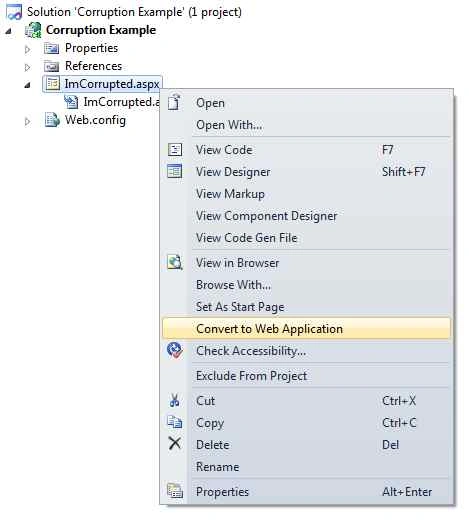
This simple fix will regenerate any of the missing files that may have been giving you any additional grief due to their unexpected vacations.
Fixing Corrupted Or Missing Designer Files In ASP.NET
In this article, you will learn how to fix corrupted or missing designer files in ASP.NET.


Gowtham KTOP 100Posted Oct 28, 2015, 6:52 AM EDT
Thanks for Sharing
Mohammed IbrahimPosted Oct 28, 2015, 5:22 AM EDT
nice
Nilesh JadavPosted Oct 28, 2015, 4:32 AM EDT
Good one sir !
Sibeesh VenuTOP 100Posted Oct 28, 2015, 3:28 AM EDT
Nice Share