
Introduction
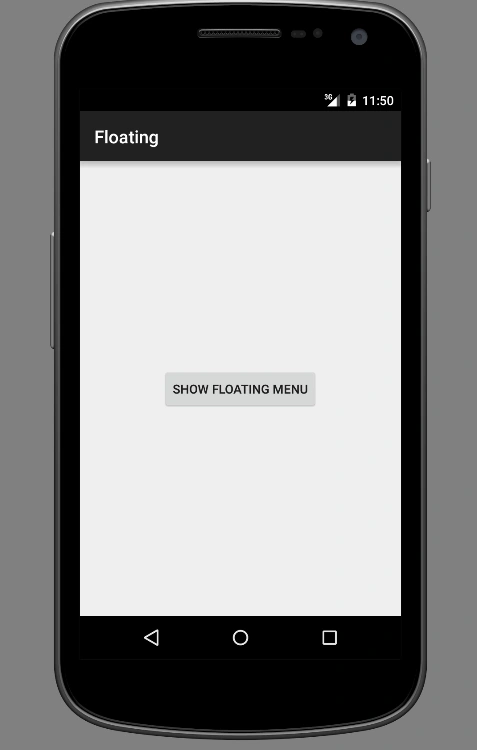
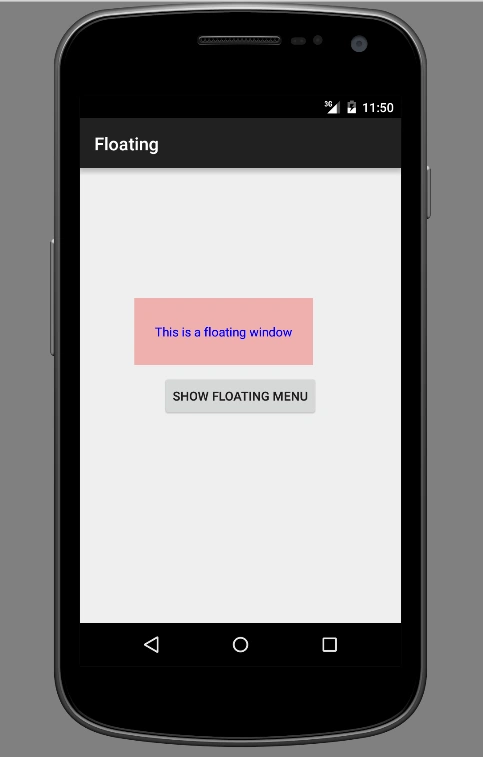
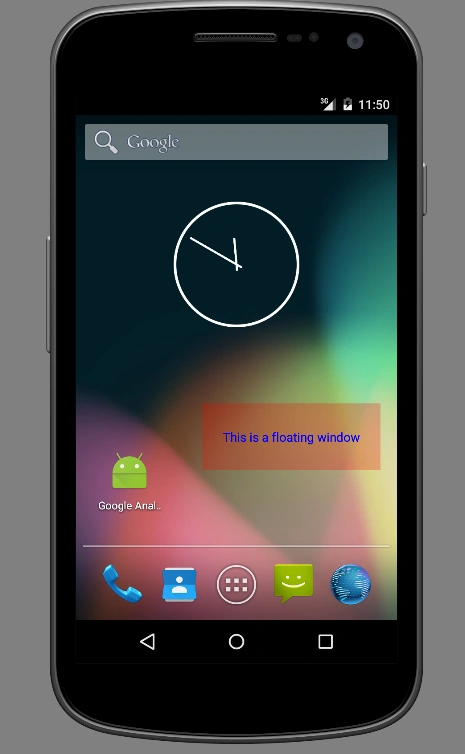
A floating window is a window in Android which will appear above all the applications in Android. This can be used in the case where the user wants to show something above all the applications in Android. Here I am going to show you how to create a floating window. For this, I have an activity and a service. On the activity, there is a button in the User interface, and on clicking on the button a floating window will be shown and the user can drag the window to any position he wants and on minimizing/closing the application also the window will be shown because the service is running in the background.
The service is handling this floating window. First create the activity layout file like the following.
- <RelativeLayout xmlns:android="http://schemas.android.com/apk/res/android"
- xmlns:tools="http://schemas.android.com/tools" android:layout_width="match_parent"
- android:layout_height="match_parent" android:paddingLeft="@dimen/activity_horizontal_margin"
- android:paddingRight="@dimen/activity_horizontal_margin"
- android:paddingTop="@dimen/activity_vertical_margin"
- android:paddingBottom="@dimen/activity_vertical_margin" tools:context=".MainActivity">
- <Button
- android:layout_width="wrap_content"
- android:layout_height="wrap_content"
- android:text="Show Floating Menu"
- android:id="@+id/showMenu"
- android:layout_centerVertical="true"
- android:layout_centerHorizontal="true" />
- </RelativeLayout>
- Button showMenu = (Button) findViewById(R.id.showMenu);
- showMenu.setOnClickListener(new View.OnClickListener() {
- @Override
- public void onClick(View view) {
- startService(new Intent(MainActivity.this, FloatWindowService.class));
- }
- });
- windowManager = (WindowManager) getSystemService(WINDOW_SERVICE);
- linearLayout = new LinearLayout(this);
- LinearLayout.LayoutParams layoutParams = new LinearLayout.LayoutParams(LinearLayout.LayoutParams.MATCH_PARENT,LinearLayout.LayoutParams.MATCH_PARENT);
- linearLayout.setBackgroundColor(Color.argb(66, 255, 0, 0));
- linearLayout.setLayoutParams(layoutParams);
- TextView textView = new TextView(this);
- textView.setText("This is a floating window");
- textView.setTextColor(Color.BLUE);
- textView.setGravity(Gravity.CENTER_HORIZONTAL | Gravity.CENTER_VERTICAL);
- LinearLayout.LayoutParams layoutParamsText = new LinearLayout.LayoutParams(LinearLayout.LayoutParams.MATCH_PARENT,LinearLayout.LayoutParams.MATCH_PARENT);
- // linearLayout.setBackgroundColor(Color.argb(66, 255, 0, 0));
- textView.setLayoutParams(layoutParamsText);
- linearLayout.addView(textView);
- final WindowManager.LayoutParams params = new WindowManager.LayoutParams(400,150,WindowManager.LayoutParams.TYPE_PHONE,WindowManager.LayoutParams.FLAG_NOT_FOCUSABLE, PixelFormat.TRANSLUCENT);
- params.x = 0;
- params.y = 0;
- params.gravity = Gravity.CENTER | Gravity.CENTER;
- windowManager.addView(linearLayout, params);
- linearLayout.setOnTouchListener(new View.OnTouchListener() {
- WindowManager.LayoutParams updatedParams = params;
- int x,y;
- float touchX,touchY;
- @Override
- public boolean onTouch(View view, MotionEvent motionEvent) {
- switch (motionEvent.getAction()){
- case MotionEvent.ACTION_DOWN:
- x= updatedParams.x;
- y=updatedParams.y;
- touchX = motionEvent.getRawX();
- touchY = motionEvent.getRawY();
- break;
- case MotionEvent.ACTION_MOVE:
- updatedParams.x = (int)(x+(motionEvent.getRawX() - touchX));
- updatedParams.y = (int)(y+(motionEvent.getRawY() - touchY));
- windowManager.updateViewLayout(linearLayout,updatedParams);
- default:break;
- }
- return false;
- }
- })
- ;
- <service android:name=".FloatWindowService"></service>
And we need to add an important permission in the manifest file,
Please see the screen shot also.
- <uses-permission android:name="android.permission.SYSTEM_ALERT_WINDOW"></uses-permission>



Khalid SaeedPosted Jul 13, 2020, 12:41 AM EDT
Farig Chutiyapa
kalu singh raoPosted Jul 31, 2016, 9:27 AM EDT
Nice share
Sonu ChaudharyPosted May 13, 2016, 9:39 AM EDT
good one
Vignesh ManiTOP 100Posted May 13, 2016, 3:22 AM EDT
Nice
Pranav J.DevPosted May 12, 2016, 8:56 PM EDT
Thank you all for your support
Hari ShankerPosted May 12, 2016, 8:23 PM EDT
Nice
Pankaj Kumar ChoudharyTOP 100Posted May 12, 2016, 8:44 AM EDT
Nice Explain Sir......