In this article, we will see how to reset the password through forgot password page in MVC.
Add an Action link on login page if the user forgets his/her password.The link redirects the user to the below page from where the user can get a reset link on the registered email id.
Note: The user should be a already-registered user.
This is how the forgot password page looks .The user needs to enter the registered and valid email id on which the reset link will be sent.
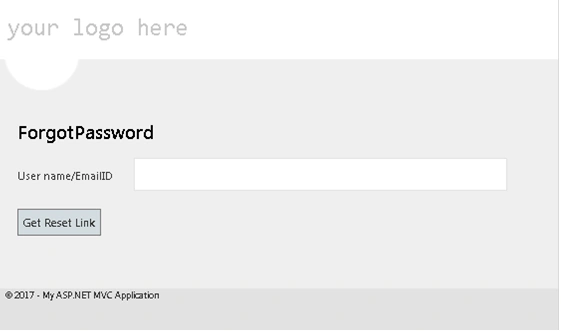
Below is the code of the forgot password action method
- public ActionResult ForgotPassword()
- {
- return View();
- }
- [HttpPost]
- public ActionResult ForgotPassword(string UserName)
- {
- if (ModelState.IsValid)
- {
- if (WebSecurity.UserExists(UserName))
- {
- string To = UserName, UserID, Password, SMTPPort, Host;
- string token = WebSecurity.GeneratePasswordResetToken(UserName);
- if (token == null)
- {
- // If user does not exist or is not confirmed.
- return View("Index");
- }
- else
- {
- //Create URL with above token
- var lnkHref = "<a href='" + Url.Action("ResetPassword", "Account", new { email = UserName, code = token }, "http") + "'>Reset Password</a>";
- //HTML Template for Send email
- string subject = "Your changed password";
- string body = "<b>Please find the Password Reset Link. </b><br/>" + lnkHref;
- //Get and set the AppSettings using configuration manager.
- EmailManager.AppSettings(out UserID, out Password, out SMTPPort, out Host);
- //Call send email methods.
- EmailManager.SendEmail(UserID, subject, body, To, UserID, Password, SMTPPort, Host);
- }
- }
- }
- return View();
- }
In this article we are using gmail for sending the reset link which requires some settings on the web.config file (the settings are given below the methods).The below method is used to fetch those settings from the web.config file
- public class EmailManager {
- public static void AppSettings(out string UserID, out string Password, out string SMTPPort, out string Host) {
- UserID = ConfigurationManager.AppSettings.Get("UserID");
- Password = ConfigurationManager.AppSettings.Get("Password");
- SMTPPort = ConfigurationManager.AppSettings.Get("SMTPPort");
- Host = ConfigurationManager.AppSettings.Get("Host");
- }
- public static void SendEmail(string From, string Subject, string Body, string To, string UserID, string Password, string SMTPPort, string Host) {
- System.Net.Mail.MailMessage mail = new System.Net.Mail.MailMessage();
- mail.To.Add(To);
- mail.From = new MailAddress(From);
- mail.Subject = Subject;
- mail.Body = Body;
- SmtpClient smtp = new SmtpClient();
- smtp.Host = Host;
- smtp.Port = Convert.ToInt16(SMTPPort);
- smtp.Credentials = new NetworkCredential(UserID, Password);
- smtp.EnableSsl = true;
- smtp.Send(mail);
- }
- }
Web config settings
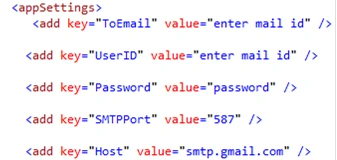
The above code will send a reset link on the registered email.Once the mail is received the user needs to click on the reset link which will redirect the user to the reset password page.
The mail will look like the below image,
Your changed password
Please find the Password Reset Link.
http://localhost:****/Account/ResetPassword?email=**************.com&code=UNbRRYVXWO4mqC15Gfdpaw2
On clicking the above link you will be redirected to a reset password page with the return/ reset token. The return/reset token is attached with the URL of the reset password page and helps in replacing the old password with the new one. User needs to enter the new password in the below page to reset it.
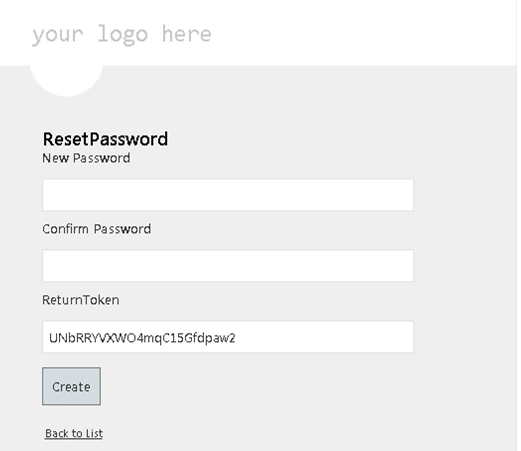
The code for Resetting password is as below:
- public ActionResult ResetPassword(string code, string email)
- {
- ResetPasswordModel model = new ResetPasswordModel();
- model.ReturnToken = code;
- return View(model);
- }
- [HttpPost]
- public ActionResult ResetPassword(ResetPasswordModel model)
- {
- if (ModelState.IsValid)
- {
- bool resetResponse = WebSecurity.ResetPassword(model.ReturnToken, model.Password);
- if (resetResponse)
- {
- ViewBag.Message = "Successfully Changed";
- }
- else
- {
- ViewBag.Message = "Something went horribly wrong!";
- }
- }
- return View(model);
- }
The Return token in WebSecurity in Mvc helps in replacing the old password with the new one. The ResetPassword() method in web security is used to reset the password with the help of return token of the registered user.


Smruti LenkaPosted Dec 28, 2022, 7:42 PM EST
Superb bro ,can you send me code [email protected]
CanhHung888Posted Aug 18, 2022, 12:21 AM EDT
Awesome Bro!! Could you please send code via email [email protected]. Thanks a lot
Atta KumahPosted Nov 29, 2021, 11:11 AM EST
Great. Bravo
Sonny RascaPosted Jun 7, 2021, 12:25 PM EDT
Hi Aditi! Can you please send me the source code to [email protected] . Many thanks in advance!
Yu-Wen ChenPosted Apr 10, 2021, 4:48 AM EDT
Thanks a lot for your explanation, could you please send me the source code to [email protected]
Abraham EbukaPosted Mar 4, 2021, 6:10 AM EST
Please does this work with ASP Core 3.1 MVC?
Saberi PradhanPosted Feb 3, 2021, 1:15 PM EST
Hi, Can you please send the source code to [email protected]. Thanks in advance.
Tharun PrakashPosted Oct 10, 2020, 8:36 PM EDT
Hi, Can you please send the source code to [email protected]. Thanks in advance.
Jay NgoPosted Jul 6, 2020, 3:22 AM EDT
Hello Aditi! Could you please send me the source code to [email protected]!
vedavalli ePosted Jan 13, 2020, 2:44 PM EST
Hi Aditi, can you please share me source code on [email protected]
noha samirPosted Oct 14, 2019, 10:03 PM EDT
Many thanks for your explanation, could you send please the code at [email protected].
Shivi AttriPosted Aug 19, 2019, 1:22 AM EDT
Hi, Could you please mail me the code at [email protected]
James HamidPosted Aug 15, 2019, 6:09 AM EDT
Hi Could you please email me the source code [email protected]
Dylan ReithelPosted Jul 16, 2019, 12:13 PM EDT
Mind sending me the source code? thanks, great read by the way very informative. [email protected]
emad goharyPosted Jun 23, 2019, 4:42 AM EDT
Hi buddy can you send me email the source code(entire project) this my email address : [email protected]
Aashish JainPosted Jun 14, 2019, 3:20 AM EDT
Hi Aditi Sawhney , Can you please share this code on my mail :- [email protected]
Onur Can ÖzkanPosted Apr 10, 2019, 10:29 PM EDT
Where is ResetPasswordModel coming from ?
Ravin GrewalPosted Mar 30, 2019, 7:28 AM EDT
Hi can u send this Demmy project to mme?
Ahsan AsimPosted Nov 18, 2018, 9:20 PM EST
Send file on [email protected], Thanks
Ahsan AsimPosted Nov 18, 2018, 9:20 PM EST
Send file on
Yogesh VedpathakPosted Oct 16, 2018, 5:13 AM EDT
Awesome article very Helpful ...
Hilmi DönmezPosted Sep 6, 2018, 2:28 AM EDT
Hi, could you upload files and share. thank you
Sam BPosted Jun 15, 2018, 9:19 AM EDT
Where is WebSecurity coming from? Why don't you add more details?
hye jinPosted Jun 1, 2018, 4:32 AM EDT
Is there any way to do forgot password page , if I use asp.net core 1.1 ? because on that version , I cannot find the web.config
Sagar Pandurang KapPosted Jan 2, 2018, 7:34 PM EST
Very nice article...Helpful.