
Microsoft has announced some new keywords and some new behavior of C# 6.0 in Visual Studio 2015.
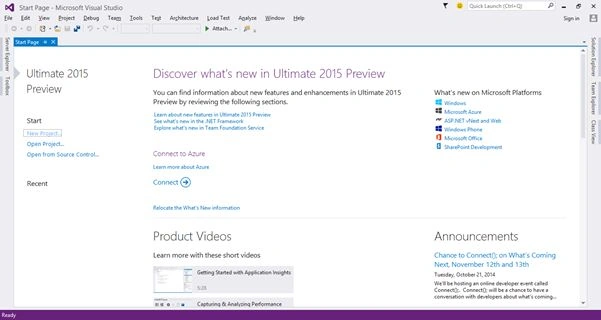
In this article, we will learn the following topics.
- using Static.
- Auto property initializer.
- Dictionary Initializer.
- nameof Expression.
- New way for Exception filters.
- await in catch and finally block.
- Null – Conditional Operator.
- Expression – Bodied Methods
- Easily format strings – String interpolation
For testing all
Open Visual Studio 2015 and select "File" -> "New" -> "Project...".

Click OK and then you will get a solution that you will see in the Solution Explorer.
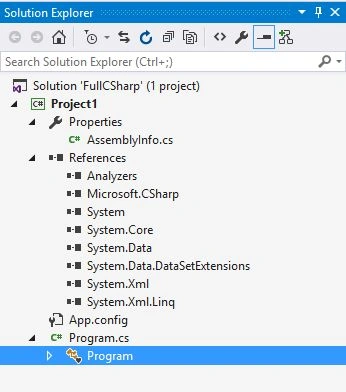
Now just do something with your program.cs file to test your compile time code.
1. using Static
This is a new concept in C# 6.0 that allows us to use any class that is static as a namespace that is very useful for every developer in that code file where we need to call the static methods from a static class like in a number of times we need to call many methods from Convert.ToInt32() or Console.Write(),Console.WriteLine() so we need to write the class name first then the method name every time in C# 5.0. In C# 6.0 however Microsoft announced a new behavior to our cs compiler that allows me to call all the static methods from the static class without the name of the classes because now we need to first use our static class name in starting with all the namespaces.
- In C# 5.0
- using System;
- using System.Collections.Generic;
- using System.Linq;
- using System.Text;
- using System.Threading.Tasks;
- namespace TestNewCSharp6
- {
- class Program
- {
- static void Main(string[] args)
- {
- Console.WriteLine("Enter first value ");
- int val1 =Convert.ToInt32(Console.ReadLine());
- Console.WriteLine("Enter next value ");
- int val2 = Convert.ToInt32(Console.ReadLine());
- Console.WriteLine("sum : {0}", (val1 + val2));
- Console.ReadLine();
- }
- }
- }
- using System;
- using System.Collections.Generic;
- using System.Linq;
- using System.Text;
- using System.Threading.Tasks;
- using static System.Convert;
- using static System.Console;
- namespace Project1
- {
- class Program
- {
- static void Main(string[] args)
- {
- WriteLine("Enter first value ");
- int val1 = ToInt32(ReadLine());
- WriteLine("Enter next value ");
- int val2 = ToInt32(ReadLine());
- WriteLine("sum : {0}", (val1+val2));
- ReadLine();
- }
- }
- }
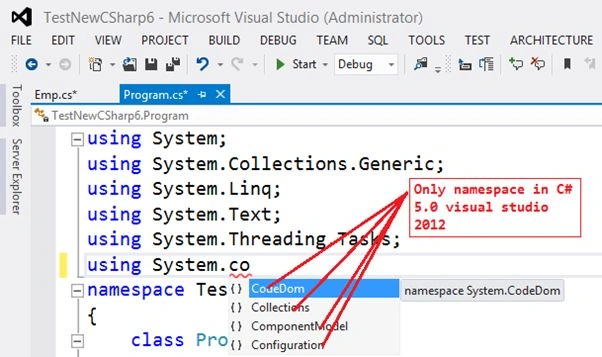
In C# 6.0
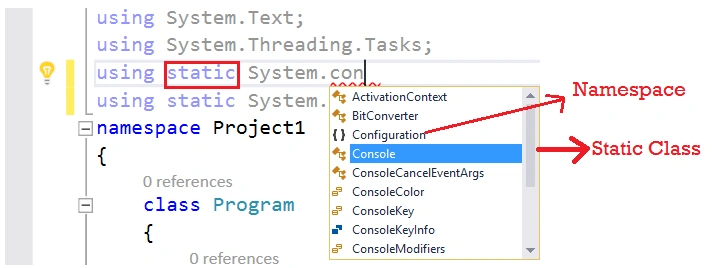
Code in 5.0
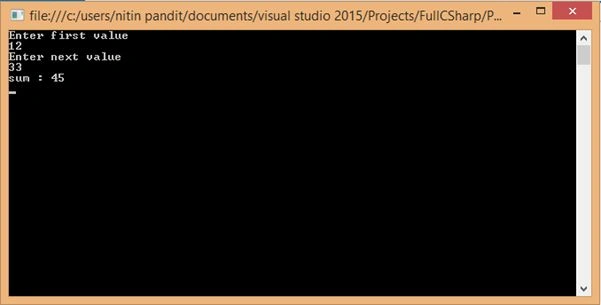
Output
2. Auto property initializer
Auto property initializer is a new concept to set the value of a property during of property declaration. We can set the default value of a read=only property, it means a property that only has a {get;} attribute. In the previous version of C# 5.0 we can set the values of the property in the default constructor of the class. Let's have an example. Suppose we need to set some property's value of a class as in the following:
- using System;
- using System.Collections.Generic;
- using System.Linq;
- using System.Text;
- namespace TestNewCSharp6
- {
- class Emp
- {
- public Emp()
- {
- Name = "nitin";
- Age = 25;
- Salary = 999;
- }
- public string Name { get; set; }
- public int Age { get; set; }
- public int Salary { get;private set; }
- }
- }
- using System;
- using System.Collections.Generic;
- using System.Linq;
- using System.Text;
- using System.Threading.Tasks;
- namespace Project2
- {
- class Emp
- {
- public string Name { get; set; }="nitin";
- public int Age { get; set; }=25;
- public int Salary { get; }=999;
- }
- }
In C# 5.0

Code
In C# 6.0
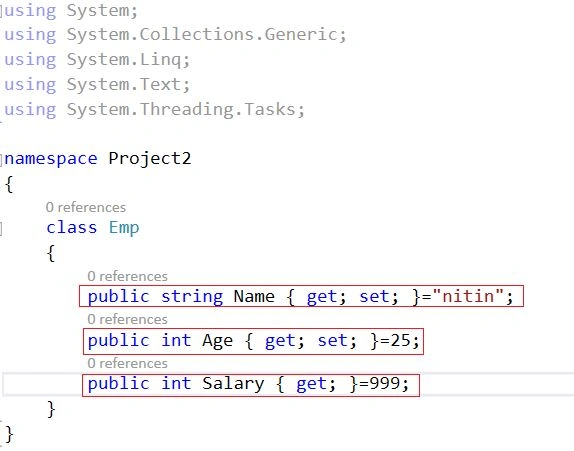
Code
3. Dictionary Initializer
Dictionary initializer is a new concept in C# 6.0. We can directly initialize a value of a key in a Dictionary Collection with it, either the key in the collection would be a string data type or any other data type. Let's see the declaration syntax in both versions like in C# 5.0 and also in C# 6.0 respectively.
- C# 5.0
- using System;
- using System.Collections.Generic;
- using System.Data;
- using System.Linq;
- using System.Text;
- using System.Threading.Tasks;
- namespace TestNewCSharp6
- {
- class Program
- {
- static void Main(string[] args)
- {
- Dictionary<string, string> dicStr = new Dictionary<string, string>()
- {
- {"Nitin","Noida"},
- {"Sonu","Baraut"},
- {"Rahul","Delhi"},
- };
- dicStr["Mohan"] = "Noida";
- foreach (var item in dicStr)
- {
- Console.WriteLine(item.Key+" "+ item.Value);
- }
- Console.WriteLine("********************************************************************");
- Dictionary<int, string> dicInt = new Dictionary<int, string>()
- {
- {1,"Nitin"},
- {2,"Sonu"},
- {3,"Mohan"},
- };
- dicInt[4] = "Rahul";
- foreach (var item in dicInt)
- {
- Console.WriteLine(item.Key + " " + item.Value);
- }
- Console.Read();
- }
- }
- }
- using System;
- using System.Collections.Generic;
- using System.Data;
- using System.Linq;
- using System.Text;
- using System.Threading.Tasks;
- namespace Project3
- {
- class Program
- {
- static void Main(string[] args)
- {
- Dictionary<string, string> dicStr = new Dictionary<string, string>()
- {
- ["Nitin"]="Noida",
- ["Sonu"]="Baraut",
- ["Rahul"]="Delhi",
- };
- dicStr["Mohan"] = "Noida";
- foreach (var item in dicStr)
- {
- Console.WriteLine(item.Key + " " + item.Value);
- }
- Console.WriteLine("********************************************************************");
- Dictionary<int, string> dicInt = new Dictionary<int, string>()
- {
- [1]="Nitin",
- [2]="Sonu",
- [3]="Mohan"
- };
- dicInt[4] = "Rahul";
- foreach (var item in dicInt)
- {
- Console.WriteLine(item.Key + " " + item.Value);
- }
- Console.Read();
- }
- }
- }
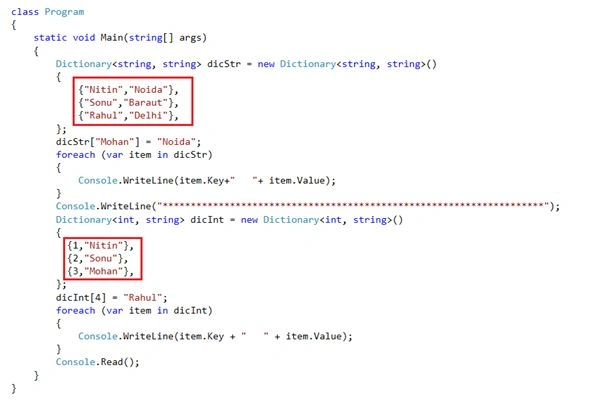
Code
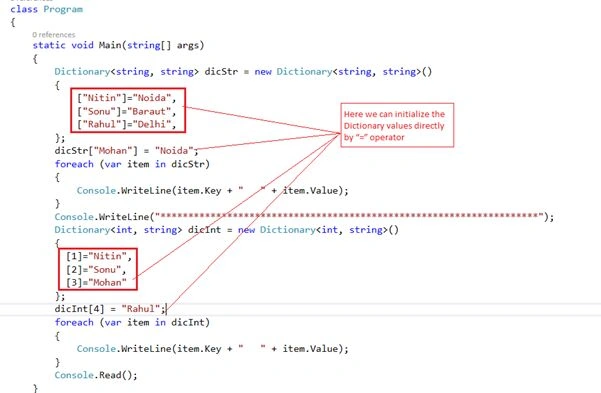
Code
Output

4. nameof Expression
nameof is new keyword in C# 6.0 and it's very useful from a developer's point of view because when we need to use a property, function or a data member name into a message as a string so we need to use the name as hard-coded in “name” in the string and in the future my property or method's name will be changed so it must change all the messages in every form or every page so it's very complicated to remember that how many number of times you already use the name of them in your project code files and this avoids having hardcoded strings to be specified in our code as well as avoids explicit use of reflection to get the names. Let's have an example.
- using System;
- using System.Collections.Generic;
- using System.Linq;
- using System.Text;
- using System.Threading.Tasks;
- using System.Console;
- namespace Project4
- {
- class Program
- {
- static void Main(string[] args)
- {
- Employee emp = new Employee();
- WriteLine("{0} : {1}", nameof(Employee.Id), emp.Id);
- WriteLine("{0} : {1}", nameof(Employee.Name), emp.Name);
- WriteLine("{0} : {1}", nameof(Employee.Salary), emp.Salary);
- ReadLine();
- }
- }
- class Employee
- {
- public int Id { get; set; } = 101;
- public string Name { get; set; } = "Nitin";
- public int Salary { get; set; } = 9999;
- }
- }
We have a class:
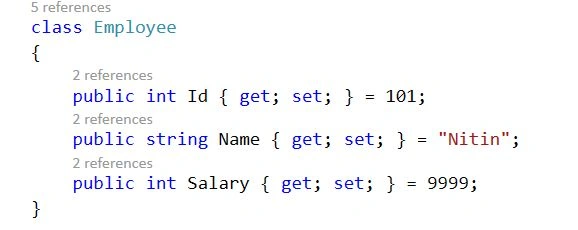
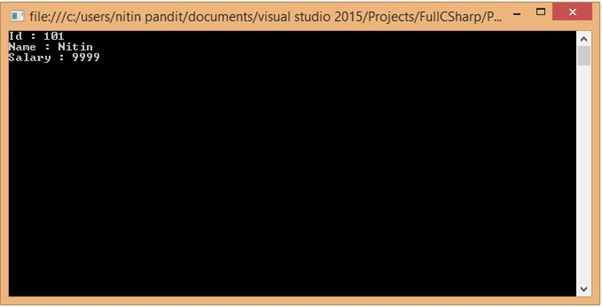
And we need to show the values of this class property to the console and also if we need to print the name of my property too with the message so in C# 6.0 we can use the nameof expression rather than hardcode the name of the property.
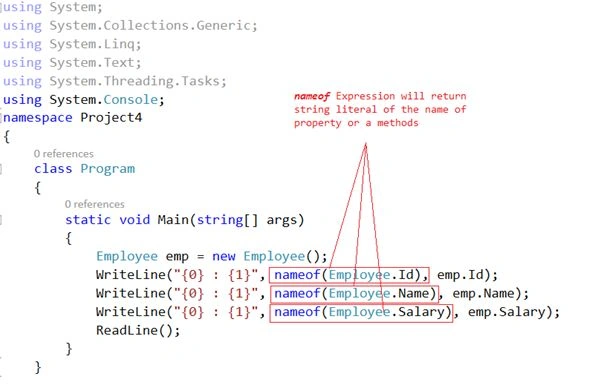
Output
Code
5. Exception filters
Exception filters are a new concept for C#. In C# 6.0 they are already supported by the VB compiler but now they are coming into C#. Exception filters allow us to specify a condition with a catch block so if the condition will return true then the catch block is executed only if the condition is satisfied. This is also the best attribute of new C# 6.0 that makes it easy to do exception filtrations in also that type of code contains a large amount of source code. Let's have an example.
- using System;
- using System.Collections.Generic;
- using System.Linq;
- using System.Text;
- using System.Threading.Tasks;
- using System.Console;
- namespace project5
- {
- class Program
- {
- static void Main(string[] args)
- {
- int val1 = 0;
- int val2 = 0;
- try
- {
- WriteLine("Enter first value :");
- val1 = int.Parse(ReadLine());
- WriteLine("Enter Next value :");
- val2 = int.Parse(ReadLine());
- WriteLine("Div : {0}", (val1 / val2));
- }
- catch (Exception ex) if (val2 == 0)
- {
- WriteLine("Can't be Division by zero ☺");
- }
- catch (Exception ex)
- {
- WriteLine(ex.Message);
- }
- ReadLine();
- }
- }
- }
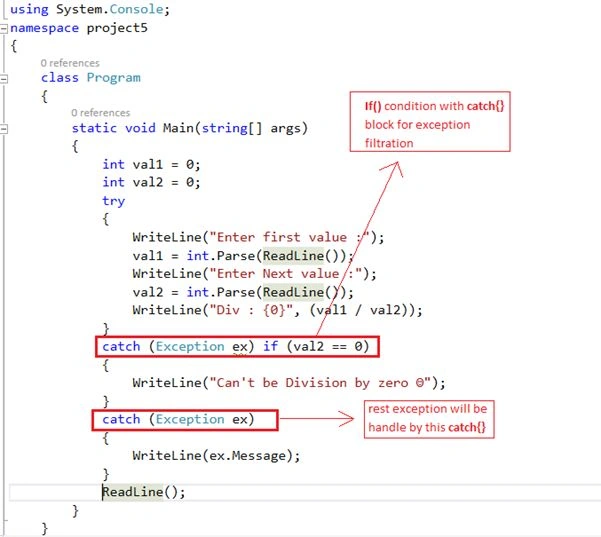
Code
If all the values are entered by user id correctly then the output will be:
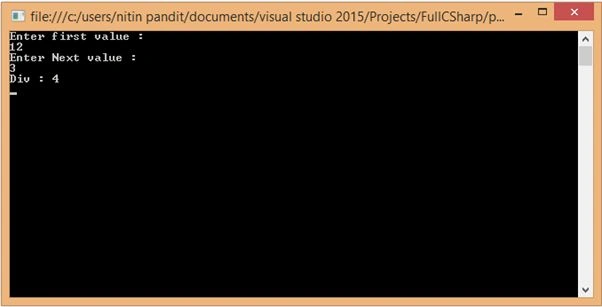
If the user enters an invalid value for division, like 0, then it will throw the exception that will be handled by Exception filtration where you mentioned an if() with catch{} block and the output will be something.
6. Await in catch and finally block
This is a new behavior of C# 6.0 that now we are able to call async methods from catch and also from finally. Using async methods are very useful because we can call then asynchronously and while working with async and await, you may have experienced that you want to put some of the result awaiting either in a catch or finally block or in both. Let's suppose we need to call an async method and there is a try and a catch{} block so when the exception occurs it is thrown in the catch{} block. We need to write log information into a file or send a service call to send exception details to the server so call the asynchronous method, so use await in catch{}, this is only possible in C# 6.0. Let's have an example.
We have a class and there is a method that is async and we need to call this with two parameters and if there is an exception then that will we return an exception and will go to the catch{} block and then we will call an async method using await and finally we have called the same in the finally.
- using System;
- using System.Collections.Generic;
- using System.Linq;
- using System.Text;
- using System.Threading.Tasks;
- using System.Console;
- namespace project6
- {
- class Program
- {
- static void Main(string[] args)
- {
- MyMath obj = new MyMath();
- obj.Div(12, 0);
- ReadLine();
- }
- }
- public class MyMath
- {
- public async void Div(int value1, int value2)
- {
- try
- {
- int res = value1 / value2;
- WriteLine("Div : {0}", res);
- }
- catch (Exception ex)
- {
- await asyncMethodForCatch();
- }
- finally
- {
- await asyncMethodForFinally();
- }
- }
- private async Task asyncMethodForFinally()
- {
- WriteLine("Method from async finally Method !!");
- }
- private async Task asyncMethodForCatch()
- {
- WriteLine("Method from async Catch Method !!");
- }
- }
- }
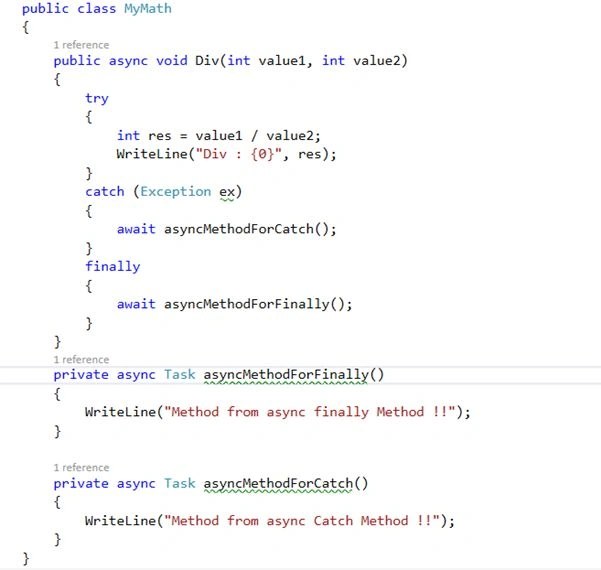
Call the async div() in Main().

Code
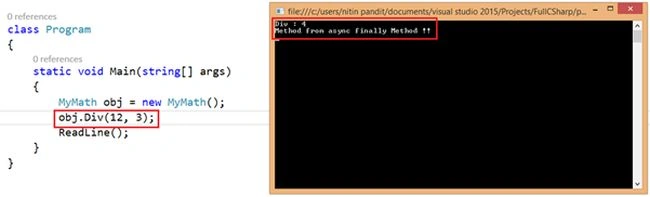
If there is no exception then:
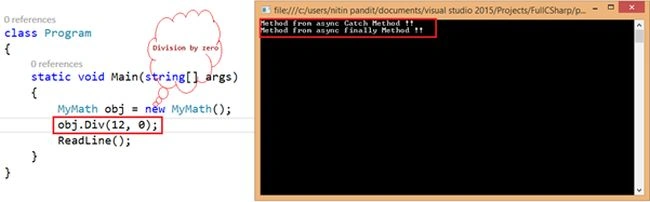
And when the exception occurs:
7. Null-Conditional Operator
The Null-Conditional operator is a new concept in C# 6.0 that is very beneficial for a developer in a source code file that we want to compare an object or a reference data type with null. So we need to write multiple lines of code to compare the objects in previous versions of C# 5.0 but in C# 6.0 we can write an in-line null-conditional with the ? and ?? operators, so let's have an example and compare both versions, C# 5.0 vs C# 6.0. We will write the code for both version.
- using System;
- using System.Collections.Generic;
- using System.Linq;
- using System.Text;
- using System.Threading.Tasks;
- using System.Console;
- namespace project7
- {
- class Program
- {
- static void Main()
- {
- Employee emp = new Employee();
- emp.Name = "Nitin Pandit";
- emp.EmployeeAddress = new Address()
- {
- HomeAddress = "Noida Sec 15",
- OfficeAddress = "Noida Sec 16"
- };
- WriteLine((emp?.Name) + " " + (emp?.EmployeeAddress?.HomeAddress??"No Address"));
- ReadLine();
- }
- }
- class Employee
- {
- public string Name { get; set; }
- public Address EmployeeAddress { get; set; }
- }
- class Address
- {
- public string HomeAddress { get; set; }
- public string OfficeAddress { get; set; }
- }
- }
Let's suppose we have two classes:

Now we need to write the code to compare the objects of the employee class with null in C# 5.0. So we need to write if() and else multiple lines.

If we want to write the same code in C# 6.0 then we can use ? and ?? to check the null value of an object, as in the following:
Condition ? code that use in case not null ?? in case of null
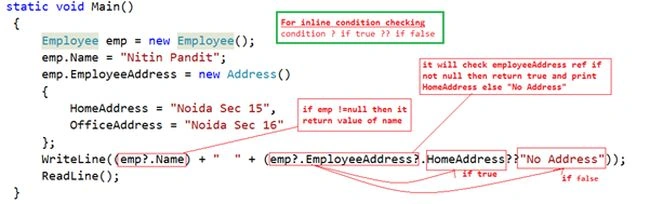
Output
The output when no object is null:
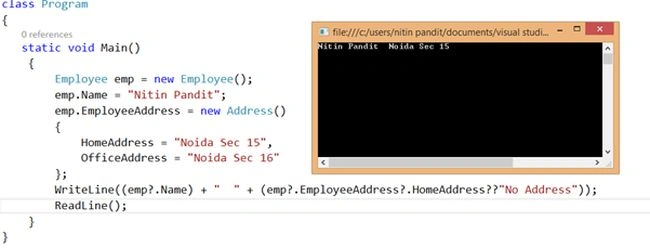
The output when an object is null:
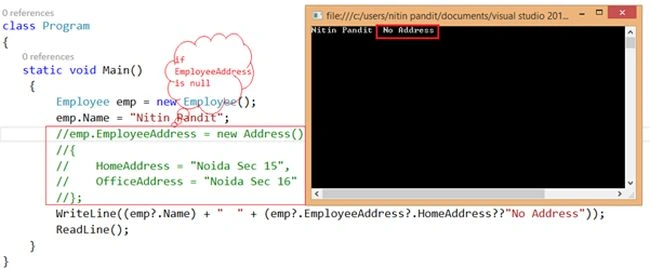
Code
8. Expression–Bodied Methods
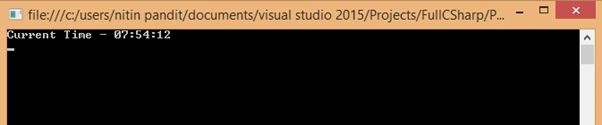
An Expression–Bodied Method is a very useful way to write a function in a new way and also very useful for those methods that can return their value by a single line so we can write those methods by using the “=>“ lamda Operator in C# 6.0 so let's have an example.
We will just write a method in both versions of C# 5.0 vs C# 6.0 with a method that only returns a message of a string value.
- In C# 5.0:
- using System;
- using System.Collections.Generic;
- using System.Linq;
- using System.Text;
- using System.Threading.Tasks;
- using System.Console;
- namespace Project8
- {
- class Program
- {
- static void Main(string[] args)
- {
- WriteLine(GetTime());
- ReadLine();
- }
- public static string GetTime()=> "Current Time - " + DateTime.Now.ToString("hh:mm:ss");
- }
- }
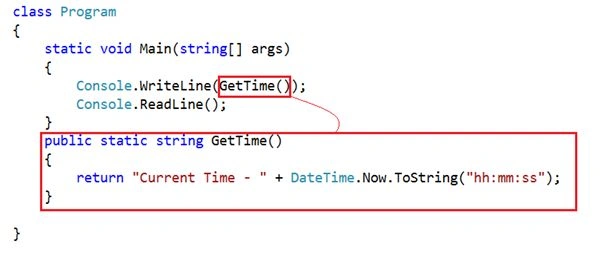
In C# 6.0

Output
The output will be the same in both.
Code
9. Easily format strings using String interpolation
To easily format a string value in C# 6.0 without any string.Format() method we can write a format for a string. It's a very useful and time consuming process to define multiple string values by “\{ variable }”. So let's have an example on String interpolation. First we are writing the source code by string.Format().
- using System;
- using System.Collections.Generic;
- using System.Linq;
- using System.Text;
- using System.Threading.Tasks;
- using System.Console;
- namespace Project9
- {
- class Program
- {
- static void Main()
- {
- string FirstName = "Nitin";
- string LastName = "Pandit";
- // With String Interpolation in C# 6.0
- string output= "\{FirstName}-\{LastName}";
- WriteLine(output);
- ReadLine();
- }
- }
- }

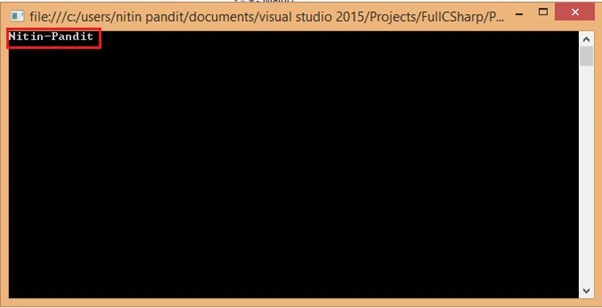
Now by “\{variable}”.

Output
The output will be the same in both but by “\{variable}” is a very short way to write the same code.
Code
Next article - List of All New Features in C# 6.0: Part 2


Anandu G NathPosted Jan 6, 2024, 4:46 AM EST
Informative Nitin Pandit
amit pandeyPosted Apr 9, 2021, 12:12 AM EDT
For exception filter "if" keyword is not working. Is it correct? We have to use "when".
Hemendra ShekharPosted Jan 29, 2021, 1:33 PM EST
Fantastic article..you made it very easy to understand
Sandip G PatilPosted Mar 9, 2019, 2:14 AM EST
Nice article....
Archana NareshPosted Dec 5, 2018, 12:54 AM EST
Nice Article !
shyam mahanwarPosted Oct 26, 2018, 3:50 AM EDT
Nice one. Easy to understand
subhashis nayakPosted Mar 12, 2017, 2:15 PM EDT
"\{FirstName}---\{LastName}" it wont work for string interpolation instead we can use in the below way$"{FirstName}---{LastName}"
subhashis nayakPosted Mar 12, 2017, 1:35 PM EDT
Explained very nicely... easy to understand.
subhashis nayakPosted Mar 12, 2017, 1:34 PM EDT
Please modify the exception filter code. The code should be catch(Exception ex) when(secondNumber == 0){....}
Babloo KumarPosted Nov 14, 2016, 5:15 AM EST
Very nice article sir. It is very helpful
Poonam ChoudharyPosted Nov 8, 2016, 3:35 AM EST
Great Article..It sounds so simple. Easy to understand
BeginnerPosted Oct 25, 2016, 9:07 PM EDT
Great effort!!! Nice Article
Aleena SaviourPosted Oct 24, 2016, 3:02 AM EDT
Useful and simple explanation
Rahul Pushpendu BhaskarPosted Oct 23, 2016, 11:06 PM EDT
Good one..
Aakash MauryaPosted Oct 23, 2016, 11:03 PM EDT
Its really a great efforts
kalu singh raoPosted Jul 26, 2016, 5:30 AM EDT
Nice share
Viresh RajputPosted Jun 29, 2016, 6:14 AM EDT
Very nice and easy explanation. Thanks Nitin. :)
Ankush BindraPosted Mar 27, 2016, 10:05 PM EDT
Good explanation with wonderful stuff...
Anil JhaPosted Mar 2, 2016, 12:07 AM EST
very well explained
Pankaj Kumar ChoudharyTOP 100Posted Feb 22, 2016, 6:18 AM EST
Nice Explain Sir.........
Sr KarthigaPosted Feb 19, 2016, 12:57 AM EST
Nice Explanation
KaustubhPosted Jan 14, 2016, 10:40 PM EST
nice share, very helpful !
vijender akulaPosted Nov 18, 2015, 12:16 AM EST
Great job Nitin
vijender akulaPosted Nov 18, 2015, 12:15 AM EST
Nice explanation any once can understand easily ..
Sabyasachi MishraPosted Oct 22, 2015, 8:28 PM EDT
Good one
Rajeesh MenothPosted Sep 11, 2015, 12:00 AM EDT
Great...:)
jackPosted Sep 1, 2015, 1:08 AM EDT
String interpolation change to $"{var1, var2}"
jackPosted Sep 1, 2015, 1:07 AM EDT
Exception filter now using "when" to replace "if"
Rajendra TaradalePosted Aug 21, 2015, 1:29 AM EDT
very well explained :)
Paras Mal MaliPosted May 25, 2015, 11:14 PM EDT
Nice article Sir....
Pankaj Kumar ChoudharyTOP 100Posted May 25, 2015, 4:09 PM EDT
Great Article Sir............
Santhakumar MunuswamyPosted May 25, 2015, 10:41 AM EDT
Thanks for good work
Mahesh ChandTOP 10Posted May 25, 2015, 8:58 AM EDT
Great job Nitin Pandit. Wow! Crazy number of comments.
Kaavya TamilvananPosted Apr 28, 2015, 11:00 AM EDT
Cooool .... very useful article .. Good work Nitin :)
Neetu GuptaPosted Apr 25, 2015, 10:51 AM EDT
Excellent article sir.very well explained. Very easy to understand..Thanks a lot sir for the post
Nirmal HotaPosted Mar 5, 2015, 3:19 AM EST
Very good Nitin Pandit . I must say, excellent article and explained in nice way. Good work :)
Prasham SabadraPosted Feb 26, 2015, 12:24 PM EST
Thanks for sharing. Nice Article!
Subbulakshmi MaheshPosted Feb 12, 2015, 10:08 PM EST
very good examples. easy to understand . nice
pratik ghumrePosted Jan 23, 2015, 3:09 AM EST
Great Explanation ,hopes to get more information in near future from you , thank a lot
Nitin PanditTOP 100Posted Jan 22, 2015, 4:41 PM EST
Thanks a lot
Thiago MoreiraPosted Jan 22, 2015, 3:34 AM EST
Great job My Friend!
Vishal KadamPosted Jan 21, 2015, 3:15 AM EST
Perfect explanation with easy to understandable comparison.
Nitin PanditTOP 100Posted Jan 18, 2015, 11:48 PM EST
thnq 2 all :)
Ankur ChauhanPosted Jan 18, 2015, 11:25 PM EST
Kya batt kya batt......................
RS PrajapatiPosted Jan 18, 2015, 7:53 PM EST
Excellent Work
Naveen NautiyalPosted Jan 14, 2015, 8:39 PM EST
Excellent sir..
Hemant SrivastavaPosted Jan 8, 2015, 5:32 AM EST
Just noticed one thing.. In 'Dictionary Initializer' section, it seems like C# 5.0 and C# 6.0 code got duplicated or I'm missing something.
Hemant SrivastavaPosted Jan 8, 2015, 5:30 AM EST
Good explanation and quite informative!
Pankaj BajajPosted Jan 7, 2015, 3:21 AM EST
Great Nitin, Lots of learning in a single page
Rasmita DashPosted Jan 5, 2015, 9:38 PM EST
Great job...
Nitin PanditTOP 100Posted Jan 5, 2015, 8:18 PM EST
thnq :)
Ramchand RepallePosted Jan 5, 2015, 3:59 AM EST
Great Article..
Anupam SinghPosted Jan 3, 2015, 9:57 PM EST
Full coverage in 1 shot. :). Thank for sharing these valuable features Nitin Pandit.
Manish Kumar ChoudharyPosted Jan 3, 2015, 8:39 PM EST
Great collections. .
Ranjeet PatilPosted Jan 3, 2015, 4:46 AM EST
nice features...thanks nitin..:)
Gaurav Kumar AroraPosted Jan 2, 2015, 3:24 AM EST
Nice to see all at one place
Humayun Kabir MamunPosted Jan 2, 2015, 2:34 AM EST
Nice...
Saravanakumar RPosted Dec 31, 2014, 6:21 AM EST
Awesome article
Utkarsh KunwarPosted Dec 31, 2014, 2:55 AM EST
gr8 article bro! keep it up
Viresh RajputPosted Dec 31, 2014, 12:11 AM EST
Nitin Bro ,Very nice,Please keep it up
Vipin TyagiPosted Dec 30, 2014, 11:42 PM EST
fist time when i write awesome one on fb I just read it very politely but here I can say that this article is Fabulous.Most interesting feature is that "Write Less Get More"
Guest UserPosted Dec 30, 2014, 10:51 PM EST
Nitin Pandit I call it mini e-book!
Guest UserPosted Dec 30, 2014, 10:51 PM EST
Really fantastic @Nitin Pan
Kiranteja JallepalliPosted Dec 30, 2014, 10:04 PM EST
very nice
sabarimalai iyyappanPosted Dec 30, 2014, 8:52 PM EST
Good Article.Thanks for your valuable sharing to keep us up to date .
Atul GuptaPosted Dec 30, 2014, 7:33 PM EST
What a Nice Article Nitin, Keep It Up!!
K P Singh ChundawatPosted Dec 30, 2014, 6:37 PM EST
good ....thanks for sharing...
Dinesh BeniwalTOP 10Posted Dec 30, 2014, 6:25 PM EST
Great work Nitin, appreciate your hard work.
Manish Kumar ChoudharyPosted Dec 30, 2014, 6:25 PM EST
Nice Information..
Veena SardaTOP 100Posted Dec 30, 2014, 6:12 PM EST
Good one
Gaurav KumarPosted Dec 30, 2014, 6:11 PM EST
Nice Graphical Representation Nitin Pandit sir very informative article you covered all new features
Vithal WadjeTOP 100Posted Dec 30, 2014, 5:46 PM EST
nice sir
Pramod ThakurPosted Dec 30, 2014, 4:47 PM EST
Nice article.. very helpful.. thx for sharing :)