
Introduction
OpenSSL is a powerful toolkit for the Transport Layer Security (TLS) and Secure Sockets Layer (SSL) protocols. It also provides cryptographic utility functions, including RSA key generation.
Prerequisites
- OpenSSL is installed on your system.
- Terminal or command-line access.
Steps
Note - For this demo, I am using Git Bash. If Git is already installed on your system, you can open Git Bash and use openssl.
1. Generate a Private key
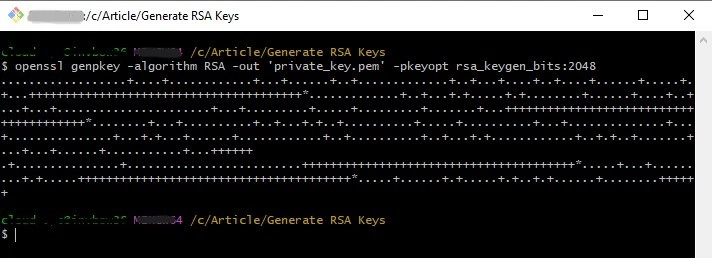
Use the below command to generate an RSA private key.
Bash
openssl genpkey -algorithm RSA -out private_key.pem -pkeyopt rsa_keygen_bits:2048- private_key.pem: Output file containing the private key.
- rsa_keygen_bits:2048: Specifies the key size (2048 bits is standard; you can use 4096 for higher security).
2. Extract Public Key
Use the private key generated in the above step to extract the public key.
Bash
openssl rsa -pubout -in private_key.pem -out public_key.pem- -pubout: Tells OpenSSL to output the public key.
- public_key.pem: Output file for the public key.

3. Output files
- private_key.pem: Contains the RSA private key.
- public_key.pem: Contains the RSA public key.
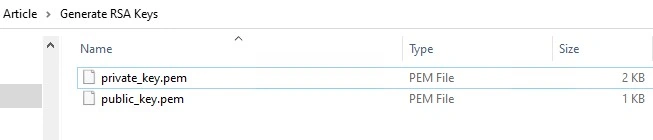
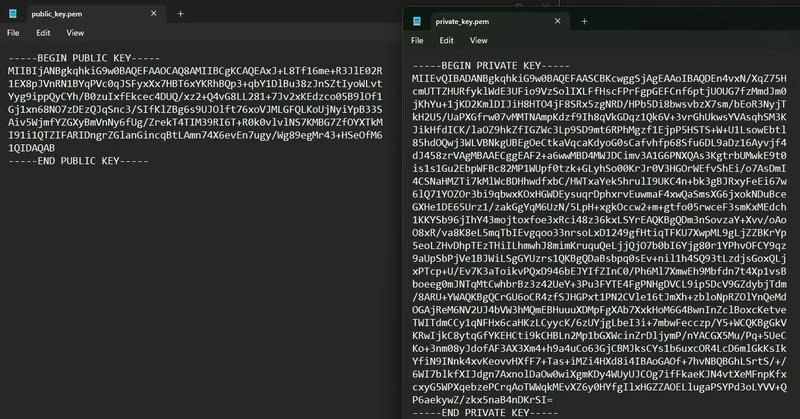
Snapshot of both key's content.
What is a .pem file?
Check out my article below to learn about the .pem file.
Conclusion
The public key and private key are two parts of a cryptographic key pair used in asymmetric encryption.
These files can be used for secure communication, digital signatures, or encryption/decryption tasks.

Join the conversation! Your thoughts help the community grow.