
In this article I will discuss how to get information about your system hardware such as available CPU Id, Physical Memory, BIOS-Information, CPU-Speed, Motherboard Maker, CPU Maker.
The first way is by using Windows Management Instrumentation (WMI) provided by the System.Management namespace. You simply call the Class-Name.
For Example:
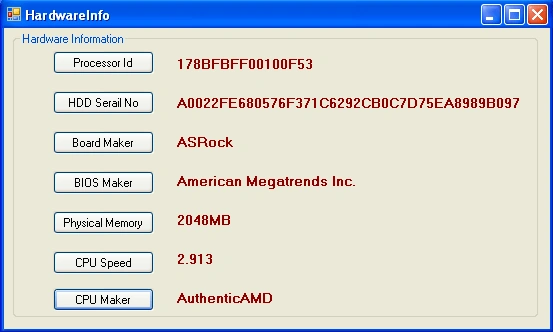
This code gives you information about the Processor Id.
C#
lblPid.Text = HardwareInfo.GetProcessorId();This code gives you the HDD Serial No.
C#
lblHDD.Text = HardwareInfo.GetHDDSerialNo();This code gives you the Board Maker.
C#
lblBM.Text = HardwareInfo.GetBoardMaker();This code gives you the Information about BIOS Maker.
C#
lblBios.Text = HardwareInfo.GetBIOSmaker();This code gives you the Information about RAM Memory.
C#
lblPM.Text = HardwareInfo.GetPhysicalMemory();This code gives you the Information about CPU Speed.
C#
lblCS.Text = HardwareInfo.GetCpuSpeedInGHz().ToString();This code gives you the Information about CPU Maker.
C#
lblCM.Text = HardwareInfo.GetCPUManufacturer();

Ng JayPosted Jul 23, 2021, 3:10 AM EDT
'System.Management' currently is only supported for Windows desktop applications.
nice guyPosted Jul 15, 2019, 11:15 PM EDT
Does it work on lInux?
SubashPosted Nov 24, 2016, 7:12 AM EST
Very nice and useful code thanks for sharing
Vishnu SinghPosted May 27, 2015, 3:02 AM EDT
Nice code.. it really helped me.... thanks
sanjeev guptaPosted Nov 18, 2014, 11:32 PM EST
thr exists some problem ,we can't fetch information from all windows machine ...as wmi is not working on some systems(i have checked this ) ....so does thr exists any solid way like the one in which Operating system fetch information about the hardware........ thanx in advance
sanjeev guptaPosted Nov 18, 2014, 11:05 PM EST
hi Ravindra,
Bahar JalaliPosted Mar 26, 2014, 6:43 AM EDT
i need some hardware information from client computer, i use your class but it give me server hardware information, how can i get client hardware information? i need at least one unique info from client computer
Mohamed Amine ZghalPosted Mar 25, 2014, 9:28 AM EDT
thaks you are a super man
lohith kumarPosted Oct 3, 2013, 6:10 PM EDT
Thank u sir....
Volkan EFEPosted Apr 16, 2013, 1:32 PM EDT
Thanks for your share! Best Regards
hamad asgharPosted Nov 24, 2012, 1:55 AM EST
Thanks Dear
Ravindra T CPosted Jun 10, 2012, 9:53 PM EDT
Hi jay i think we are not able to change the processor Id we can only retrieve the Processor information. Thanks for viewing my article.
Jay JayPosted Jun 10, 2012, 3:47 AM EDT
Hi Ravindra and all. I have doubt, can we change Processor ID in Windox XP and Window 7. Looking forward for reply. Regards, [email protected]
Rewan SoleimaniPosted Apr 5, 2012, 4:26 AM EDT
Thank you for this post. Finally i found best code for ProcessorId, Thanks ...
K JabazPosted Apr 2, 2012, 1:36 AM EDT
Thanks You ! It's very useful .
K JabazPosted Apr 2, 2012, 1:36 AM EDT
Thanks You ! It's very useful .
sandeep raju dantuluriPosted Mar 25, 2012, 9:31 PM EDT
thanks for sharing...
Arun ChoudharyPosted Mar 24, 2012, 3:46 AM EDT
Thanks for sharing.
Nanda KishorPosted Nov 30, 2011, 2:49 AM EST
Thanks...For the code;
mohit bansalPosted Jul 22, 2011, 11:17 PM EDT
thanks
Dinesh BeniwalTOP 10Posted Jun 28, 2011, 3:27 AM EDT
Very useful , thanks